Back to Technology

Complete Protocols Master Part 5: Session & Presentation Layers

January 31, 2026 Wasil Zafar 40 min read

Explore the crucial middle layers that handle encryption, session management, and data representation. Master TLS/SSL, certificates, PKI, and learn how data is serialized, compressed, and secured for transmission.

Table of Contents

  1. Introduction
  2. TLS/SSL Fundamentals
  3. TLS Handshake
  4. Certificates & PKI
  5. Cryptography Basics
  6. Data Serialization
  7. Compression
  8. Hands-On Exercises
  9. Summary & Next Steps

Introduction: Session & Presentation Layers

In Part 4, we explored how TCP and UDP deliver data between applications. Now we examine Layers 5 and 6 of the OSI model—often overlooked but critically important for secure, efficient communication.

Series Context: This is Part 5 of 20 in the Complete Protocols Master series. We're bridging transport and application layers with security and data handling.

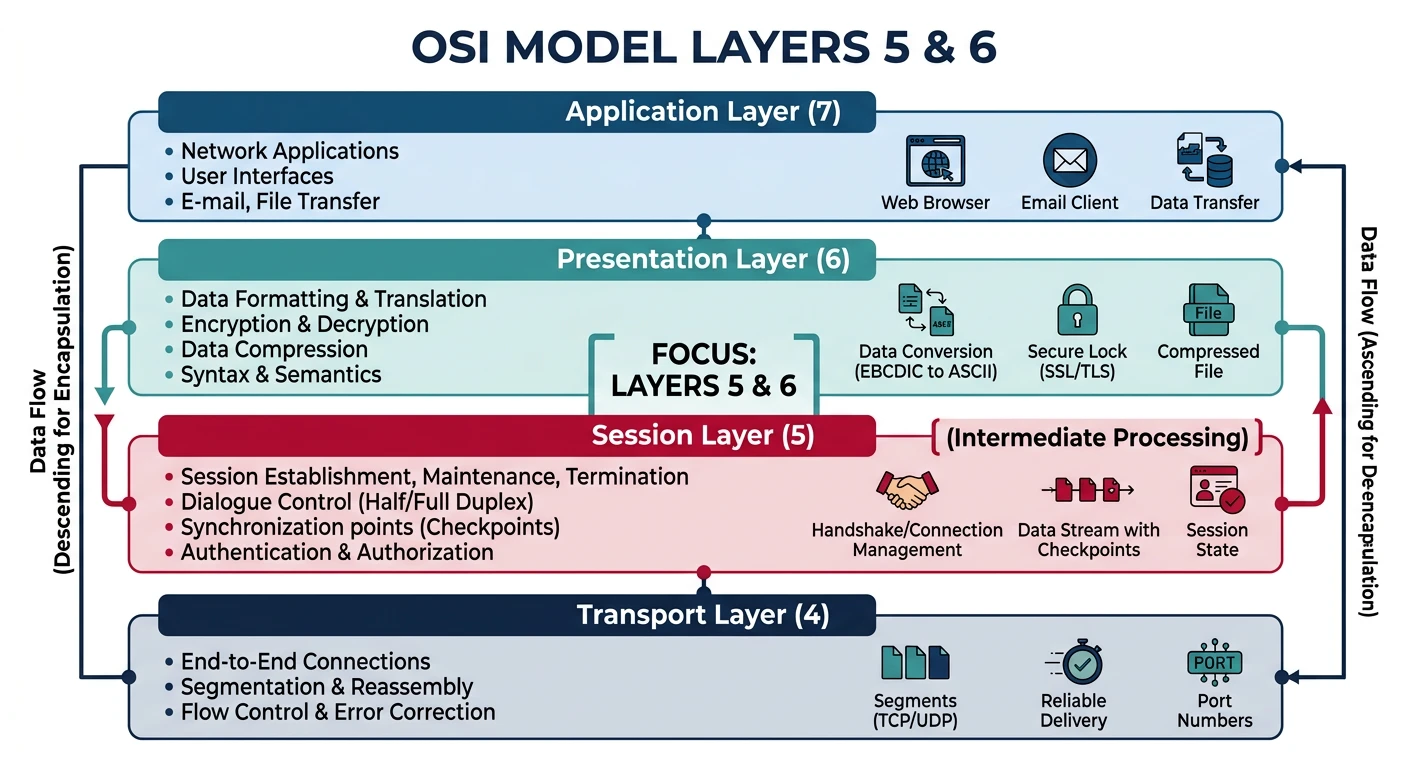
OSI Model vs Reality

Layer 5 Layer 6

Session & Presentation Layer Functions

OSI Layer 5 - Session Layer:
├── Session establishment, maintenance, termination
├── Dialog control (who speaks when)
├── Synchronization (checkpoints for recovery)
├── Authentication negotiation
└── Examples: RPC sessions, NetBIOS, PPTP

OSI Layer 6 - Presentation Layer:
├── Data translation (format conversion)
├── Encryption/Decryption
├── Compression/Decompression  
├── Character encoding (ASCII, UTF-8)
└── Examples: SSL/TLS, MIME, JPEG, MPEG

Reality Check:
┌────────────────────────────────────────────────────────┐
│ In TCP/IP, Layers 5-6 are merged into the             │
│ Application Layer. TLS operates between TCP and       │
│ HTTP, handling both session and presentation duties.  │
│                                                        │
│ Modern stacks: App ↔ TLS ↔ TCP ↔ IP ↔ Network        │
└────────────────────────────────────────────────────────┘
Why Study These Layers? While pure OSI layers 5/6 protocols are rare, their functions are everywhere: TLS handles encryption (presentation) and session keys (session), JSON/XML handle data representation, and gzip handles compression. Understanding these concepts is essential for secure application development.

TLS/SSL Fundamentals

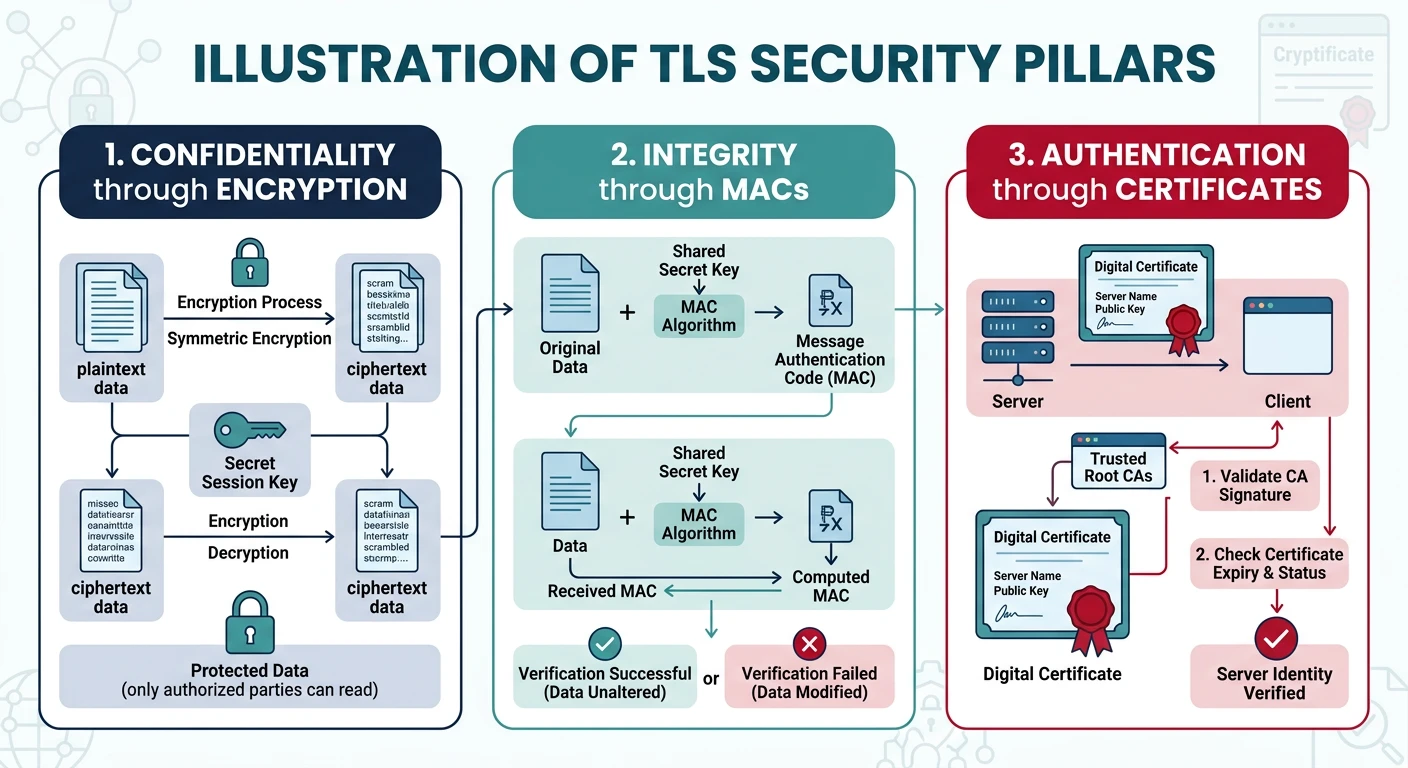
TLS (Transport Layer Security) is the cryptographic protocol that secures most internet traffic. When you see the padlock in your browser, TLS is at work.

TLS Overview

What TLS Provides

  • Confidentiality: Encryption prevents eavesdropping
  • Integrity: MACs detect tampering
  • Authentication: Certificates verify identity
  • Forward Secrecy: (TLS 1.3) Past sessions can't be decrypted if keys compromised

Historical Note: SSL (Secure Sockets Layer) was developed by Netscape. After SSL 3.0, it was renamed TLS. SSL is now deprecated and insecure—always use TLS 1.2+.

TLS Version History

Version Timeline

TLS/SSL Evolution

Version Year Status Key Features
SSL 2.0 1995 ❌ Deprecated First public version, many flaws
SSL 3.0 1996 ❌ Deprecated POODLE vulnerability
TLS 1.0 1999 ⚠️ Deprecated Renamed from SSL, BEAST vulnerability
TLS 1.1 2006 ⚠️ Deprecated Fixed BEAST, still weak
TLS 1.2 2008 ✅ Supported SHA-256, AEAD ciphers, most common
TLS 1.3 2018 ✅ Recommended Faster, simpler, mandatory forward secrecy
Security Advisory: TLS 1.0 and 1.1 were deprecated by browsers in 2020. Major sites dropped support. Always configure servers for TLS 1.2+ and prefer TLS 1.3.

Cipher Suites

Cipher Suites

Understanding Cipher Suite Names

TLS 1.2 Cipher Suite Example:
TLS_ECDHE_RSA_WITH_AES_256_GCM_SHA384
│    │     │        │   │   │    │
│    │     │        │   │   │    └── PRF hash (key derivation)
│    │     │        │   │   └─────── AEAD tag size
│    │     │        │   └─────────── Block cipher mode
│    │     │        └─────────────── Bulk encryption key size
│    │     └──────────────────────── Server authentication
│    └────────────────────────────── Key exchange algorithm
└─────────────────────────────────── Protocol

Components:
┌─────────────────┬───────────────────────────────────────────┐
│ Key Exchange    │ ECDHE, DHE, RSA (avoid RSA key exchange)  │
├─────────────────┼───────────────────────────────────────────┤
│ Authentication  │ RSA, ECDSA, Ed25519                       │
├─────────────────┼───────────────────────────────────────────┤
│ Bulk Cipher     │ AES-128, AES-256, ChaCha20                │
├─────────────────┼───────────────────────────────────────────┤
│ Cipher Mode     │ GCM, CCM (AEAD), CBC (avoid)              │
├─────────────────┼───────────────────────────────────────────┤
│ Hash/MAC        │ SHA-256, SHA-384, Poly1305                │
└─────────────────┴───────────────────────────────────────────┘

TLS 1.3 Simplified (only 5 cipher suites):
- TLS_AES_256_GCM_SHA384
- TLS_AES_128_GCM_SHA256
- TLS_CHACHA20_POLY1305_SHA256
- TLS_AES_128_CCM_SHA256
- TLS_AES_128_CCM_8_SHA256

(Key exchange always ECDHE or DHE, authentication separate)
# Check TLS configuration of a website

# Using OpenSSL
openssl s_client -connect google.com:443 -tls1_3
openssl s_client -connect google.com:443 -tls1_2

# Show certificate
openssl s_client -connect google.com:443 -showcerts

# List supported cipher suites
openssl ciphers -v 'TLSv1.3'
openssl ciphers -v 'HIGH:!aNULL:!MD5'

# Using nmap for comprehensive scan
nmap --script ssl-enum-ciphers -p 443 google.com

# Using testssl.sh (comprehensive testing)
# https://github.com/drwetter/testssl.sh
./testssl.sh google.com

# Check your server's TLS configuration
# https://www.ssllabs.com/ssltest/

The TLS Handshake

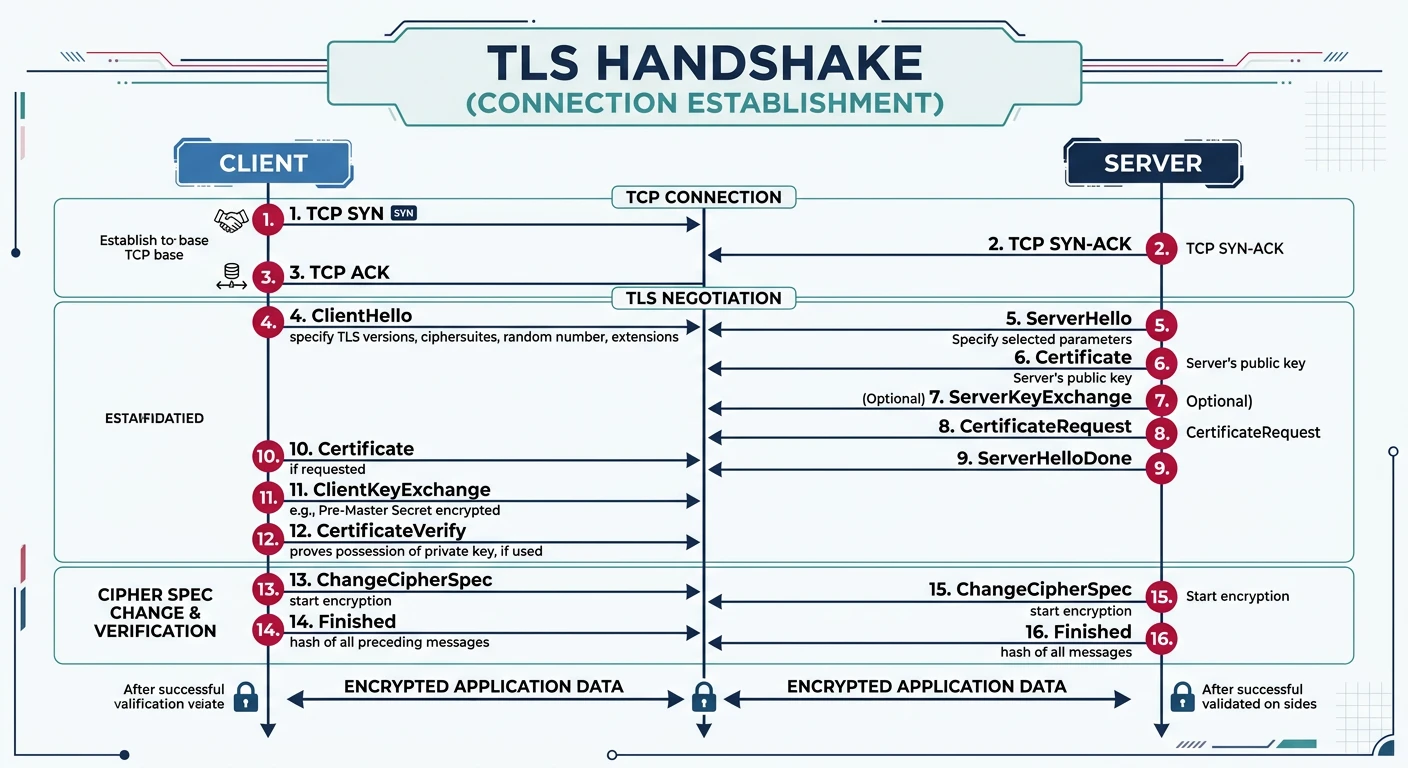
The TLS handshake establishes a secure connection by negotiating protocol version, cipher suite, and exchanging keys.

TLS 1.2

TLS 1.2 Full Handshake (2-RTT)

Client                                              Server
   │                                                   │
   │  1. ClientHello                                   │
   │     - TLS version (1.2)                           │
   │     - Random (32 bytes)                           │
   │     - Session ID                                  │
   │     - Cipher suites list                          │
   │     - Extensions (SNI, etc.)                      │
   │ ────────────────────────────────────────────────> │
   │                                                   │
   │  2. ServerHello                                   │
   │     - Chosen TLS version                          │
   │     - Server random                               │
   │     - Session ID                                  │
   │     - Chosen cipher suite                         │
   │ <──────────────────────────────────────────────── │
   │                                                   │
   │  3. Certificate                                   │
   │     - Server's X.509 certificate chain            │
   │ <──────────────────────────────────────────────── │
   │                                                   │
   │  4. ServerKeyExchange (if ECDHE/DHE)              │
   │     - DH parameters                               │
   │     - Signature                                   │
   │ <──────────────────────────────────────────────── │
   │                                                   │
   │  5. ServerHelloDone                               │
   │ <──────────────────────────────────────────────── │
   │                                                   │
   │  6. ClientKeyExchange                             │
   │     - Client's DH public value or                 │
   │       RSA-encrypted pre-master secret             │
   │ ────────────────────────────────────────────────> │
   │                                                   │
   │  7. ChangeCipherSpec                              │
   │     "Switching to encrypted mode"                 │
   │ ────────────────────────────────────────────────> │
   │                                                   │
   │  8. Finished (encrypted)                          │
   │     - Hash of all handshake messages              │
   │ ────────────────────────────────────────────────> │
   │                                                   │
   │  9. ChangeCipherSpec                              │
   │ <──────────────────────────────────────────────── │
   │                                                   │
   │  10. Finished (encrypted)                         │
   │ <──────────────────────────────────────────────── │
   │                                                   │
   │  ═══════ ENCRYPTED APPLICATION DATA ═══════      │
   │ <═══════════════════════════════════════════════> │

TLS 1.3 Handshake (1-RTT)

TLS 1.3

TLS 1.3 Full Handshake (1-RTT)

Client                                              Server
   │                                                   │
   │  1. ClientHello                                   │
   │     - TLS version 1.3                             │
   │     - Random                                      │
   │     - Cipher suites                               │
   │     - key_share (client's DH public)              │
   │     - supported_versions                          │
   │     - signature_algorithms                        │
   │ ────────────────────────────────────────────────> │
   │                                                   │
   │  2. ServerHello                                   │
   │     - Random                                      │
   │     - Chosen cipher suite                         │
   │     - key_share (server's DH public)              │
   │ <──────────────────────────────────────────────── │
   │                                                   │
   │  ══════ ENCRYPTION STARTS HERE ══════            │
   │                                                   │
   │  3. EncryptedExtensions                           │
   │ <──────────────────────────────────────────────── │
   │                                                   │
   │  4. Certificate                                   │
   │ <──────────────────────────────────────────────── │
   │                                                   │
   │  5. CertificateVerify                             │
   │ <──────────────────────────────────────────────── │
   │                                                   │
   │  6. Finished                                      │
   │ <──────────────────────────────────────────────── │
   │                                                   │
   │  7. Finished                                      │
   │ ────────────────────────────────────────────────> │
   │                                                   │
   │  ═══════ ENCRYPTED APPLICATION DATA ═══════      │

Key Improvements in TLS 1.3:
- 1-RTT handshake (vs 2-RTT in 1.2)
- 0-RTT for repeat connections (with caveats)
- Encryption starts earlier (after ServerHello)
- Removed insecure features (RSA key exchange, CBC, etc.)
- Mandatory forward secrecy (ECDHE/DHE only)
- Simpler, fewer cipher suites
# Examine TLS handshake with Python ssl module
import ssl
import socket
import pprint

def analyze_tls_connection(hostname, port=443):
    """Analyze TLS connection details"""
    
    # Create SSL context
    context = ssl.create_default_context()
    
    # Connect and wrap socket
    with socket.create_connection((hostname, port)) as sock:
        with context.wrap_socket(sock, server_hostname=hostname) as ssock:
            
            print(f"TLS Connection Analysis: {hostname}")
            print("=" * 60)
            
            # Protocol version
            print(f"Protocol Version: {ssock.version()}")
            
            # Cipher suite
            cipher = ssock.cipher()
            print(f"\nCipher Suite:")
            print(f"  Name: {cipher[0]}")
            print(f"  Protocol: {cipher[1]}")
            print(f"  Key Bits: {cipher[2]}")
            
            # Certificate info
            cert = ssock.getpeercert()
            print(f"\nCertificate Info:")
            print(f"  Subject: {dict(x[0] for x in cert['subject'])}")
            print(f"  Issuer: {dict(x[0] for x in cert['issuer'])}")
            print(f"  Valid From: {cert['notBefore']}")
            print(f"  Valid Until: {cert['notAfter']}")
            
            # Subject Alternative Names
            if 'subjectAltName' in cert:
                sans = [x[1] for x in cert['subjectAltName']]
                print(f"  SANs: {sans[:5]}{'...' if len(sans) > 5 else ''}")
            
            return cert

# Example usage
print("Analyzing TLS connection to google.com...")
print("(This requires network access)")
print()

# Uncomment to run:
# analyze_tls_connection('google.com')

# Show available ciphers
print("\nDefault cipher list on this system:")
context = ssl.create_default_context()
ciphers = context.get_ciphers()
for i, cipher in enumerate(ciphers[:5]):
    print(f"  {i+1}. {cipher['name']}")
print(f"  ... and {len(ciphers) - 5} more")

Certificates & PKI

X.509 certificates are digital documents that bind a public key to an identity. They're the foundation of internet trust.

X.509 Structure

Certificate Contents

X.509 v3 Certificate Structure:
┌─────────────────────────────────────────────────────────────┐
│ Version: 3                                                  │
│ Serial Number: Unique identifier                            │
│ Signature Algorithm: e.g., SHA256withRSA                    │
├─────────────────────────────────────────────────────────────┤
│ Issuer: CA that signed this certificate                     │
│   CN=DigiCert Global Root G2, O=DigiCert Inc, C=US          │
├─────────────────────────────────────────────────────────────┤
│ Validity:                                                   │
│   Not Before: Jan 01 00:00:00 2024 GMT                      │
│   Not After:  Jan 01 00:00:00 2025 GMT                      │
├─────────────────────────────────────────────────────────────┤
│ Subject: Entity this certificate identifies                 │
│   CN=www.example.com, O=Example Inc, L=City, C=US           │
├─────────────────────────────────────────────────────────────┤
│ Subject Public Key Info:                                    │
│   Algorithm: RSA (2048 bits) or ECDSA (P-256)               │
│   Public Key: [binary data]                                 │
├─────────────────────────────────────────────────────────────┤
│ X.509v3 Extensions:                                         │
│   Key Usage: Digital Signature, Key Encipherment            │
│   Extended Key Usage: TLS Web Server Authentication         │
│   Subject Alternative Name: DNS:www.example.com,            │
│                             DNS:example.com                 │
│   Basic Constraints: CA:FALSE                               │
│   Authority Key Identifier: [CA's key ID]                   │
│   CRL Distribution Points: [URL to CRL]                     │
│   Authority Info Access: OCSP - [URL]                       │
├─────────────────────────────────────────────────────────────┤
│ Signature: CA's signature over all the above                │
└─────────────────────────────────────────────────────────────┘

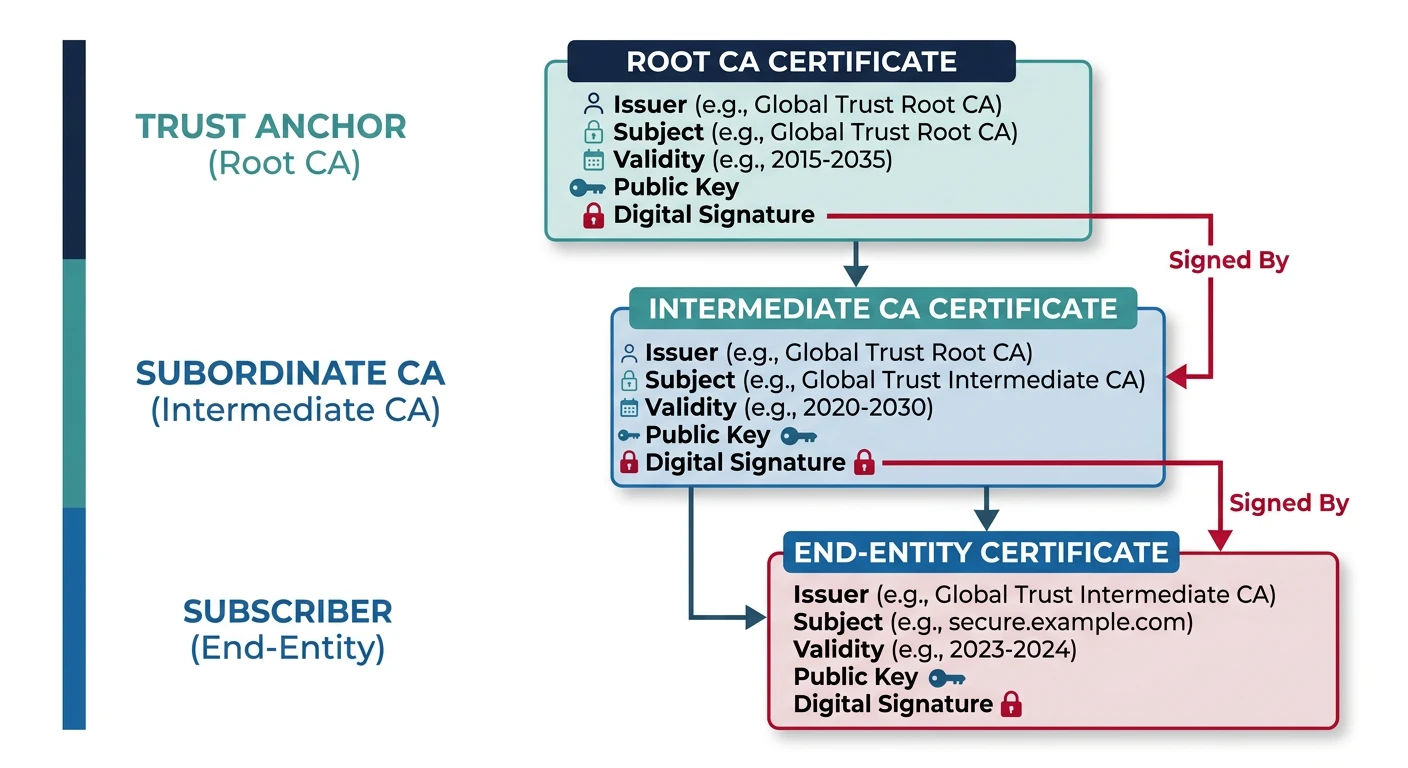
Certificate Chain of Trust

Trust Chain

How Certificate Validation Works

Certificate Chain (Chain of Trust):

┌─────────────────────────────────┐
│       Root CA Certificate       │  ← Self-signed, pre-installed
│   (e.g., DigiCert Root CA)      │     in browser/OS trust store
│   Validity: 20+ years           │
└────────────────┬────────────────┘
                 │ Signs
                 ▼
┌─────────────────────────────────┐
│    Intermediate CA Certificate  │  ← Signed by Root CA
│   (e.g., DigiCert TLS RSA)      │     Stored on server
│   Validity: 5-10 years          │
└────────────────┬────────────────┘
                 │ Signs
                 ▼
┌─────────────────────────────────┐
│    End-Entity Certificate       │  ← Your website's cert
│   (e.g., www.example.com)       │     Signed by Intermediate
│   Validity: 1-2 years           │
└─────────────────────────────────┘

Validation Process:
1. Server sends: End-Entity + Intermediate cert(s)
2. Browser verifies End-Entity signature with Intermediate's public key
3. Browser verifies Intermediate signature with Root's public key
4. Root is in browser's trust store → TRUSTED
5. Check validity dates, revocation status (CRL/OCSP)
6. Check hostname matches certificate's CN or SAN
# Examine certificates with OpenSSL

# View certificate details
openssl s_client -connect google.com:443 -showcerts < /dev/null 2>/dev/null | \
    openssl x509 -text -noout

# Get certificate chain
openssl s_client -connect google.com:443 -showcerts < /dev/null

# Check certificate expiration
echo | openssl s_client -connect google.com:443 2>/dev/null | \
    openssl x509 -noout -dates

# Verify certificate chain
openssl verify -CAfile /etc/ssl/certs/ca-certificates.crt cert.pem

# Generate self-signed certificate (for testing)
openssl req -x509 -newkey rsa:4096 -keyout key.pem -out cert.pem \
    -days 365 -nodes -subj "/CN=localhost"

# Convert certificate formats
openssl x509 -in cert.pem -outform DER -out cert.der  # PEM to DER
openssl x509 -in cert.der -inform DER -outform PEM -out cert.pem  # DER to PEM

Public Key Infrastructure (PKI)

PKI Components

PKI Ecosystem

Component Role
Certificate Authority (CA) Issues and signs certificates. Root CAs are trusted by default.
Registration Authority (RA) Verifies identity before CA issues cert (domain validation, org validation).
Certificate Revocation List (CRL) List of revoked certificates. Published periodically by CA.
OCSP (Online Certificate Status Protocol) Real-time certificate status checking. More efficient than CRL.
OCSP Stapling Server includes OCSP response in TLS handshake. Better privacy.
Certificate Transparency (CT) Public logs of all issued certificates. Detects rogue CAs.
Let's Encrypt Revolution: Since 2015, Let's Encrypt has issued billions of free certificates, making HTTPS accessible to everyone. They automated Domain Validation (DV) via the ACME protocol, which tools like Certbot use.

Cryptography Basics

Understanding cryptographic primitives helps you make informed security decisions and debug TLS issues.

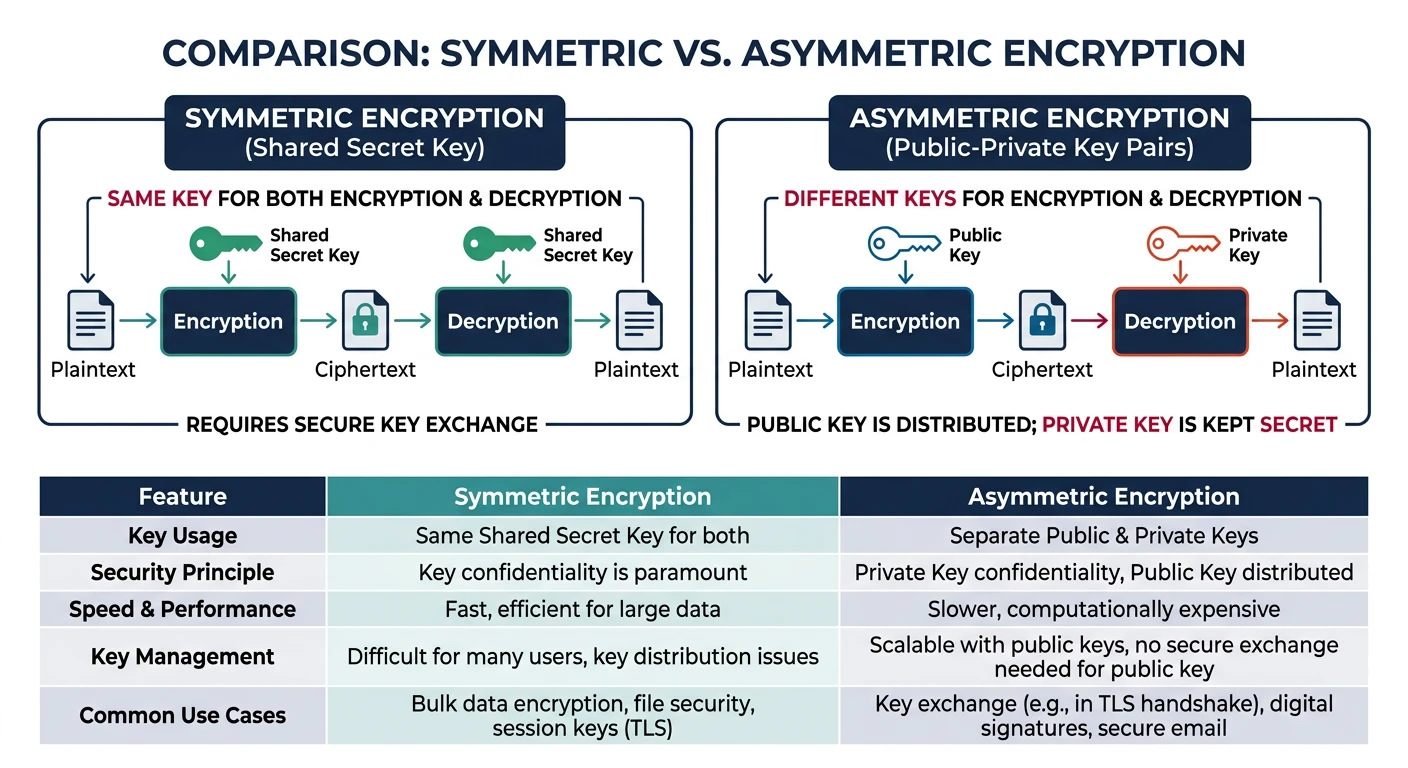
Symmetric Encryption

Symmetric (Secret Key) Cryptography

Same key for encryption and decryption. Fast, used for bulk data.

Symmetric Encryption:

Plaintext ─────► [Encrypt with Key K] ─────► Ciphertext
                        │
                        │ Same key
                        ▼
Ciphertext ────► [Decrypt with Key K] ─────► Plaintext

Common Algorithms:
┌────────────────┬─────────────┬─────────────────────────────────┐
│ Algorithm      │ Key Size    │ Notes                           │
├────────────────┼─────────────┼─────────────────────────────────┤
│ AES-128        │ 128 bits    │ Fast, secure, hardware support  │
│ AES-256        │ 256 bits    │ Quantum-resistant key size      │
│ ChaCha20       │ 256 bits    │ Fast on mobile (no AES-NI)      │
│ 3DES           │ 168 bits    │ Legacy, avoid                   │
└────────────────┴─────────────┴─────────────────────────────────┘

Block Cipher Modes:
- GCM (Galois/Counter Mode): AEAD, parallelizable, preferred
- CBC (Cipher Block Chaining): Vulnerable to padding oracle, avoid
- CTR (Counter Mode): Streaming, needs separate MAC

Asymmetric (Public Key) Cryptography

Asymmetric Encryption

Public/Private Key Pairs

Asymmetric Encryption:

For Encryption (confidentiality):
Plaintext ─────► [Encrypt with Public Key] ─────► Ciphertext
Ciphertext ────► [Decrypt with Private Key] ────► Plaintext

For Digital Signatures (authentication):
Message ────────► [Sign with Private Key] ──────► Signature
Message+Sig ────► [Verify with Public Key] ─────► Valid/Invalid

Key Exchange (Diffie-Hellman):
Alice: a (private), g^a (public)
Bob:   b (private), g^b (public)
Both compute: g^(ab) = shared secret

Common Algorithms:
┌────────────────┬─────────────────┬────────────────────────────┐
│ Algorithm      │ Key Size        │ Use Case                   │
├────────────────┼─────────────────┼────────────────────────────┤
│ RSA            │ 2048-4096 bits  │ Encryption, signatures     │
│ ECDSA          │ 256-384 bits    │ Signatures (P-256, P-384)  │
│ Ed25519        │ 256 bits        │ Modern signatures, fast    │
│ ECDH           │ 256-384 bits    │ Key exchange               │
│ X25519         │ 256 bits        │ Modern key exchange        │
└────────────────┴─────────────────┴────────────────────────────┘

Why Both?
- Asymmetric: Solves key distribution (can share public key openly)
- Symmetric: Much faster (1000x) for bulk encryption
- TLS uses asymmetric to exchange symmetric keys, then symmetric for data

Hashing and MACs

Hash Functions

Cryptographic Hash Functions

Hash Function Properties:
- Deterministic: Same input → same output
- One-way: Cannot reverse hash to get input
- Collision-resistant: Hard to find two inputs with same hash
- Avalanche effect: Small input change → completely different hash

Common Hash Functions:
┌─────────────┬────────────┬───────────────────────────────────┐
│ Algorithm   │ Output     │ Status                            │
├─────────────┼────────────┼───────────────────────────────────┤
│ MD5         │ 128 bits   │ ❌ Broken, collisions found       │
│ SHA-1       │ 160 bits   │ ❌ Deprecated, collisions found   │
│ SHA-256     │ 256 bits   │ ✅ Secure, widely used            │
│ SHA-384     │ 384 bits   │ ✅ Secure                         │
│ SHA-512     │ 512 bits   │ ✅ Secure                         │
│ SHA-3       │ Variable   │ ✅ Secure, backup to SHA-2        │
│ BLAKE2/3    │ Variable   │ ✅ Fast, secure                   │
└─────────────┴────────────┴───────────────────────────────────┘

MAC (Message Authentication Code):
- Hash + Secret Key = MAC
- Verifies integrity AND authenticity
- HMAC-SHA256: HMAC(key, message) = hash
- Modern: Use AEAD modes (GCM) which include MAC
# Cryptography examples in Python
import hashlib
import hmac
import secrets

# Hashing
def demonstrate_hashing():
    """Show different hash algorithms"""
    message = b"Hello, TLS!"
    
    print("Hashing Examples")
    print("=" * 60)
    print(f"Message: {message.decode()}")
    print()
    
    algorithms = ['md5', 'sha1', 'sha256', 'sha384', 'sha512']
    
    for algo in algorithms:
        h = hashlib.new(algo, message)
        status = "❌ Broken" if algo in ['md5', 'sha1'] else "✅ Secure"
        print(f"{algo.upper():10} ({h.digest_size * 8} bits) {status}")
        print(f"  {h.hexdigest()}")
        print()

demonstrate_hashing()

# HMAC (Message Authentication Code)
def demonstrate_hmac():
    """Show HMAC usage"""
    key = secrets.token_bytes(32)  # 256-bit key
    message = b"Transfer $1000 to account 12345"
    
    # Create HMAC
    mac = hmac.new(key, message, hashlib.sha256)
    
    print("HMAC Example")
    print("=" * 60)
    print(f"Message: {message.decode()}")
    print(f"Key: {key.hex()[:32]}...")
    print(f"HMAC-SHA256: {mac.hexdigest()}")
    print()
    
    # Verify HMAC
    received_mac = mac.hexdigest()
    verification = hmac.compare_digest(
        mac.hexdigest(),
        received_mac
    )
    print(f"Verification: {'✅ Valid' if verification else '❌ Invalid'}")

demonstrate_hmac()

# Key derivation (for passwords)
def demonstrate_key_derivation():
    """Show secure password hashing"""
    import hashlib
    
    password = b"user_password_123"
    salt = secrets.token_bytes(16)  # Random salt
    
    # PBKDF2 - Password-Based Key Derivation Function
    derived_key = hashlib.pbkdf2_hmac(
        'sha256',
        password,
        salt,
        iterations=100000,  # High iteration count
        dklen=32
    )
    
    print("Password Key Derivation (PBKDF2)")
    print("=" * 60)
    print(f"Password: {password.decode()}")
    print(f"Salt: {salt.hex()}")
    print(f"Iterations: 100,000")
    print(f"Derived Key: {derived_key.hex()}")
    print()
    print("Store: salt + derived_key (never the password!)")

demonstrate_key_derivation()

Data Serialization

The Presentation Layer handles converting data between application format and network format. Serialization formats determine efficiency and interoperability.

Text Formats

Human-Readable Formats

JSON (JavaScript Object Notation):
{
    "name": "Alice",
    "age": 30,
    "active": true,
    "roles": ["admin", "user"]
}
Pros: Human-readable, universal support, simple
Cons: Verbose, no schema, no comments, limited types

XML (Extensible Markup Language):
<user>
    <name>Alice</name>
    <age>30</age>
    <active>true</active>
    <roles>
        <role>admin</role>
        <role>user</role>
    </roles>
</user>
Pros: Self-describing, schema support (XSD), namespaces
Cons: Very verbose, complex, slow parsing

YAML (YAML Ain't Markup Language):
name: Alice
age: 30
active: true
roles:
  - admin
  - user
Pros: Very readable, comments, complex structures
Cons: Whitespace-sensitive, security risks (code execution)

Binary Formats

Binary Formats

Efficient Binary Serialization

Protocol Buffers (Google):
// .proto schema file
message User {
    string name = 1;
    int32 age = 2;
    bool active = 3;
    repeated string roles = 4;
}
Pros: Very compact, fast, schema-based, code generation
Cons: Not human-readable, requires schema, Google ecosystem

MessagePack:
Similar to JSON but binary-encoded
Pros: JSON-compatible, compact, fast, no schema needed
Cons: Less tooling than Protobuf

Apache Avro:
Schema embedded or separate, dynamic typing
Pros: Schema evolution, compact, Hadoop ecosystem
Cons: More complex, less common outside big data

Apache Thrift (Facebook):
RPC framework with serialization
Pros: Multi-language, includes RPC, flexible
Cons: Complex, heavy

FlatBuffers (Google):
Zero-copy deserialization
Pros: Extremely fast access, no parsing needed
Cons: Complex schemas, larger than Protobuf

Cap'n Proto:
Zero-copy, no encoding step
Pros: Fastest serialization (none needed)
Cons: Less portable, complex

Format Comparison

Comparison

Serialization Format Trade-offs

Format Size Speed Human-Readable Schema
JSON Large Slow ✅ Yes Optional
XML Very Large Slowest ✅ Yes Optional (XSD)
YAML Medium Slow ✅ Yes No
MessagePack Small Fast ❌ No No
Protobuf Smallest Very Fast ❌ No Required
Avro Small Fast ❌ No Required
FlatBuffers Medium Fastest Read ❌ No Required
# Compare serialization formats in Python
import json
import sys

# Sample data
user_data = {
    "id": 12345,
    "name": "Alice Johnson",
    "email": "alice@example.com",
    "age": 30,
    "active": True,
    "roles": ["admin", "developer", "reviewer"],
    "metadata": {
        "created": "2024-01-15T10:30:00Z",
        "last_login": "2024-01-20T14:22:00Z",
        "login_count": 42
    }
}

print("Serialization Format Comparison")
print("=" * 60)

# JSON
json_data = json.dumps(user_data)
json_pretty = json.dumps(user_data, indent=2)
print(f"JSON (compact):  {len(json_data)} bytes")
print(f"JSON (pretty):   {len(json_pretty)} bytes")

# MessagePack (if available)
try:
    import msgpack
    msgpack_data = msgpack.packb(user_data)
    print(f"MessagePack:     {len(msgpack_data)} bytes")
except ImportError:
    print("MessagePack:     (install: pip install msgpack)")

# YAML (if available)
try:
    import yaml
    yaml_data = yaml.dump(user_data)
    print(f"YAML:            {len(yaml_data)} bytes")
except ImportError:
    print("YAML:            (install: pip install pyyaml)")

print()
print("Note: Protocol Buffers requires schema definition (.proto)")
print("      and code generation - not shown in this simple example")

# Show size comparison
print()
print("Size Comparison (typical ratio to JSON):")
print("  JSON:        1.00x (baseline)")
print("  YAML:        0.95x")
print("  MessagePack: 0.70x")
print("  Protobuf:    0.50x")
print("  FlatBuffers: 0.60x")

Compression

Compression reduces data size for faster transmission and lower bandwidth costs. The Presentation Layer handles compression/decompression transparently.
Algorithms

Compression Algorithm Comparison

Algorithm Ratio Speed CPU Use Case
gzip Good Medium Medium HTTP, general purpose
deflate Good Medium Medium HTTP, ZIP files
Brotli (br) Best Slower Higher Web content (20% better than gzip)
zstd Excellent Very Fast Low Modern apps, databases
LZ4 Lower Fastest Lowest Real-time, databases
Snappy Lower Very Fast Low Google services, Hadoop

HTTP Compression

# HTTP Compression Headers

# Client request - indicates supported compression
Accept-Encoding: gzip, deflate, br

# Server response - indicates applied compression
Content-Encoding: gzip

# Check compression with curl
curl -H "Accept-Encoding: gzip, deflate, br" -I https://google.com

# Compare compressed vs uncompressed size
curl -so /dev/null -w "Uncompressed: %{size_download} bytes\n" https://example.com
curl -so /dev/null -w "Compressed: %{size_download} bytes\n" \
     -H "Accept-Encoding: gzip" https://example.com

# Decompress gzip response
curl -H "Accept-Encoding: gzip" https://example.com | gunzip

# nginx configuration for compression
# gzip on;
# gzip_types text/plain text/css application/json application/javascript;
# gzip_min_length 1000;
# gzip_comp_level 6;
# Compression comparison in Python
import gzip
import zlib
import json
import time

# Sample data (realistic JSON payload)
data = {
    "users": [
        {"id": i, "name": f"User {i}", "email": f"user{i}@example.com", 
         "bio": "Lorem ipsum dolor sit amet " * 10}
        for i in range(100)
    ]
}

original = json.dumps(data).encode()
print("Compression Comparison")
print("=" * 60)
print(f"Original size: {len(original):,} bytes")
print()

# Test different compression methods
results = []

# gzip
start = time.time()
gzipped = gzip.compress(original, compresslevel=9)
gzip_time = time.time() - start
results.append(("gzip", len(gzipped), gzip_time))

# zlib (deflate)
start = time.time()
deflated = zlib.compress(original, level=9)
deflate_time = time.time() - start
results.append(("deflate", len(deflated), deflate_time))

# Try brotli if available
try:
    import brotli
    start = time.time()
    br_compressed = brotli.compress(original, quality=11)
    br_time = time.time() - start
    results.append(("brotli", len(br_compressed), br_time))
except ImportError:
    results.append(("brotli", None, None))

# Try zstd if available
try:
    import zstandard
    start = time.time()
    cctx = zstandard.ZstdCompressor(level=19)
    zstd_compressed = cctx.compress(original)
    zstd_time = time.time() - start
    results.append(("zstd", len(zstd_compressed), zstd_time))
except ImportError:
    results.append(("zstd", None, None))

# Print results
print(f"{'Algorithm':<12} {'Compressed':<12} {'Ratio':<8} {'Time':<10}")
print("-" * 42)

for name, size, compress_time in results:
    if size is not None:
        ratio = len(original) / size
        print(f"{name:<12} {size:>8,} B   {ratio:.2f}x    {compress_time*1000:.2f}ms")
    else:
        print(f"{name:<12} (not installed)")

print()
print("Install optional: pip install brotli zstandard")
Compression Best Practices:
  • Text content: Always compress (HTML, CSS, JS, JSON) - 70-90% reduction
  • Images: Don't compress (JPEG, PNG already compressed)
  • Brotli for static: Pre-compress static files with Brotli at high quality
  • gzip for dynamic: Faster for on-the-fly compression
  • Min size: Don't compress files under 1KB (overhead > savings)

Hands-On Exercises

# Complete TLS analysis tool
import ssl
import socket
import hashlib
from datetime import datetime

def full_tls_analysis(hostname, port=443):
    """Comprehensive TLS connection analysis"""
    
    print(f"TLS Analysis: {hostname}:{port}")
    print("=" * 70)
    
    context = ssl.create_default_context()
    
    try:
        with socket.create_connection((hostname, port), timeout=10) as sock:
            with context.wrap_socket(sock, server_hostname=hostname) as ssock:
                
                # Connection info
                print("\n[Connection Info]")
                print(f"  Protocol: {ssock.version()}")
                cipher = ssock.cipher()
                print(f"  Cipher Suite: {cipher[0]}")
                print(f"  Key Exchange Bits: {cipher[2]}")
                
                # Certificate
                cert = ssock.getpeercert()
                cert_bin = ssock.getpeercert(binary_form=True)
                
                print("\n[Certificate]")
                subject = dict(x[0] for x in cert['subject'])
                print(f"  Subject CN: {subject.get('commonName', 'N/A')}")
                
                issuer = dict(x[0] for x in cert['issuer'])
                print(f"  Issuer: {issuer.get('organizationName', 'N/A')}")
                
                # Parse dates
                not_before = cert['notBefore']
                not_after = cert['notAfter']
                print(f"  Valid From: {not_before}")
                print(f"  Valid Until: {not_after}")
                
                # Certificate fingerprint
                sha256_fp = hashlib.sha256(cert_bin).hexdigest()
                print(f"  SHA-256 Fingerprint: {sha256_fp[:32]}...")
                
                # SANs
                if 'subjectAltName' in cert:
                    sans = [x[1] for x in cert['subjectAltName'] if x[0] == 'DNS']
                    print(f"  Subject Alt Names: {len(sans)} domains")
                    for san in sans[:3]:
                        print(f"    - {san}")
                    if len(sans) > 3:
                        print(f"    ... and {len(sans) - 3} more")
                
                # Security assessment
                print("\n[Security Assessment]")
                
                version = ssock.version()
                if version == 'TLSv1.3':
                    print("  ✅ TLS 1.3 - Excellent")
                elif version == 'TLSv1.2':
                    print("  ✅ TLS 1.2 - Good")
                else:
                    print(f"  ⚠️ {version} - Outdated, upgrade recommended")
                
                # Check cipher strength
                if 'GCM' in cipher[0] or 'CHACHA' in cipher[0]:
                    print("  ✅ AEAD cipher mode")
                else:
                    print("  ⚠️ Non-AEAD cipher, consider upgrading")
                
                if 'ECDHE' in cipher[0] or 'DHE' in cipher[0]:
                    print("  ✅ Forward secrecy enabled")
                else:
                    print("  ⚠️ No forward secrecy")
                
                return True
                
    except ssl.SSLCertVerificationError as e:
        print(f"\n❌ Certificate Error: {e}")
        return False
    except socket.timeout:
        print(f"\n❌ Connection timeout")
        return False
    except Exception as e:
        print(f"\n❌ Error: {e}")
        return False

# Example (uncomment to run)
print("TLS Analysis Tool")
print("=" * 70)
print("Usage: full_tls_analysis('google.com')")
print()
print("Example output would show:")
print("  - TLS version and cipher suite")
print("  - Certificate details and validity")
print("  - Security assessment")
Self-Assessment

Quiz: Test Your Knowledge

  1. What's the minimum recommended TLS version? (TLS 1.2, prefer 1.3)
  2. How many RTTs does TLS 1.3 need for a full handshake? (1 RTT)
  3. What does AEAD stand for? (Authenticated Encryption with Associated Data)
  4. Which is faster: symmetric or asymmetric encryption? (Symmetric, ~1000x faster)
  5. What does forward secrecy protect against? (Future key compromise decrypting past traffic)
  6. What's the most compact serialization format? (Protocol Buffers)
  7. Which HTTP compression has the best ratio? (Brotli)
  8. What verifies a certificate wasn't revoked? (OCSP or CRL)

Summary & Next Steps

Key Takeaways:
  • TLS provides encryption, integrity, and authentication for secure communication
  • TLS 1.3 is faster (1-RTT), simpler, and more secure than 1.2
  • Certificates bind public keys to identities; trust chains verify them
  • Symmetric encryption (AES) is fast for data; asymmetric (RSA/ECDH) for key exchange
  • Serialization formats trade off readability, size, and speed (JSON vs Protobuf)
  • Compression (gzip, Brotli) reduces bandwidth significantly for text content
Quick Reference

Security Cheat Sheet

  • TLS Version: Use TLS 1.2+ (prefer 1.3)
  • Cipher Suites: ECDHE + AES-GCM or ChaCha20-Poly1305
  • Key Size: RSA 2048+, ECDSA P-256+, Ed25519
  • Hashing: SHA-256+ (never MD5 or SHA-1)
  • Certificates: Use Let's Encrypt, enable OCSP stapling

Next in the Series

In Part 6: Web Protocols, we'll explore HTTP/1.1, HTTP/2, HTTP/3, and WebSockets. Learn how web communication evolved from simple request-response to multiplexed, bidirectional, real-time connections.