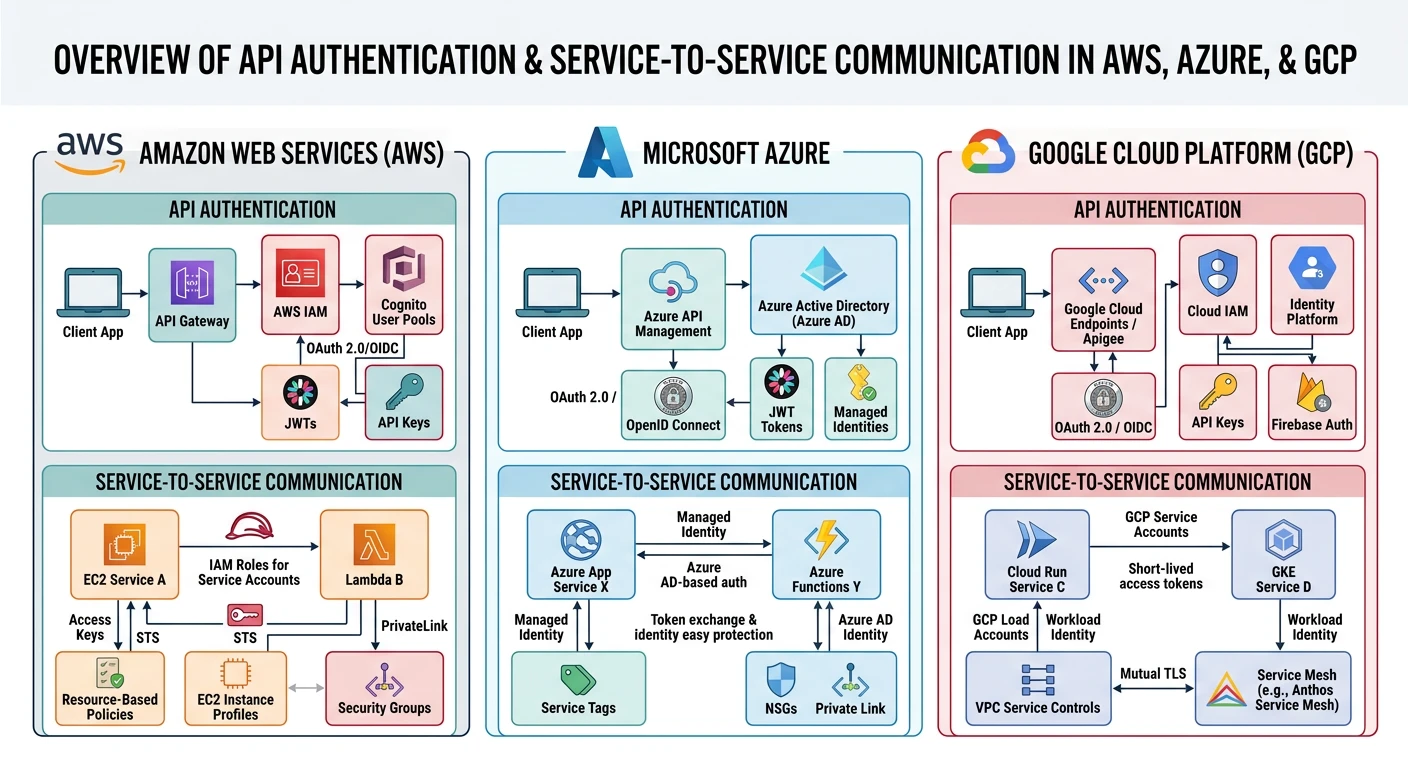
Cloud providers expose services through APIs. Understanding how AWS, Azure, and GCP handle authentication, authorization, and service communication is essential for cloud-native development.
Cloud providers use distinct authentication mechanisms — AWS SigV4 signing, Azure OAuth 2.0 bearer tokens, and GCP service account credentials
Series Context: This is Part 18 of 20 in the Complete Protocols Master series. Cloud APIs build on HTTP/REST and use provider-specific authentication mechanisms.
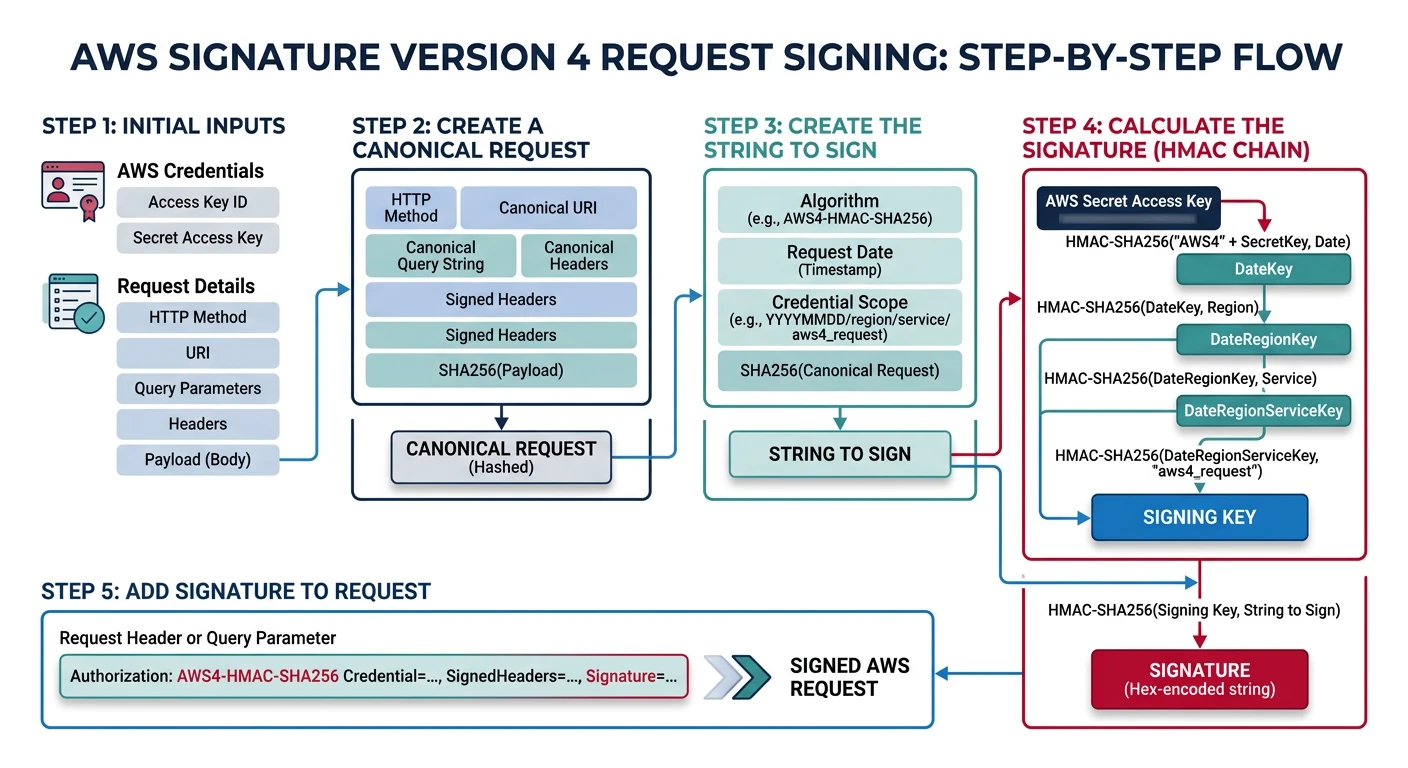
AWS uses Signature Version 4 (SigV4) for API authentication. Every request is cryptographically signed using your access key—no tokens, no passwords in transit.
AWS SigV4 derives a signing key through a chain of HMAC-SHA256 operations using date, region, and service to cryptographically sign every API request
# AWS CLI uses SigV4 automatically

# List S3 buckets (CLI handles signing)
aws s3 ls

# Debug to see signed request
aws s3 ls --debug 2>&1 | grep "Authorization:"

# Presigned URL (time-limited signed URL)
aws s3 presign s3://my-bucket/file.pdf --expires-in 3600

# Assume role (temporary credentials)
aws sts assume-role \
  --role-arn arn:aws:iam::123456789012:role/MyRole \
  --role-session-name my-session
# AWS API calls with boto3

import boto3
from botocore.auth import SigV4Auth
from botocore.awsrequest import AWSRequest
import requests

def aws_api_example():
    """Demonstrate AWS API patterns"""

    # SDK handles SigV4 automatically
    s3 = boto3.client('s3')

    # List buckets
    response = s3.list_buckets()
    for bucket in response['Buckets']:
        print(f"Bucket: {bucket['Name']}")

    # Generate presigned URL
    url = s3.generate_presigned_url(
        'get_object',
        Params={'Bucket': 'my-bucket', 'Key': 'file.pdf'},
        ExpiresIn=3600
    )
    print(f"Presigned URL: {url}")

def manual_sigv4_example():
    """Manual SigV4 signing (for understanding)"""

    print("""
    # Manual SigV4 (rarely needed, SDK does this)

    from botocore.auth import SigV4Auth
    from botocore.awsrequest import AWSRequest
    from botocore.credentials import Credentials

    credentials = Credentials(
        access_key='AKIAIOSFODNN7EXAMPLE',
        secret_key='wJalrXUtnFEMI/K7MDENG/bPxRfiCYEXAMPLEKEY'
    )

    request = AWSRequest(
        method='GET',
        url='https://s3.us-east-1.amazonaws.com/my-bucket',
        headers={'Host': 's3.us-east-1.amazonaws.com'}
    )

    SigV4Auth(credentials, 's3', 'us-east-1').add_auth(request)

    # Now request.headers contains Authorization
    """)

# IAM role for EC2 (no hardcoded credentials)
print("""
EC2 Instance Profile (Best Practice):
• EC2 instance assumes IAM role
• Credentials auto-rotate
• No keys in code or env vars

# boto3 auto-discovers credentials:
# 1. Environment variables
# 2. Shared credentials file
# 3. IAM role (EC2/Lambda/ECS)
""")
AWS Services
Common AWS Service Protocols
AWS Service Protocols:

S3:
• REST API over HTTPS
• Path-style: s3.amazonaws.com/bucket/key
• Virtual-hosted: bucket.s3.amazonaws.com/key
• Transfer Acceleration: bucket.s3-accelerate.amazonaws.com

DynamoDB:
• HTTPS POST with JSON
• x-amz-target: DynamoDB_20120810.GetItem

SQS:
• REST or Query API
• Long polling: WaitTimeSeconds=20

Lambda:
• Invoke: POST /functions/{name}/invocations
• Async: X-Amz-Invocation-Type: Event

API Gateway:
• REST API or HTTP API
• WebSocket API supported
Azure Protocols
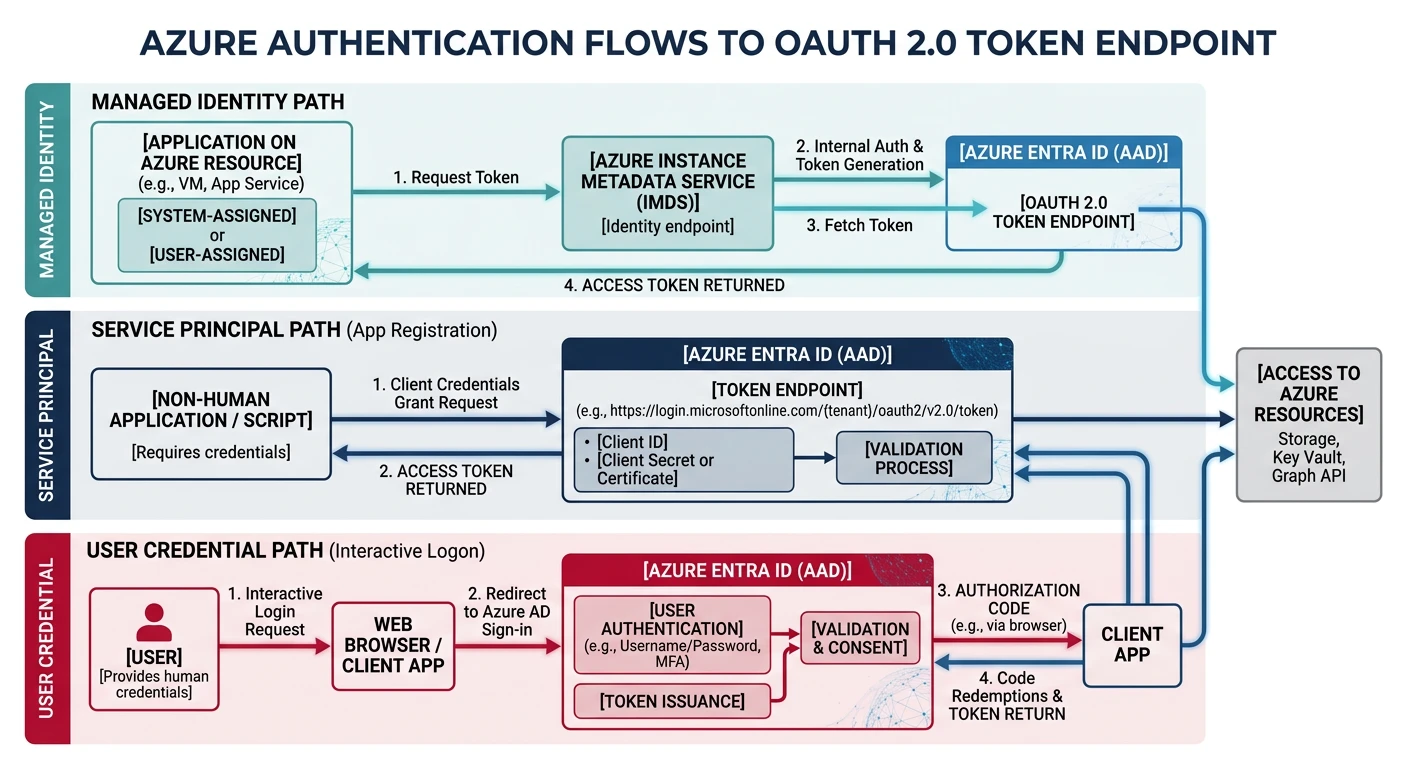
Azure uses OAuth 2.0 bearer tokens from Azure AD. Managed identities eliminate the need for credentials in code—Azure automatically provides tokens.
Azure authentication supports service principals, managed identities (recommended), and user credentials — all flowing through the Azure AD OAuth 2.0 token endpoint
Auth
Azure Authentication
Azure Authentication Options:

1. SERVICE PRINCIPAL (App Registration)
   • Client credentials flow
   • App ID + Secret/Certificate
   • For automation, CI/CD

2. MANAGED IDENTITY (Recommended)
   • System-assigned: tied to resource
   • User-assigned: reusable across resources
   • No secrets to manage!

3. USER AUTHENTICATION
   • Interactive login
   • Device code flow
   • For development

Token Endpoint:
POST https://login.microsoftonline.com/{tenant}/oauth2/v2.0/token
Content-Type: application/x-www-form-urlencoded

client_id={app-id}&
scope=https://management.azure.com/.default&
client_secret={secret}&
grant_type=client_credentials
# Azure CLI authentication

# Login interactively
az login

# Login with service principal
az login --service-principal \
  -u "app-id" \
  -p "secret" \
  --tenant "tenant-id"

# Get access token (for API calls)
az account get-access-token --resource https://management.azure.com/

# Managed identity (on Azure VM/App Service)
curl -H "Metadata: true" \
  "http://169.254.169.254/metadata/identity/oauth2/token?api-version=2018-02-01&resource=https://management.azure.com/"
# Azure API with Python

from azure.identity import DefaultAzureCredential, ManagedIdentityCredential
from azure.storage.blob import BlobServiceClient

def azure_api_example():
    """Demonstrate Azure API patterns"""

    # DefaultAzureCredential tries multiple methods:
    # 1. Environment variables
    # 2. Managed Identity
    # 3. Azure CLI
    # 4. Visual Studio Code
    credential = DefaultAzureCredential()

    # Use with Blob Storage
    blob_service = BlobServiceClient(
        account_url="https://mystorageaccount.blob.core.windows.net",
        credential=credential
    )

    # List containers
    for container in blob_service.list_containers():
        print(f"Container: {container['name']}")

def managed_identity_example():
    """Managed Identity on Azure resources"""

    print("""
    # On Azure VM/App Service/Function

    from azure.identity import ManagedIdentityCredential

    # System-assigned identity
    credential = ManagedIdentityCredential()

    # User-assigned identity
    credential = ManagedIdentityCredential(
        client_id="user-assigned-client-id"
    )

    # Get token for specific resource
    token = credential.get_token("https://vault.azure.net/.default")
    print(f"Token: {token.token[:50]}...")

    # Use with Key Vault
    from azure.keyvault.secrets import SecretClient

    client = SecretClient(
        vault_url="https://my-vault.vault.azure.net",
        credential=credential
    )

    secret = client.get_secret("my-secret")
    """)

azure_api_example()
ARM API
Azure Resource Manager API
Azure ARM REST API:

Base URL: https://management.azure.com

List resource groups:
GET /subscriptions/{subscriptionId}/resourcegroups?api-version=2021-04-01
Authorization: Bearer {token}

Create storage account:
PUT /subscriptions/{subId}/resourceGroups/{rg}/providers/Microsoft.Storage/storageAccounts/{name}?api-version=2021-08-01
Authorization: Bearer {token}
Content-Type: application/json
{
  "location": "eastus",
  "sku": {"name": "Standard_LRS"},
  "kind": "StorageV2"
}

API Versions:
• Each resource type has versioned API
• Always specify api-version parameter
GCP Protocols
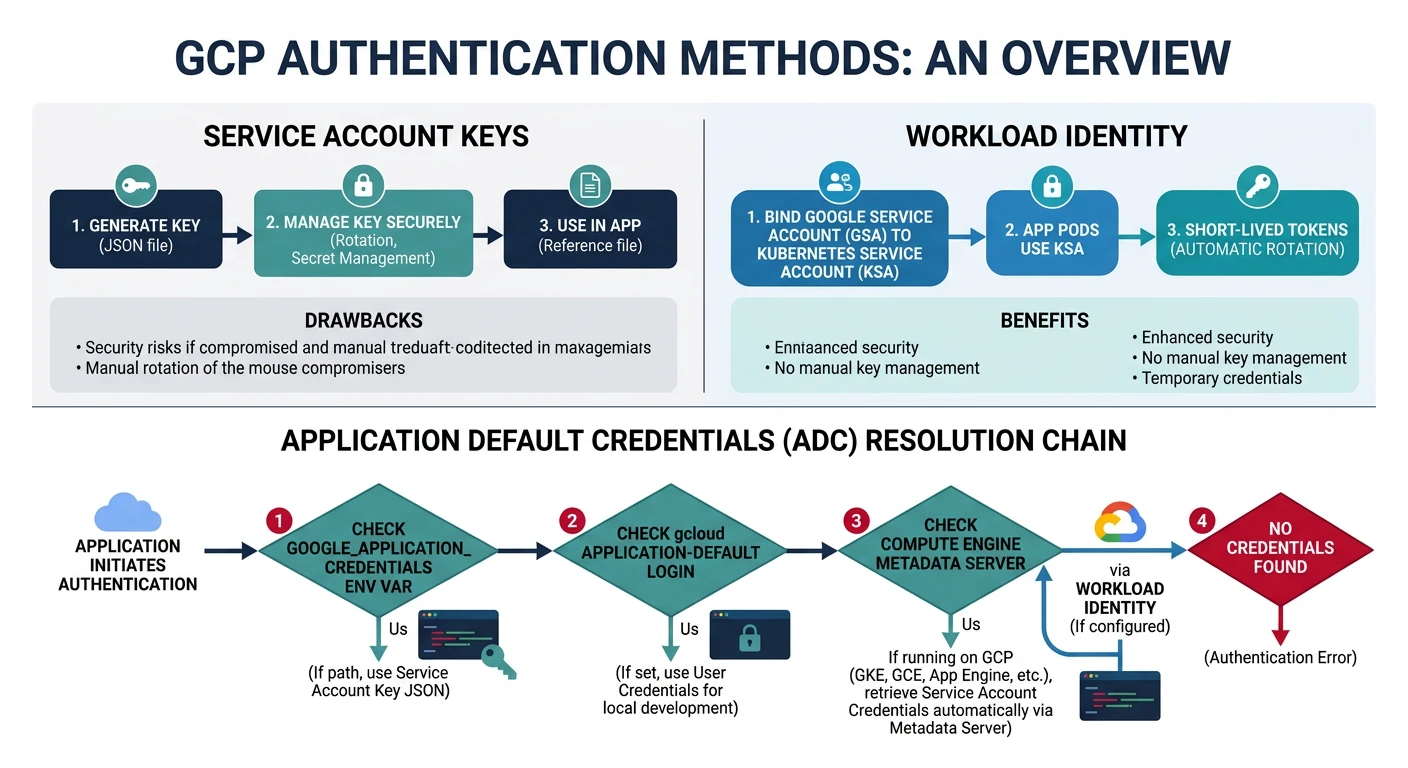
GCP uses OAuth 2.0 with service accounts. Service account keys are JSON files, but Workload Identity (like Azure Managed Identity) is preferred.
GCP Application Default Credentials checks environment variables, gcloud credentials, and metadata server in order — with Workload Identity as the recommended keyless approach
Auth
GCP Authentication
GCP Authentication Methods:

1. SERVICE ACCOUNT KEY (JSON file)
   • Download from Console
   • Set GOOGLE_APPLICATION_CREDENTIALS
   • Rotate regularly (security risk)

2. WORKLOAD IDENTITY (Recommended)
   • No keys to manage
   • For GKE, Cloud Run, Cloud Functions
   • Maps Kubernetes SA to GCP SA

3. USER CREDENTIALS
   • gcloud auth login
   • For development only

4. METADATA SERVER (on GCP)
   • Auto-available on GCE, GKE
   • curl metadata.google.internal/...

Application Default Credentials (ADC):
1. GOOGLE_APPLICATION_CREDENTIALS env var
2. gcloud auth application-default credentials
3. Metadata server (on GCP)
# GCP API with Python

from google.cloud import storage
from google.auth import default

def gcp_api_example():
    """Demonstrate GCP API patterns"""

    # ADC auto-discovery
    credentials, project = default()
    print(f"Using project: {project}")

    # Cloud Storage
    client = storage.Client()

    # List buckets
    for bucket in client.list_buckets():
        print(f"Bucket: {bucket.name}")

def service_account_example():
    """Service account usage patterns"""

    print("""
    # With key file (less secure)

    from google.oauth2 import service_account

    credentials = service_account.Credentials.from_service_account_file(
        'service-account.json',
        scopes=['https://www.googleapis.com/auth/cloud-platform']
    )

    client = storage.Client(credentials=credentials)

    # With Workload Identity (on GKE)
    # Kubernetes ServiceAccount mapped to GCP ServiceAccount
    # ADC automatically picks up credentials

    client = storage.Client()  # Just works!
    """)

def gcp_rest_api():
    """Direct REST API call"""

    print("""
    # GCP REST API (rarely needed with SDK)

    import google.auth
    import google.auth.transport.requests

    credentials, project = google.auth.default()
    auth_req = google.auth.transport.requests.Request()
    credentials.refresh(auth_req)

    headers = {
        'Authorization': f'Bearer {credentials.token}'
    }

    # List buckets
    response = requests.get(
        f'https://storage.googleapis.com/storage/v1/b?project={project}',
        headers=headers
    )
    """)

gcp_api_example()
Cloud-Native Patterns
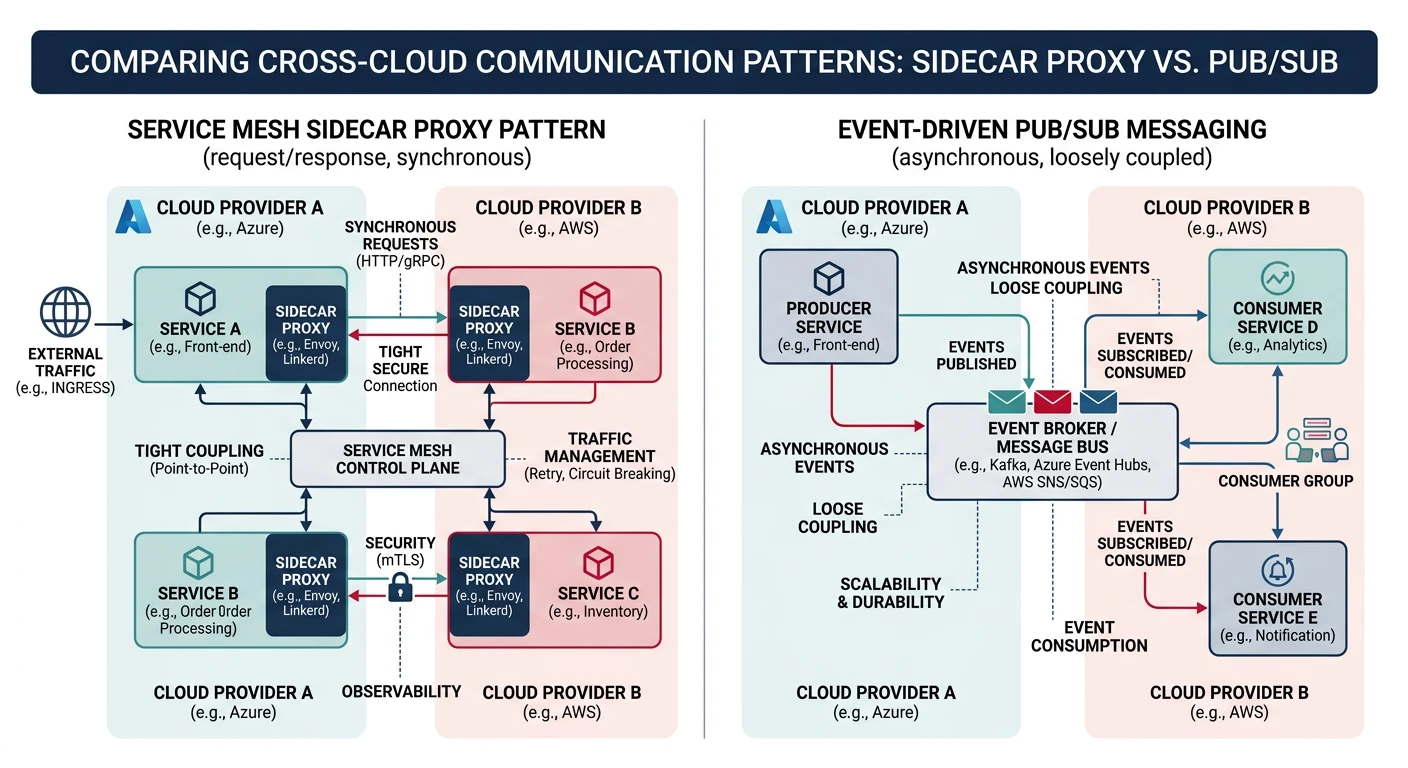
Beyond provider-specific APIs, cloud-native applications use common patterns for service communication: service mesh, message queues, and event-driven architectures.
Cloud-native patterns include service mesh for mTLS-encrypted service-to-service communication and event-driven architectures using SNS/SQS, Service Bus, or Pub/Sub
Service Mesh
Service-to-Service Communication
Service Mesh (Istio, Linkerd):

Without Service Mesh:
[Service A] → HTTP → [Service B]
• No encryption
• No retry logic
• No observability

With Service Mesh:
[Service A] → [Sidecar] → mTLS → [Sidecar] → [Service B]
• Automatic mTLS
• Retries, timeouts
• Distributed tracing
• Traffic management

AWS App Mesh / Azure Service Mesh / GCP Anthos:
• Managed service mesh
• Integrated with cloud IAM