Complete Protocols Master Part 2: Physical & Data Link Layers
January 31, 2026Wasil Zafar32 min read
Explore the Physical and Data Link layers where bits become frames and hardware meets protocol. Master Ethernet, Wi-Fi, MAC addressing, VLANs, switching, and the technologies that connect billions of devices on local networks.
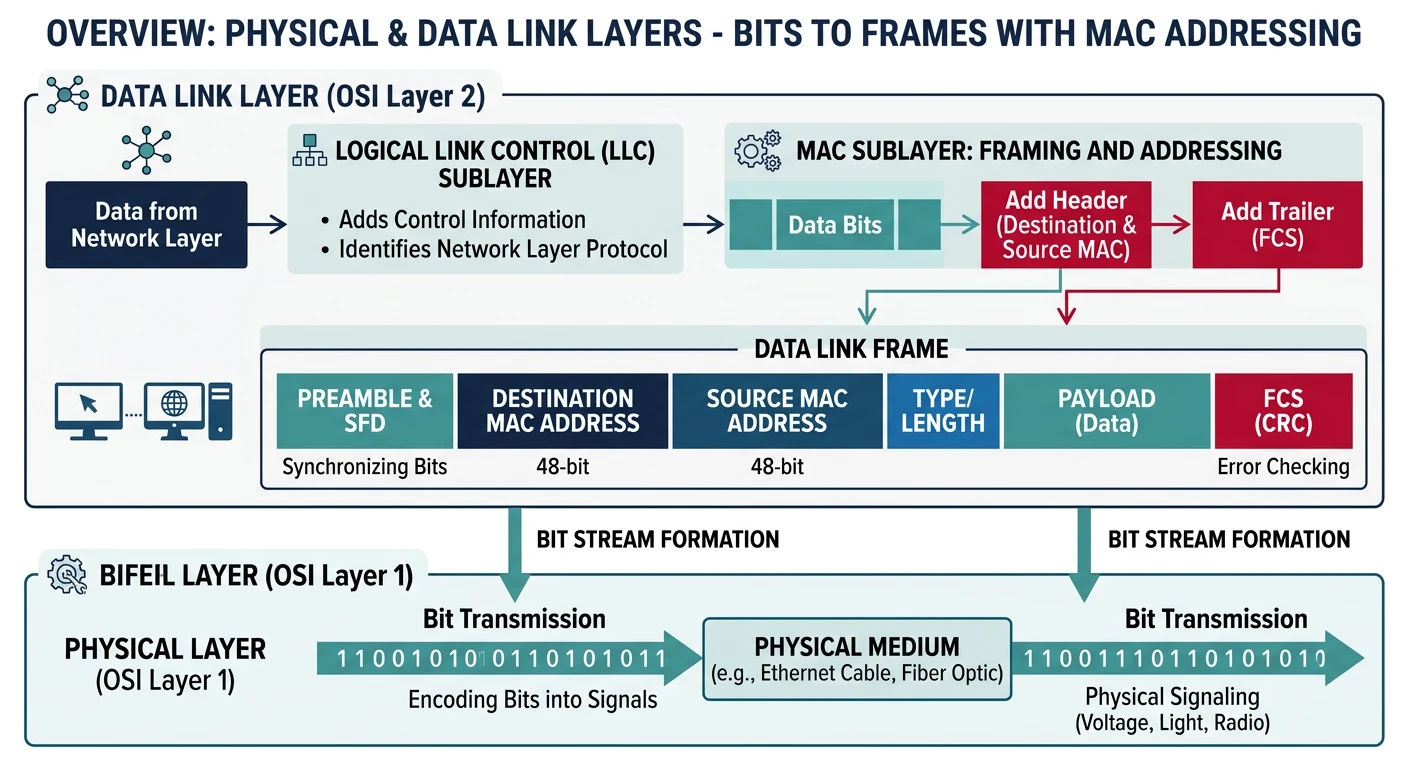
In Part 1, we explored the OSI model's seven layers. Now we'll deep-dive into Layers 1 and 2—the Physical and Data Link layers—where abstract data becomes physical reality. These layers are where:
The Physical and Data Link layers transform abstract data into electrical signals and manage local network communication.
Bits become electrical signals, light pulses, or radio waves
Devices are identified by hardware addresses
Local network communication happens
Switches make intelligent forwarding decisions
Series Context: This is Part 2 of 20 in the Complete Protocols Master series. We're building from the physical foundation up to application-level protocols.
Real-World Relevance: Understanding these layers helps you troubleshoot "it's not connecting" problems, design efficient local networks, configure VLANs for security segmentation, and optimize Wi-Fi performance. This knowledge is essential for network engineers, DevOps, and anyone managing infrastructure.
Physical Layer (Layer 1): Bits on the Wire
The Physical Layer is responsible for the actual transmission of raw bits over a physical medium. It defines electrical, optical, and radio specifications for data transmission.
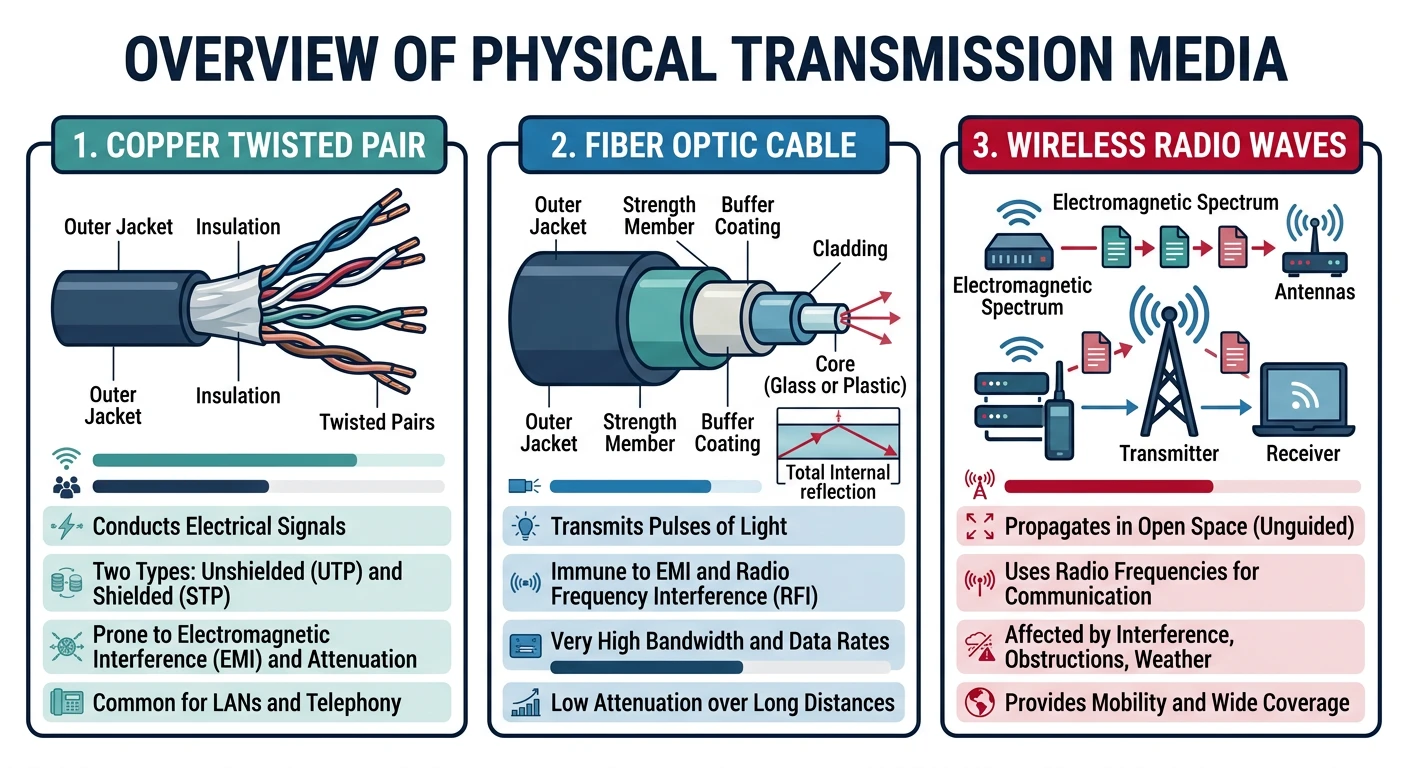
Physical Layer transmission media — copper cables, fiber optics, and wireless signals each carry data differently.
Layer 1Hardware Level
Physical Layer Responsibilities
Bit Transmission: Converting 1s and 0s to physical signals
Twisted Pair Explained: The wires in Cat5/6 cables are twisted together to reduce electromagnetic interference (EMI). Each pair carries a differential signal—interference affects both wires equally and gets canceled out. This is why you shouldn't untwist more than 0.5 inches when terminating cables!
Unguided Media
Wireless Transmission
Technology
Frequency
Range
Use Case
Wi-Fi 2.4 GHz
2.4 GHz
~50m indoors
IoT, legacy devices, long range
Wi-Fi 5 GHz
5 GHz
~35m indoors
High-speed, video streaming
Wi-Fi 6 GHz
6 GHz
~25m indoors
Congestion-free, Wi-Fi 6E
Bluetooth
2.4 GHz
10-100m
Personal devices, peripherals
Cellular (5G)
Various
Km scale
Mobile broadband
Signaling and Encoding
The Physical Layer must convert digital bits (0s and 1s) into signals that can travel through the medium:
Encoding Schemes
Common Line Encoding Methods
NRZ (Non-Return to Zero): High voltage = 1, Low voltage = 0. Simple but has synchronization issues with long runs of same bit.
Manchester: Transition in middle of each bit period. Rising edge = 1, Falling edge = 0. Used in 10 Mbps Ethernet. Self-clocking but uses 2x bandwidth.
4B/5B: Encodes 4 bits as 5 bits to ensure sufficient transitions. Used with NRZI for 100 Mbps Fast Ethernet.
8B/10B: Encodes 8 bits as 10 bits. Used in Gigabit Ethernet and Fiber Channel. Provides DC balance and error detection.
PAM-4: Uses 4 voltage levels to encode 2 bits per symbol. Used in 100GbE and 400GbE for higher data rates.
# Visualizing Manchester Encoding
def manchester_encode(data_bits):
    """
    Manchester encoding: Each bit is represented by a transition
    - 0: High-to-Low transition (falling edge)
    - 1: Low-to-High transition (rising edge)
    """
    encoded = []
    for bit in data_bits:
        if bit == '1':
            encoded.extend([0, 1])  # Low-to-High transition
        else:  # bit == '0'
            encoded.extend([1, 0])  # High-to-Low transition
    return encoded

# Example: Encode "1010"
data = "1010"
encoded = manchester_encode(data)

print(f"Original bits: {data}")
print(f"Manchester:    {encoded}")
print(f"Signal length: {len(data)} bits -> {len(encoded)} symbols (2x)")

# Visual representation
print("\nVisual encoding:")
for i, bit in enumerate(data):
    symbols = encoded[i*2:i*2+2]
    if bit == '1':
        print(f"Bit {bit}: _/‾ (Low-to-High)")
    else:
        print(f"Bit {bit}: ‾\_ (High-to-Low)")
Physical Layer Devices
Layer 1 Devices
Physical Layer Hardware
Hub: A "dumb" repeater that broadcasts incoming signals to ALL ports. Creates one large collision domain. Obsolete in modern networks.
Repeater: Regenerates and amplifies signals to extend cable distance. Doesn't interpret data—just boosts the signal.
Media Converter: Converts between media types (e.g., copper to fiber). Essential for connecting different cable plants.
Network Interface Card (NIC): Hardware that connects a device to the network. Operates at both Layer 1 (physical) and Layer 2 (MAC address).
Transceiver (SFP/QSFP): Small Form-factor Pluggable modules that convert electrical signals to optical and vice versa.
Hub vs Switch: Hubs operate at Layer 1 and broadcast everything everywhere (inefficient, insecure). Switches operate at Layer 2 and intelligently forward frames only to the destination port. Modern networks use switches exclusively.
Data Link Layer (Layer 2): Frames & Addressing
The Data Link Layer provides node-to-node data transfer—delivering frames between two directly connected nodes. It handles physical addressing (MAC), error detection, and media access control.
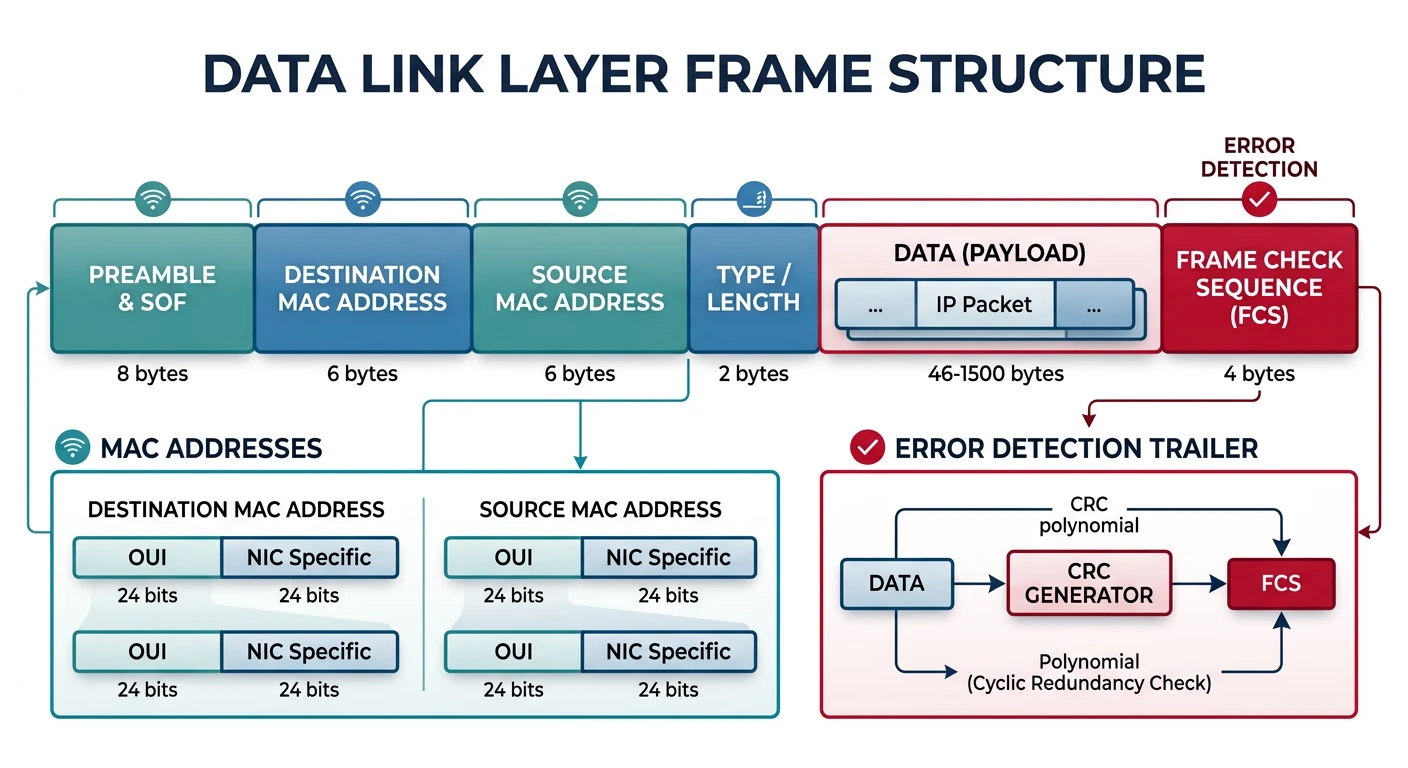
The Data Link Layer wraps packets into frames with MAC addresses and CRC error detection.
Layer 2Frame Level
Data Link Layer Responsibilities
Framing: Encapsulating packets into frames with headers/trailers
Physical Addressing: Adding source/destination MAC addresses
Error Detection: CRC (Cyclic Redundancy Check) in frame trailer
Media Access Control: Determining when a device can transmit
Flow Control: Preventing fast senders from overwhelming slow receivers
MAC Addressing: The Hardware Identity
Every network interface has a unique MAC (Media Access Control) address—a 48-bit (6-byte) hardware address burned into the NIC.
MAC Format
MAC Address Structure
MAC Address: 00:1A:2B:3C:4D:5E
             ├─────┤├─────┤
             OUI     NIC-Specific

OUI (Organizationally Unique Identifier):
  - First 3 bytes (24 bits)
  - Assigned by IEEE to manufacturers
  - Identifies the vendor (Intel, Cisco, Apple, etc.)

NIC-Specific:
  - Last 3 bytes (24 bits)
  - Assigned by manufacturer
  - Unique to each network interface

Total combinations: 2^48 = 281 trillion unique addresses
# Working with MAC addresses in Python
import re
import random

def validate_mac(mac_address):
    """Validate MAC address format"""
    # Common formats: 00:1A:2B:3C:4D:5E, 00-1A-2B-3C-4D-5E, 001A.2B3C.4D5E
    patterns = [
        r'^([0-9A-Fa-f]{2}:){5}[0-9A-Fa-f]{2}$',  # Colon separated
        r'^([0-9A-Fa-f]{2}-){5}[0-9A-Fa-f]{2}$',  # Dash separated
        r'^([0-9A-Fa-f]{4}\.){2}[0-9A-Fa-f]{4}$'  # Cisco format
    ]
    return any(re.match(pattern, mac_address) for pattern in patterns)

def normalize_mac(mac_address):
    """Convert any MAC format to standard colon format"""
    # Remove all separators
    clean = re.sub(r'[:\-\.]', '', mac_address)
    # Insert colons
    return ':'.join(clean[i:i+2] for i in range(0, 12, 2)).upper()

def get_oui_info(mac_address):
    """Extract OUI (vendor) portion"""
    normalized = normalize_mac(mac_address)
    oui = normalized[:8]  # First 8 chars (including colons)

    # Common OUI examples (in reality, use IEEE database)
    oui_database = {
        '00:1A:2B': 'Ayecom Technology',
        'FC:FB:FB': 'Cisco Systems',
        '00:50:56': 'VMware',
        'DC:A6:32': 'Raspberry Pi',
        '3C:22:FB': 'Apple',
        'B8:27:EB': 'Raspberry Pi Foundation',
    }
    return oui_database.get(oui, 'Unknown Vendor')

def generate_random_mac():
    """Generate a random locally administered MAC"""
    # Set locally administered bit (2nd least significant bit of first byte)
    first_byte = random.randint(0, 255) | 0x02  # Set LA bit
    first_byte &= 0xFE  # Clear multicast bit

    remaining = [random.randint(0, 255) for _ in range(5)]
    mac_bytes = [first_byte] + remaining

    return ':'.join(f'{b:02X}' for b in mac_bytes)

# Examples
macs = ['00:1A:2B:3C:4D:5E', '00-50-56-C0-00-08', 'FCFB.FB12.3456']

for mac in macs:
    print(f"MAC: {mac}")
    print(f"  Valid: {validate_mac(mac)}")
    print(f"  Normalized: {normalize_mac(mac)}")
    print()

print(f"Random locally administered MAC: {generate_random_mac()}")
Special MAC Addresses:
FF:FF:FF:FF:FF:FF — Broadcast (sent to all devices on LAN)
01:00:5E:xx:xx:xx — IPv4 Multicast
33:33:xx:xx:xx:xx — IPv6 Multicast
Bit 0 of first byte = 1 — Multicast address
Bit 1 of first byte = 1 — Locally administered address
Ethernet Frame Structure
Ethernet is the dominant Layer 2 protocol for wired LANs. Let's examine the frame structure:
# Parsing an Ethernet frame in Python
import struct

def parse_ethernet_frame(raw_data):
    """Parse Ethernet II frame header"""
    # First 14 bytes are the Ethernet header
    # 6 bytes dest MAC + 6 bytes src MAC + 2 bytes EtherType

    dest_mac = raw_data[0:6]
    src_mac = raw_data[6:12]
    ethertype = struct.unpack('!H', raw_data[12:14])[0]
    payload = raw_data[14:]

    return {
        'dest_mac': format_mac(dest_mac),
        'src_mac': format_mac(src_mac),
        'ethertype': hex(ethertype),
        'ethertype_name': get_ethertype_name(ethertype),
        'payload_length': len(payload)
    }

def format_mac(mac_bytes):
    """Format MAC address bytes to string"""
    return ':'.join(f'{b:02X}' for b in mac_bytes)

def get_ethertype_name(ethertype):
    """Get human-readable EtherType name"""
    ethertypes = {
        0x0800: 'IPv4',
        0x0806: 'ARP',
        0x86DD: 'IPv6',
        0x8100: 'VLAN Tagged (802.1Q)',
        0x8847: 'MPLS Unicast',
        0x88CC: 'LLDP'
    }
    return ethertypes.get(ethertype, 'Unknown')

# Example: Parse a sample frame header
# (In real code, you'd capture this from the network)
sample_frame = bytes([
    0xFC, 0xFB, 0xFB, 0x12, 0x34, 0x56,  # Dest MAC
    0x00, 0x1A, 0x2B, 0x3C, 0x4D, 0x5E,  # Src MAC
    0x08, 0x00,                            # EtherType (IPv4)
    # ... payload would follow
])

parsed = parse_ethernet_frame(sample_frame)
for key, value in parsed.items():
    print(f"{key}: {value}")
LLC and MAC Sublayers
The Data Link Layer is divided into two sublayers:
Sublayers
LLC (Logical Link Control) - IEEE 802.2
The upper sublayer that provides:
Flow control between sender and receiver
Error control and acknowledgment
Multiplexing of network layer protocols
LLC is largely unused in modern Ethernet (Ethernet II frames dominate), but still used in some protocols like STP.
MAC (Media Access Control)
The lower sublayer that provides:
Physical addressing (MAC addresses)
Media access control (CSMA/CD, CSMA/CA)
Frame delimiting and recognition
Error detection (FCS/CRC)
Ethernet Deep Dive
Ethernet, standardized as IEEE 802.3, has been the dominant LAN technology since the 1980s. Let's explore its evolution and mechanisms.
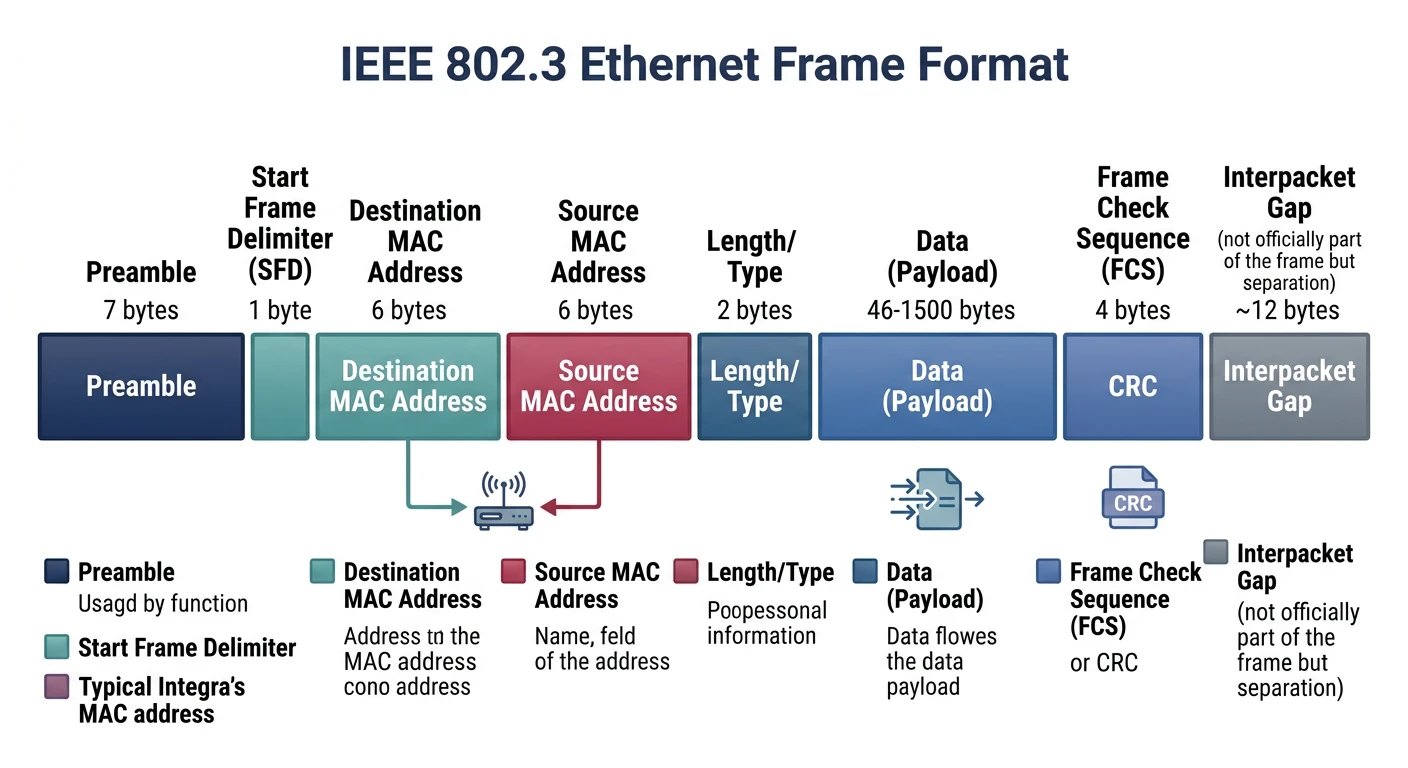
The Ethernet frame format (IEEE 802.3) has evolved from 10 Mbps to 400 Gbps while maintaining backward compatibility.
IEEE 802.3
Ethernet Standards Evolution
Standard
Speed
Media
Max Distance
10BASE-T
10 Mbps
Cat3+ Twisted Pair
100m
100BASE-TX (Fast Ethernet)
100 Mbps
Cat5+ Twisted Pair
100m
1000BASE-T (Gigabit)
1 Gbps
Cat5e+ Twisted Pair
100m
10GBASE-T
10 Gbps
Cat6a+ Twisted Pair
100m
25GBASE-T
25 Gbps
Cat8 Twisted Pair
30m
1000BASE-SX
1 Gbps
Multi-Mode Fiber
550m
1000BASE-LX
1 Gbps
Single-Mode Fiber
5km
10GBASE-SR
10 Gbps
Multi-Mode Fiber
400m
10GBASE-LR
10 Gbps
Single-Mode Fiber
10km
100GBASE-SR4
100 Gbps
Multi-Mode Fiber (4x)
100m
400GBASE-SR16
400 Gbps
Multi-Mode Fiber (16x)
100m
Naming Convention:[Speed]BASE-[Signal Type][Segment Length or Media]
T = Twisted Pair
S = Short wavelength (850nm, multi-mode fiber)
L = Long wavelength (1310nm, single-mode fiber)
X = 4B/5B encoding over fiber
R = LAN PHY (as opposed to WAN)
CSMA/CD: Collision Detection
Carrier Sense Multiple Access with Collision Detection (CSMA/CD) is the media access method used by classic Ethernet:
Algorithm
CSMA/CD Process
Carrier Sense: Listen to the medium. Is anyone transmitting?
If idle: Start transmitting the frame
If busy: Wait until idle, then transmit
Collision Detection: While transmitting, monitor for collisions
If collision detected:
Stop transmitting
Send jam signal (32 bits)
Wait random backoff time (exponential)
Retry (up to 16 attempts)
# CSMA/CD Simulation
import random
import time

class CSMACDSimulator:
    """Simulates CSMA/CD collision handling"""

    MAX_ATTEMPTS = 16
    SLOT_TIME = 51.2  # microseconds for 10 Mbps Ethernet

    def __init__(self, station_id):
        self.station_id = station_id
        self.attempts = 0

    def calculate_backoff(self):
        """
        Binary Exponential Backoff:
        - After n collisions, wait random(0, 2^n - 1) slot times
        - n is capped at 10 (max backoff range = 0-1023 slots)
        """
        k = min(self.attempts, 10)
        max_slots = (2 ** k) - 1
        backoff_slots = random.randint(0, max_slots)
        backoff_time = backoff_slots * self.SLOT_TIME
        return backoff_time, backoff_slots

    def transmit(self, collision_occurred=False):
        """Attempt to transmit with collision handling"""

        if collision_occurred:
            self.attempts += 1

            if self.attempts > self.MAX_ATTEMPTS:
                print(f"Station {self.station_id}: ABORT - Max attempts exceeded")
                return False

            backoff_time, slots = self.calculate_backoff()
            print(f"Station {self.station_id}: Collision #{self.attempts}")
            print(f"  Backoff: {slots} slots ({backoff_time:.1f} μs)")
            return 'retry'

        self.attempts = 0
        print(f"Station {self.station_id}: Transmission successful!")
        return True

# Simulate multiple stations experiencing collisions
print("=== CSMA/CD Backoff Simulation ===\n")

station = CSMACDSimulator("A")

# Simulate 5 consecutive collisions then success
for i in range(6):
    collision = i < 5  # Collisions for first 5 attempts
    result = station.transmit(collision_occurred=collision)
    if result == True:
        break
    print()
Modern Networks: CSMA/CD is largely obsolete! Modern full-duplex switched Ethernet eliminates collisions entirely. Each port has a dedicated collision domain, and devices can send/receive simultaneously. CSMA/CD only applies to half-duplex connections (rare today) and legacy hub-based networks.
Ethernet Speed Evolution
Timeline
40+ Years of Ethernet
1973: Ethernet invented at Xerox PARC (2.94 Mbps)
1980: DIX Ethernet (10 Mbps)
1983: IEEE 802.3 standard
1995: Fast Ethernet (100 Mbps)
1998: Gigabit Ethernet (1 Gbps)
2006: 10 Gigabit Ethernet
2010: 40/100 Gigabit Ethernet
2017: 25/50/200/400 Gigabit Ethernet
2020s: 800 Gbps and Terabit Ethernet emerging
Pattern: Ethernet speed increases ~10x every 5-7 years while maintaining backward compatibility!
Wi-Fi (IEEE 802.11)
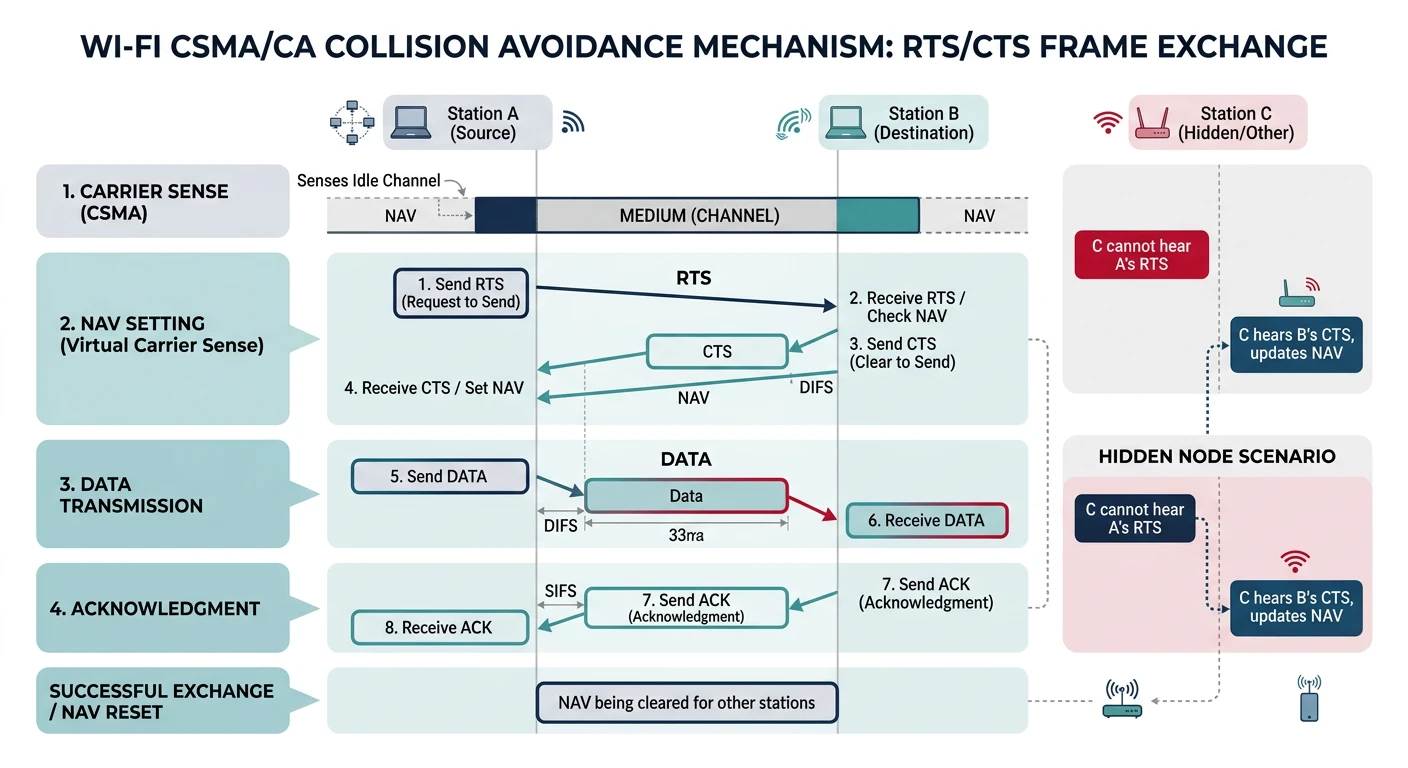
Wi-Fi operates at the same Data Link and Physical layers as Ethernet, but uses radio waves instead of cables. It uses CSMA/CA (Collision Avoidance) instead of CSMA/CD because wireless stations can't detect collisions while transmitting.
Wi-Fi uses CSMA/CA — devices listen before transmitting and use RTS/CTS to avoid wireless collisions.
Wi-Fi Standards
Wi-Fi Generations
Generation
Standard
Frequency
Max Speed
Year
-
802.11
2.4 GHz
2 Mbps
1997
-
802.11b
2.4 GHz
11 Mbps
1999
-
802.11a
5 GHz
54 Mbps
1999
-
802.11g
2.4 GHz
54 Mbps
2003
Wi-Fi 4
802.11n
2.4/5 GHz
600 Mbps
2009
Wi-Fi 5
802.11ac
5 GHz
6.9 Gbps
2013
Wi-Fi 6
802.11ax
2.4/5 GHz
9.6 Gbps
2019
Wi-Fi 6E
802.11ax
6 GHz
9.6 Gbps
2020
Wi-Fi 7
802.11be
2.4/5/6 GHz
46 Gbps
2024
Wi-Fi Security Protocols
Security Evolution
Wi-Fi Security Timeline
WEP (Wired Equivalent Privacy) - 1997: Broken! Uses RC4 with weak key management. Can be cracked in minutes. Never use.
WPA (Wi-Fi Protected Access) - 2003: Improved but still uses RC4. TKIP (Temporal Key Integrity Protocol) provides per-packet keys. Deprecated.
WPA2 (802.11i) - 2004: Uses AES-CCMP encryption. Secure when using strong passwords. Current minimum standard.
WPA3 - 2018: Uses SAE (Simultaneous Authentication of Equals) for key exchange. Protected against offline dictionary attacks. 192-bit security suite option. Required for Wi-Fi 6 certification.
Security Best Practices:
Use WPA3 if all devices support it, otherwise WPA2
Consider RADIUS authentication (802.1X) for enterprise
Use separate SSIDs for IoT devices (network segmentation)
Wi-Fi Channels and Frequencies
# Wi-Fi Channel Information
wifi_channels = {
    '2.4 GHz': {
        'channels': list(range(1, 14)),  # Channels 1-13 (14 in Japan)
        'non_overlapping': [1, 6, 11],   # Only 3 non-overlapping channels!
        'channel_width': 20,              # MHz per channel
        'frequency_start': 2412,          # MHz for channel 1
        'channel_spacing': 5              # MHz between channel centers
    },
    '5 GHz': {
        'channels': [36, 40, 44, 48, 52, 56, 60, 64,  # UNII-1 & UNII-2A
                     100, 104, 108, 112, 116, 120, 124, 128, 132, 136, 140, 144,  # UNII-2C
                     149, 153, 157, 161, 165],  # UNII-3
        'non_overlapping': 'All channels when using 20 MHz width',
        'channel_widths': [20, 40, 80, 160],  # MHz options
    },
    '6 GHz (Wi-Fi 6E/7)': {
        'channels': list(range(1, 234, 4)),  # Many more channels!
        'advantages': 'Less congestion, wider channels, newer devices only'
    }
}

def calculate_frequency(channel, band='2.4 GHz'):
    """Calculate center frequency for a 2.4 GHz channel"""
    if band == '2.4 GHz' and 1 <= channel <= 13:
        return 2407 + (channel * 5)  # MHz
    return None

# Display 2.4 GHz channel layout
print("2.4 GHz Channel Layout:")
print("=" * 50)
for ch in range(1, 14):
    freq = calculate_frequency(ch)
    non_overlap = "✓" if ch in [1, 6, 11] else " "
    print(f"Channel {ch:2d}: {freq} MHz  Non-overlapping: {non_overlap}")

print("\n⚠️  Only channels 1, 6, and 11 don't overlap in 2.4 GHz!")
print("   Using other channels causes interference with neighbors.")
Pro Tip: In dense environments (apartments, offices), the 5 GHz and 6 GHz bands offer much more capacity due to more non-overlapping channels and wider channel options. The 2.4 GHz band is extremely congested because Bluetooth, microwaves, baby monitors, and millions of IoT devices all share it!
Switches and Bridging
Switches are the workhorses of modern LANs. They operate at Layer 2 and make intelligent forwarding decisions based on MAC addresses.
Layer 2 Device
How Switches Work
Learn: When a frame arrives, record the source MAC and incoming port in the MAC address table
Forward: Look up destination MAC in the table:
If found → Forward to that specific port only
If not found → Flood to all ports except source (unknown unicast)
If broadcast → Flood to all ports except source
Filter: If destination is on same port as source, drop the frame
MAC Address Tables
# View MAC address table on different platforms

# Cisco IOS
show mac address-table

# Example output:
#           Mac Address Table
# -------------------------------------------
# Vlan    Mac Address       Type        Ports
# ----    -----------       --------    -----
#  1      0050.7966.6800    DYNAMIC     Fa0/1
#  1      0050.7966.6801    DYNAMIC     Fa0/2
#  1      0050.7966.6802    DYNAMIC     Fa0/3

# Linux bridge
bridge fdb show

# Windows (from network adapter)
getmac /v
# Simulate a simple Layer 2 switch
class Layer2Switch:
    """Simple Layer 2 switch simulation"""

    def __init__(self, num_ports=8):
        self.num_ports = num_ports
        self.mac_table = {}  # {mac_address: port_number}
        self.mac_table_timeout = 300  # seconds (typical aging time)

    def receive_frame(self, frame, ingress_port):
        """Process an incoming frame"""
        src_mac = frame['src_mac']
        dst_mac = frame['dst_mac']

        # Learn: Update MAC table with source
        self.learn(src_mac, ingress_port)

        # Forward decision
        if dst_mac == 'FF:FF:FF:FF:FF:FF':
            # Broadcast - flood to all except source
            return self.flood(ingress_port)
        elif dst_mac in self.mac_table:
            # Known unicast - forward to specific port
            egress_port = self.mac_table[dst_mac]
            if egress_port == ingress_port:
                # Filter - same port, don't forward
                return []
            return [egress_port]
        else:
            # Unknown unicast - flood
            return self.flood(ingress_port)

    def learn(self, mac, port):
        """Learn a MAC address"""
        if mac not in self.mac_table:
            print(f"  Learning: {mac} on port {port}")
        self.mac_table[mac] = port

    def flood(self, except_port):
        """Flood to all ports except one"""
        return [p for p in range(self.num_ports) if p != except_port]

    def show_mac_table(self):
        """Display MAC address table"""
        print("\nMAC Address Table:")
        print("-" * 40)
        print(f"{'MAC Address':<20} {'Port':<10}")
        print("-" * 40)
        for mac, port in sorted(self.mac_table.items()):
            print(f"{mac:<20} {port:<10}")

# Simulation
switch = Layer2Switch(num_ports=4)

frames = [
    {'src_mac': 'AA:AA:AA:AA:AA:01', 'dst_mac': 'BB:BB:BB:BB:BB:02', 'port': 0},
    {'src_mac': 'BB:BB:BB:BB:BB:02', 'dst_mac': 'AA:AA:AA:AA:AA:01', 'port': 1},
    {'src_mac': 'CC:CC:CC:CC:CC:03', 'dst_mac': 'FF:FF:FF:FF:FF:FF', 'port': 2},
    {'src_mac': 'AA:AA:AA:AA:AA:01', 'dst_mac': 'BB:BB:BB:BB:BB:02', 'port': 0},
]

print("Switch Frame Processing:")
print("=" * 50)

for i, frame in enumerate(frames):
    print(f"\nFrame {i+1}: {frame['src_mac']} → {frame['dst_mac']}")
    print(f"  Ingress port: {frame['port']}")

    egress_ports = switch.receive_frame(frame, frame['port'])

    if len(egress_ports) == 0:
        print(f"  Action: FILTERED (same segment)")
    elif len(egress_ports) == switch.num_ports - 1:
        print(f"  Action: FLOODED to ports {egress_ports}")
    else:
        print(f"  Action: FORWARDED to port {egress_ports[0]}")

switch.show_mac_table()
Spanning Tree Protocol (STP)
When you have redundant paths between switches (for reliability), loops can form. STP prevents broadcast storms by blocking redundant paths:
IEEE 802.1D
STP Basics
The Problem: Layer 2 has no TTL (Time To Live). A broadcast frame in a loop will circulate forever, consuming all bandwidth (broadcast storm).
The Solution: STP creates a loop-free logical topology by blocking some ports:
Elect a Root Bridge (lowest Bridge ID wins)
Each switch finds its Root Port (best path to root)
Each segment elects a Designated Port
All other ports are Blocked
Port States: Blocking → Listening → Learning → Forwarding
Modern Alternatives: Many data centers now use TRILL, SPB (Shortest Path Bridging), or simply Layer 3 everywhere to avoid STP's limitations. In cloud environments, software-defined networking handles these concerns differently.
VLANs: Virtual LANs
VLANs allow you to segment a physical network into multiple logical networks. Devices in different VLANs can't communicate directly—traffic must go through a router (inter-VLAN routing).
Benefits
Why Use VLANs?
Security: Isolate sensitive systems (finance, HR, servers)
Performance: Reduce broadcast domain size
Flexibility: Group users by function, not physical location
Cost Savings: One switch can serve multiple logical networks
Simplified Management: Move users between VLANs without rewiring
802.1Q VLAN Tagging
When frames need to travel between switches, they're "tagged" with a VLAN ID:
802.1Q Frame
802.1Q Tagged Frame
Standard Ethernet Frame:
┌──────────┬──────────┬──────────┬─────────┬─────┐
│ Dest MAC │ Src MAC  │EtherType │ Payload │ FCS │
│ (6 bytes)│ (6 bytes)│ (2 bytes)│(46-1500)│(4 B)│
└──────────┴──────────┴──────────┴─────────┴─────┘

802.1Q Tagged Frame:
┌──────────┬──────────┬──────────────┬──────────┬─────────┬─────┐
│ Dest MAC │ Src MAC  │   802.1Q     │EtherType │ Payload │ FCS │
│ (6 bytes)│ (6 bytes)│   Tag        │ (2 bytes)│(46-1500)│(4 B)│
│          │          │  (4 bytes)   │          │         │     │
└──────────┴──────────┴──────────────┴──────────┴─────────┴─────┘

802.1Q Tag (4 bytes):
┌────────────────┬─────────┬──────────────┐
│     TPID       │   TCI                  │
│   (2 bytes)    │   (2 bytes)            │
│   0x8100       │                        │
└────────────────┴─────────┬──────────────┘
                           │
                    ┌──────┴───────┐
                    │ PCP │DEI│VID │
                    │(3b) │(1b)│(12b)│
                    └──────────────┘

TPID: Tag Protocol Identifier (always 0x8100)
PCP:  Priority Code Point (QoS, 0-7)
DEI:  Drop Eligible Indicator
VID:  VLAN Identifier (1-4094, 0 and 4095 reserved)
# Parse and create 802.1Q VLAN tags
import struct

def create_vlan_tag(vlan_id, priority=0, dei=0):
    """
    Create an 802.1Q VLAN tag

    Args:
        vlan_id: VLAN ID (1-4094)
        priority: PCP value (0-7)
        dei: Drop Eligible Indicator (0 or 1)

    Returns:
        4-byte VLAN tag
    """
    if not 1 <= vlan_id <= 4094:
        raise ValueError("VLAN ID must be 1-4094")
    if not 0 <= priority <= 7:
        raise ValueError("Priority must be 0-7")

    tpid = 0x8100
    # TCI = PCP (3 bits) + DEI (1 bit) + VID (12 bits)
    tci = (priority << 13) | (dei << 12) | vlan_id

    return struct.pack('!HH', tpid, tci)

def parse_vlan_tag(tag_bytes):
    """Parse an 802.1Q VLAN tag"""
    tpid, tci = struct.unpack('!HH', tag_bytes)

    if tpid != 0x8100:
        raise ValueError(f"Invalid TPID: {hex(tpid)}")

    priority = (tci >> 13) & 0x07
    dei = (tci >> 12) & 0x01
    vlan_id = tci & 0x0FFF

    return {
        'tpid': hex(tpid),
        'priority': priority,
        'dei': dei,
        'vlan_id': vlan_id
    }

# Examples
print("Creating VLAN tags:")
print("-" * 40)

test_cases = [
    (100, 0, 0),   # VLAN 100, default priority
    (200, 5, 0),   # VLAN 200, high priority (voice)
    (300, 0, 1),   # VLAN 300, drop eligible
]

for vlan_id, priority, dei in test_cases:
    tag = create_vlan_tag(vlan_id, priority, dei)
    parsed = parse_vlan_tag(tag)
    print(f"VLAN {vlan_id}, Priority {priority}, DEI {dei}")
    print(f"  Raw bytes: {tag.hex()}")
    print(f"  Parsed: {parsed}")
    print()
Access Ports vs Trunk Ports
Port Types
Switch Port Modes
Feature
Access Port
Trunk Port
VLANs Carried
Single VLAN
Multiple VLANs
Tagging
Frames are untagged
Frames are 802.1Q tagged
Connected To
End devices (PCs, servers)
Other switches, routers
Native VLAN
N/A
Untagged traffic goes here
# Cisco IOS VLAN Configuration Examples

# Create VLANs
Switch(config)# vlan 10
Switch(config-vlan)# name Engineering
Switch(config-vlan)# vlan 20
Switch(config-vlan)# name Finance
Switch(config-vlan)# vlan 30
Switch(config-vlan)# name Guest

# Configure Access Port (connects to end device)
Switch(config)# interface FastEthernet0/1
Switch(config-if)# switchport mode access
Switch(config-if)# switchport access vlan 10

# Configure Trunk Port (connects to another switch)
Switch(config)# interface GigabitEthernet0/1
Switch(config-if)# switchport mode trunk
Switch(config-if)# switchport trunk allowed vlan 10,20,30
Switch(config-if)# switchport trunk native vlan 1

# View VLAN configuration
Switch# show vlan brief
Switch# show interfaces trunk
VLAN Security Tips:
Change the native VLAN from default (VLAN 1)
Disable unused ports and put them in a "parking lot" VLAN
Use private VLANs for additional isolation
Enable BPDU guard on access ports to prevent STP attacks
Consider 802.1X for port-based authentication
ARP: Address Resolution Protocol
ARP bridges Layer 2 and Layer 3 by mapping IP addresses to MAC addresses. When your computer wants to send data to another device on the same network, it needs to know the destination's MAC address.
ARP Process
How ARP Works
Device A wants to send to 192.168.1.100 but doesn't know its MAC
Device A broadcasts: "Who has 192.168.1.100? Tell 192.168.1.1"
All devices receive the broadcast (Layer 2 broadcast)
Device with 192.168.1.100 responds: "192.168.1.100 is at AA:BB:CC:DD:EE:FF"
Device A caches this mapping and sends the frame
Working with ARP
# View ARP cache on different systems

# Windows
arp -a

# Linux/macOS
arp -n
# or
ip neighbor show

# Example output:
# 192.168.1.1      ether   00:11:22:33:44:55   C   eth0
# 192.168.1.100    ether   aa:bb:cc:dd:ee:ff   C   eth0

# Clear ARP cache
# Windows (Admin)
arp -d *

# Linux
sudo ip neighbor flush all

# Add static ARP entry (prevent ARP spoofing for critical hosts)
# Linux
sudo arp -s 192.168.1.1 00:11:22:33:44:55

# Windows
arp -s 192.168.1.1 00-11-22-33-44-55
ARP Security: ARP has no authentication! Anyone can send ARP replies claiming any IP address (ARP Spoofing/Poisoning). This enables man-in-the-middle attacks. Mitigations include:
Dynamic ARP Inspection (DAI) on managed switches
Static ARP entries for critical systems
VLAN segmentation
Encryption (even if traffic is intercepted, it's encrypted)
Hands-On Exercises
Exercise 1: Network Discovery
# Discover devices on your local network

# Method 1: Ping sweep + ARP
# Linux
for ip in $(seq 1 254); do
    ping -c 1 -W 1 192.168.1.$ip &>/dev/null && echo "192.168.1.$ip is alive" &
done
wait
arp -n

# Method 2: nmap (comprehensive)
sudo nmap -sn 192.168.1.0/24

# Method 3: Windows
for /L %i in (1,1,254) do @ping -n 1 -w 100 192.168.1.%i >nul && echo 192.168.1.%i is alive
arp -a
Exercise 2: Python Network Tools
# Get your own MAC and IP addresses
import socket
import uuid
import subprocess
import platform

def get_mac_address():
    """Get the MAC address of the default interface"""
    mac = ':'.join(['{:02x}'.format((uuid.getnode() >> ele) & 0xff)
                    for ele in range(0, 8*6, 8)][::-1])
    return mac.upper()

def get_local_ip():
    """Get the local IP address"""
    s = socket.socket(socket.AF_INET, socket.SOCK_DGRAM)
    try:
        # Connect to external address (doesn't actually send data)
        s.connect(('8.8.8.8', 80))
        ip = s.getsockname()[0]
    except Exception:
        ip = '127.0.0.1'
    finally:
        s.close()
    return ip

def get_default_gateway():
    """Get default gateway (platform-specific)"""
    system = platform.system()

    if system == 'Windows':
        result = subprocess.run(['ipconfig'], capture_output=True, text=True)
        for line in result.stdout.split('\n'):
            if 'Default Gateway' in line and ':' in line:
                parts = line.split(':')
                if len(parts) > 1:
                    gateway = parts[1].strip()
                    if gateway:
                        return gateway
    else:  # Linux/macOS
        result = subprocess.run(['ip', 'route'], capture_output=True, text=True)
        for line in result.stdout.split('\n'):
            if line.startswith('default'):
                return line.split()[2]

    return 'Unknown'

# Display network information
print("Local Network Information")
print("=" * 40)
print(f"MAC Address:      {get_mac_address()}")
print(f"Local IP:         {get_local_ip()}")
print(f"Default Gateway:  {get_default_gateway()}")
print(f"Hostname:         {socket.gethostname()}")
Exercise 3: Capture and Analyze Frames
# Use tcpdump to capture Ethernet frames

# Capture ARP traffic
sudo tcpdump -i any -n arp

# Capture and show Ethernet headers
sudo tcpdump -i eth0 -e -n -c 10

# Example output:
# 14:30:45.123456 aa:bb:cc:dd:ee:ff > ff:ff:ff:ff:ff:ff, ethertype ARP (0x0806)
# 14:30:45.123789 11:22:33:44:55:66 > aa:bb:cc:dd:ee:ff, ethertype ARP (0x0806)

# Save capture for Wireshark analysis
sudo tcpdump -i any -w layer2_capture.pcap

# Then open in Wireshark:
# wireshark layer2_capture.pcap
Self-Assessment
Quiz: Test Your Knowledge
What's the maximum distance for Cat6a at 10 Gbps? (Answer: 100m)
How many non-overlapping channels are there in 2.4 GHz Wi-Fi? (Answer: 3 - channels 1, 6, 11)
What does a switch do with an unknown unicast frame? (Answer: Floods to all ports except source)
What protocol prevents Layer 2 loops? (Answer: Spanning Tree Protocol - STP)
What field in an 802.1Q tag identifies the VLAN? (Answer: VID - VLAN Identifier, 12 bits)
How does ARP find MAC addresses? (Answer: Broadcasts a request, target sends unicast reply)
What security protocol should you use for Wi-Fi today? (Answer: WPA3, or WPA2 minimum)
Summary & Next Steps
Key Takeaways:
Physical Layer handles bit transmission via cables, fiber, or radio waves
Data Link Layer uses MAC addresses for local delivery in frames