Back to Technology

Complete Protocols Master Part 6: Web Protocols

January 31, 2026 Wasil Zafar 45 min read

Trace the evolution of HTTP from 1.1 to HTTP/3. Master request/response cycles, headers, caching, HTTP/2 multiplexing, HTTP/3's QUIC integration, WebSockets for real-time communication, and modern web performance optimization.

Table of Contents

  1. Introduction
  2. HTTP/1.1
  3. HTTP Caching
  4. HTTP/2
  5. HTTP/3 & QUIC
  6. WebSockets
  7. Server-Sent Events
  8. Performance Optimization
  9. Hands-On Exercises
  10. Summary & Next Steps

Introduction: The Evolution of HTTP

HTTP (Hypertext Transfer Protocol) is the foundation of the World Wide Web. From simple document retrieval in 1991 to powering complex web applications today, HTTP has evolved dramatically to meet modern demands for speed, security, and interactivity.

Series Context: This is Part 6 of 20 in the Complete Protocols Master series. We're now at the Application Layer, exploring how web browsers and servers communicate.

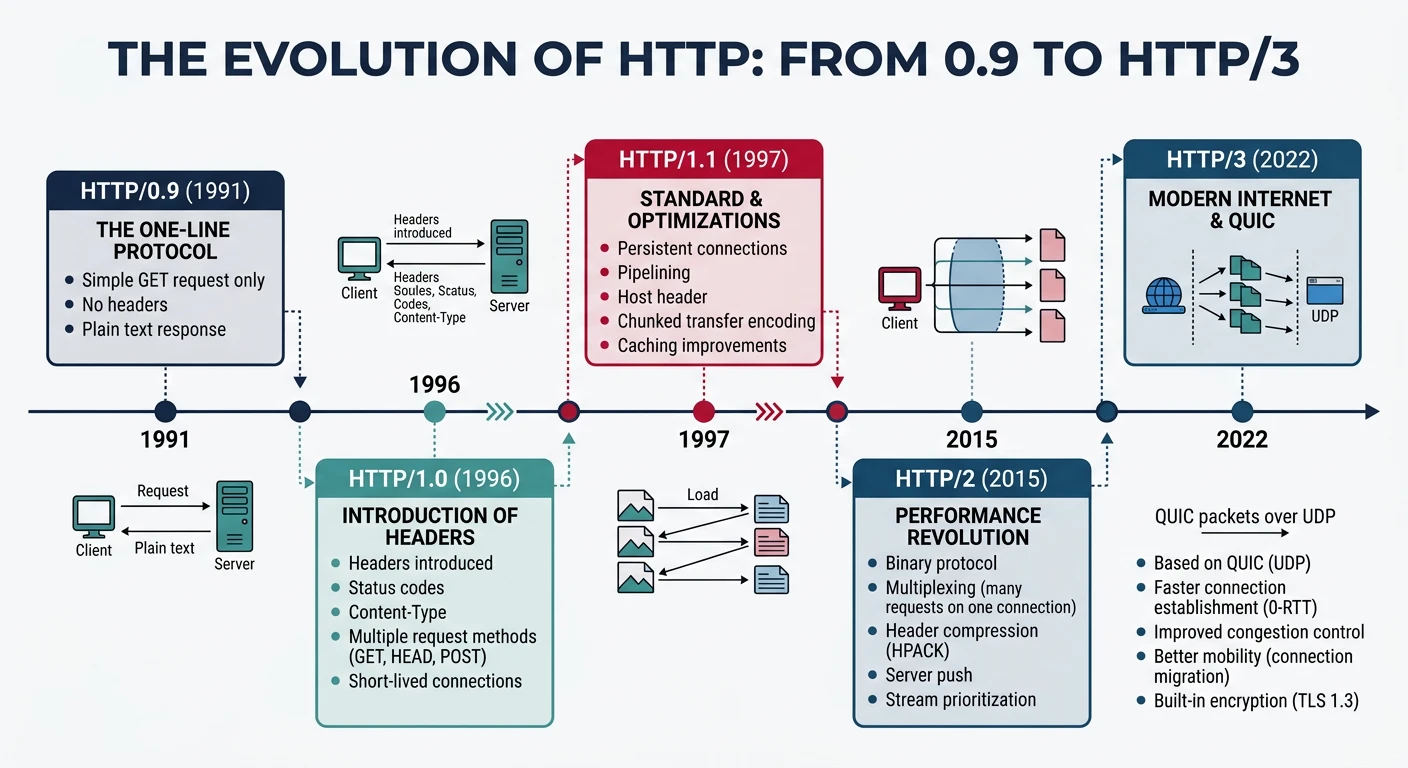
HTTP Version Timeline

Evolution
HTTP Version History:

1991 - HTTP/0.9  "The One-Line Protocol"
       └── GET only, no headers, HTML only
       
1996 - HTTP/1.0  RFC 1945
       └── Headers, status codes, POST, HEAD
       └── One request per TCP connection
       
1997 - HTTP/1.1  RFC 2068 → RFC 7230-7235
       └── Keep-alive (connection reuse)
       └── Chunked transfer, Host header
       └── Caching, content negotiation
       └── Still the most common version!
       
2015 - HTTP/2    RFC 7540
       └── Binary protocol (not text)
       └── Multiplexing (parallel requests)
       └── Header compression (HPACK)
       └── Server push
       
2022 - HTTP/3    RFC 9114
       └── Runs over QUIC (not TCP!)
       └── Built-in encryption
       └── Faster connection establishment
       └── Better mobile performance

HTTP Basics: Request-Response Model

Fundamentals

How HTTP Works

HTTP Request-Response Cycle:

┌──────────────┐                    ┌──────────────┐
│    Client    │                    │    Server    │
│   (Browser)  │                    │  (Web App)   │
└──────┬───────┘                    └──────┬───────┘
       │                                   │
       │  1. HTTP Request                  │
       │  GET /index.html HTTP/1.1         │
       │  Host: example.com                │
       │ ─────────────────────────────────>│
       │                                   │
       │  2. Server Processing             │
       │                           ┌───────┴───────┐
       │                           │ Read file,    │
       │                           │ run code,     │
       │                           │ query DB...   │
       │                           └───────┬───────┘
       │                                   │
       │  3. HTTP Response                 │
       │  HTTP/1.1 200 OK                  │
       │  Content-Type: text/html          │
       │  ...                 │
       │ <─────────────────────────────────│
       │                                   │

HTTP is:
• Stateless: Each request is independent
• Text-based: (HTTP/1.x) Human-readable headers
• Client-initiated: Server can't push without request (until HTTP/2)
• Layered: HTTP → TLS → TCP → IP → Network

HTTP/1.1 In Depth

Request Format

HTTP/1.1 Request Structure

# HTTP Request Structure

POST /api/users HTTP/1.1              ← Request Line (Method URI Version)
Host: api.example.com                 ← Required in HTTP/1.1
Content-Type: application/json        ← Headers
Content-Length: 45
Authorization: Bearer eyJhbGc...
User-Agent: Mozilla/5.0
Accept: application/json
Accept-Encoding: gzip, deflate, br
Connection: keep-alive
                                      ← Empty line (CRLF)
{"name": "Alice", "email": "a@b.com"} ← Body (optional)


# HTTP Response Structure

HTTP/1.1 201 Created                  ← Status Line (Version Code Reason)
Content-Type: application/json        ← Headers
Content-Length: 67
Date: Mon, 31 Jan 2026 12:00:00 GMT
Server: nginx/1.24.0
Cache-Control: no-cache
Set-Cookie: session=abc123; HttpOnly
                                      ← Empty line
{"id": 123, "name": "Alice", ...}     ← Body

HTTP Methods (Verbs)

Methods

HTTP Request Methods

Method Purpose Safe Idempotent Body
GET Retrieve resource
HEAD GET without body (check headers)
POST Create resource / submit data
PUT Replace entire resource
PATCH Partial update
DELETE Remove resource Optional
OPTIONS Get allowed methods (CORS preflight)

Safe: Doesn't modify server state (read-only)
Idempotent: Same result regardless of how many times called

Important HTTP Headers

Headers

Common HTTP Headers Reference

# Request Headers (Client → Server)

Host: example.com                    # Required: Target server
User-Agent: Mozilla/5.0...           # Client identification
Accept: text/html, application/json  # Acceptable response types
Accept-Language: en-US,en;q=0.9      # Preferred languages
Accept-Encoding: gzip, deflate, br   # Supported compression
Authorization: Bearer <token>        # Authentication credentials
Cookie: session=abc123               # Stored cookies
Content-Type: application/json       # Request body format
Content-Length: 1234                 # Body size in bytes
Origin: https://app.example.com      # CORS: request origin
Referer: https://example.com/page    # Previous page URL
If-None-Match: "abc123"              # Conditional: ETag check
If-Modified-Since: Wed, 21 Oct...    # Conditional: freshness check

# Response Headers (Server → Client)

Content-Type: text/html; charset=utf-8    # Response body type
Content-Length: 5678                      # Response body size
Content-Encoding: gzip                    # Applied compression
Date: Mon, 31 Jan 2026 12:00:00 GMT       # Response timestamp
Server: nginx/1.24.0                      # Server software
Set-Cookie: session=xyz; HttpOnly; Secure # Set cookie
Cache-Control: max-age=3600, public       # Caching directives
ETag: "abc123"                            # Resource version tag
Last-Modified: Wed, 21 Oct 2025...        # Last change time
Location: /new-url                        # Redirect target
Access-Control-Allow-Origin: *            # CORS permissions
Strict-Transport-Security: max-age=...    # HSTS
X-Content-Type-Options: nosniff           # Security header
X-Frame-Options: DENY                     # Clickjacking protection

HTTP Status Codes

Status Codes

Status Code Categories

HTTP Status Codes:

1xx Informational (rare in practice)
├── 100 Continue          # Keep sending request body
├── 101 Switching Protocols # WebSocket upgrade
└── 103 Early Hints       # Preload resources (HTTP/2+)

2xx Success
├── 200 OK                # Standard success
├── 201 Created           # Resource created (POST)
├── 204 No Content        # Success, no body (DELETE)
└── 206 Partial Content   # Range request (video streaming)

3xx Redirection
├── 301 Moved Permanently # URL changed forever (SEO)
├── 302 Found             # Temporary redirect (legacy)
├── 304 Not Modified      # Use cached version
├── 307 Temporary Redirect # Keep method (POST stays POST)
└── 308 Permanent Redirect # Keep method, permanent

4xx Client Error
├── 400 Bad Request       # Malformed request
├── 401 Unauthorized      # Auth required (login)
├── 403 Forbidden         # No permission (logged in but denied)
├── 404 Not Found         # Resource doesn't exist
├── 405 Method Not Allowed # GET instead of POST, etc.
├── 408 Request Timeout   # Client too slow
├── 409 Conflict          # State conflict (duplicate)
├── 413 Payload Too Large # Body exceeds limit
├── 415 Unsupported Media Type # Wrong Content-Type
├── 422 Unprocessable Entity # Validation error (WebDAV but common)
├── 429 Too Many Requests # Rate limited
└── 451 Unavailable For Legal # Censorship/legal

5xx Server Error
├── 500 Internal Server Error # Generic server crash
├── 501 Not Implemented   # Feature not available
├── 502 Bad Gateway       # Upstream server error
├── 503 Service Unavailable # Maintenance/overload
└── 504 Gateway Timeout   # Upstream timeout

HTTP Caching

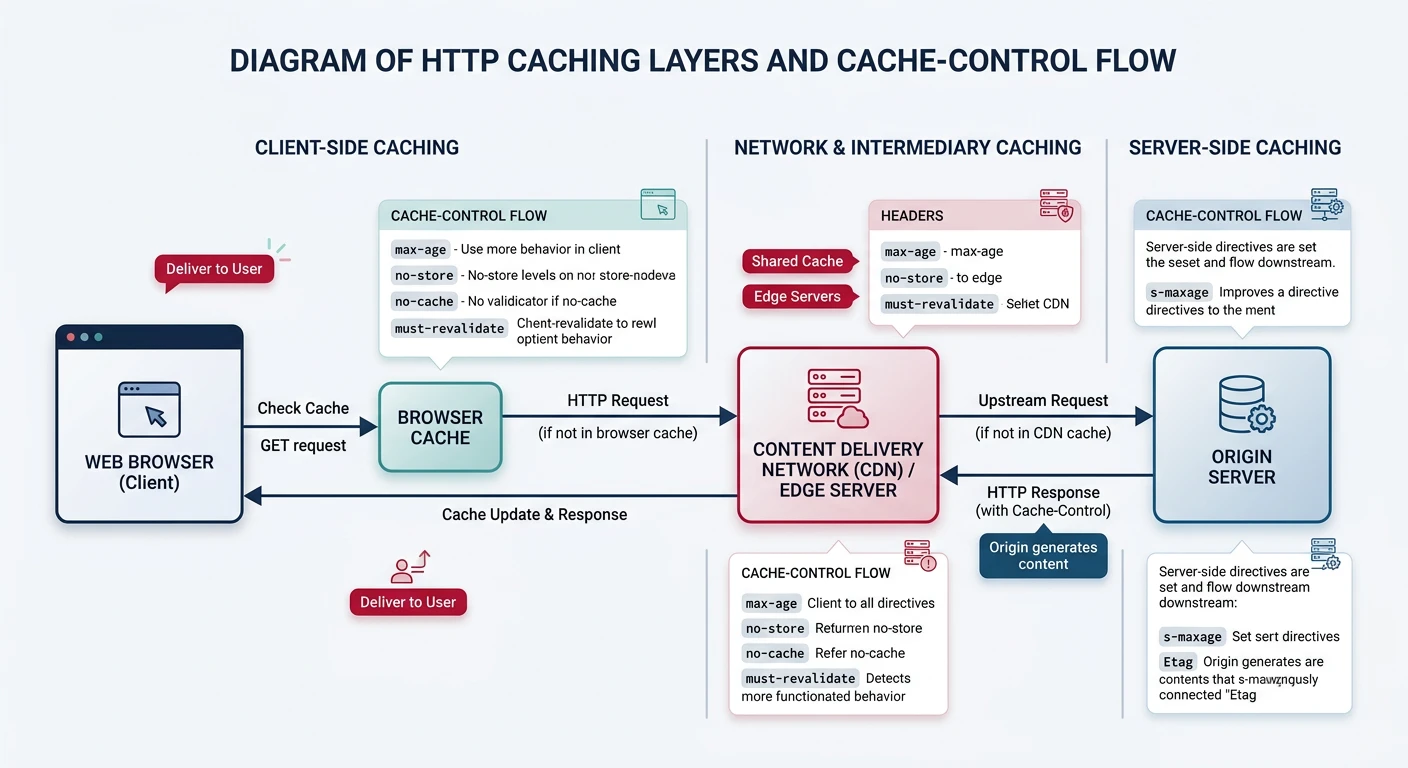
Caching is crucial for web performance. Properly configured caching can reduce server load by 90% and dramatically improve page load times.

Cache-Control

Cache-Control Directives

Cache-Control Header Directives:

# Cacheability
public           # Any cache can store (CDN, browser)
private          # Only browser cache (user-specific data)
no-cache         # Must revalidate before using cached copy
no-store         # Don't cache at all (sensitive data)

# Expiration
max-age=3600     # Fresh for 3600 seconds (1 hour)
s-maxage=86400   # Shared cache (CDN) max age
max-stale=600    # Accept stale responses up to 600s
min-fresh=60     # Response must be fresh for at least 60s

# Revalidation
must-revalidate  # Must check origin when stale
proxy-revalidate # Shared caches must revalidate
immutable        # Resource will never change (versioned URLs)

# Examples for different content types:

# Static assets (versioned filename: app.a1b2c3.js)
Cache-Control: public, max-age=31536000, immutable

# HTML pages (always revalidate)
Cache-Control: no-cache

# API responses (private, short cache)
Cache-Control: private, max-age=60

# Sensitive data (no caching)
Cache-Control: no-store

# CDN edge caching
Cache-Control: public, max-age=3600, s-maxage=86400

ETags and Conditional Requests

Validation

Cache Validation Flow

ETag-based Validation:

Initial Request:
Client → GET /data.json
Server → 200 OK
         ETag: "abc123"
         Cache-Control: max-age=60
         [data]
         
After 60 seconds (stale):
Client → GET /data.json
         If-None-Match: "abc123"

If unchanged:
Server → 304 Not Modified
         (No body - use cached version)

If changed:
Server → 200 OK
         ETag: "def456"
         [new data]


Last-Modified Validation:

Initial Request:
Server → Last-Modified: Wed, 21 Oct 2025 07:28:00 GMT

Subsequent Request:
Client → If-Modified-Since: Wed, 21 Oct 2025 07:28:00 GMT

Server → 304 Not Modified  OR  200 OK with new content

Best Practice:
- Use ETags for dynamic content (hashed content)
- Use Last-Modified for static files
- Combine both for maximum compatibility
# HTTP caching demonstration
import hashlib
from datetime import datetime, timedelta

def generate_etag(content: bytes) -> str:
    """Generate ETag from content hash"""
    return f'"{hashlib.md5(content).hexdigest()}"'

def check_conditional_request(request_etag, current_etag):
    """Check if cached version is still valid"""
    if request_etag == current_etag:
        return {"status": 304, "body": None, "message": "Not Modified"}
    return {"status": 200, "body": "new content", "message": "OK"}

# Simulate caching
content = b"Hello, World!"
etag = generate_etag(content)

print("HTTP Caching Simulation")
print("=" * 50)
print(f"Content: {content.decode()}")
print(f"Generated ETag: {etag}")
print()

# Simulate conditional request (content unchanged)
result = check_conditional_request(etag, etag)
print(f"Request with matching ETag:")
print(f"  Status: {result['status']} {result['message']}")
print(f"  Body: {result['body'] or '(use cached)'}")
print()

# Simulate content change
new_content = b"Hello, Updated World!"
new_etag = generate_etag(new_content)

result = check_conditional_request(etag, new_etag)
print(f"Request after content change:")
print(f"  Status: {result['status']} {result['message']}")
print(f"  New ETag: {new_etag}")

HTTP/2: Multiplexing Revolution

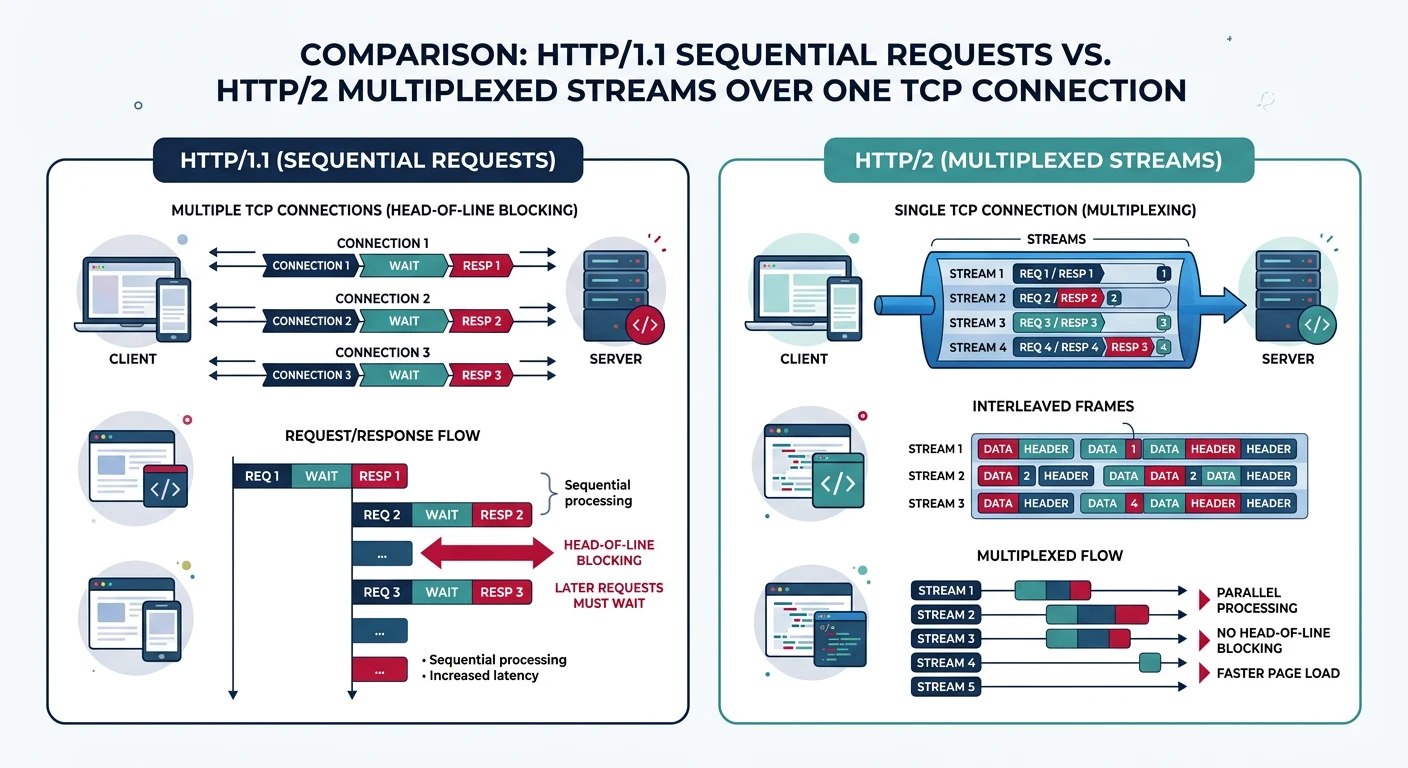
HTTP/2 (2015) addressed the performance limitations of HTTP/1.1 while maintaining backward compatibility. The key innovation: multiplexing multiple requests over a single TCP connection.

HTTP/1.1 vs HTTP/2

Connection Comparison

HTTP/1.1 - Head-of-Line Blocking:

┌─────────────────────────────────────────────────────────────┐
│ TCP Connection 1:  [──────Req1──────][──────Resp1──────]    │
│                                      [───Req2───][─Resp2─]  │
│                                                             │
│ TCP Connection 2:  [───Req3───][─Resp3─]                    │
│                                 [───Req4───][─Resp4─]       │
│                                                             │
│ TCP Connection 3:  [───Req5───][─Resp5─]                    │
│                                                             │
│ Problem: 6 connections max per domain, one request at a time│
│          Large response blocks everything behind it         │
└─────────────────────────────────────────────────────────────┘


HTTP/2 - Multiplexed Streams:

┌─────────────────────────────────────────────────────────────┐
│                                                             │
│ Single TCP Connection:                                      │
│                                                             │
│ Stream 1: ■■■───────────■■■■■■■■■■■■■■■──────────           │
│ Stream 3: ──■■■■■■──────■■■■────────────────────────        │
│ Stream 5: ────────■■■■■■───────■■■■■■■■■■───────────        │
│ Stream 7: ──────────────────■■■■■■■────────────────         │
│ Stream 9: ─────────────■■■■■────────■■■■■■■■■──────         │
│                                                             │
│ Benefits:                                                   │
│ • Single connection (reduced TCP overhead)                  │
│ • Parallel requests/responses interleaved                   │
│ • Priority-based scheduling                                 │
│ • Header compression (HPACK)                                │
└─────────────────────────────────────────────────────────────┘

HTTP/2 Key Features

Features

HTTP/2 Feature Set

HTTP/2 Features:

1. Binary Framing Layer
   HTTP/1.1: GET /index.html HTTP/1.1\r\nHost: example.com\r\n
   HTTP/2:   [Frame Type][Length][Flags][Stream ID][Payload]
   
   Frame Types:
   - DATA (body content)
   - HEADERS (compressed headers)
   - PRIORITY (stream priority)
   - RST_STREAM (cancel stream)
   - SETTINGS (connection config)
   - PUSH_PROMISE (server push)
   - PING (connection health)
   - GOAWAY (graceful shutdown)
   - WINDOW_UPDATE (flow control)

2. HPACK Header Compression
   HTTP/1.1: Headers repeated on every request (~800 bytes)
   HTTP/2:   Static + dynamic table, Huffman encoding
   
   Example savings:
   First request:  ":method: GET" → full encoding
   Second request: Index reference → 1 byte!
   
   Typical compression: 85-95% reduction

3. Stream Priorities
   Client can specify:
   - Weight (1-256)
   - Dependencies (parent streams)
   
   Browser priority example:
   - HTML: Highest
   - CSS: High
   - JS: Medium
   - Images: Low

4. Server Push (use carefully)
   Client requests index.html
   Server pushes style.css and app.js proactively
   
   Caveat: Often inefficient (client may have cached)
   Modern alternative: 103 Early Hints
# Check HTTP/2 support with curl
curl -I --http2 https://www.google.com

# Verbose HTTP/2 details
curl -v --http2 https://www.google.com 2>&1 | grep -E "(HTTP/|ALPN|h2)"

# Check HPACK compression (with nghttp2)
nghttp -nv https://www.google.com 2>&1 | head -50

# List HTTP/2 frames
curl --http2 -v https://example.com 2>&1 | grep -E "^[*<>]"

# OpenSSL: Check ALPN negotiation
openssl s_client -connect www.google.com:443 -alpn h2 2>/dev/null | \
    grep -E "(ALPN|Protocol)"
HTTP/2 Limitations: Despite multiplexing, HTTP/2 still suffers from TCP head-of-line blocking. If a packet is lost, all streams are blocked until TCP retransmits. This is why HTTP/3 moved to QUIC.

HTTP/3 and QUIC

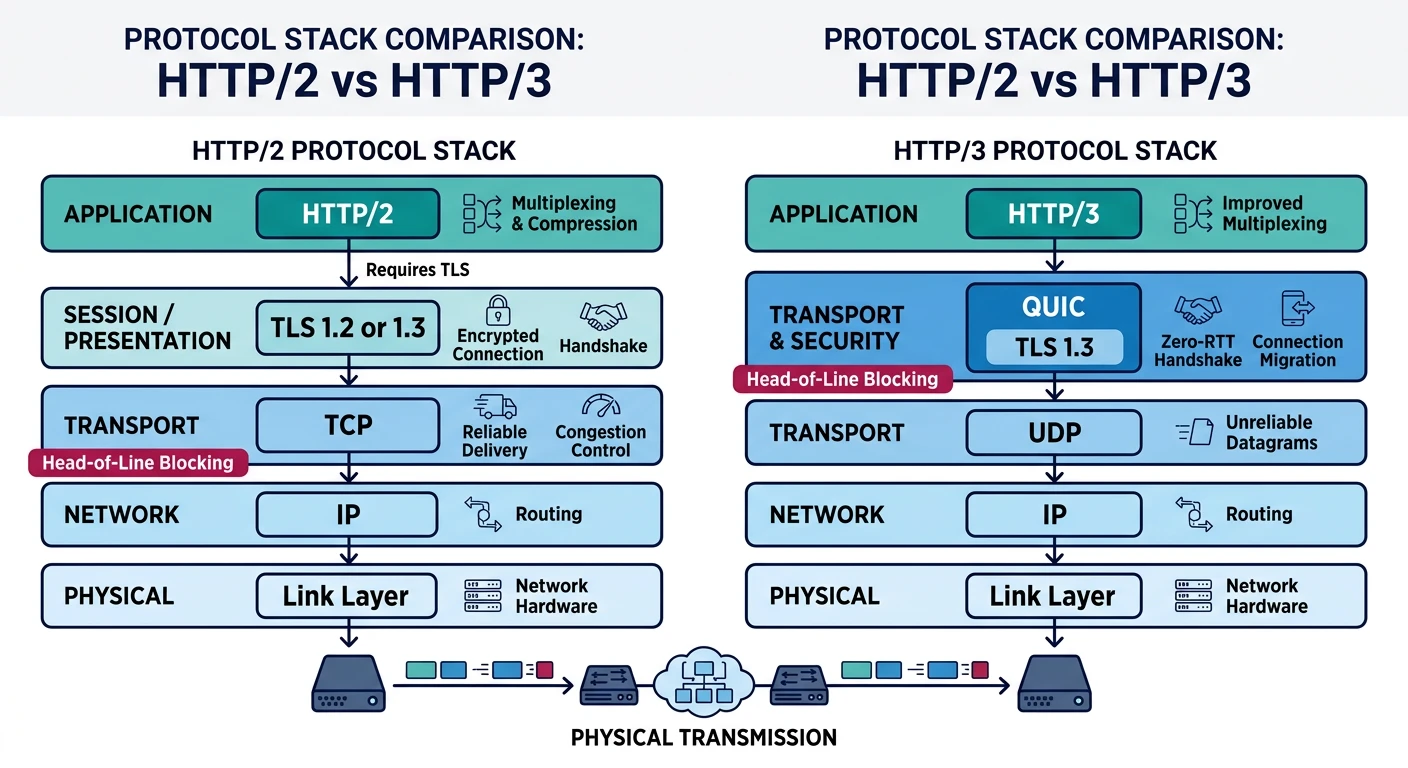
HTTP/3 (2022) represents a fundamental shift: it runs over QUIC instead of TCP. This solves HTTP/2's remaining performance issues and enables new optimizations.

QUIC

QUIC Protocol Overview

HTTP/3 Stack Comparison:

HTTP/1.1 & HTTP/2:        HTTP/3:
┌───────────────┐         ┌───────────────┐
│    HTTP/x     │         │    HTTP/3     │
├───────────────┤         ├───────────────┤
│    TLS 1.x    │         │     QUIC      │ ← Includes TLS 1.3
├───────────────┤         │   (streams,   │
│      TCP      │         │  congestion,  │
├───────────────┤         │  reliability) │
│      IP       │         ├───────────────┤
└───────────────┘         │      UDP      │
                          ├───────────────┤
                          │      IP       │
                          └───────────────┘

QUIC Benefits:
• 0-RTT connection establishment (repeat connections)
• Independent stream loss recovery (no HOL blocking)
• Connection migration (WiFi → cellular seamlessly)
• Built-in encryption (TLS 1.3 mandatory)
• Userspace implementation (faster iteration)

HTTP/3 Performance Benefits

Benefits

Why HTTP/3 is Faster

Connection Establishment:

TCP + TLS 1.3 (HTTP/2):
Round 1: TCP SYN → SYN-ACK → ACK
Round 2: TLS ClientHello → ServerHello
Round 3: TLS Finished
Total: 2-3 RTT before first data

QUIC (HTTP/3) First Connection:
Round 1: QUIC Initial (includes TLS) → Response
Total: 1 RTT

QUIC Resumed Connection (0-RTT):
Round 0: QUIC 0-RTT + Application Data
Total: 0 RTT! (data sent immediately)


Head-of-Line Blocking Solved:

HTTP/2 over TCP:
┌─────────────────────────────────────────────────────┐
│ Stream 1: ■■■■■[PACKET LOST]─────────blocked──────  │
│ Stream 3: ■■■■■─────────────blocked───────────────  │
│ Stream 5: ■■■■■─────────────blocked───────────────  │
│                          │                          │
│            All streams wait for TCP retransmit      │
└─────────────────────────────────────────────────────┘

HTTP/3 over QUIC:
┌─────────────────────────────────────────────────────┐
│ Stream 1: ■■■■■[LOST]──────■■■■ (retransmit)        │
│ Stream 3: ■■■■■■■■■■■■■■■■ (unaffected)             │
│ Stream 5: ■■■■■■■■■■■■■■■■ (unaffected)             │
│                                                     │
│            Only affected stream is blocked          │
└─────────────────────────────────────────────────────┘


Connection Migration:

TCP: IP address change = connection reset
QUIC: Connection ID survives network changes

Example: User walks from WiFi to cellular
- TCP: All connections dropped, re-establish
- QUIC: Seamless migration, no interruption
# Check HTTP/3 support
curl --http3 -I https://www.google.com 2>/dev/null
# Note: Requires curl 7.66+ compiled with HTTP/3 support

# Check via browser DevTools:
# Network tab → Protocol column shows "h3"

# Alternative: Use online tools
# https://http3check.net/
# https://www.cloudflare.com/learning/performance/what-is-http3/

# Wireshark: Filter QUIC traffic
# Filter: quic

# Check QUIC with quiche-client (Cloudflare)
# https://github.com/cloudflare/quiche
./quiche-client https://cloudflare-quic.com
HTTP/3 Adoption (2024): ~30% of top websites support HTTP/3. Major adopters include Google, Facebook, Cloudflare, and Fastly. Browser support is universal in Chrome, Firefox, Safari, and Edge.

WebSockets: Bidirectional Communication

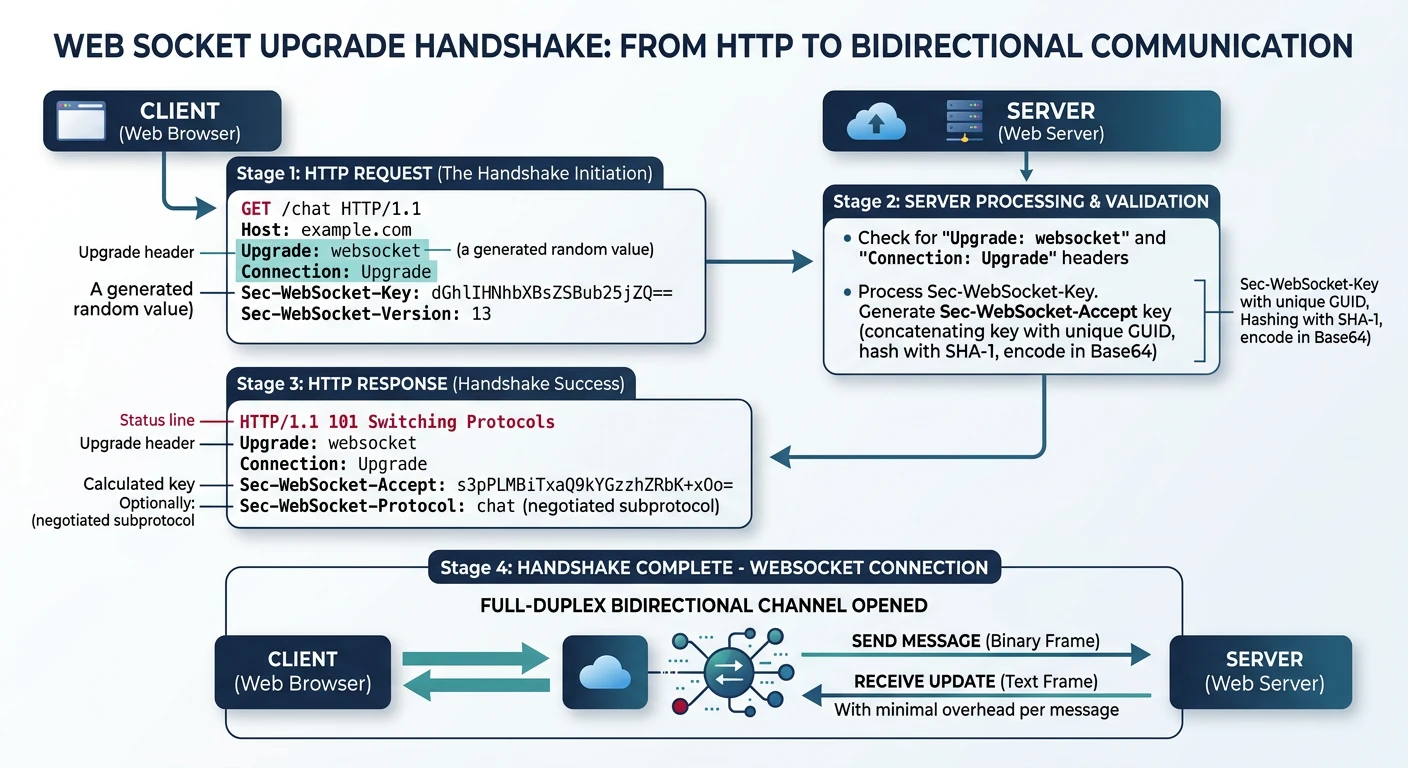
WebSockets provide full-duplex communication over a single TCP connection. Unlike HTTP's request-response model, either side can send messages at any time.

Handshake

WebSocket Upgrade Handshake

WebSocket Connection Establishment:

1. Client initiates HTTP upgrade request:
GET /chat HTTP/1.1
Host: server.example.com
Upgrade: websocket
Connection: Upgrade
Sec-WebSocket-Key: dGhlIHNhbXBsZSBub25jZQ==
Sec-WebSocket-Version: 13
Origin: http://example.com

2. Server accepts upgrade:
HTTP/1.1 101 Switching Protocols
Upgrade: websocket
Connection: Upgrade
Sec-WebSocket-Accept: s3pPLMBiTxaQ9kYGzzhZRbK+xOo=

3. Connection switches from HTTP to WebSocket protocol
   ════════════════════════════════════════════════
   Full-duplex binary/text messages in both directions
   No HTTP overhead per message
   Connection stays open indefinitely

Key Generation:
Sec-WebSocket-Accept = Base64(SHA1(
    Sec-WebSocket-Key + "258EAFA5-E914-47DA-95CA-C5AB0DC85B11"
))

WebSocket Frame Format

Frames

WebSocket Data Frames

WebSocket Frame Structure:

 0                   1                   2                   3
 0 1 2 3 4 5 6 7 8 9 0 1 2 3 4 5 6 7 8 9 0 1 2 3 4 5 6 7 8 9 0 1
+-+-+-+-+-------+-+-------------+-------------------------------+
|F|R|R|R| opcode|M| Payload len |    Extended payload length    |
|I|S|S|S|  (4)  |A|     (7)     |             (16/64)           |
|N|V|V|V|       |S|             |   (if payload len==126/127)   |
| |1|2|3|       |K|             |                               |
+-+-+-+-+-------+-+-------------+ - - - - - - - - - - - - - - - +
|     Extended payload length continued, if payload len == 127  |
+ - - - - - - - - - - - - - - - +-------------------------------+
|                               |Masking-key, if MASK set to 1  |
+-------------------------------+-------------------------------+
| Masking-key (continued)       |          Payload Data         |
+-------------------------------- - - - - - - - - - - - - - - - +
:                     Payload Data continued ...                :
+---------------------------------------------------------------+

Opcodes:
0x0 = Continuation frame
0x1 = Text frame (UTF-8)
0x2 = Binary frame
0x8 = Connection close
0x9 = Ping
0xA = Pong

Client → Server: MUST be masked (security)
Server → Client: MUST NOT be masked
# WebSocket client example
import asyncio
import websockets
import json

async def websocket_demo():
    """Demonstrate WebSocket communication"""
    
    print("WebSocket Client Demo")
    print("=" * 50)
    print("Note: This requires a WebSocket server to connect to")
    print()
    
    # Example: Connect to echo server
    uri = "wss://echo.websocket.events"
    
    try:
        async with websockets.connect(uri) as websocket:
            print(f"Connected to {uri}")
            
            # Send a message
            message = json.dumps({"type": "greeting", "text": "Hello, WebSocket!"})
            await websocket.send(message)
            print(f"Sent: {message}")
            
            # Receive response
            response = await websocket.recv()
            print(f"Received: {response}")
            
            # Send another message
            await websocket.send("Ping!")
            response = await websocket.recv()
            print(f"Echo: {response}")
            
    except Exception as e:
        print(f"Connection error: {e}")
        print("\nSimulated WebSocket communication:")
        print("  → Sent: {'type': 'greeting', 'text': 'Hello!'}")
        print("  ← Received: {'type': 'greeting', 'text': 'Hello!'}")

# Run the demo
print("To run: asyncio.run(websocket_demo())")
print("Requires: pip install websockets")
print()

# Simple synchronous demonstration of the concept
print("WebSocket Use Cases:")
print("  • Real-time chat applications")
print("  • Live notifications")
print("  • Collaborative editing (Google Docs)")
print("  • Live sports scores")
print("  • Stock tickers")
print("  • Multiplayer games")
print("  • Live dashboards")
// Browser WebSocket client example
const ws = new WebSocket('wss://echo.websocket.events');

ws.onopen = function() {
    console.log('Connected!');
    ws.send(JSON.stringify({ message: 'Hello!' }));
};

ws.onmessage = function(event) {
    console.log('Received:', event.data);
};

ws.onerror = function(error) {
    console.error('WebSocket error:', error);
};

ws.onclose = function(event) {
    console.log('Disconnected:', event.code, event.reason);
};

// Send message
ws.send('Hello, server!');

// Close connection gracefully
ws.close(1000, 'Normal closure');

Server-Sent Events (SSE)

SSE provides a simpler alternative to WebSockets for server-to-client streaming. It uses standard HTTP, works through proxies, and auto-reconnects.

SSE vs WebSocket

Comparison: SSE vs WebSocket

Feature Server-Sent Events WebSockets
Direction Server → Client only Bidirectional
Protocol HTTP WS/WSS
Reconnection Automatic Manual
Data Format Text only Text + Binary
Browser Support All modern (not IE) All modern
Use Case Notifications, feeds Chat, games, real-time
# SSE Server Response Format

HTTP/1.1 200 OK
Content-Type: text/event-stream
Cache-Control: no-cache
Connection: keep-alive

data: First message

data: Message with
data: multiple lines

event: userLogin
data: {"userId": 123, "name": "Alice"}

id: 42
event: notification
data: You have a new message!
retry: 5000

# Event format:
# event:   (optional, default is "message")
# id:        (optional, for reconnection)
# data:       (required, can be multi-line)
# retry:           (optional, reconnect interval)
# (blank line ends each event)
// Browser SSE client
const eventSource = new EventSource('/api/events');

// Handle default message events
eventSource.onmessage = function(event) {
    console.log('Message:', event.data);
};

// Handle named events
eventSource.addEventListener('userLogin', function(event) {
    const user = JSON.parse(event.data);
    console.log('User logged in:', user.name);
});

eventSource.addEventListener('notification', function(event) {
    showNotification(event.data);
});

// Handle connection events
eventSource.onopen = function() {
    console.log('SSE Connected');
};

eventSource.onerror = function(error) {
    console.error('SSE Error:', error);
    // Browser will auto-reconnect
};

// Close connection
eventSource.close();

Web Performance Optimization

Optimization

HTTP Performance Best Practices

Performance Optimization Checklist:

1. ENABLE HTTP/2 OR HTTP/3
   ✓ Single connection, multiplexing
   ✓ Header compression
   ✓ Most servers support it now
   
2. OPTIMIZE CACHING
   # Static assets (versioned)
   Cache-Control: public, max-age=31536000, immutable
   
   # HTML (revalidate)
   Cache-Control: no-cache
   ETag: "abc123"
   
   # API (short cache)
   Cache-Control: private, max-age=60, stale-while-revalidate=300

3. COMPRESS RESPONSES
   # Enable Brotli (br) with gzip fallback
   Content-Encoding: br
   
   # Compress: HTML, CSS, JS, JSON, SVG, fonts
   # Don't compress: Images, videos (already compressed)

4. MINIMIZE REQUESTS
   ✓ Bundle CSS/JS (but not excessively with HTTP/2)
   ✓ Inline critical CSS
   ✓ Use CSS sprites or icon fonts
   ✓ Lazy load images below fold

5. OPTIMIZE IMAGES
   ✓ Modern formats: WebP, AVIF
   ✓ Responsive images: srcset
   ✓ Lazy loading: loading="lazy"
   ✓ Proper dimensions (avoid layout shift)

6. PRELOAD CRITICAL RESOURCES
   <link rel="preload" href="font.woff2" as="font" crossorigin>
   <link rel="preconnect" href="https://api.example.com">
   <link rel="dns-prefetch" href="https://cdn.example.com">

7. USE CDN
   ✓ Geographic distribution
   ✓ Edge caching
   ✓ DDoS protection
   ✓ HTTP/3 support
Core Web Vitals: Google measures LCP (Largest Contentful Paint), FID (First Input Delay), and CLS (Cumulative Layout Shift). These metrics impact SEO rankings. Target: LCP < 2.5s, FID < 100ms, CLS < 0.1.

Hands-On Exercises

# HTTP debugging with Python requests
import time

def analyze_http_response():
    """Analyze HTTP response characteristics"""
    
    print("HTTP Response Analysis")
    print("=" * 60)
    print("Note: Run with network access for full results")
    print()
    
    # Simulated analysis (would use requests library with network)
    analysis = {
        "url": "https://www.google.com",
        "status_code": 200,
        "protocol": "HTTP/2",
        "headers": {
            "Content-Type": "text/html; charset=UTF-8",
            "Content-Encoding": "gzip",
            "Cache-Control": "private, max-age=0",
            "Server": "gws",
            "Alt-Svc": 'h3=":443"; ma=2592000'
        },
        "timing": {
            "dns_lookup": 15,
            "tcp_connect": 25,
            "tls_handshake": 45,
            "first_byte": 85,
            "total": 150
        }
    }
    
    print(f"URL: {analysis['url']}")
    print(f"Status: {analysis['status_code']}")
    print(f"Protocol: {analysis['protocol']}")
    print()
    print("Key Headers:")
    for header, value in analysis['headers'].items():
        print(f"  {header}: {value}")
    print()
    print("Timing (ms):")
    for phase, ms in analysis['timing'].items():
        print(f"  {phase.replace('_', ' ').title()}: {ms}ms")
    print()
    print("Analysis:")
    
    # Check for HTTP/3 support
    if 'Alt-Svc' in analysis['headers'] and 'h3' in analysis['headers']['Alt-Svc']:
        print("  ✅ HTTP/3 supported (Alt-Svc header present)")
    
    # Check compression
    if analysis['headers'].get('Content-Encoding') == 'gzip':
        print("  ✅ Response is gzip compressed")
    elif analysis['headers'].get('Content-Encoding') == 'br':
        print("  ✅ Response is Brotli compressed")
    
    # Check caching
    cache = analysis['headers'].get('Cache-Control', '')
    if 'no-store' in cache:
        print("  ⚠️ No caching (no-store)")
    elif 'max-age=0' in cache:
        print("  ⚠️ Requires revalidation (max-age=0)")
    elif 'max-age' in cache:
        print("  ✅ Cacheable response")

analyze_http_response()
Self-Assessment

Quiz: Test Your Knowledge

  1. Which HTTP method is idempotent but not safe? (PUT, DELETE)
  2. What status code means "Use cached version"? (304 Not Modified)
  3. How many RTTs does HTTP/2 over TCP+TLS need? (2-3 RTT)
  4. What transport does HTTP/3 use? (QUIC over UDP)
  5. What header enables HTTP/3 discovery? (Alt-Svc)
  6. What's the HTTP upgrade for WebSockets? (101 Switching Protocols)
  7. When should you use SSE over WebSocket? (Server→client only, simpler)
  8. What Cache-Control value allows CDN but not browser caching? (s-maxage)

Summary & Next Steps

Key Takeaways:
  • HTTP/1.1 is text-based, simple, but suffers from head-of-line blocking
  • HTTP/2 adds multiplexing, header compression, and server push
  • HTTP/3 runs over QUIC for faster connections and better mobile performance
  • Caching (Cache-Control, ETags) dramatically improves performance
  • WebSockets enable bidirectional real-time communication
  • SSE is simpler for server-to-client streaming
Version Guide

Quick Reference: Which HTTP Version?

  • HTTP/1.1: Legacy systems, simple requirements
  • HTTP/2: Most web traffic today, good default
  • HTTP/3: Mobile apps, high-latency networks, bleeding edge
  • WebSockets: Real-time bidirectional (chat, games)
  • SSE: Server-to-client streaming (notifications, feeds)

Next in the Series

In Part 7: API Protocols, we'll explore REST, GraphQL, gRPC, and SOAP. Learn how to design, consume, and secure modern APIs for web and mobile applications.