Every time you see the padlock in your browser, TLS is at work. It's the foundation of web security—encrypting data, verifying server identity, and ensuring integrity of communication.
Series Context: This is Part 17 of 20 in the Complete Protocols Master series. TLS operates at the Presentation/Session layers, securing Application Layer protocols like HTTP, SMTP, and IMAP.
TLS Security Properties:

1. CONFIDENTIALITY
   • Data encrypted in transit
   • Only sender/receiver can read
   • Symmetric encryption (AES, ChaCha20)

2. INTEGRITY
   • Data not modified in transit
   • Detects tampering
   • MAC or AEAD

3. AUTHENTICATION
   • Server proves identity (always)
   • Client proves identity (optional)
   • X.509 certificates

What TLS Does NOT Provide:
• Privacy (metadata visible: IPs, timing)
• Protection at rest (only in-transit)
• Protection against compromised endpoints
History
SSL/TLS Evolution
Version
Year
Status
Notes
SSL 2.0
1995
❌ Insecure
Broken
SSL 3.0
1996
❌ Insecure
POODLE attack
TLS 1.0
1999
❌ Deprecated
BEAST vulnerable
TLS 1.1
2006
❌ Deprecated
Weak ciphers
TLS 1.2
2008
✅ Acceptable
Still widely used
TLS 1.3
2018
✅ Recommended
Modern, faster
TLS Protocol Deep-Dive
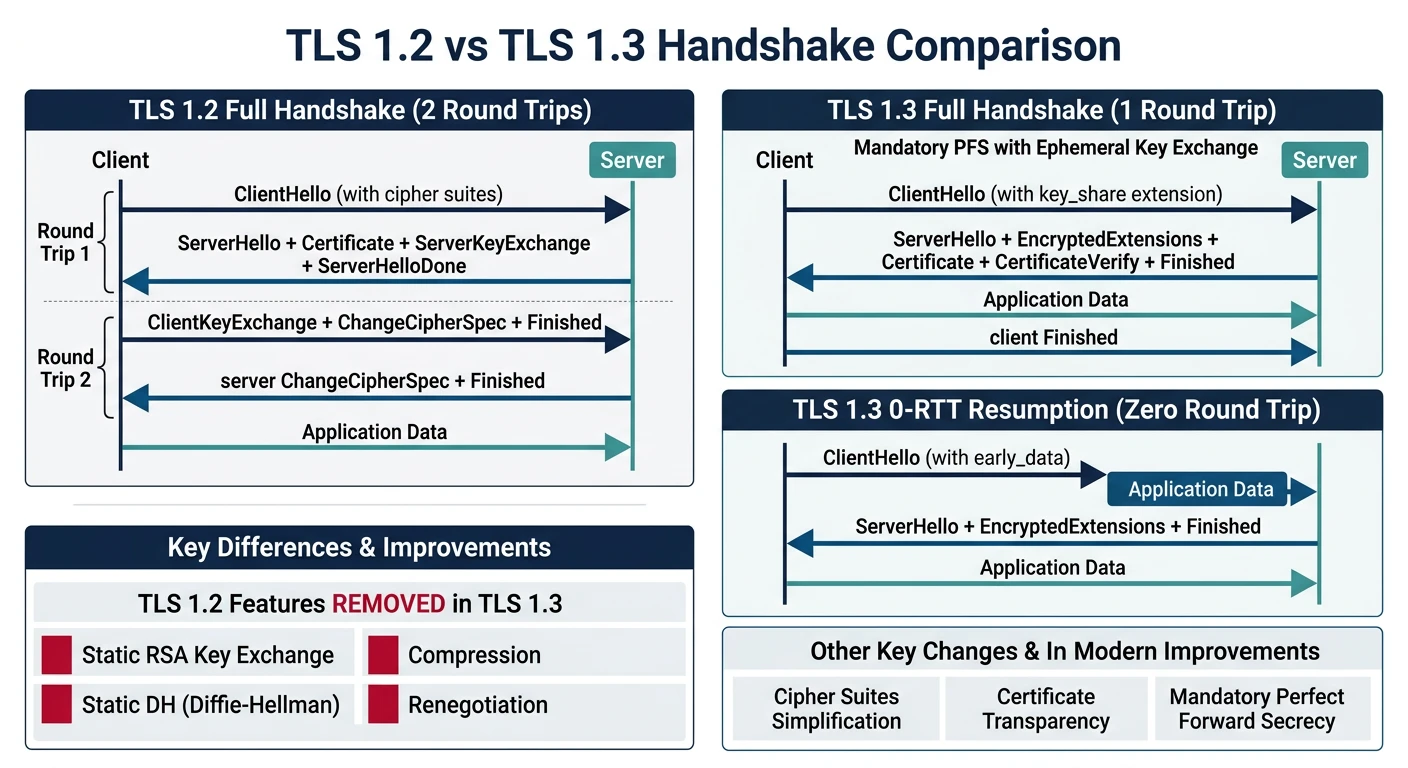
TLS 1.3 is a major improvement over 1.2—faster handshake (1-RTT), removed obsolete algorithms, and mandatory forward secrecy. Let's understand both.
TLS 1.2 (2-RTT) vs TLS 1.3 (1-RTT) handshake comparison — TLS 1.3 combines key exchange with the first message, halving connection setup time
# Inspect TLS connection with OpenSSL

# Connect and show certificate
openssl s_client -connect example.com:443 -showcerts

# Check TLS version and cipher
openssl s_client -connect example.com:443 2>/dev/null | \
  grep -E "Protocol|Cipher"
# Protocol  : TLSv1.3
# Cipher    : TLS_AES_256_GCM_SHA384

# Force specific TLS version
openssl s_client -connect example.com:443 -tls1_2
openssl s_client -connect example.com:443 -tls1_3

# Show certificate details
echo | openssl s_client -connect example.com:443 2>/dev/null | \
  openssl x509 -noout -text

# Check certificate expiration
echo | openssl s_client -connect example.com:443 2>/dev/null | \
  openssl x509 -noout -dates
# TLS connection inspection with Python

import ssl
import socket
from datetime import datetime

def inspect_tls(hostname, port=443):
    """Inspect TLS connection details"""

    context = ssl.create_default_context()

    with socket.create_connection((hostname, port)) as sock:
        with context.wrap_socket(sock, server_hostname=hostname) as tls_sock:

            print(f"TLS Connection to {hostname}")
            print("=" * 50)

            # Protocol version
            print(f"Protocol: {tls_sock.version()}")

            # Cipher suite
            cipher = tls_sock.cipher()
            print(f"Cipher: {cipher[0]}")
            print(f"Bits: {cipher[2]}")

            # Certificate
            cert = tls_sock.getpeercert()

            print(f"\nCertificate:")
            print(f"  Subject: {dict(x[0] for x in cert['subject'])}")
            print(f"  Issuer: {dict(x[0] for x in cert['issuer'])}")

            # Validity
            not_after = cert['notAfter']
            expiry = datetime.strptime(not_after, '%b %d %H:%M:%S %Y %Z')
            days_left = (expiry - datetime.now()).days
            print(f"  Expires: {not_after} ({days_left} days)")

            # SANs
            if 'subjectAltName' in cert:
                sans = [x[1] for x in cert['subjectAltName']]
                print(f"  SANs: {', '.join(sans[:3])}...")

# Example
# inspect_tls('google.com')

print("""
TLS 1.3 Improvements:
• 1-RTT handshake (was 2-RTT)
• 0-RTT resumption (with replay risk)
• Forward secrecy mandatory
• Removed RSA key exchange
• Removed weak ciphers (RC4, 3DES)
• Simplified cipher suite naming
""")
X.509 Certificates
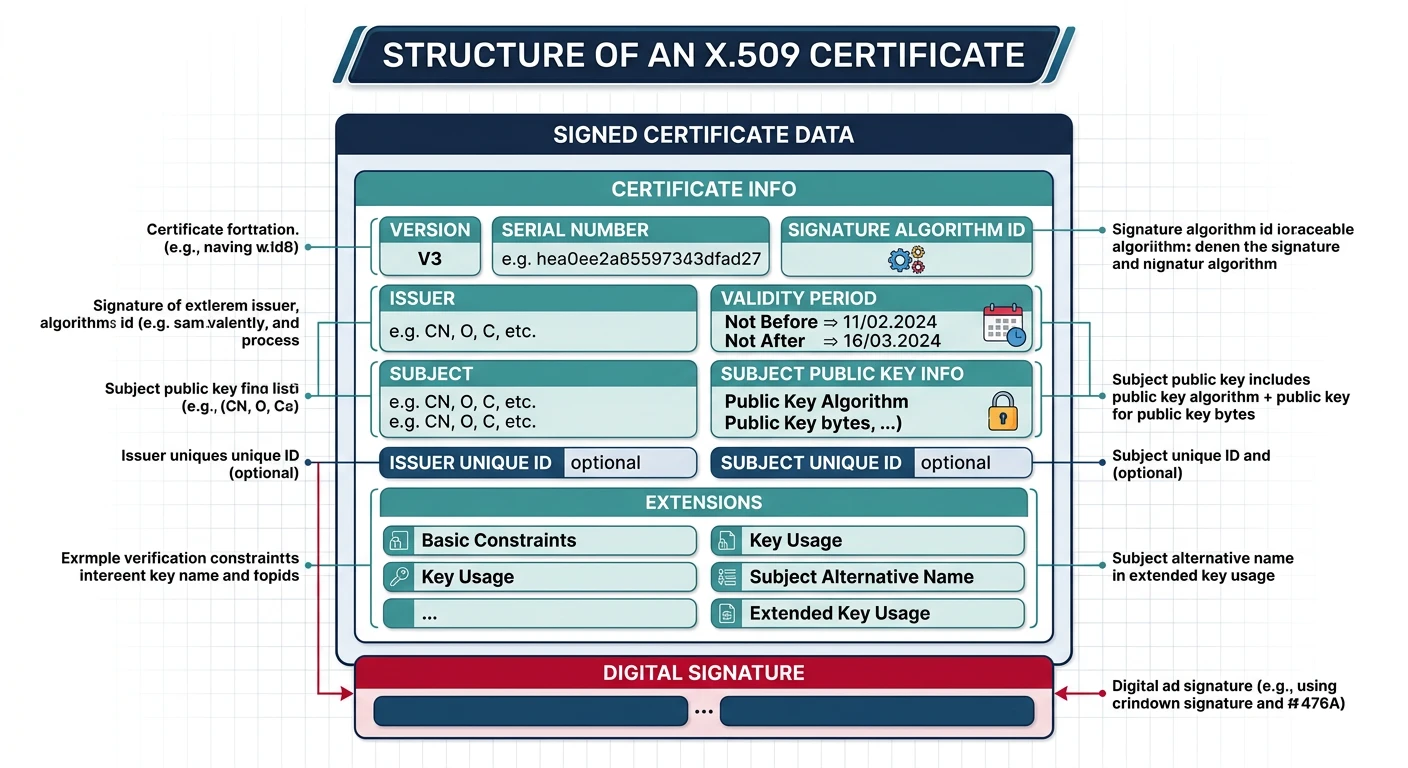
X.509 certificates are digital documents that bind a public key to an identity. They're the foundation of internet trust—your browser trusts thousands of root CAs.
Anatomy of an X.509 certificate — key fields include the issuer (who signed it), subject (who it identifies), validity period, public key, and v3 extensions like SAN
Structure
Certificate Anatomy
X.509 Certificate Structure:

Certificate:
    Version: 3 (0x2)
    Serial Number: unique identifier

    Signature Algorithm: sha256WithRSAEncryption

    Issuer: CN=DigiCert Global Root CA, O=DigiCert Inc

    Validity:
        Not Before: Jan 1 00:00:00 2020 GMT
        Not After : Dec 31 23:59:59 2025 GMT

    Subject: CN=example.com, O=Example Inc

    Subject Public Key Info:
        Public Key Algorithm: rsaEncryption
        RSA Public Key: (2048 bit)

    X509v3 Extensions:
        Basic Constraints: CA:FALSE
        Key Usage: Digital Signature, Key Encipherment
        Extended Key Usage: TLS Web Server Authentication
        Subject Alternative Name:
            DNS:example.com
            DNS:www.example.com
        Authority Key Identifier: ...
        Certificate Policies: ...
        CRL Distribution Points: ...
        Authority Information Access:
            OCSP - URI:http://ocsp.digicert.com
            CA Issuers - URI:http://...

Signature Algorithm: sha256WithRSAEncryption
Signature: (binary signature)
# Certificate analysis with Python

from cryptography import x509
from cryptography.hazmat.backends import default_backend
import ssl
import socket

def analyze_certificate(hostname):
    """Analyze server certificate"""

    # Get certificate
    context = ssl.create_default_context()
    with socket.create_connection((hostname, 443)) as sock:
        with context.wrap_socket(sock, server_hostname=hostname) as tls:
            der_cert = tls.getpeercert(binary_form=True)

    # Parse certificate
    cert = x509.load_der_x509_certificate(der_cert, default_backend())

    print(f"Certificate Analysis: {hostname}")
    print("=" * 50)

    # Subject
    print(f"Subject: {cert.subject.rfc4514_string()}")
    print(f"Issuer: {cert.issuer.rfc4514_string()}")

    # Validity
    print(f"Valid From: {cert.not_valid_before}")
    print(f"Valid Until: {cert.not_valid_after}")

    # Key info
    pub_key = cert.public_key()
    print(f"Key Type: {type(pub_key).__name__}")
    print(f"Key Size: {pub_key.key_size} bits")

    # SANs
    try:
        san = cert.extensions.get_extension_for_class(
            x509.SubjectAlternativeName)
        names = san.value.get_values_for_type(x509.DNSName)
        print(f"SANs: {names}")
    except x509.ExtensionNotFound:
        print("SANs: None")

    # Signature algorithm
    print(f"Signature: {cert.signature_algorithm_oid._name}")

# Example
# analyze_certificate('google.com')
PKI Infrastructure
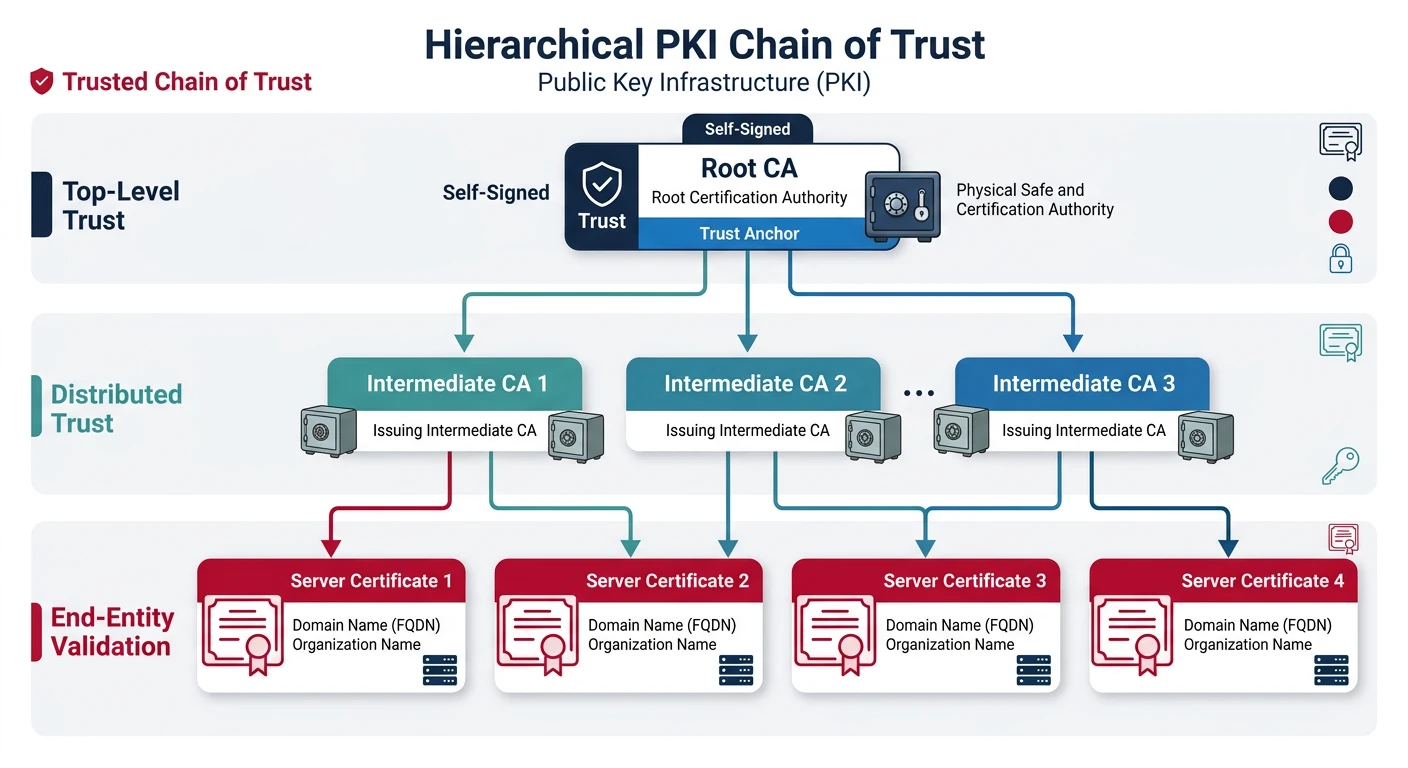
PKI (Public Key Infrastructure) is the trust hierarchy that makes certificates work. Root CAs are trusted by browsers, and they sign intermediate CAs, which sign end-entity certificates.
PKI certificate chain of trust — root CAs (stored in browsers) sign intermediate CAs, which sign end-entity certificates presented by servers
Chain of Trust: Your browser trusts ~150 root CAs. Each root can sign intermediates, which sign server certificates. If ANY CA is compromised, the whole system fails.
Trust Chain
Certificate Chain
Certificate Trust Chain:

Root CA Certificate (self-signed)
  └── Trusted by browsers/OS
  └── Stored offline, rarely used
        |
        ↓ signs
Intermediate CA Certificate
  └── Signs end-entity certificates
  └── Limits blast radius if compromised
        |
        ↓ signs
End-Entity Certificate (your server)
  └── Presented to clients
  └── Valid for specific domain(s)

Example Chain:
1. DigiCert Global Root CA (in browser trust store)
2. DigiCert SHA2 Extended Validation Server CA
3. www.example.com

Server sends: #3 + #2 (leaf + intermediates)
Browser has: #1 (root, pre-trusted)
# View certificate chain

# Show full chain
openssl s_client -connect example.com:443 -showcerts 2>/dev/null | \
  grep -E "s:|i:" | head -10

# Chain depth
# 0 s: CN=www.example.com (leaf)
#   i: CN=DigiCert SHA2 Extended Validation Server CA (intermediate)
# 1 s: CN=DigiCert SHA2 Extended Validation Server CA
#   i: CN=DigiCert High Assurance EV Root CA (root)

# Verify chain
openssl verify -CAfile root.crt -untrusted intermediate.crt server.crt
Types
Certificate Types
Type
Validation
Indicator
Use Case
DV
Domain only
Padlock
Personal sites
OV
Organization verified
Padlock
Business sites
EV
Extended validation
Padlock (was green bar)
E-commerce, banks
Wildcard
*.domain.com
Padlock
Multiple subdomains
Multi-domain
SAN list
Padlock
Multiple domains
Cipher Suites
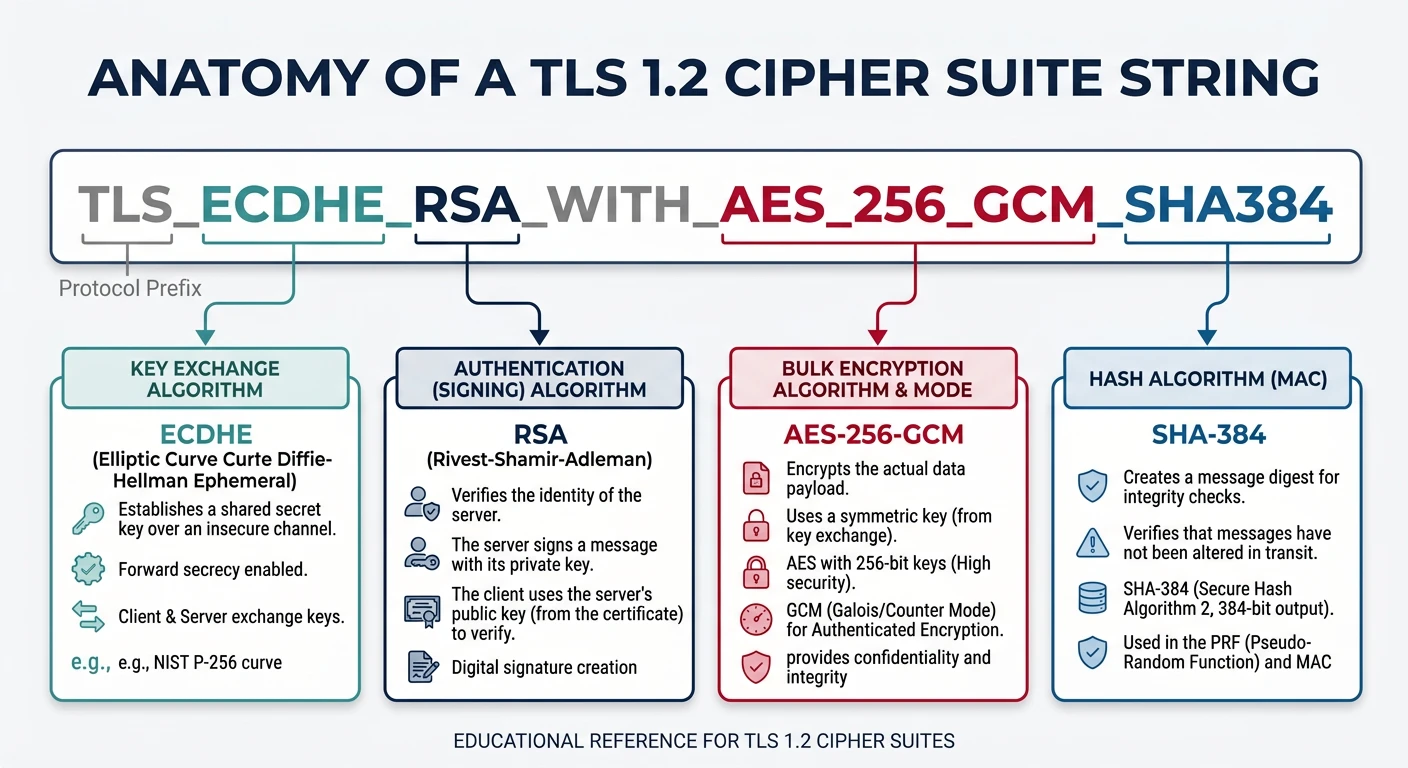
A cipher suite defines the algorithms used for key exchange, authentication, encryption, and integrity. TLS 1.3 simplified this significantly.
TLS cipher suite component breakdown — TLS 1.2 specifies four algorithm choices (key exchange, auth, encryption, hash), while TLS 1.3 simplifies to just encryption and hash