Complete Protocols Master Part 11: Real-Time Protocols
January 31, 2026Wasil Zafar40 min read
Master real-time communication: WebSockets for bidirectional messaging, WebRTC for peer-to-peer video, SIP/RTP for VoIP, and XMPP for chat applications.
HTTP's request-response model doesn't work for real-time applications. When you need instant updates—chat messages, live scores, video calls—you need protocols designed for bidirectional, low-latency communication.
Series Context: This is Part 11 of 20 in the Complete Protocols Master series. Real-time protocols operate at the Application Layer, often building on TCP (WebSockets), UDP (RTP), or both (WebRTC).
# Real-time vs Request-Response

# HTTP: Request-Response
# Client: "Any new messages?"
# Server: "No"
# (1 second later)
# Client: "Any new messages?"
# Server: "No"
# (Polling wastes bandwidth, adds latency)

# WebSocket: Bidirectional
# Client: "Open connection"
# Server: "Connected"
# Server: "New message: Hello!"  (instant push)
# Client: "Send: Hi back!"
# (Connection stays open)

# Key differences:
comparison = {
    "HTTP Polling": {
        "connection": "Open, close, repeat",
        "latency": "High (request interval)",
        "bandwidth": "High (headers each time)",
        "bidirectional": False
    },
    "WebSocket": {
        "connection": "Persistent",
        "latency": "Low (instant)",
        "bandwidth": "Low (minimal framing)",
        "bidirectional": True
    }
}

for proto, features in comparison.items():
    print(f"\n{proto}:")
    for key, value in features.items():
        print(f"  {key}: {value}")
WebSockets
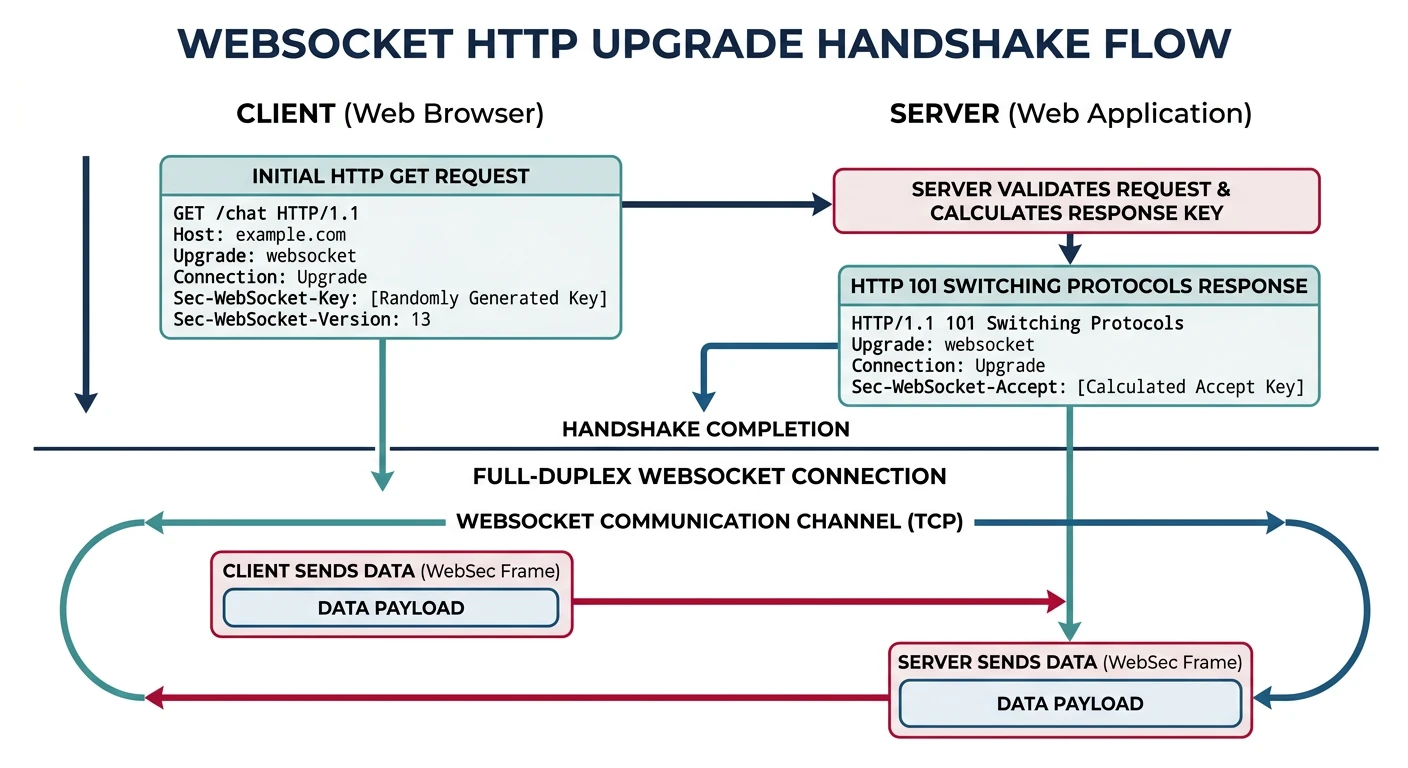
WebSockets (RFC 6455) provide full-duplex communication over a single TCP connection. They're the foundation of real-time web applications—chat, gaming, live updates.
WebSocket connection upgrade: HTTP handshake transitions to persistent full-duplex communication
Handshake
WebSocket Connection Upgrade
WebSocket starts as HTTP, then upgrades:

CLIENT REQUEST:
GET /chat HTTP/1.1
Host: server.example.com
Upgrade: websocket
Connection: Upgrade
Sec-WebSocket-Key: dGhlIHNhbXBsZSBub25jZQ==
Sec-WebSocket-Version: 13

SERVER RESPONSE:
HTTP/1.1 101 Switching Protocols
Upgrade: websocket
Connection: Upgrade
Sec-WebSocket-Accept: s3pPLMBiTxaQ9kYGzzhZRbK+xOo=

After this handshake:
• No more HTTP headers
• Binary framing only
• Full-duplex communication
• Either side can send anytime
# WebSocket server with Python (websockets library)

async def websocket_server_example():
    """WebSocket server demonstration"""

    print("WebSocket Server Example")
    print("=" * 50)

    print("""
    import asyncio
    import websockets

    # Store connected clients
    clients = set()

    async def handler(websocket, path):
        # Register client
        clients.add(websocket)
        try:
            async for message in websocket:
                print(f"Received: {message}")

                # Broadcast to all clients
                for client in clients:
                    if client != websocket:
                        await client.send(f"User said: {message}")
        finally:
            clients.remove(websocket)

    # Start server
    async def main():
        async with websockets.serve(handler, "localhost", 8765):
            print("WebSocket server running on ws://localhost:8765")
            await asyncio.Future()  # Run forever

    asyncio.run(main())
    """)

    print("\nInstall: pip install websockets")

asyncio.run(websocket_server_example()) if 'asyncio' in dir() else websocket_server_example()
// WebSocket client (JavaScript)

// Browser WebSocket API
const socket = new WebSocket('wss://server.example.com/chat');

// Connection opened
socket.addEventListener('open', (event) => {
    console.log('Connected!');
    socket.send('Hello Server!');
});

// Listen for messages
socket.addEventListener('message', (event) => {
    console.log('Message from server:', event.data);
});

// Connection closed
socket.addEventListener('close', (event) => {
    console.log('Disconnected');
});

// Handle errors
socket.addEventListener('error', (error) => {
    console.error('WebSocket error:', error);
});

// Send message
function sendMessage(text) {
    if (socket.readyState === WebSocket.OPEN) {
        socket.send(text);
    }
}

// Close connection
function disconnect() {
    socket.close();
}
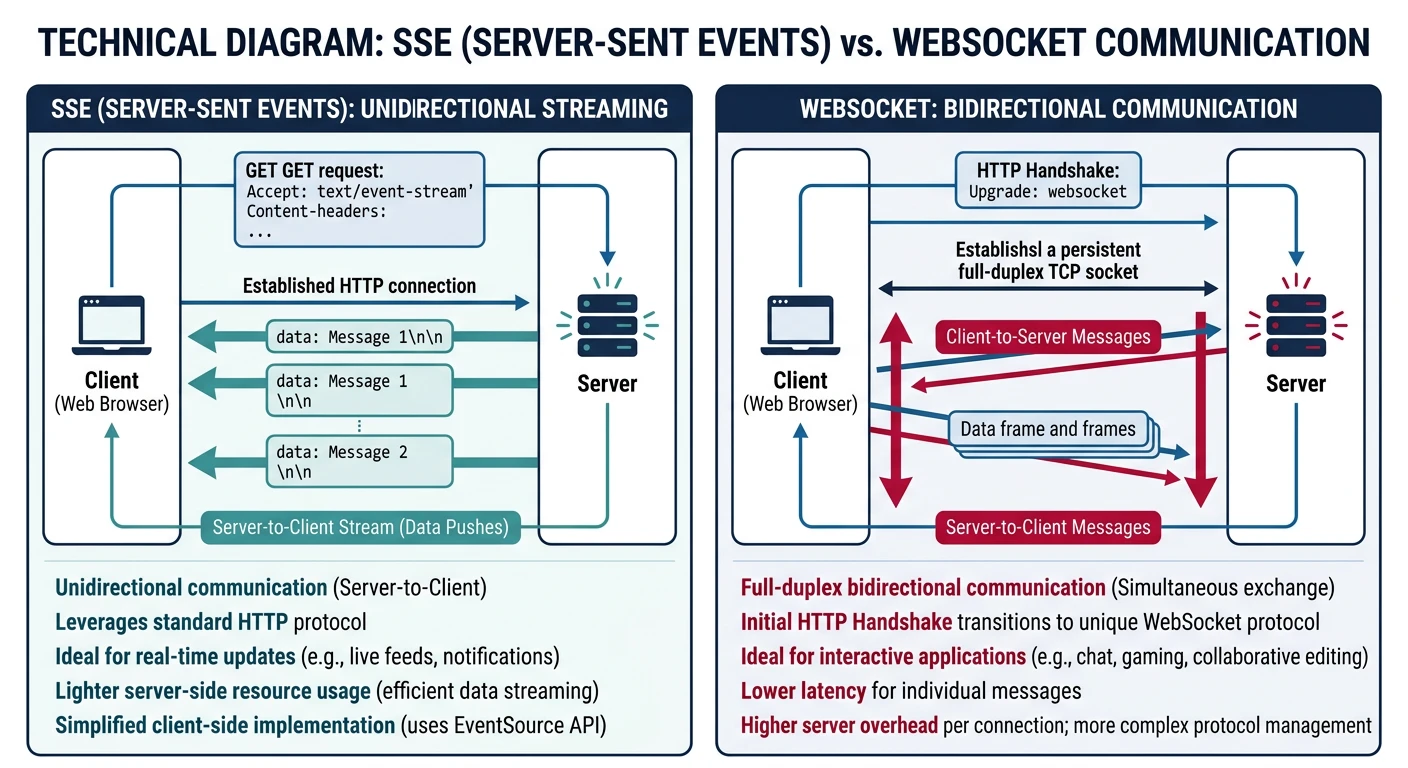
SSE provides one-way server-to-client streaming over HTTP. Simpler than WebSockets when you only need server push (notifications, live feeds).
Server-Sent Events: unidirectional push from server to client over standard HTTP
SSE vs WebSocket
When to Use SSE
SSE Advantages:
• Simpler than WebSocket
• Works over HTTP/2 (multiplexing)
• Auto-reconnection built-in
• Event IDs for resume after disconnect

SSE Limitations:
• One-way only (server → client)
• Text data only (no binary)
• Limited connections per browser (6 HTTP/1.1)

Use SSE for:
✅ Live scores
✅ News feeds
✅ Notifications
✅ Stock tickers

Use WebSocket for:
✅ Chat (bidirectional)
✅ Gaming (low latency)
✅ Collaborative editing
# SSE server with Python (Flask)

from flask import Flask, Response
import time

app = Flask(__name__)

def generate_events():
    """Generator for SSE events"""
    count = 0
    while True:
        count += 1
        # SSE format: data: message\n\n
        yield f"data: Event {count} at {time.strftime('%H:%M:%S')}\n\n"
        time.sleep(1)

@app.route('/events')
def events():
    return Response(
        generate_events(),
        mimetype='text/event-stream',
        headers={
            'Cache-Control': 'no-cache',
            'Connection': 'keep-alive'
        }
    )

# Run: flask run
# Client connects to /events and receives stream
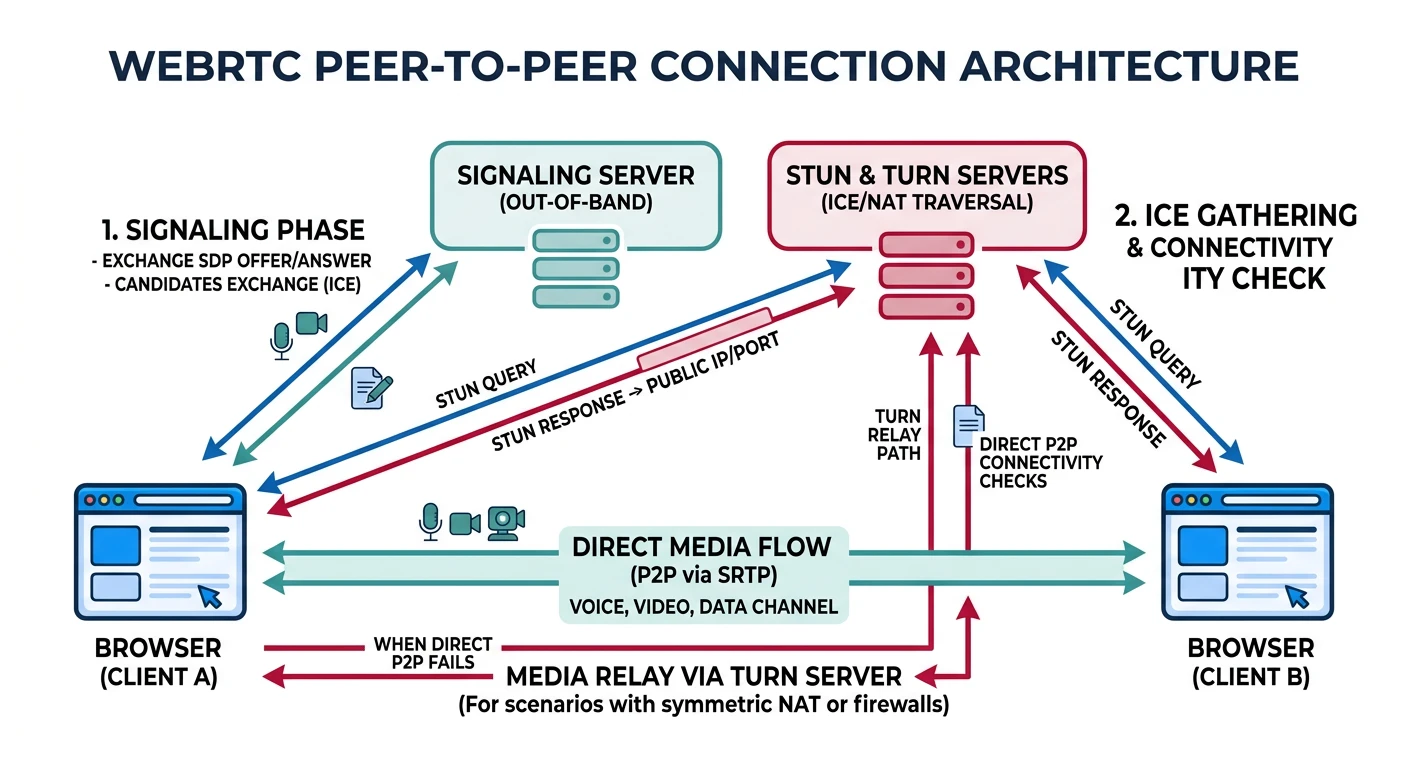
WebRTC (Web Real-Time Communication) enables peer-to-peer audio, video, and data directly between browsers—no plugins needed. Powers video calls, screen sharing, and file transfer.
WebRTC architecture: signaling server exchanges SDP, STUN/TURN traverses NAT, media flows peer-to-peer
P2P But Needs Servers: WebRTC is peer-to-peer for media, but still needs: (1) Signaling server to exchange connection info, (2) STUN/TURN servers to traverse NAT/firewalls.
Architecture
WebRTC Connection Flow
WebRTC Connection Steps:

1. SIGNALING (via WebSocket/HTTP)
   • Exchange SDP (Session Description Protocol)
   • Describes media capabilities

2. ICE CANDIDATE GATHERING
   • STUN: Discover public IP/port
   • TURN: Relay if direct P2P fails

3. ICE CONNECTIVITY CHECKS
   • Try all candidate pairs
   • Select best path (usually direct P2P)

4. DTLS HANDSHAKE
   • Secure the connection
   • Exchange encryption keys

5. MEDIA/DATA FLOW
   • SRTP for audio/video (encrypted RTP)
   • SCTP for data channels

STUN vs TURN:
STUN: "What's my public IP?" (cheap, just discovery)
TURN: "Relay my traffic" (expensive, when P2P fails)
// WebRTC peer connection example

// Create peer connection
const config = {
    iceServers: [
        { urls: 'stun:stun.l.google.com:19302' },
        {
            urls: 'turn:turn.example.com',
            username: 'user',
            credential: 'pass'
        }
    ]
};

const pc = new RTCPeerConnection(config);

// Handle ICE candidates
pc.onicecandidate = (event) => {
    if (event.candidate) {
        // Send candidate to peer via signaling server
        sendToSignaling({ type: 'candidate', candidate: event.candidate });
    }
};

// Handle incoming tracks (audio/video)
pc.ontrack = (event) => {
    document.getElementById('remoteVideo').srcObject = event.streams[0];
};

// Add local media
async function startCall() {
    const stream = await navigator.mediaDevices.getUserMedia({
        video: true,
        audio: true
    });

    // Show local video
    document.getElementById('localVideo').srcObject = stream;

    // Add tracks to peer connection
    stream.getTracks().forEach(track => pc.addTrack(track, stream));

    // Create and send offer
    const offer = await pc.createOffer();
    await pc.setLocalDescription(offer);
    sendToSignaling({ type: 'offer', sdp: offer });
}

// Handle incoming offer
async function handleOffer(offer) {
    await pc.setRemoteDescription(new RTCSessionDescription(offer));
    const answer = await pc.createAnswer();
    await pc.setLocalDescription(answer);
    sendToSignaling({ type: 'answer', sdp: answer });
}

// Handle incoming answer
async function handleAnswer(answer) {
    await pc.setRemoteDescription(new RTCSessionDescription(answer));
}

// Handle incoming ICE candidate
async function handleCandidate(candidate) {
    await pc.addIceCandidate(new RTCIceCandidate(candidate));
}
Data Channels
WebRTC for Data (Not Just Video)
// WebRTC Data Channels: P2P data transfer

const pc = new RTCPeerConnection(config);

// Create data channel (initiator)
const dataChannel = pc.createDataChannel('chat', {
    ordered: true,      // Guarantee order
    maxRetransmits: 3   // Reliability
});

dataChannel.onopen = () => {
    console.log('Data channel open');
    dataChannel.send('Hello peer!');
};

dataChannel.onmessage = (event) => {
    console.log('Received:', event.data);
};

// Handle incoming data channel (responder)
pc.ondatachannel = (event) => {
    const channel = event.channel;
    channel.onmessage = (e) => console.log('Received:', e.data);
};

// Use cases:
// • P2P file transfer (no server storage!)
// • Low-latency gaming
// • Collaborative editing
SIP & RTP: VoIP Protocols
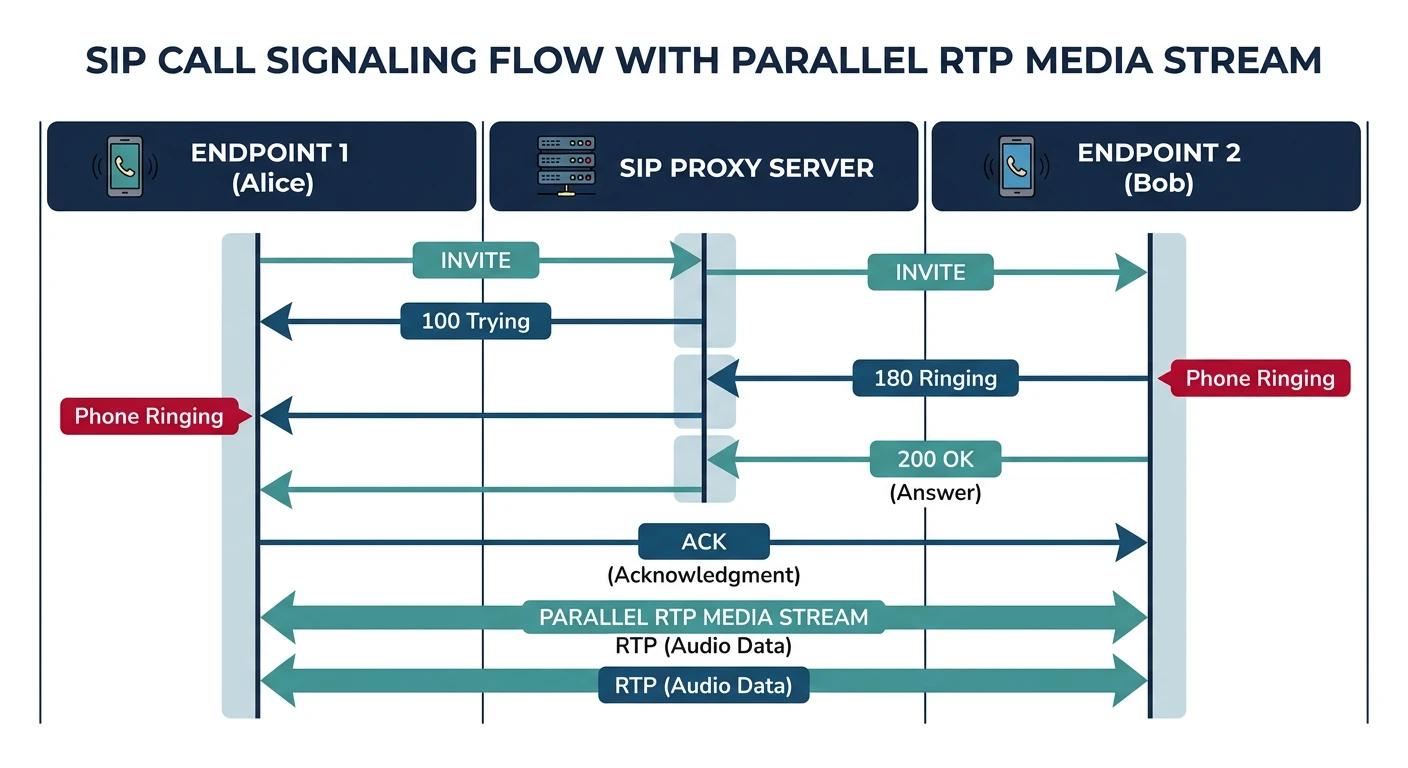
SIP (Session Initiation Protocol) handles call signaling—ringing, answering, hanging up. RTP (Real-time Transport Protocol) carries the actual audio/video.
SIP handles call setup signaling while RTP carries the actual audio/video media stream
SIP Basics
SIP Call Flow
SIP Call Setup:

Alice                 Server                 Bob
  |                     |                     |
  |------ INVITE ------>|                     |
  |                     |------ INVITE ------>|
  |                     |<----- 180 Ringing --|
  |<---- 180 Ringing ---|                     |
  |                     |<----- 200 OK -------|
  |<---- 200 OK --------|                     |
  |------- ACK -------->|                     |
  |                     |------- ACK -------->|
  |                     |                     |
  |<========== RTP Media Flow =============>|
  |                     |                     |
  |------- BYE -------->|                     |
  |                     |------- BYE -------->|
  |                     |<----- 200 OK -------|
  |<---- 200 OK --------|                     |

SIP Methods:
INVITE    - Start call
ACK       - Confirm INVITE
BYE       - End call
CANCEL    - Cancel pending INVITE
REGISTER  - Register with server
OPTIONS   - Query capabilities
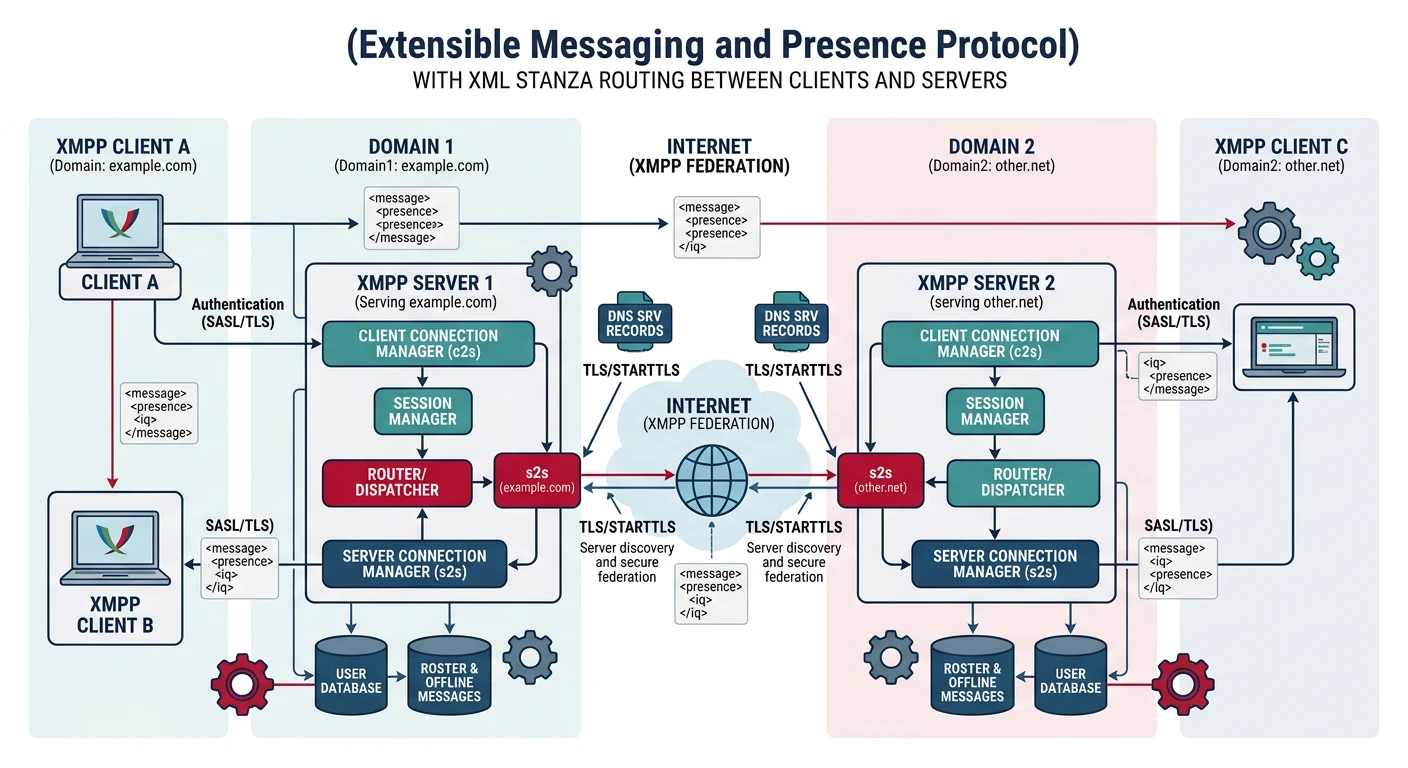
XMPP (Extensible Messaging and Presence Protocol) is an open standard for instant messaging, presence, and multi-user chat. Used by WhatsApp (modified), Google Talk, and many enterprise chat systems.
XMPP federated architecture: XML stanzas route between distributed servers for messaging and presence