Complete Protocols Master Part 3: Network Layer & IP
January 31, 2026Wasil Zafar38 min read
Master the Network Layer where packets find their path across networks. Learn IPv4 and IPv6 addressing, subnetting, CIDR notation, ICMP, NAT, and the routing protocols that make the global internet possible.
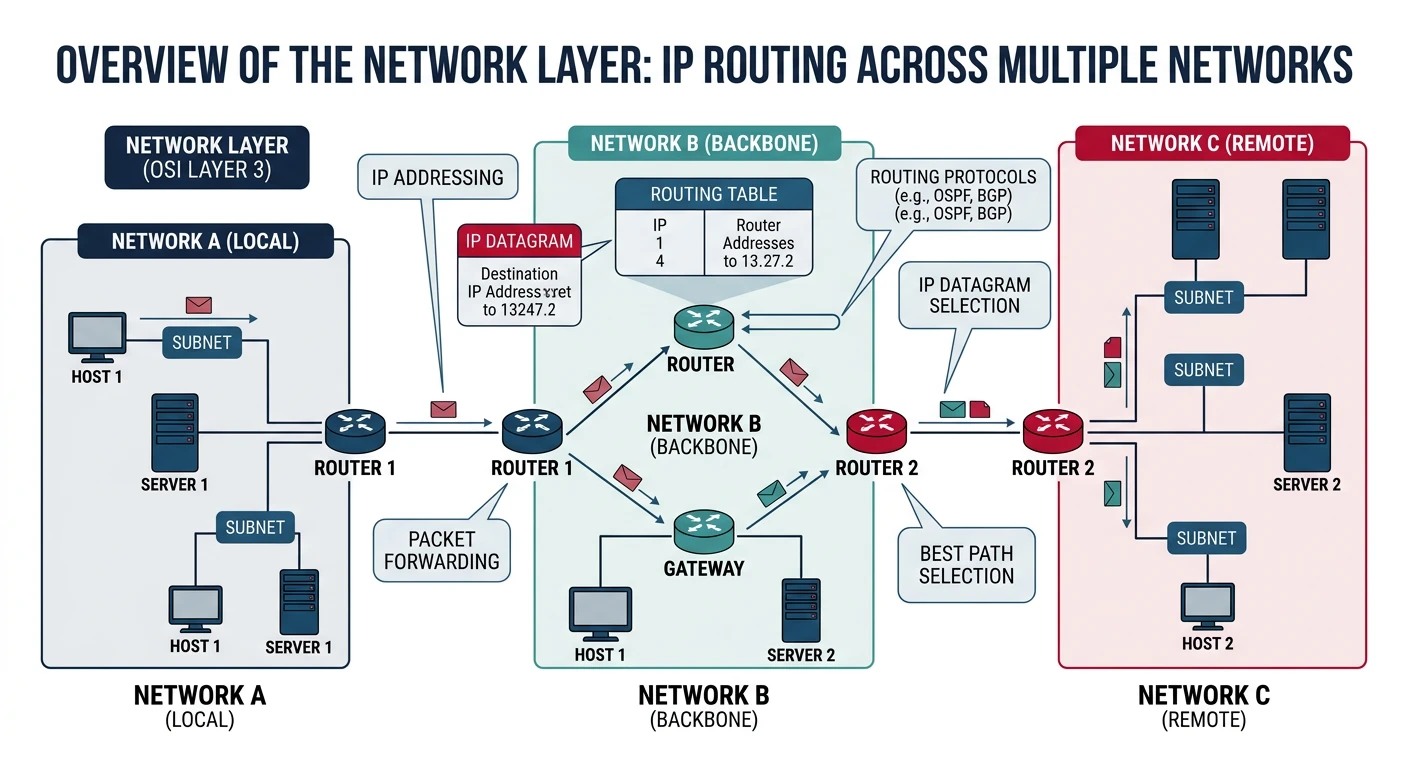
In Part 2, we explored how data moves within local networks at Layers 1 and 2. Now we ascend to Layer 3—the Network Layer—where the magic of global connectivity happens. This is where:
The Network Layer enables global connectivity by routing packets across interconnected networks using logical IP addresses.
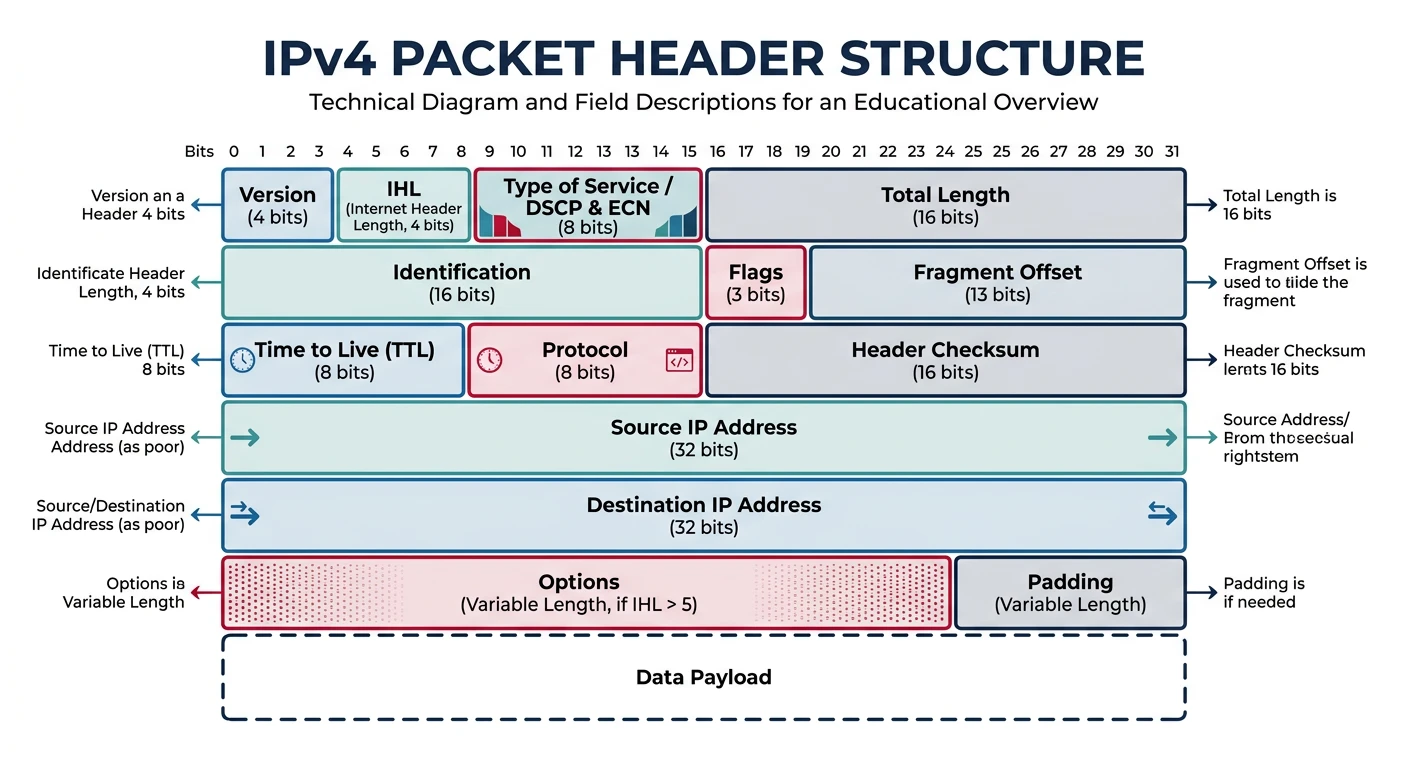
Fragmentation: Breaking large packets to fit link MTU
Error Reporting: ICMP for network diagnostics
Key Protocols: IP (IPv4, IPv6), ICMP, IGMP, IPsec
Key Devices: Routers, Layer 3 switches
MAC vs IP: MAC addresses work on local networks (Layer 2). IP addresses work globally (Layer 3). When a packet crosses a router, the MAC addresses change at each hop, but the IP addresses stay the same end-to-end.
IPv4 Addressing
Internet Protocol version 4 (IPv4) has been the backbone of the internet since 1983. Despite IPv6's availability, IPv4 still carries the majority of internet traffic.
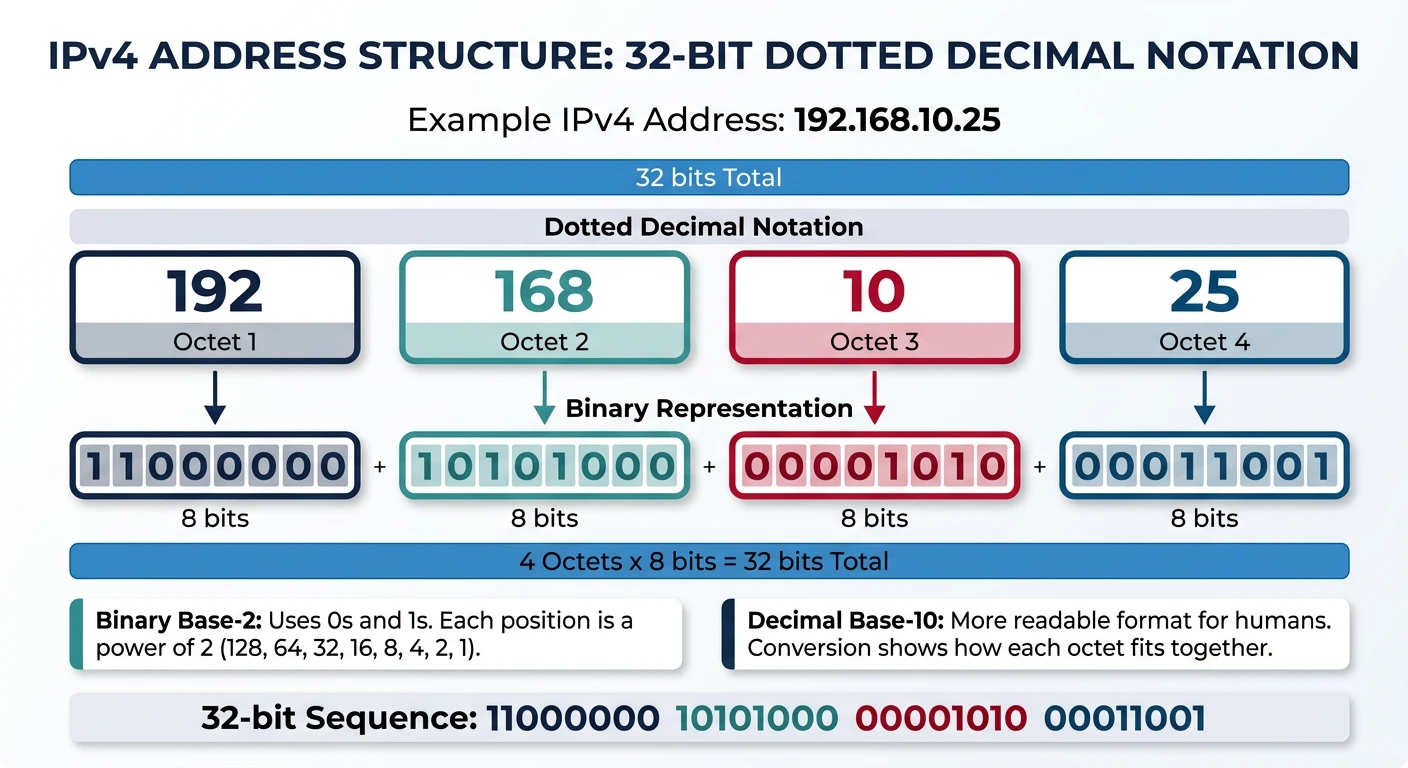
An IPv4 address is a 32-bit number written as four octets in dotted decimal notation (e.g., 192.168.1.100).
IPv4
IPv4 Address Structure
An IPv4 address is a 32-bit number, typically written in dotted decimal notation:
# Understanding IPv4 addresses in Python
import ipaddress

# Create an IPv4 address object
ip = ipaddress.IPv4Address('192.168.1.100')

print(f"Address: {ip}")
print(f"Integer value: {int(ip)}")
print(f"Binary: {bin(int(ip))}")
print(f"Packed bytes: {ip.packed}")
print(f"Is private: {ip.is_private}")
print(f"Is global: {ip.is_global}")
print(f"Is loopback: {ip.is_loopback}")
print(f"Is multicast: {ip.is_multicast}")

# Convert between formats
ip_from_int = ipaddress.IPv4Address(3232235876)
print(f"\nFrom integer 3232235876: {ip_from_int}")

# Binary to decimal conversion for each octet
def ip_to_binary(ip_str):
    """Convert IP address to binary representation"""
    octets = ip_str.split('.')
    binary = [format(int(octet), '08b') for octet in octets]
    return '.'.join(binary)

print(f"\n192.168.1.100 in binary: {ip_to_binary('192.168.1.100')}")
IPv4 Address Classes (Historical)
Originally, IPv4 addresses were divided into classes. While classful addressing is obsolete, understanding it helps comprehend legacy systems and network fundamentals:
Historical Reference
Classful Address Ranges
Class
First Octet
Range
Default Mask
Networks
Hosts/Network
A
0xxxxxxx
1.0.0.0 - 126.255.255.255
/8 (255.0.0.0)
126
16,777,214
B
10xxxxxx
128.0.0.0 - 191.255.255.255
/16 (255.255.0.0)
16,384
65,534
C
110xxxxx
192.0.0.0 - 223.255.255.255
/24 (255.255.255.0)
2,097,152
254
D
1110xxxx
224.0.0.0 - 239.255.255.255
N/A
Multicast
E
1111xxxx
240.0.0.0 - 255.255.255.255
N/A
Reserved/Experimental
Note: Classful addressing wasted IP addresses massively. A Class A network gave you 16 million hosts even if you needed 1,000. Modern networks use CIDR (Classless Inter-Domain Routing) for flexible address allocation.
Private and Special Addresses
RFC 1918
Private Address Ranges
These addresses are not routable on the public internet and can be reused by any organization:
Range
CIDR
Addresses
Typical Use
10.0.0.0 - 10.255.255.255
10.0.0.0/8
16,777,216
Large enterprises, cloud VPCs
172.16.0.0 - 172.31.255.255
172.16.0.0/12
1,048,576
Medium organizations
192.168.0.0 - 192.168.255.255
192.168.0.0/16
65,536
Home networks, small offices
Special Addresses
Other Reserved Addresses
Range
Purpose
127.0.0.0/8
Loopback - localhost (usually 127.0.0.1)
169.254.0.0/16
Link-Local - Auto-assigned when DHCP fails (APIPA)
0.0.0.0/8
This Network - Used during boot before IP assigned
255.255.255.255
Limited Broadcast - Local network broadcast
100.64.0.0/10
Carrier-Grade NAT - ISP shared address space
192.0.2.0/24
Documentation - TEST-NET-1 for examples
203.0.113.0/24
Documentation - TEST-NET-3 for examples
Subnetting & CIDR
Subnetting divides a network into smaller, manageable pieces. CIDR (Classless Inter-Domain Routing) provides flexible allocation by specifying exactly how many bits identify the network.
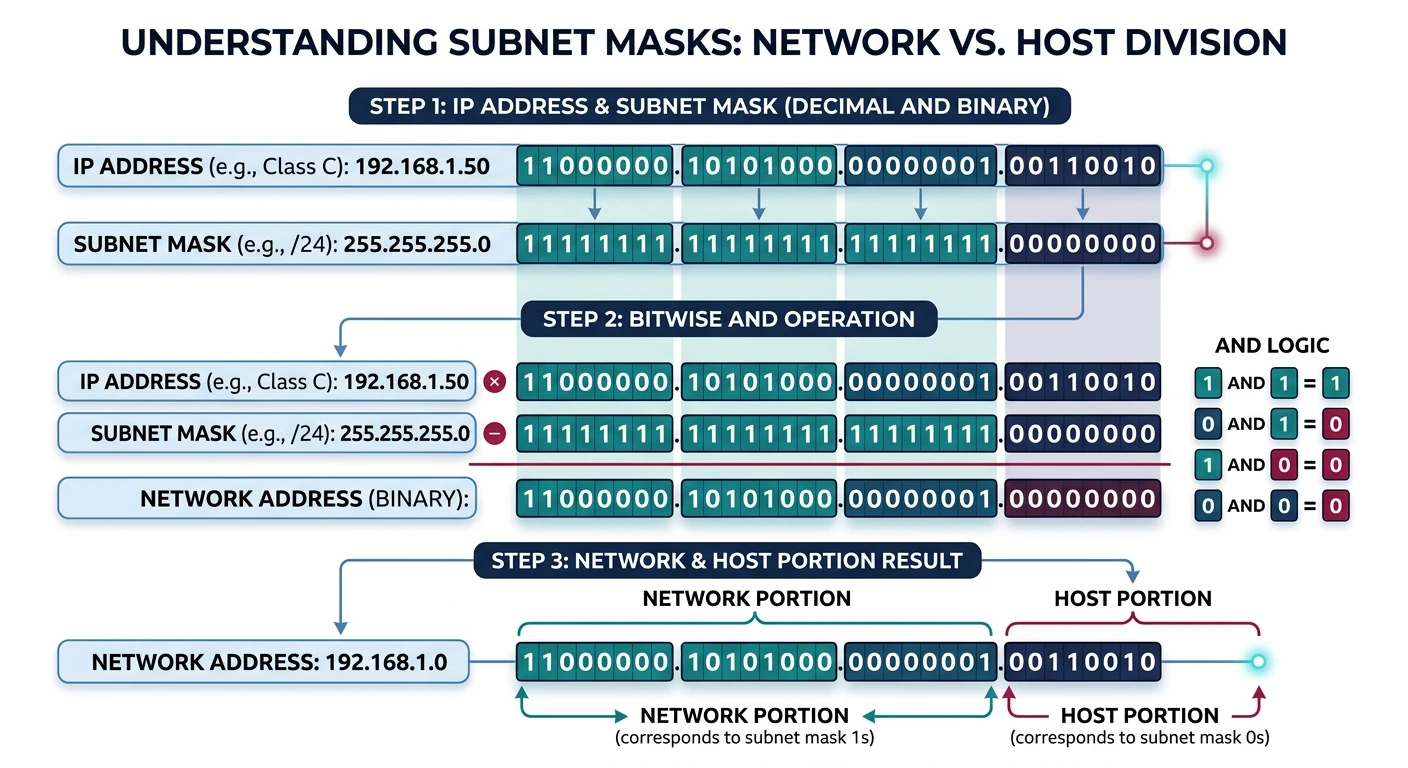
A subnet mask separates the network portion from the host portion of an IP address using binary masking.
Subnet Mask
Understanding Subnet Masks
A subnet mask separates the network portion from the host portion of an IP address:
CIDR notation uses a slash followed by the number of network bits:
CIDR Reference
Common CIDR Blocks
CIDR
Subnet Mask
Addresses
Usable Hosts
/8
255.0.0.0
16,777,216
16,777,214
/16
255.255.0.0
65,536
65,534
/20
255.255.240.0
4,096
4,094
/24
255.255.255.0
256
254
/25
255.255.255.128
128
126
/26
255.255.255.192
64
62
/27
255.255.255.224
32
30
/28
255.255.255.240
16
14
/29
255.255.255.248
8
6
/30
255.255.255.252
4
2
/31
255.255.255.254
2
2*
/32
255.255.255.255
1
1 (host route)
* /31 is special - used for point-to-point links (RFC 3021), no network/broadcast addresses needed
Subnet Calculations
# Comprehensive subnet calculator in Python
import ipaddress

def analyze_network(network_str):
    """
    Analyze an IPv4 network and display all relevant information
    """
    network = ipaddress.IPv4Network(network_str, strict=False)

    print(f"Network Analysis: {network_str}")
    print("=" * 50)

    # Basic info
    print(f"Network Address:    {network.network_address}")
    print(f"Broadcast Address:  {network.broadcast_address}")
    print(f"Subnet Mask:        {network.netmask}")
    print(f"Wildcard Mask:      {network.hostmask}")
    print(f"CIDR Notation:      /{network.prefixlen}")

    # Address counts
    print(f"\nTotal Addresses:    {network.num_addresses}")
    print(f"Usable Hosts:       {network.num_addresses - 2 if network.num_addresses > 2 else network.num_addresses}")

    # Host range
    hosts = list(network.hosts())
    if hosts:
        print(f"First Usable Host:  {hosts[0]}")
        print(f"Last Usable Host:   {hosts[-1]}")

    # Binary representation
    print(f"\nBinary Network:     {bin(int(network.network_address))[2:].zfill(32)}")
    print(f"Binary Mask:        {bin(int(network.netmask))[2:].zfill(32)}")

    return network

# Example analysis
print("EXAMPLE 1: Standard /24 Network")
print("-" * 50)
analyze_network("192.168.1.0/24")

print("\n\nEXAMPLE 2: /27 Subnet")
print("-" * 50)
analyze_network("10.0.0.0/27")

print("\n\nEXAMPLE 3: Check if IP is in network")
print("-" * 50)
network = ipaddress.IPv4Network("192.168.1.0/24")
test_ips = ["192.168.1.50", "192.168.2.50", "192.168.1.255"]

for ip_str in test_ips:
    ip = ipaddress.IPv4Address(ip_str)
    in_network = ip in network
    print(f"{ip_str} in 192.168.1.0/24: {in_network}")
# Subnet division example
import ipaddress

def divide_network(network_str, new_prefix):
    """
    Divide a network into smaller subnets
    """
    network = ipaddress.IPv4Network(network_str)

    if new_prefix <= network.prefixlen:
        raise ValueError(f"New prefix must be larger than {network.prefixlen}")

    subnets = list(network.subnets(new_prefix=new_prefix))

    print(f"Dividing {network_str} into /{new_prefix} subnets:")
    print("=" * 60)

    for i, subnet in enumerate(subnets):
        hosts = list(subnet.hosts())
        first_host = hosts[0] if hosts else "N/A"
        last_host = hosts[-1] if hosts else "N/A"

        print(f"Subnet {i+1}: {subnet}")
        print(f"  Network:   {subnet.network_address}")
        print(f"  Broadcast: {subnet.broadcast_address}")
        print(f"  Range:     {first_host} - {last_host}")
        print(f"  Hosts:     {len(hosts)}")
        print()

    return subnets

# Divide a /24 into four /26 subnets
print("Scenario: Divide 192.168.1.0/24 into 4 departments")
print("-" * 60)
divide_network("192.168.1.0/24", 26)
Quick Math:
Hosts per subnet = 2(32 - prefix) - 2
/24 = 28 - 2 = 254 hosts
/26 = 26 - 2 = 62 hosts
/28 = 24 - 2 = 14 hosts
Subnets when dividing = 2(new_prefix - old_prefix)
IPv6 Addressing
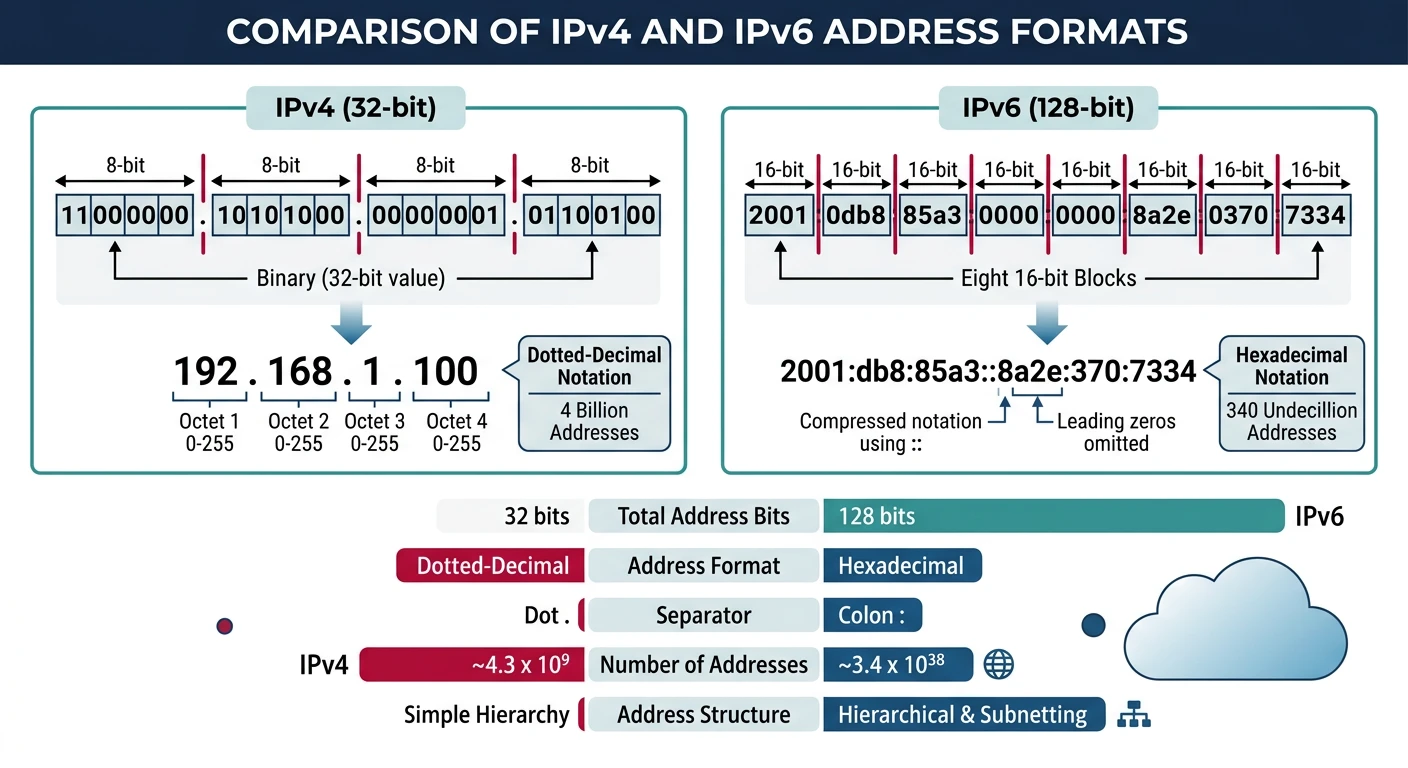
IPv6 was designed to solve IPv4 address exhaustion. With 128-bit addresses, it provides 340 undecillion addresses—enough for every atom on Earth's surface!
IPv6 expands the address space from 4.3 billion (IPv4) to 340 undecillion unique addresses.
Why IPv6?
IPv4 vs IPv6 Comparison
Feature
IPv4
IPv6
Address Size
32 bits (4 bytes)
128 bits (16 bytes)
Address Space
~4.3 billion
~340 undecillion (3.4 × 1038)
Notation
Dotted decimal (192.168.1.1)
Hexadecimal (2001:db8::1)
Header Size
20-60 bytes (variable)
40 bytes (fixed)
Fragmentation
Routers and hosts
Source only (no router fragmentation)
Broadcast
Yes
No (uses multicast instead)
IPsec
Optional
Mandatory support
Auto-configuration
DHCP required
SLAAC built-in
IPv6 Address Format
Format Rules
IPv6 Address Structure
Full IPv6 Address:
2001:0db8:85a3:0000:0000:8a2e:0370:7334

Structure:
- 8 groups of 4 hexadecimal digits
- Separated by colons
- Each group = 16 bits
- Total = 128 bits

Compression Rules:

1. Leading zeros in a group can be omitted:
   2001:0db8:0001:0000:0000:0000:0000:0001
   → 2001:db8:1:0:0:0:0:1

2. One sequence of consecutive all-zero groups can be replaced with ::
   2001:db8:1:0:0:0:0:1
   → 2001:db8:1::1

3. :: can only be used ONCE in an address
   (otherwise ambiguous how many zeros)

Examples:
   ::1                     = Loopback (like 127.0.0.1)
   ::                      = All zeros (unspecified)
   2001:db8::              = 2001:db8:0:0:0:0:0:0
   fe80::1                 = Link-local address
   2001:db8:85a3::8a2e:370:7334 = Typical compressed form
# Working with IPv6 in Python
import ipaddress

# Create IPv6 address objects
full_addr = ipaddress.IPv6Address('2001:0db8:85a3:0000:0000:8a2e:0370:7334')
compressed = ipaddress.IPv6Address('2001:db8:85a3::8a2e:370:7334')
loopback = ipaddress.IPv6Address('::1')

print("IPv6 Address Analysis")
print("=" * 60)

for addr in [full_addr, compressed, loopback]:
    print(f"\nAddress: {addr}")
    print(f"  Compressed:  {addr.compressed}")
    print(f"  Exploded:    {addr.exploded}")
    print(f"  Is loopback: {addr.is_loopback}")
    print(f"  Is link-local: {addr.is_link_local}")
    print(f"  Is global:   {addr.is_global}")
    print(f"  Is private:  {addr.is_private}")

# IPv6 network analysis
print("\n\nIPv6 Network Analysis")
print("=" * 60)
network = ipaddress.IPv6Network('2001:db8::/32')
print(f"Network:     {network}")
print(f"Prefix:      /{network.prefixlen}")
print(f"Num addresses: {network.num_addresses}")
print(f"First addr:  {network.network_address}")
print(f"Last addr:   {network.broadcast_address}")

# Common IPv6 prefix sizes
print("\n\nCommon IPv6 Allocations")
print("=" * 60)
allocations = [
    ("/32", "Regional Internet Registry (RIR) to ISP"),
    ("/48", "ISP to Customer site"),
    ("/56", "ISP to Residential customer"),
    ("/64", "Single subnet (standard)"),
    ("/128", "Single host (loopback, etc.)")
]
for prefix, description in allocations:
    print(f"{prefix:8} - {description}")
IPv6 Address Types
Address Types
IPv6 Address Categories
Type
Prefix
Description
Global Unicast
2000::/3
Routable on the internet (like public IPv4)
Link-Local
fe80::/10
Auto-configured, not routed (local network only)
Unique Local (ULA)
fc00::/7 (fd00::/8 used)
Private addresses (like RFC 1918 in IPv4)
Multicast
ff00::/8
One-to-many communication
Loopback
::1/128
Localhost (like 127.0.0.1)
Unspecified
::/128
No address assigned yet
Documentation
2001:db8::/32
For examples and documentation
IPv6 in Practice: Every IPv6 interface typically has multiple addresses:
MTU is the largest packet size a network link can carry. When a packet exceeds the MTU, it must be fragmented:
Ethernet MTU: 1500 bytes (standard)
Jumbo frames: 9000 bytes (data centers)
Internet minimum: 576 bytes (IPv4), 1280 bytes (IPv6)
IPv4: Any router can fragment packets
IPv6: Only the source can fragment (Path MTU Discovery)
# Check MTU on your system

# Linux
ip link show | grep mtu
# or
cat /sys/class/net/eth0/mtu

# Windows
netsh interface ipv4 show subinterfaces

# macOS
networksetup -getMTU en0

# Test path MTU to a destination (Linux)
tracepath google.com

# Ping with specific size (don't fragment)
# Linux
ping -M do -s 1472 google.com   # 1472 + 28 (headers) = 1500

# Windows
ping -f -l 1472 google.com

# macOS
ping -D -s 1472 google.com
Fragmentation Problems: Fragmentation hurts performance and can cause issues:
All fragments must arrive for reassembly
Loss of one fragment loses entire packet
Some firewalls block fragments (security risk)
TCP uses Path MTU Discovery to avoid fragmentation
ICMP: Internet Control Message Protocol
ICMP provides error reporting and diagnostic functions for IP. It's the protocol behind ping and traceroute.
ICMP Messages
Common ICMP Message Types
Type
Name
Description
0
Echo Reply
Response to ping (Type 8)
3
Destination Unreachable
Packet couldn't be delivered
4
Source Quench
Congestion control (deprecated)
5
Redirect
Better route available
8
Echo Request
Ping request
11
Time Exceeded
TTL expired (used by traceroute)
12
Parameter Problem
Bad IP header
Ping and Traceroute
# Ping - Test connectivity using ICMP Echo Request/Reply

# Basic ping
ping google.com

# Ping with count
ping -c 4 google.com           # Linux/macOS
ping -n 4 google.com           # Windows

# Ping with specific TTL
ping -t 10 google.com          # Linux
ping -i 10 google.com          # macOS

# Continuous ping with timestamp
ping -D google.com             # Linux (show timestamp)


# Traceroute - Discover the path packets take

# Linux
traceroute google.com

# Windows
tracert google.com

# Using ICMP instead of UDP (Linux)
sudo traceroute -I google.com

# Show AS numbers
traceroute -A google.com

# MTR - Combined ping + traceroute (live updating)
mtr google.com
Traceroute Mechanism: Traceroute works by sending packets with increasing TTL values (1, 2, 3...). Each router decrements TTL and sends back ICMP "Time Exceeded" when TTL reaches 0, revealing its IP address. This maps the entire path to the destination.
Routing Fundamentals
Routing is the process of selecting paths for traffic in a network. Routers use routing tables to decide where to forward packets.
Routing Basics
How Routing Works
Router receives a packet
Examines destination IP address
Looks up longest matching prefix in routing table
Forwards packet to next hop or directly to destination
Decrements TTL (drops if TTL = 0)
# View routing table on different systems

# Linux
ip route show
# or
route -n
# or
netstat -rn

# Windows
route print
# or
netstat -rn

# macOS
netstat -rn

# Example Linux output:
# default via 192.168.1.1 dev eth0 proto dhcp metric 100
# 192.168.1.0/24 dev eth0 proto kernel scope link src 192.168.1.100

# Explanation:
# default         - Default route (0.0.0.0/0)
# via 192.168.1.1 - Next hop (gateway)
# dev eth0        - Outgoing interface
# metric 100      - Route preference (lower = preferred)
# Simulate a simple routing table lookup
class Router:
    """Simple router simulation with longest prefix matching"""

    def __init__(self, name):
        self.name = name
        self.routes = []  # List of (network, next_hop, interface)

    def add_route(self, network, next_hop, interface):
        """Add a route to the routing table"""
        import ipaddress
        net = ipaddress.IPv4Network(network)
        self.routes.append({
            'network': net,
            'prefix': network,
            'next_hop': next_hop,
            'interface': interface
        })
        # Sort by prefix length (longest first) for proper matching
        self.routes.sort(key=lambda r: r['network'].prefixlen, reverse=True)

    def lookup(self, destination):
        """Find the best route for a destination (longest prefix match)"""
        import ipaddress
        dest_ip = ipaddress.IPv4Address(destination)

        for route in self.routes:
            if dest_ip in route['network']:
                return {
                    'destination': destination,
                    'matched_route': route['prefix'],
                    'next_hop': route['next_hop'],
                    'interface': route['interface']
                }

        return {'destination': destination, 'result': 'No route found'}

    def show_routes(self):
        """Display routing table"""
        print(f"\nRouting Table for {self.name}")
        print("=" * 60)
        print(f"{'Network':<20} {'Next Hop':<16} {'Interface':<12}")
        print("-" * 60)
        for route in self.routes:
            print(f"{route['prefix']:<20} {route['next_hop']:<16} {route['interface']:<12}")

# Create a router with typical routes
router = Router("R1")

# Add routes (specific to general)
router.add_route("192.168.1.0/24", "directly_connected", "eth0")
router.add_route("192.168.2.0/24", "192.168.1.254", "eth0")
router.add_route("10.0.0.0/8", "192.168.1.253", "eth0")
router.add_route("0.0.0.0/0", "192.168.1.1", "eth0")  # Default route

router.show_routes()

# Test lookups
print("\nRoute Lookups:")
print("-" * 60)
test_destinations = [
    "192.168.1.50",   # Local network
    "192.168.2.100",  # Adjacent network
    "10.50.100.200",  # Remote private network
    "8.8.8.8",        # Internet (Google DNS)
]

for dest in test_destinations:
    result = router.lookup(dest)
    print(f"\n{dest}:")
    for key, value in result.items():
        print(f"  {key}: {value}")
Routing Protocols
Protocol Types
Interior vs Exterior Gateway Protocols
IGP (Interior Gateway Protocol): Used within an organization (Autonomous System)
RIP (Routing Information Protocol): Simple, distance-vector, max 15 hops. Legacy.
OSPF (Open Shortest Path First): Link-state, uses Dijkstra's algorithm. Most common IGP.
IS-IS (Intermediate System to Intermediate System): Link-state, popular with ISPs.
EGP (Exterior Gateway Protocol): Used between organizations
BGP (Border Gateway Protocol): The protocol that routes the entire internet!
BGP: The Internet's Routing Protocol
BGP
Border Gateway Protocol
BGP is a path-vector protocol that exchanges routing information between Autonomous Systems (AS)—networks under single administrative control.
AS Numbers: Unique identifiers (e.g., Google is AS15169)
BGP Peers: Routers exchange routes via TCP port 179
Path Selection: Based on policies, AS path length, and other attributes
Full Internet Table: ~900,000+ routes (2024)
# Explore BGP and AS information

# Look up ASN for an IP
whois -h whois.radb.net 8.8.8.8

# View BGP looking glass (web tools)
# https://bgp.he.net/
# https://www.ripe.net/analyse/internet-measurements/routing-information-service-ris

# Check your own public IP's ASN
curl ipinfo.io

# Traceroute with AS numbers
traceroute -A google.com

# Example output shows AS path:
# 1  192.168.1.1 [AS0]      0.5ms
# 2  10.0.0.1 [AS12345]     5.2ms
# 3  72.14.238.1 [AS15169]  10.1ms  # Google's AS
BGP Security: BGP was designed without security! Notable incidents:
BGP Hijacking: Malicious AS announces routes it doesn't own
Route Leaks: Accidental propagation of internal routes
Solutions: RPKI (Resource Public Key Infrastructure), BGPsec
NAT: Network Address Translation
NAT allows multiple devices to share a single public IP address. It's what lets your entire home network access the internet through one IP from your ISP.
How NAT Works
NAT Translation Process
Outbound (Private → Public):
1. Device 192.168.1.100 sends packet to 8.8.8.8
2. Router receives packet
3. Router changes source IP: 192.168.1.100 → 203.0.113.50 (public IP)
4. Router records mapping in NAT table
5. Packet sent to internet with public source IP

Inbound (Public → Private):
1. Response arrives for 203.0.113.50
2. Router looks up NAT table
3. Router changes dest IP: 203.0.113.50 → 192.168.1.100
4. Packet forwarded to internal device

NAT Table Example:
┌─────────────────────┬──────────────────────┬───────────────┐
│ Internal            │ External             │ Destination   │
│ 192.168.1.100:54321 │ 203.0.113.50:12345   │ 8.8.8.8:53   │
│ 192.168.1.101:54322 │ 203.0.113.50:12346   │ 8.8.8.8:53   │
└─────────────────────┴──────────────────────┴───────────────┘
Types of NAT
NAT Variants
NAT Types Explained
Type
Description
Use Case
Static NAT
1:1 mapping of private to public IP
Servers that need consistent public IP
Dynamic NAT
Pool of public IPs assigned dynamically
Organizations with multiple public IPs
PAT/NAPT (Overload)
Many private IPs share one public IP using ports
Home routers, most common type
Port Forwarding
External port → internal IP:port
Hosting servers behind NAT
# NAT configuration examples (Linux iptables)

# Enable IP forwarding
echo 1 > /proc/sys/net/ipv4/ip_forward

# Basic SNAT (Source NAT) - Masquerade
# All traffic from 192.168.1.0/24 gets NAT'd to eth0's IP
iptables -t nat -A POSTROUTING -s 192.168.1.0/24 -o eth0 -j MASQUERADE

# SNAT with specific public IP
iptables -t nat -A POSTROUTING -s 192.168.1.0/24 -o eth0 -j SNAT --to-source 203.0.113.50

# DNAT (Destination NAT) - Port forwarding
# Forward port 8080 on public IP to internal web server
iptables -t nat -A PREROUTING -i eth0 -p tcp --dport 8080 -j DNAT --to-destination 192.168.1.100:80

# View NAT rules
iptables -t nat -L -n -v

# View active NAT connections
conntrack -L
NAT Drawbacks:
Breaks end-to-end connectivity: Devices behind NAT can't be reached directly
Complicates protocols: FTP, SIP, gaming require special NAT traversal
Adds latency: Translation takes time
IPv6 eliminates need: Enough addresses for every device to have public IP
Hands-On Exercises
Exercise 1: Network Exploration Tools
# Complete IP investigation toolkit

# 1. Find your IP configuration
# Linux
ip addr show
ip route show

# Windows
ipconfig /all

# macOS
ifconfig
netstat -rn

# 2. Test connectivity
ping -c 4 google.com
ping -c 4 8.8.8.8

# 3. Trace the path
traceroute google.com

# 4. DNS lookup
nslookup google.com
dig google.com

# 5. Check what's listening
netstat -tlnp    # Linux
netstat -an      # Windows

# 6. Check your public IP
curl ifconfig.me
curl ipinfo.io/json
Exercise 2: Python IP Tools
# Comprehensive IP utility library
import ipaddress
import socket

class IPTools:
    """Collection of IP utility functions"""

    @staticmethod
    def get_network_info(ip_cidr):
        """Get comprehensive network information"""
        network = ipaddress.IPv4Network(ip_cidr, strict=False)

        return {
            'network': str(network.network_address),
            'broadcast': str(network.broadcast_address),
            'netmask': str(network.netmask),
            'wildcard': str(network.hostmask),
            'prefix_length': network.prefixlen,
            'total_hosts': network.num_addresses,
            'usable_hosts': max(0, network.num_addresses - 2),
            'first_usable': str(list(network.hosts())[0]) if list(network.hosts()) else None,
            'last_usable': str(list(network.hosts())[-1]) if list(network.hosts()) else None,
            'is_private': network.is_private
        }

    @staticmethod
    def ip_in_range(ip, network):
        """Check if IP is in a network range"""
        addr = ipaddress.IPv4Address(ip)
        net = ipaddress.IPv4Network(network, strict=False)
        return addr in net

    @staticmethod
    def get_ip_class(ip):
        """Determine classful address class (historical)"""
        first_octet = int(ip.split('.')[0])

        if first_octet < 128:
            return 'A'
        elif first_octet < 192:
            return 'B'
        elif first_octet < 224:
            return 'C'
        elif first_octet < 240:
            return 'D (Multicast)'
        else:
            return 'E (Reserved)'

    @staticmethod
    def resolve_hostname(hostname):
        """Resolve hostname to IP address"""
        try:
            ip = socket.gethostbyname(hostname)
            return {'hostname': hostname, 'ip': ip, 'success': True}
        except socket.gaierror as e:
            return {'hostname': hostname, 'error': str(e), 'success': False}

    @staticmethod
    def reverse_lookup(ip):
        """Reverse DNS lookup"""
        try:
            hostname = socket.gethostbyaddr(ip)[0]
            return {'ip': ip, 'hostname': hostname, 'success': True}
        except socket.herror as e:
            return {'ip': ip, 'error': str(e), 'success': False}

    @staticmethod
    def summarize_networks(networks):
        """Summarize multiple networks into supernets"""
        nets = [ipaddress.IPv4Network(n) for n in networks]
        return list(ipaddress.collapse_addresses(nets))

# Examples
tools = IPTools()

# Network analysis
print("Network Analysis: 192.168.1.0/24")
print("=" * 50)
info = tools.get_network_info("192.168.1.0/24")
for key, value in info.items():
    print(f"  {key}: {value}")

# IP range check
print("\n\nIP Range Checks:")
print("=" * 50)
test_ips = ["192.168.1.50", "192.168.2.50", "10.0.0.1"]
for ip in test_ips:
    in_range = tools.ip_in_range(ip, "192.168.1.0/24")
    print(f"  {ip} in 192.168.1.0/24: {in_range}")

# Hostname resolution
print("\n\nHostname Resolution:")
print("=" * 50)
hosts = ["google.com", "github.com", "invalid.hostname.test"]
for host in hosts:
    result = tools.resolve_hostname(host)
    if result['success']:
        print(f"  {host} → {result['ip']}")
    else:
        print(f"  {host} → Error: {result['error']}")

# Network summarization (route aggregation)
print("\n\nNetwork Summarization:")
print("=" * 50)
networks_to_summarize = [
    "192.168.0.0/24",
    "192.168.1.0/24",
    "192.168.2.0/24",
    "192.168.3.0/24"
]
print(f"  Original: {networks_to_summarize}")
summarized = tools.summarize_networks(networks_to_summarize)
print(f"  Summarized: {[str(n) for n in summarized]}")
Self-Assessment
Quiz: Test Your Knowledge
How many bits in an IPv4 address? (Answer: 32 bits)
What's the subnet mask for /27? (Answer: 255.255.255.224)
How many usable hosts in a /28 network? (Answer: 14)
What private range is 172.16.0.0 in? (Answer: 172.16.0.0/12)
What ICMP type is Echo Reply? (Answer: Type 0)
What protocol runs the internet's routing? (Answer: BGP)
What's the IPv6 loopback address? (Answer: ::1)
What does NAT stand for? (Answer: Network Address Translation)