Master IoT communication: MQTT for lightweight pub/sub, CoAP for REST-like constrained devices, and wireless protocols like Zigbee, Z-Wave, and LoRaWAN.
IoT devices face unique constraints: limited battery, weak processors, unreliable networks. HTTP is too heavy. These protocols are designed for efficiency—minimal overhead, low power, and reliable delivery over lossy connections.
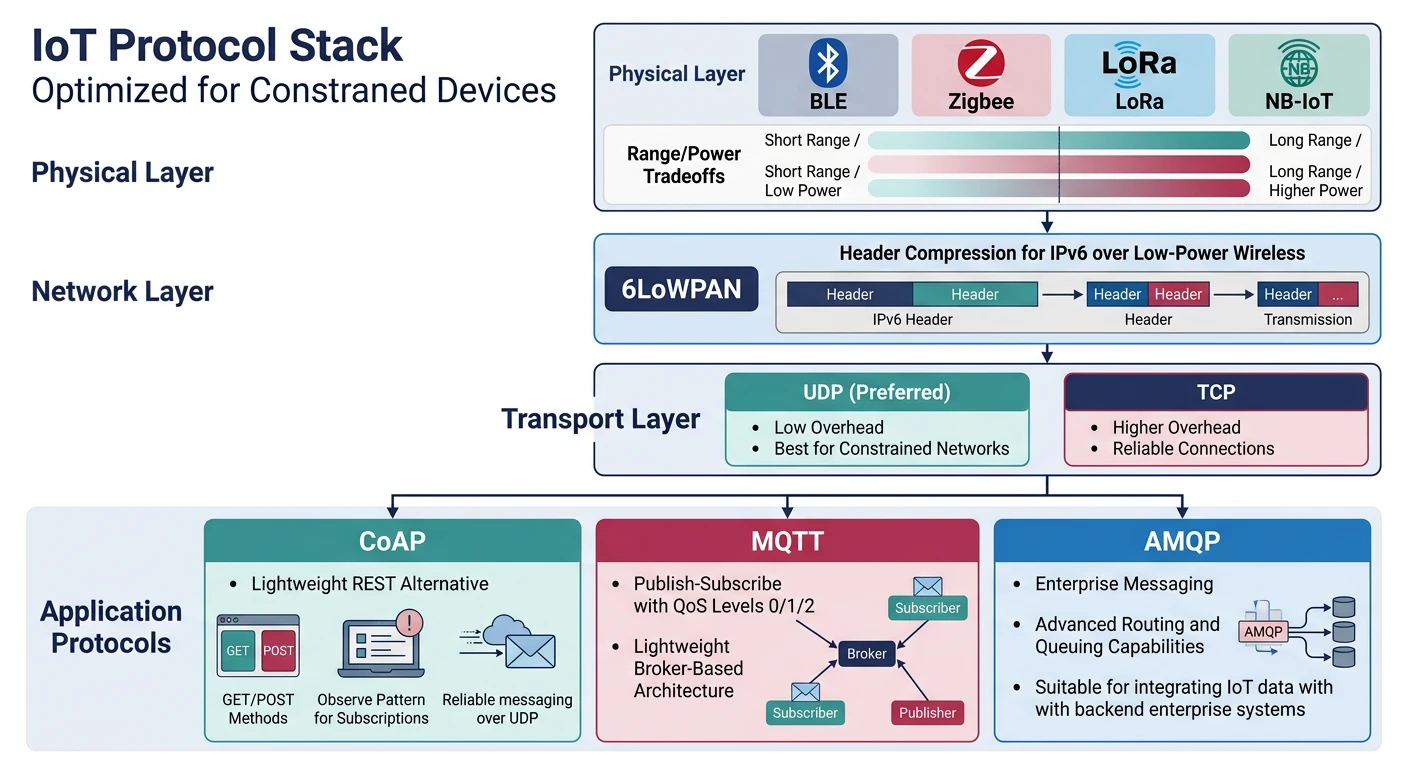
IoT protocol landscape: each protocol addresses specific constraints in power, range, bandwidth, and reliability
Series Context: This is Part 13 of 20 in the Complete Protocols Master series. IoT protocols span multiple OSI layers—MQTT/CoAP at Application, Zigbee/LoRa handling Physical through Application.
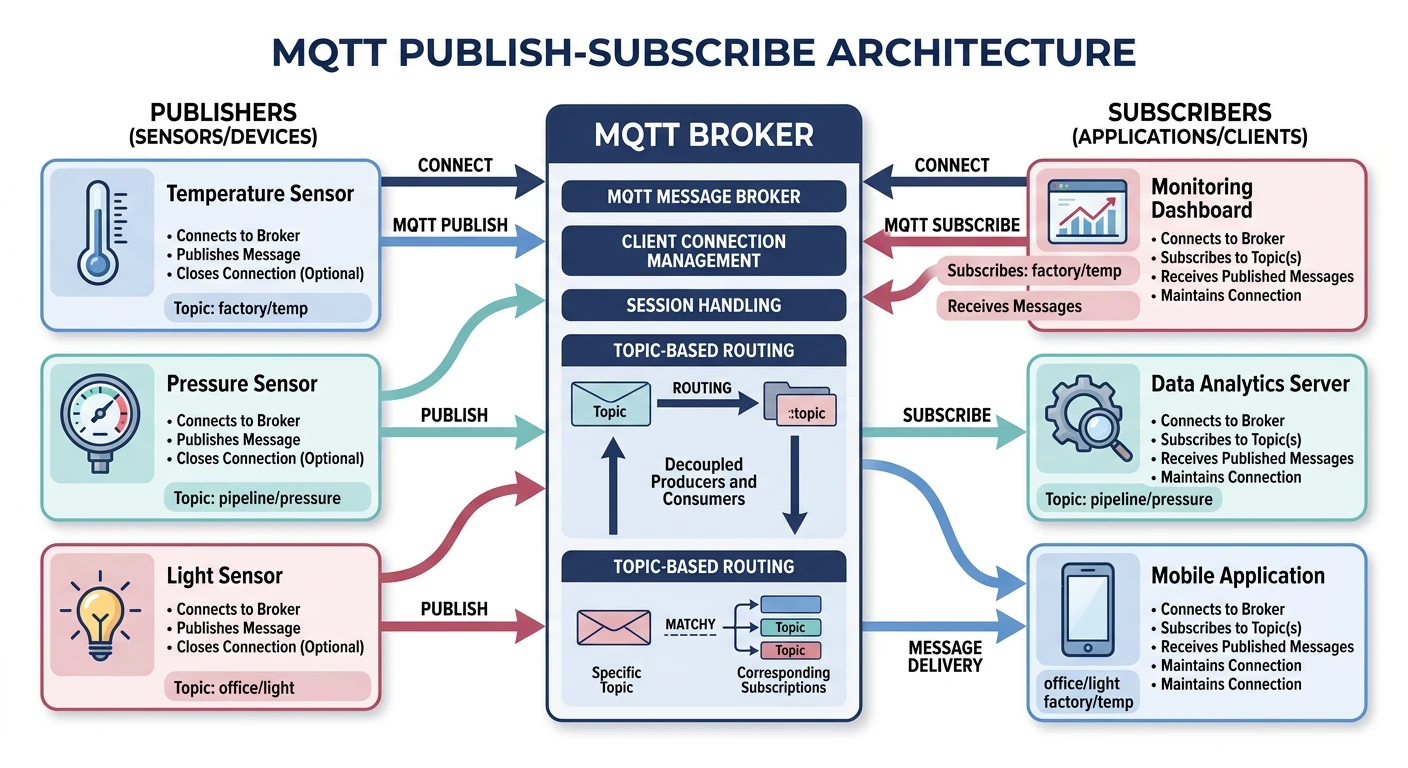
MQTT is the dominant IoT application protocol. Its publish/subscribe pattern decouples senders and receivers, making it perfect for sensor networks where devices come and go.
MQTT pub/sub model: sensors publish to topics, broker routes messages to all matching subscribers
Why MQTT? Designed in 1999 for oil pipeline telemetry over satellite links. Minimal overhead (2-byte header minimum), reliable delivery options, works on unstable connections.
MQTT QoS Levels:

QoS 0: AT MOST ONCE (Fire and Forget)
  Publisher → Broker
  • No acknowledgment
  • May be lost
  • Use for: Frequent sensor readings (loss OK)

QoS 1: AT LEAST ONCE
  Publisher → Broker → PUBACK
  • Acknowledged
  • May be delivered multiple times
  • Use for: Important but idempotent data

QoS 2: EXACTLY ONCE
  Publisher → Broker → PUBREC
  Publisher → Broker → PUBREL
  Publisher → Broker → PUBCOMP
  • 4-way handshake
  • Guaranteed exactly once
  • Use for: Financial, critical commands

QoS Trade-offs:
• Higher QoS = more overhead, more latency
• QoS 0: ~2 bytes overhead
• QoS 1: ~4 bytes + acknowledgment
• QoS 2: 4 messages total
# MQTT Publisher and Subscriber with paho-mqtt

import time
import random

def mqtt_publisher_example():
    """MQTT publisher code example"""

    print("MQTT Publisher Example")
    print("=" * 50)

    print("""
    import paho.mqtt.client as mqtt
    import json
    import time

    # Create client
    client = mqtt.Client(client_id="sensor_001")

    # Connect to broker
    client.connect("broker.hivemq.com", 1883, 60)

    # Start network loop
    client.loop_start()

    # Publish sensor data
    while True:
        data = {
            "device_id": "sensor_001",
            "temperature": 23.5,
            "humidity": 45.2,
            "timestamp": time.time()
        }

        client.publish(
            topic="home/living-room/sensors",
            payload=json.dumps(data),
            qos=1,
            retain=False
        )

        time.sleep(10)
    """)

def mqtt_subscriber_example():
    """MQTT subscriber code example"""

    print("\nMQTT Subscriber Example")
    print("=" * 50)

    print("""
    import paho.mqtt.client as mqtt
    import json

    def on_connect(client, userdata, flags, rc):
        print(f"Connected with code {rc}")
        # Subscribe after connect
        client.subscribe("home/+/sensors")  # All room sensors

    def on_message(client, userdata, msg):
        data = json.loads(msg.payload)
        print(f"Topic: {msg.topic}")
        print(f"Data: {data}")

    client = mqtt.Client(client_id="dashboard_app")
    client.on_connect = on_connect
    client.on_message = on_message

    client.connect("broker.hivemq.com", 1883, 60)
    client.loop_forever()
    """)

    print("\nInstall: pip install paho-mqtt")

mqtt_publisher_example()
mqtt_subscriber_example()
Features
MQTT Special Features
MQTT Special Features:

1. RETAINED MESSAGES
   • Broker stores last message per topic
   • New subscribers get it immediately
   • Perfect for: Current state (thermostat setting)

   client.publish("home/thermostat/setpoint", "22", retain=True)

2. LAST WILL AND TESTAMENT (LWT)
   • Message sent if client disconnects unexpectedly
   • Set during connect
   • Perfect for: Device offline notification

   client.will_set("devices/sensor_001/status", "offline", retain=True)

3. PERSISTENT SESSIONS
   • Broker remembers subscriptions
   • Queues messages while offline
   • clean_session=False

4. KEEP-ALIVE
   • Periodic PINGREQ/PINGRESP
   • Detects half-open connections
   • Default: 60 seconds
CoAP: Constrained Application Protocol
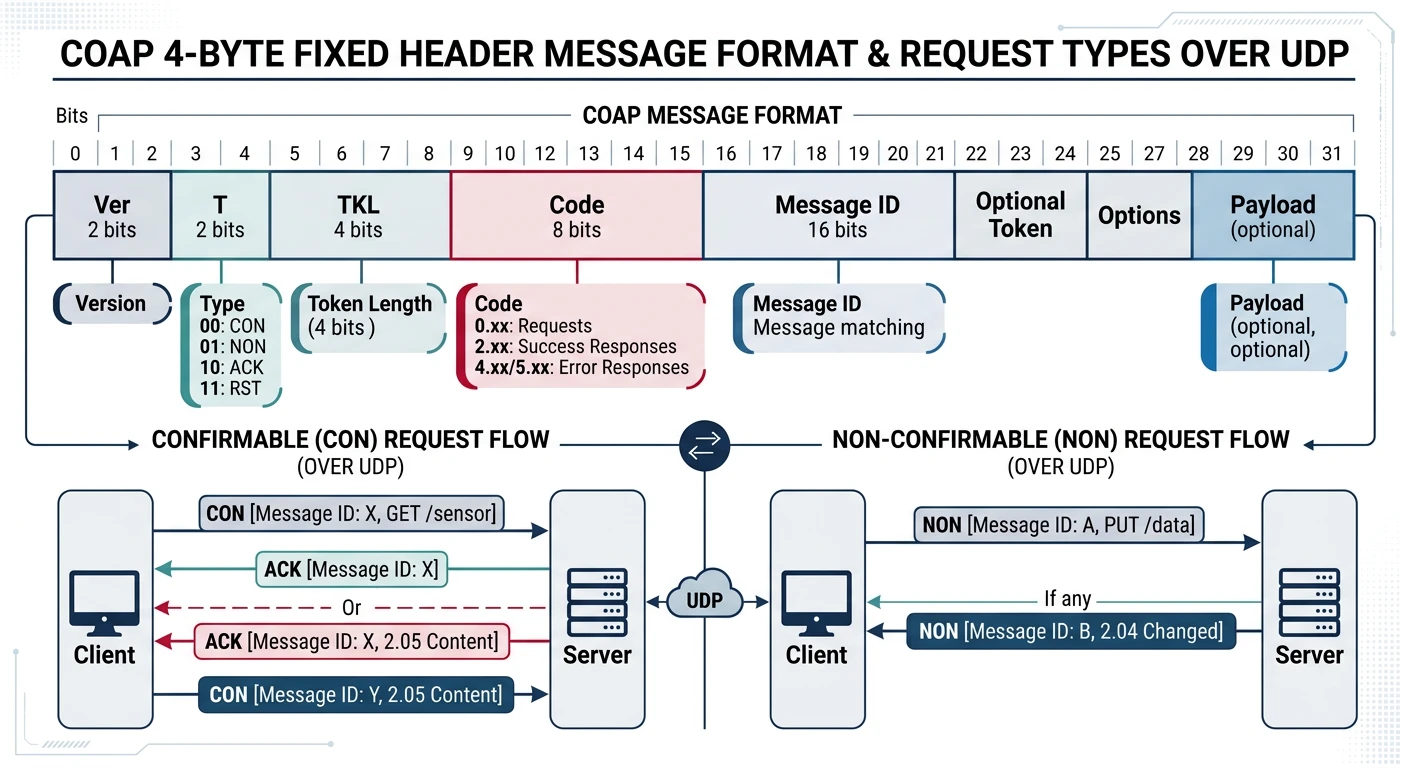
CoAP is "HTTP for IoT"—a REST-like protocol designed for constrained devices. It uses UDP instead of TCP, with minimal overhead for resource-limited sensors.
CoAP message format: 4-byte fixed header enables REST-like requests over UDP with minimal overhead
CoAP vs HTTP
Protocol Comparison
Feature
HTTP
CoAP
Transport
TCP
UDP
Header
Variable (100s bytes)
4 bytes fixed
Methods
GET, POST, PUT, DELETE
Same (mapped)
Reliability
TCP guarantees
Optional (CON/NON)
Multicast
Not supported
Supported
Observe
Polling required
Built-in push
CoAP Message Format (4 bytes header):

 0                   1                   2                   3
 0 1 2 3 4 5 6 7 8 9 0 1 2 3 4 5 6 7 8 9 0 1 2 3 4 5 6 7 8 9 0 1
+-+-+-+-+-+-+-+-+-+-+-+-+-+-+-+-+-+-+-+-+-+-+-+-+-+-+-+-+-+-+-+-+
|Ver| T |  TKL  |      Code     |          Message ID           |
+-+-+-+-+-+-+-+-+-+-+-+-+-+-+-+-+-+-+-+-+-+-+-+-+-+-+-+-+-+-+-+-+
|   Token (0-8 bytes)           |
+-+-+-+-+-+-+-+-+-+-+-+-+-+-+-+-+
|   Options (variable)          |
+-+-+-+-+-+-+-+-+-+-+-+-+-+-+-+-+
|   Payload                     |

T = Type:
  00 = CON (Confirmable) - needs ACK
  01 = NON (Non-confirmable) - fire and forget
  10 = ACK (Acknowledgment)
  11 = RST (Reset)

Code = Method or Response:
  0.01 = GET
  0.02 = POST
  0.03 = PUT
  0.04 = DELETE
  2.05 = Content (200 OK equivalent)
  4.04 = Not Found
CoAP Observe (like MQTT subscription):

Without Observe:
  Client → GET /temperature → Server
  (Wait 10 seconds)
  Client → GET /temperature → Server
  (Polling wastes battery and bandwidth)

With Observe:
  Client → GET /temperature (Observe option) → Server
  Server → 2.05 Content (22.5°C) → Client
  (Temperature changes)
  Server → 2.05 Content (23.0°C) → Client
  (Push notifications until deregistered)

Use cases:
• Sensor readings that change infrequently
• Alert thresholds
• State monitoring
Zigbee & Z-Wave: Mesh Networks
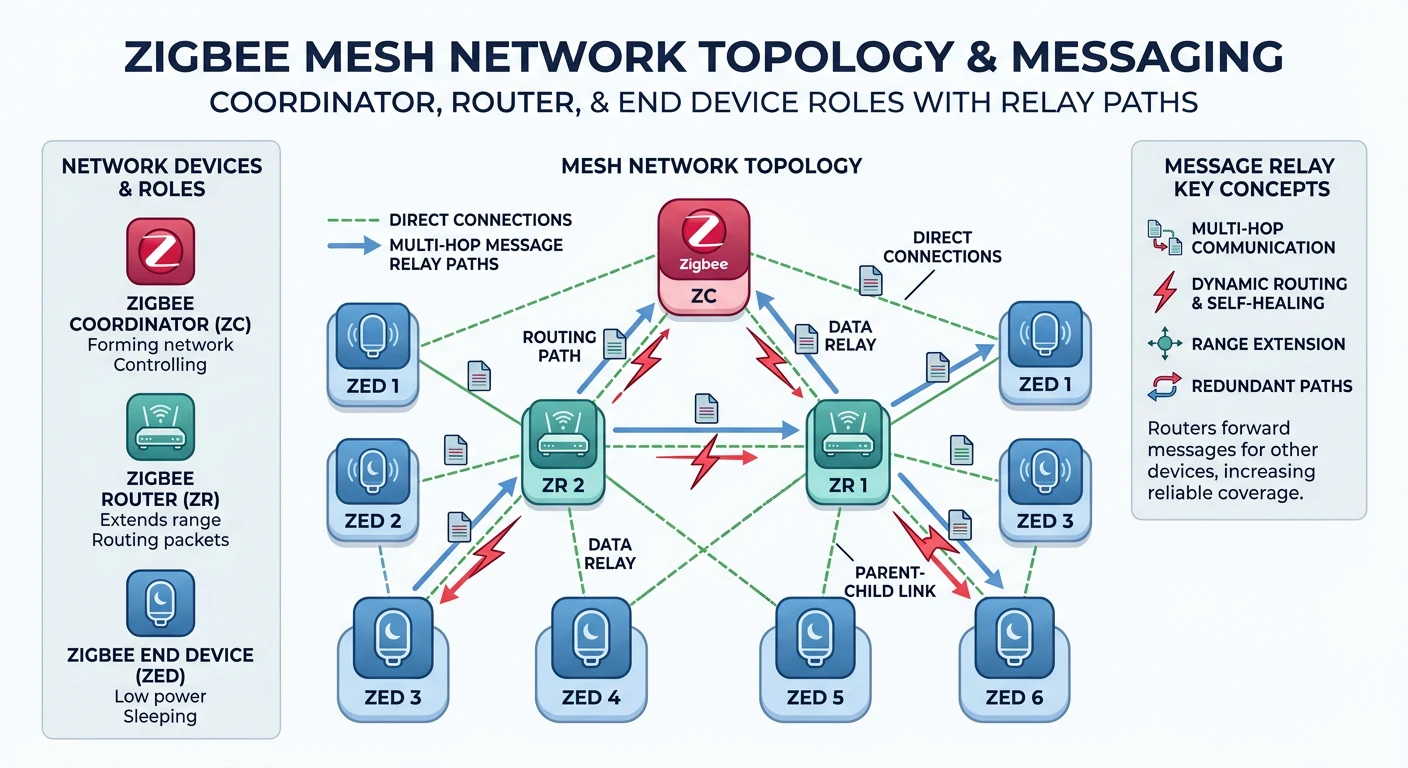
Zigbee and Z-Wave create mesh networks where devices relay messages to extend range. Popular in home automation—lights, switches, sensors.
Zigbee mesh network: coordinators form the network, routers extend range, end devices sleep to conserve power
Comparison
Zigbee vs Z-Wave
Feature
Zigbee
Z-Wave
Frequency
2.4 GHz (worldwide)
Sub-GHz (varies by region)
Range
10-100m
30-100m
Max devices
65,000
232
Data rate
250 kbps
100 kbps
Interference
WiFi overlap
Less (sub-GHz)
Standard
IEEE 802.15.4
Proprietary (now open)
Hubs
Philips Hue, SmartThings
SmartThings, Vera
Zigbee Network Architecture:

Device Types:
1. COORDINATOR (1 per network)
   • Forms the network
   • Assigns addresses
   • Usually the hub

2. ROUTER (mains-powered)
   • Extends range
   • Relays messages
   • Light bulbs, smart plugs

3. END DEVICE (battery-powered)
   • Sleeps to save power
   • Cannot relay
   • Sensors, remotes

Mesh Topology:
    [Coordinator]
        /    \
   [Router]  [Router]
    /   \       \
[End]  [End]  [End]

Messages hop through routers to reach coordinator
If one router fails, messages route around it
# Zigbee interaction example (zigpy library)

def zigbee_example():
    """Show Zigbee concepts"""

    print("Zigbee Example (zigpy)")
    print("=" * 50)

    print("""
    # zigpy is the Python library for Zigbee
    # Used by Home Assistant's ZHA integration

    import zigpy.application
    from zigpy.profiles import zha

    # Device types in Zigbee Cluster Library (ZCL)
    clusters = {
        "On/Off": "0x0006",      # Lights, switches
        "Level Control": "0x0008",  # Dimmers
        "Color Control": "0x0300",  # RGB lights
        "Temperature": "0x0402",    # Sensors
        "Humidity": "0x0405",
        "Occupancy": "0x0406",      # Motion sensors
        "IAS Zone": "0x0500",       # Security sensors
    }

    # Example: Turn on a light
    # await device.endpoints[1].on_off.on()

    # Example: Set brightness
    # await device.endpoints[1].level.move_to_level(255, 10)

    # Example: Read temperature
    # temp = await device.endpoints[1].temperature.read_attributes(['measured_value'])
    """)

    print("\nPopular Zigbee Hubs:")
    print("• Philips Hue Bridge")
    print("• Amazon Echo (4th gen)")
    print("• SmartThings Hub")
    print("• Home Assistant (with Zigbee dongle)")

zigbee_example()
LoRaWAN: Long Range Wide Area Network
LoRaWAN enables communication over kilometers on tiny batteries. Perfect for remote sensors, agriculture, smart cities—anywhere WiFi/cellular doesn't reach.
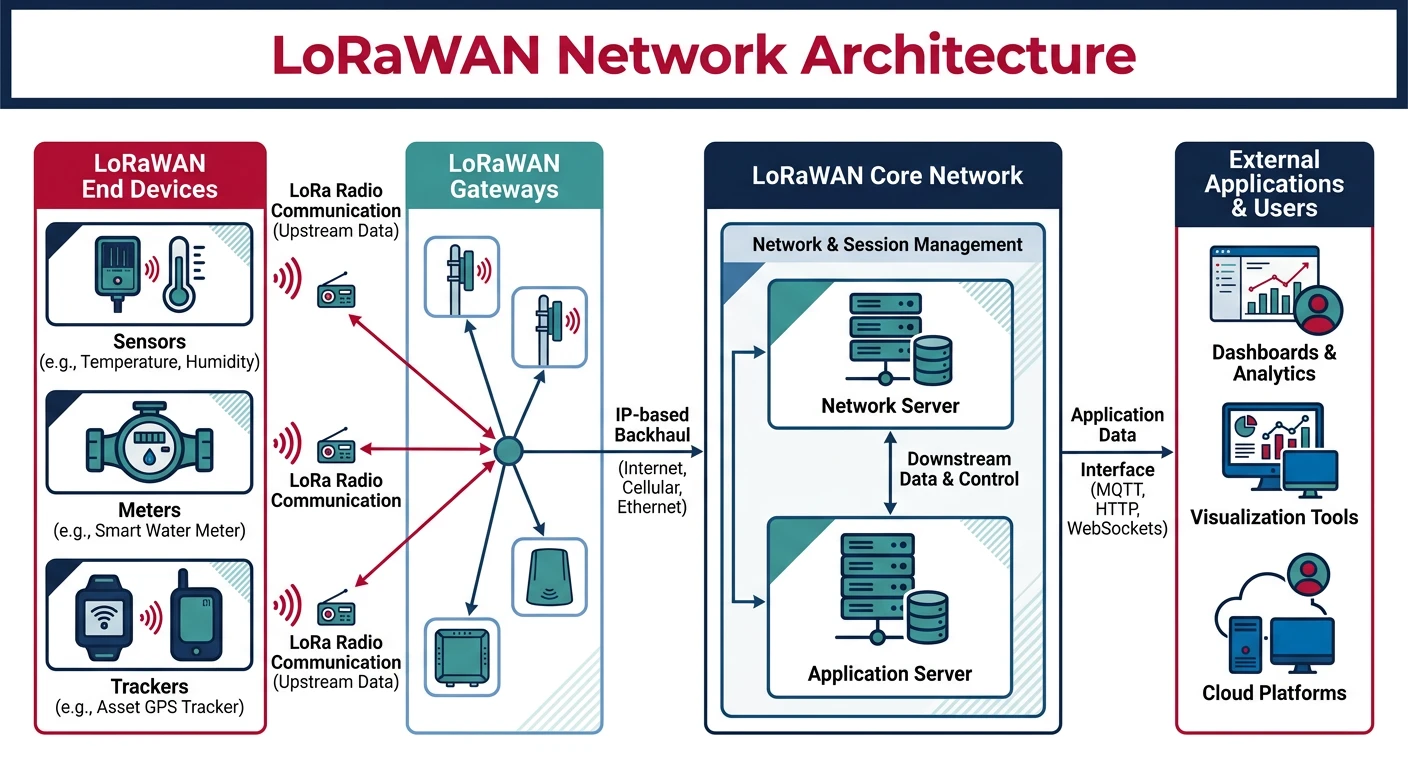
LoRaWAN architecture: end devices reach gateways over kilometers via LoRa radio, forwarded to network/app servers via IP
LoRa vs LoRaWAN: LoRa is the physical layer (radio modulation). LoRaWAN is the network protocol on top. Think of it like WiFi (physical) vs IP (protocol).
Architecture
LoRaWAN Network
LoRaWAN Architecture:

[End Devices] → (LoRa Radio) → [Gateways] → (IP) → [Network Server] → [App Server]

1. END DEVICES
   • Sensors, actuators
   • Battery-powered (years!)
   • Send small messages (51-242 bytes)

2. GATEWAYS
   • Receive LoRa, forward to network
   • Multiple gateways receive same message
   • Coverage: 2-15 km (urban to rural)

3. NETWORK SERVER
   • De-duplicate messages
   • Handle encryption
   • Manage device activation

4. APPLICATION SERVER
   • Your data processing
   • Decode payloads
   • Integrate with services

Device Classes:
• Class A: Lowest power, send then listen briefly
• Class B: Scheduled receive windows
• Class C: Always listening (mains-powered)
# LoRaWAN payload encoding example

import struct

def lorawan_payload_example():
    """Demonstrate efficient LoRaWAN payload encoding"""

    print("LoRaWAN Payload Encoding")
    print("=" * 50)

    # LoRaWAN payloads should be SMALL (bandwidth costs!)
    # Use binary encoding, not JSON

    # Example: Weather station data
    # Temperature: -40 to +85°C (0.1° resolution)
    # Humidity: 0-100% (1% resolution)
    # Battery: 0-100% (1% resolution)

    def encode_weather_data(temp_c, humidity_pct, battery_pct):
        """Encode weather data to minimal bytes"""
        # Temperature: offset by 40, multiply by 10 (0-1250 fits in 2 bytes)
        temp_encoded = int((temp_c + 40) * 10)
        # Humidity and battery: 1 byte each

        # Pack into 4 bytes total
        payload = struct.pack('>HBB', temp_encoded, humidity_pct, battery_pct)
        return payload

    def decode_weather_data(payload):
        """Decode weather data from bytes"""
        temp_encoded, humidity, battery = struct.unpack('>HBB', payload)
        temp_c = (temp_encoded / 10) - 40
        return {'temperature': temp_c, 'humidity': humidity, 'battery': battery}

    # Example
    temp = 23.5
    humidity = 65
    battery = 87

    payload = encode_weather_data(temp, humidity, battery)
    print(f"\nOriginal: temp={temp}°C, humidity={humidity}%, battery={battery}%")
    print(f"Encoded: {payload.hex()} ({len(payload)} bytes)")

    decoded = decode_weather_data(payload)
    print(f"Decoded: {decoded}")

    # Compare to JSON
    import json
    json_payload = json.dumps({'temperature': temp, 'humidity': humidity, 'battery': battery})
    print(f"\nJSON would be: {len(json_payload)} bytes")
    print(f"Savings: {len(json_payload) - len(payload)} bytes ({(1 - len(payload)/len(json_payload))*100:.0f}% smaller)")

lorawan_payload_example()
Limits
LoRaWAN Constraints
LoRaWAN Limitations:

DATA RATE: 0.3 - 50 kbps (very slow!)
• Not for: Video, audio, large files
• Good for: Sensor readings, alerts

DUTY CYCLE: 1% in EU (regulation)
• Can only transmit 1% of time
• 36 seconds per hour maximum
• Plan message frequency carefully

PAYLOAD SIZE: 51-242 bytes (depends on data rate)
• Use binary encoding, not JSON
• Every byte counts

LATENCY: Seconds to minutes
• Not real-time
• Suitable for telemetry, not control

DOWNLINK: Limited
• Class A: Only after uplink
• More uplinks than downlinks expected