Understand how email works: SMTP for sending, POP3 and IMAP for receiving. Learn essential email security mechanisms including SPF, DKIM, and DMARC to protect against spoofing and phishing.
Email is one of the oldest and most critical internet services. Despite being decades old, email remains the backbone of business communication, delivering over 300 billion messages daily.
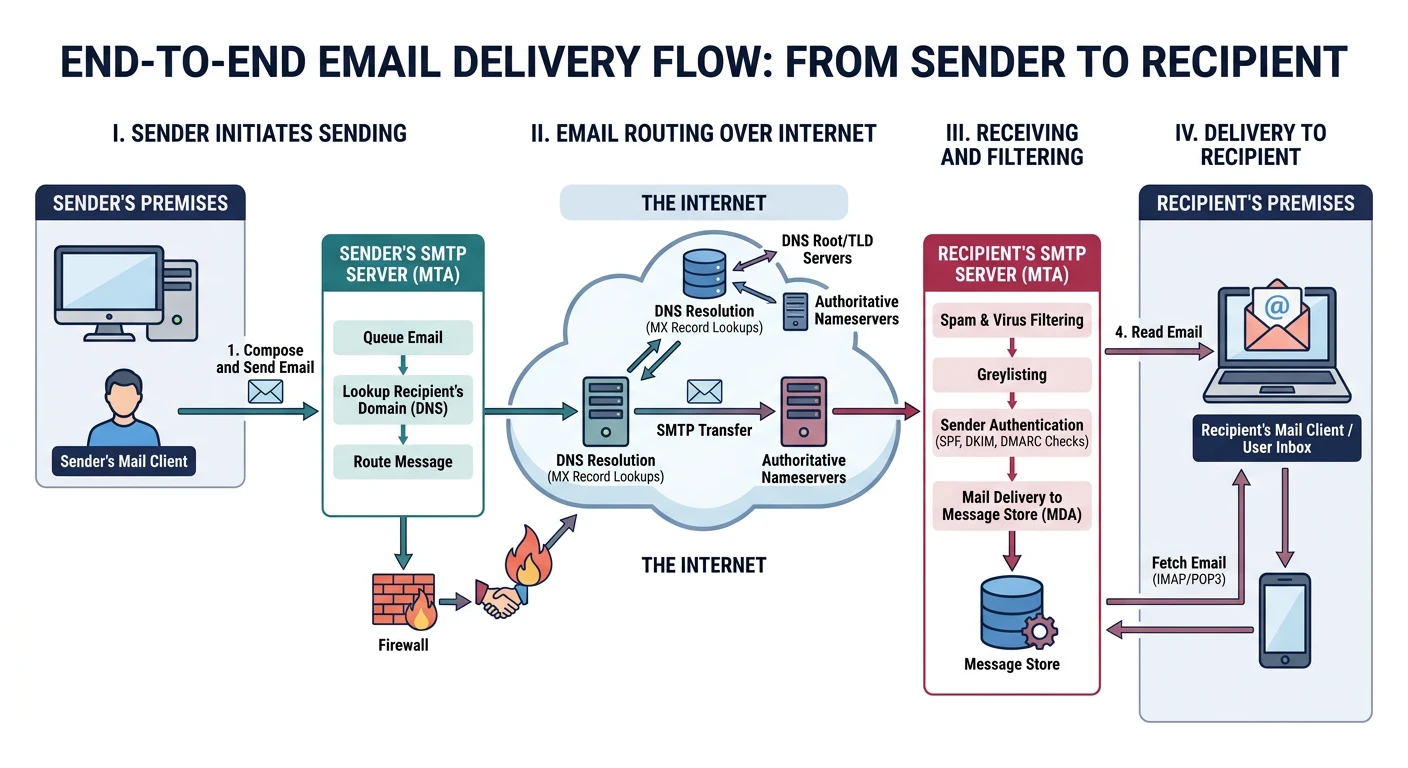
Email delivery flow: from sender's mail client through SMTP relay servers to the recipient's inbox
Series Context: This is Part 9 of 20 in the Complete Protocols Master series. Email protocols work at the Application Layer, with DNS playing a crucial role in mail routing via MX records.
1. Alice composes email, clicks Send
2. Client submits to smtp.company.com (port 587, authenticated)
3. company.com queries DNS for example.org MX record
4. SMTP relay to mail.example.org (port 25)
5. SPF/DKIM/DMARC checks performed
6. Message stored in Bob's mailbox
7. Bob's client fetches via IMAP (port 993)

+-----------------------------------------------------+
| Alice's    SMTP     Company     SMTP     Example   |
| Client  ------->  Mail Server -----> Mail Server   |
|                                           |        |
| Bob's      IMAP                      Bob's         |
| Client  <-------------------------- Mailbox        |
+-----------------------------------------------------+
SMTP: Simple Mail Transfer Protocol
SMTP is the protocol for sending email. It's text-based and human-readable, making it easy to debug but also easy to abuse without proper authentication.
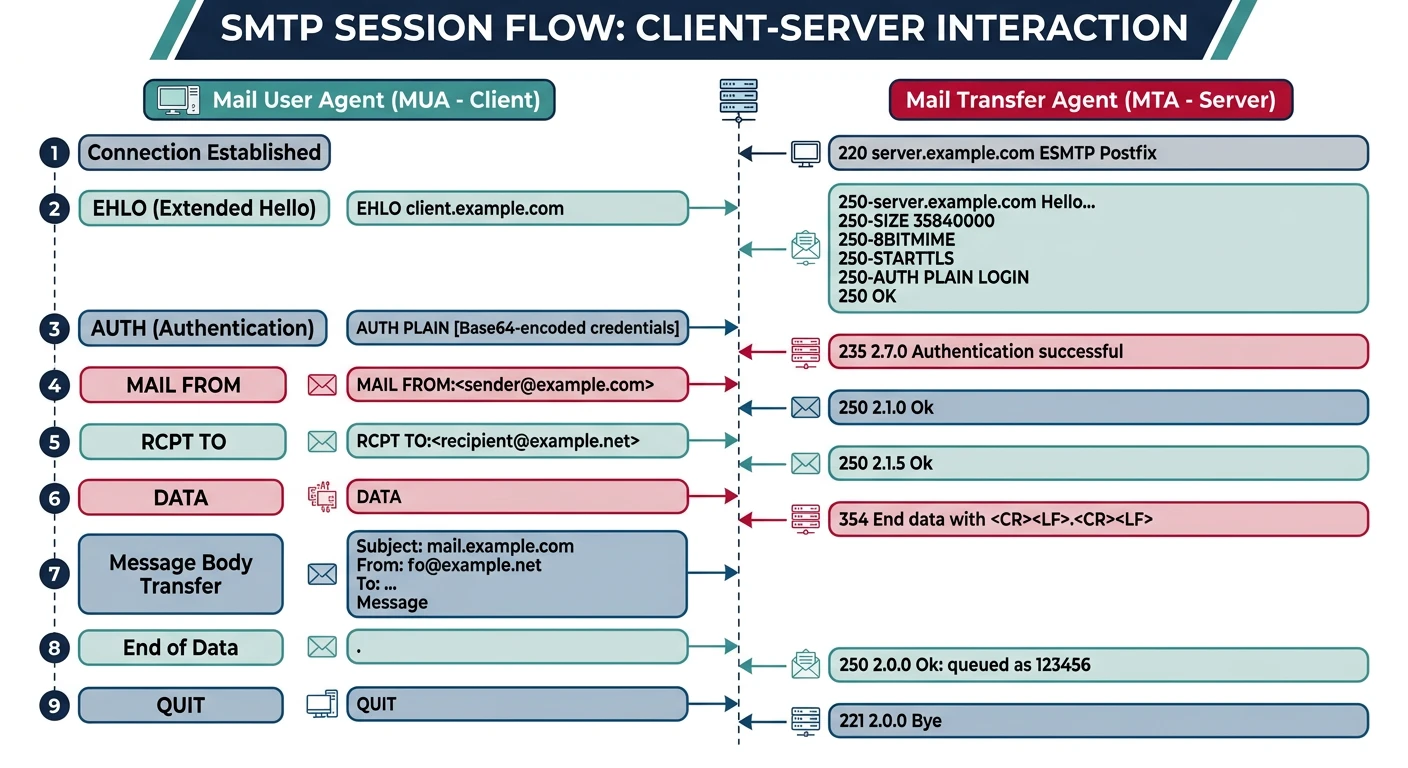
SMTP session flow: client commands and server responses during email transmission
Commands
SMTP Commands
SMTP Commands:
EHLO/HELO    - Identify client (EHLO for extensions)
AUTH         - Authenticate (LOGIN, PLAIN)
MAIL FROM:   - Specify sender
RCPT TO:     - Specify recipient(s)
DATA         - Start message content (end with .\r\n)
QUIT         - End session

Response Codes:
220 - Service ready
250 - OK
354 - Start mail input
421 - Service unavailable
550 - Mailbox not found

Ports:
25  - Server-to-server relay
465 - SMTP over SSL
587 - Submission (client-to-server with STARTTLS)
# SMTP session example
S: 220 smtp.example.com ESMTP ready
C: EHLO client.example.net
S: 250-smtp.example.com
S: 250-STARTTLS
S: 250-AUTH LOGIN PLAIN
S: 250 OK
C: STARTTLS
S: 220 Ready to start TLS
[TLS handshake]
C: AUTH LOGIN
S: 334 VXNlcm5hbWU6
C: [base64 username]
S: 334 UGFzc3dvcmQ6
C: [base64 password]
S: 235 Authentication successful
C: MAIL FROM:<alice@example.com>
S: 250 OK
C: RCPT TO:<bob@example.org>
S: 250 OK
C: DATA
S: 354 Start mail input
C: From: Alice <alice@example.com>
C: To: Bob <bob@example.org>
C: Subject: Hello!
C:
C: Hi Bob, this is a test.
C: .
S: 250 OK: queued
C: QUIT
S: 221 Bye
# Python SMTP example
from email.mime.text import MIMEText
from email.mime.multipart import MIMEMultipart

def demonstrate_smtp_message():
    """Show SMTP message structure"""
    msg = MIMEMultipart()
    msg['From'] = 'alice@example.com'
    msg['To'] = 'bob@example.org'
    msg['Subject'] = 'Hello from Python!'

    body = "Hi Bob,\n\nThis is a test email.\n\nBest,\nAlice"
    msg.attach(MIMEText(body, 'plain'))

    print("SMTP Message Structure:")
    print("=" * 50)
    print(msg.as_string())

    print("\nTo send:")
    print("""
    import smtplib
    with smtplib.SMTP('smtp.example.com', 587) as server:
        server.starttls()
        server.login('user', 'password')
        server.send_message(msg)
    """)

demonstrate_smtp_message()
POP3: Post Office Protocol
POP3 is simple|download emails, optionally delete from server. Best for single-device access with local storage.
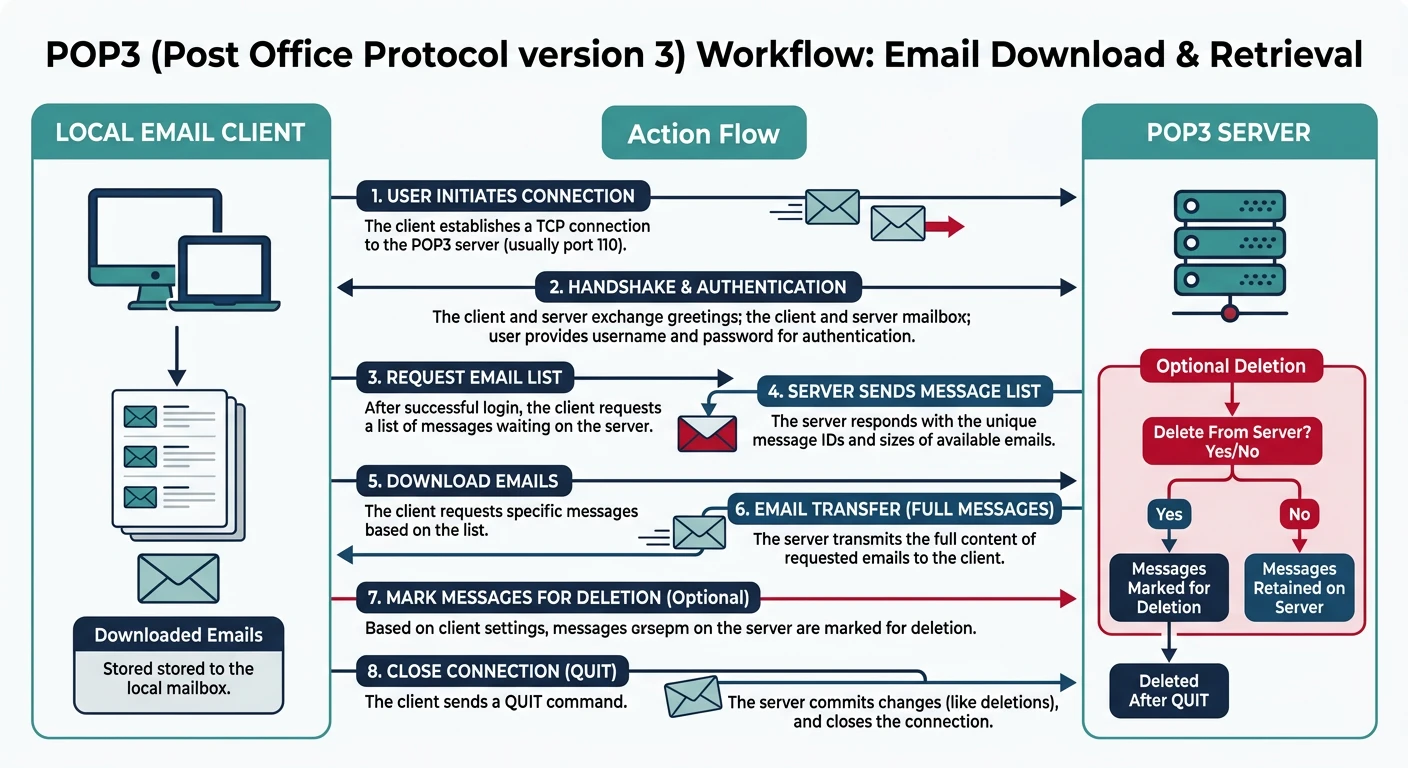
POP3 workflow: download emails to local storage with optional server-side deletion
POP3
POP3 Commands
POP3 Commands:
USER <name>    - Username
PASS <pwd>     - Password
STAT           - Mailbox status
LIST           - List messages
RETR <n>       - Retrieve message n
DELE <n>       - Delete message n
QUIT           - Commit and close

Session:
S: +OK POP3 ready
C: USER bob
S: +OK
C: PASS secret
S: +OK 3 messages
C: STAT
S: +OK 3 12048
C: RETR 1
S: +OK
S: [message content]
S: .
C: DELE 1
S: +OK deleted
C: QUIT
S: +OK bye

Ports: 110 (plain), 995 (SSL)
POP3 Limitations: Single-device focused, no folders, no sync. Delete on one device = gone everywhere. Use IMAP for multi-device access.
IMAP: Internet Message Access Protocol
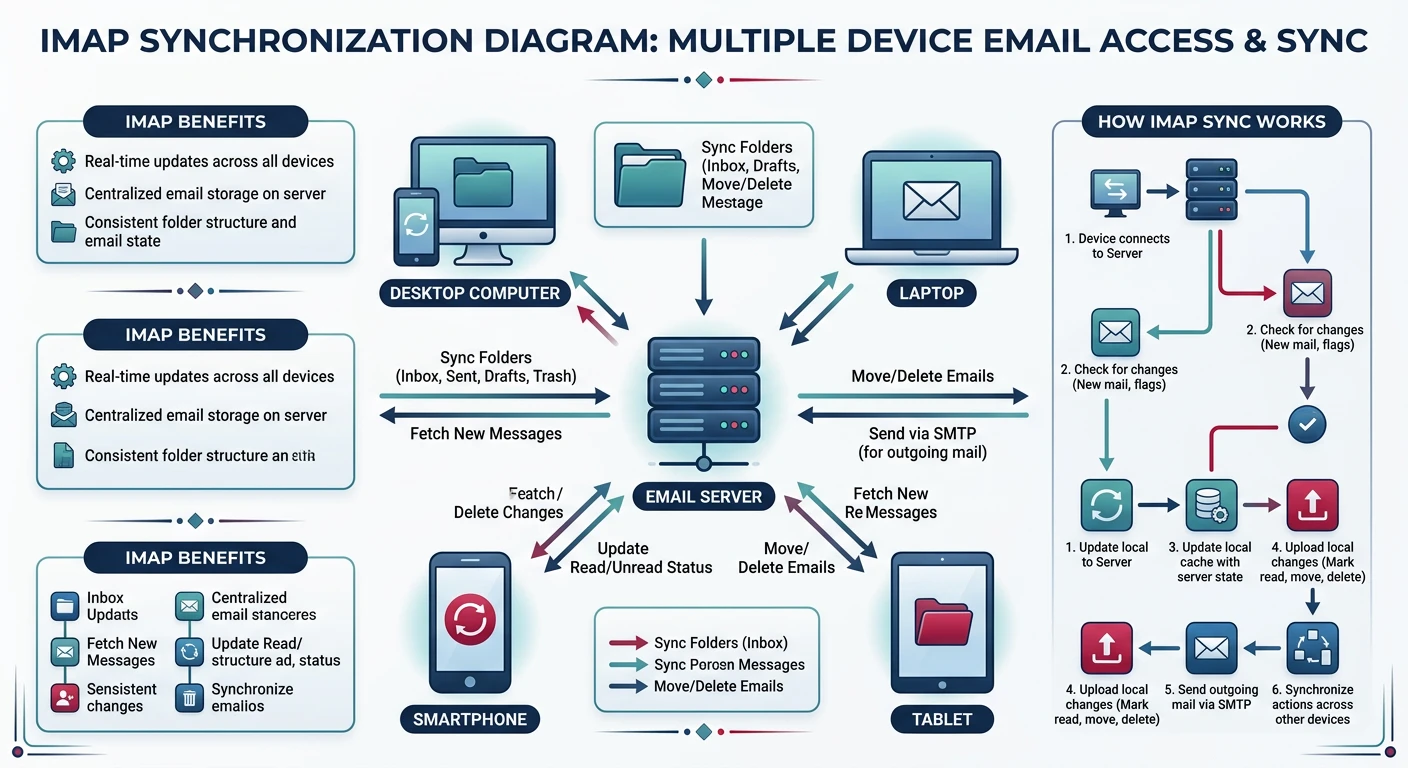
IMAP keeps email on the server and synchronizes across devices. It supports folders, server-side search, and partial message fetching.
IMAP multi-device sync: emails stay on the server and synchronize across all connected devices
Comparison
IMAP vs POP3
Feature
POP3
IMAP
Storage
Download locally
Server-side
Folders
Inbox only
Multiple
Multi-device
Poor
Designed for it
Search
Local
Server-side
Partial fetch
No
Yes
# IMAP session example
S: * OK IMAP4rev1 ready
C: a001 LOGIN bob secret
S: a001 OK LOGIN completed
C: a002 SELECT INBOX
S: * 172 EXISTS
S: * 1 RECENT
S: a002 OK SELECT completed
C: a003 FETCH 172 (FLAGS BODY[HEADER])
S: * 172 FETCH (FLAGS (\Recent) BODY[HEADER] {...})
S: a003 OK FETCH completed
C: a004 STORE 172 +FLAGS (\Seen)
S: a004 OK STORE completed
C: a005 LOGOUT
S: * BYE
S: a005 OK LOGOUT completed

Key Commands: LOGIN, SELECT, FETCH, STORE, SEARCH, COPY, IDLE
Ports: 143 (STARTTLS), 993 (SSL)
# IMAP operations demo
def demonstrate_imap_operations():
    """Demonstrate IMAP concepts"""
    operations = [
        ("LOGIN", "Authenticate"),
        ("SELECT INBOX", "Open mailbox"),
        ("SEARCH UNSEEN", "Find unread"),
        ("FETCH n (BODY[HEADER])", "Get headers"),
        ("FETCH n (BODY[TEXT])", "Get body"),
        ("STORE n +FLAGS (\\Seen)", "Mark read"),
        ("COPY n Archive", "Copy to folder"),
        ("IDLE", "Wait for new mail (push)")
    ]

    print("IMAP Operations:")
    print("=" * 50)
    for cmd, desc in operations:
        print(f"  {cmd:30} - {desc}")

    print("\nPython example:")
    print("""
    import imaplib

    mail = imaplib.IMAP4_SSL('imap.example.com', 993)
    mail.login('user', 'password')
    mail.select('INBOX')

    status, messages = mail.search(None, 'UNSEEN')
    for num in messages[0].split():
        status, data = mail.fetch(num, '(RFC822)')
        # Process email...

    mail.logout()
    """)

demonstrate_imap_operations()
Email Security: SPF, DKIM, DMARC
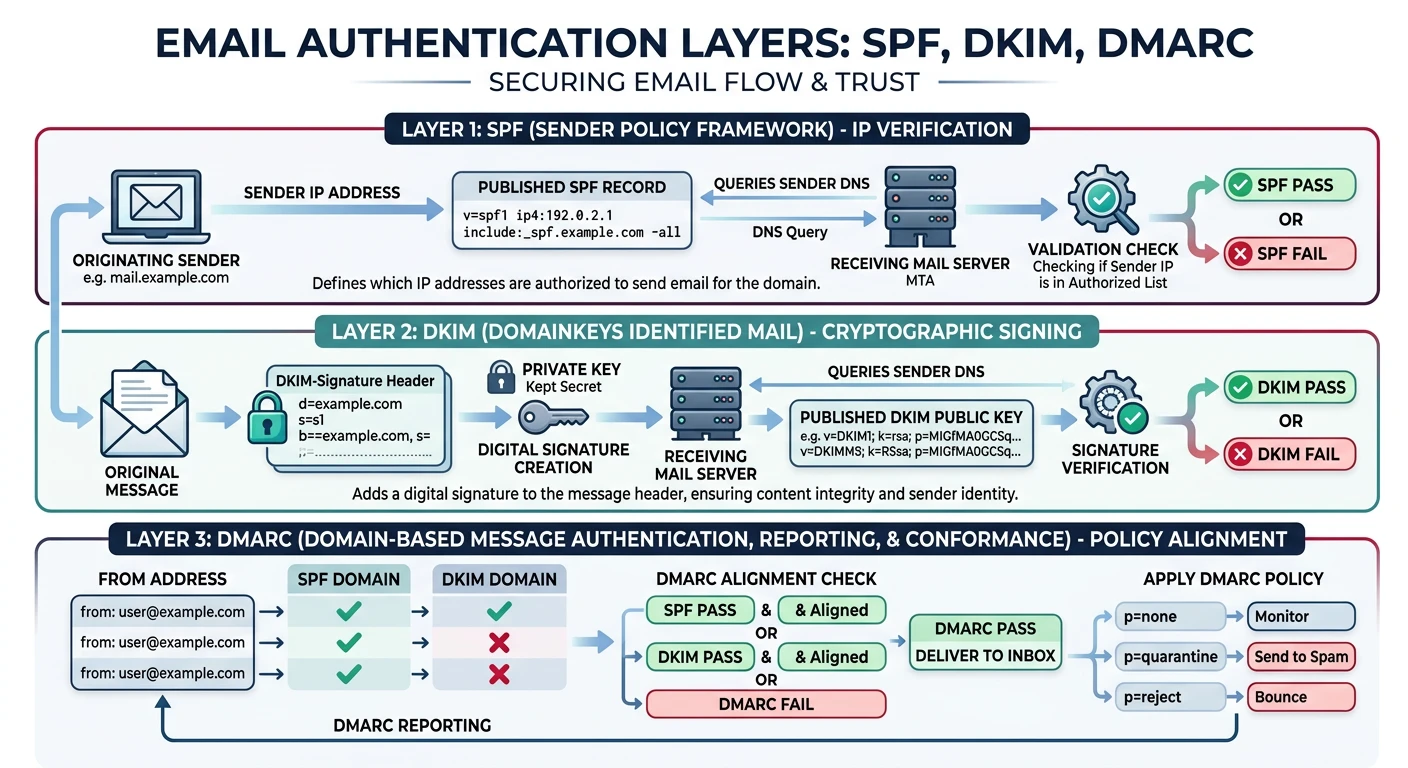
Email was designed without authentication|the From header can be anything! SPF, DKIM, and DMARC work together to prevent spoofing.
SPF: DNS TXT record listing authorized sending IPs

example.com. TXT "v=spf1 ip4:192.0.2.0/24 include:_spf.google.com -all"

Components:
v=spf1           - Version
ip4:192.0.2.0/24 - Allow IP range
include:...      - Include another SPF
a                - Allow A record IPs
mx               - Allow MX record IPs
-all             - Hard fail others
~all             - Soft fail others

Check: Does sending IP match SPF record for envelope sender domain?
Limitation: Doesn't check From: header, breaks with forwarding
DKIM
DKIM: DomainKeys Identified Mail
DKIM: Cryptographically signs email headers + body

DKIM-Signature: v=1; a=rsa-sha256; d=example.com; s=selector1;
  h=from:to:subject:date;
  bh=base64_body_hash;
  b=base64_signature

Public key in DNS:
selector1._domainkey.example.com. TXT "v=DKIM1; k=rsa; p=MIGfMA0..."

Advantages:
| Survives forwarding (signature travels with email)
| Verifies content integrity
| More robust than SPF alone
DMARC
DMARC: Domain-based Message Authentication
DMARC: Ties SPF + DKIM together with policy and reporting

_dmarc.example.com. TXT "v=DMARC1; p=reject; rua=mailto:dmarc@example.com"

Parameters:
p=none       - Monitor only
p=quarantine - Send to spam
p=reject     - Block entirely
rua=         - Aggregate report email
ruf=         - Forensic report email

ALIGNMENT (Critical):
SPF checks: envelope sender (MAIL FROM)
DKIM checks: signing domain (d=)
DMARC requires: at least one must ALIGN with visible From: header!

Recommended rollout:
1. p=none (monitor)
2. p=quarantine pct=10 (test 10%)
3. p=quarantine pct=100
4. p=reject (full protection)
# Email authentication check simulation
def check_email_auth(email_info):
    """Simulate SPF/DKIM/DMARC checks"""
    results = {'spf': 'unknown', 'dkim': 'unknown', 'dmarc': 'unknown'}

    # SPF: Is sending IP authorized?
    envelope_domain = email_info['envelope_from'].split('@')[1]
    if email_info['sending_ip'] in email_info.get('spf_ips', []):
        results['spf'] = 'pass'
    else:
        results['spf'] = 'fail'

    # DKIM: Is signature valid?
    results['dkim'] = 'pass' if email_info.get('dkim_valid') else 'fail'

    # DMARC: Alignment check
    header_domain = email_info['header_from'].split('@')[1]
    dkim_domain = email_info.get('dkim_domain', '')

    spf_aligned = envelope_domain == header_domain
    dkim_aligned = dkim_domain == header_domain

    if (results['spf'] == 'pass' and spf_aligned) or \
       (results['dkim'] == 'pass' and dkim_aligned):
        results['dmarc'] = 'pass'
    else:
        results['dmarc'] = 'fail'

    return results

# Test: Legitimate email
print("Legitimate Email:")
result = check_email_auth({
    'header_from': 'alice@example.com',
    'envelope_from': 'bounce@example.com',
    'sending_ip': '192.0.2.10',
    'spf_ips': ['192.0.2.10'],
    'dkim_valid': True,
    'dkim_domain': 'example.com'
})
for k, v in result.items():
    print(f"  {k.upper()}: {v}")

# Test: Spoofed email
print("\nSpoofed Email:")
result = check_email_auth({
    'header_from': 'ceo@example.com',
    'envelope_from': 'attacker@evil.com',
    'sending_ip': '198.51.100.5',
    'spf_ips': ['192.0.2.10'],
    'dkim_valid': False,
    'dkim_domain': ''
})
for k, v in result.items():
    print(f"  {k.upper()}: {v}")
print("  Action: REJECT (DMARC policy)")
Hands-On Exercises
Quiz
Test Your Knowledge
What protocol sends email? (SMTP)
POP3 vs IMAP main difference? (POP3 downloads/deletes, IMAP syncs)
SMTP submission port with TLS? (587)
What does SPF verify? (Sending IP authorization)
What does DKIM add? (Cryptographic signature)
What is DMARC alignment? (SPF/DKIM domain must match From:)