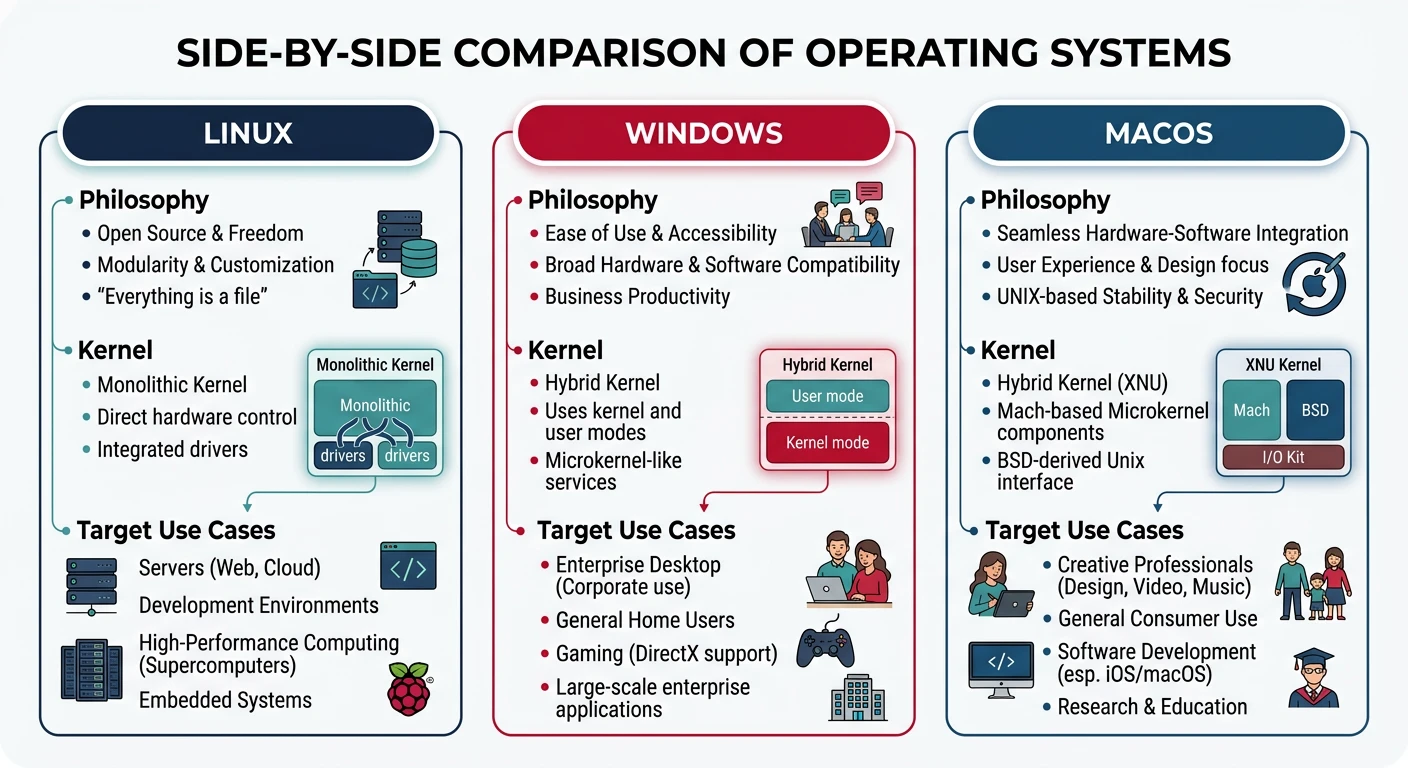
Each major operating system represents different design philosophies and trade-offs. Comparing them reveals the diversity of approaches to common OS challenges.
Three major operating systems compared: Linux (flexibility), Windows (compatibility), and macOS (integration) reflect distinct design philosophies
Series Context: This is Part 23 of 24 in the Computer Architecture & Operating Systems Mastery series. We compare the three major desktop/server operating systems.
Design Philosophy Matters: Linux prioritizes flexibility and transparency. Windows emphasizes compatibility. macOS focuses on integration. These philosophies shape every technical decision.
Linux Overview
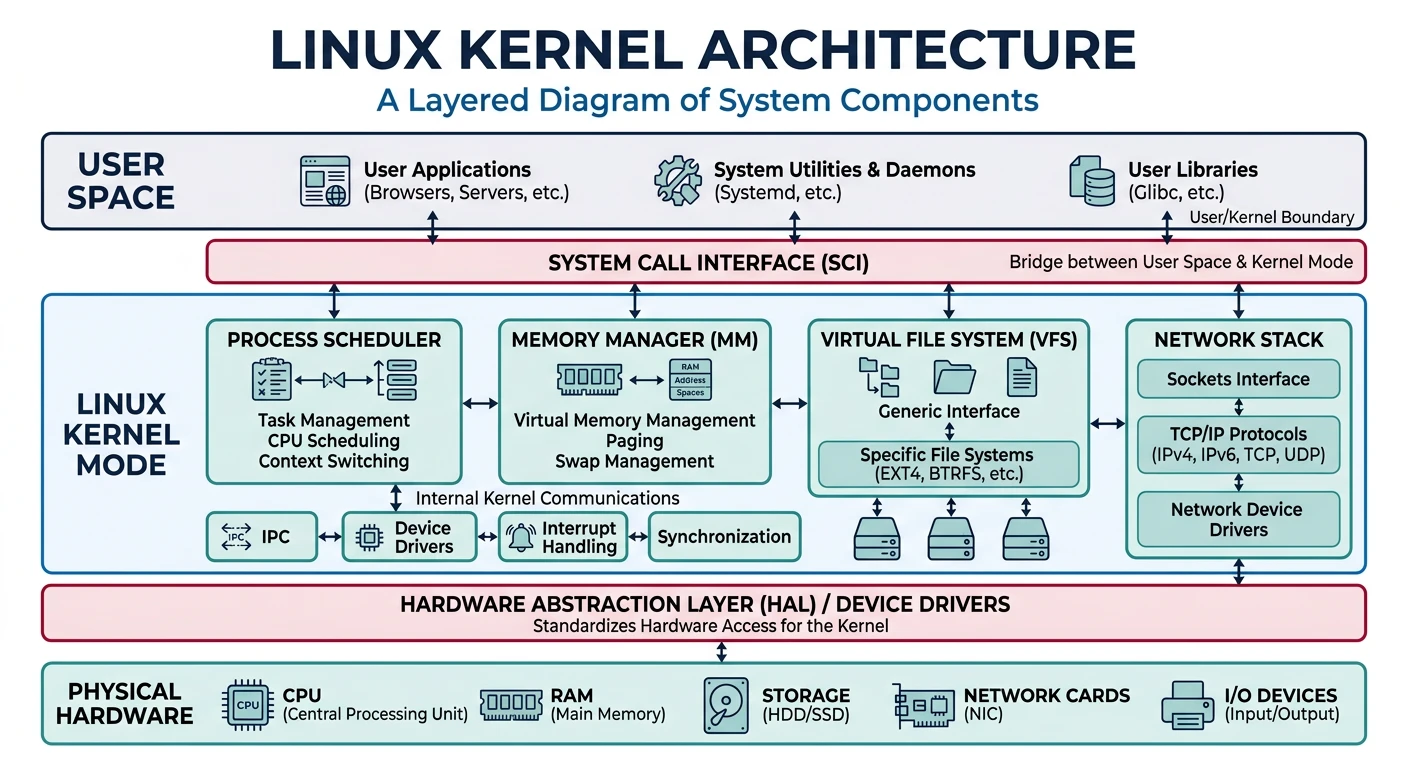
Linux is a free, open-source kernel powering everything from phones (Android) to supercomputers.
Linux monolithic kernel architecture: all core services run in kernel space with a unified system call interface
Linux History & Philosophy
Linux Timeline:
══════════════════════════════════════════════════════════════

1991  Linus Torvalds releases Linux 0.01
1994  Linux 1.0 (TCP/IP, X Window)
1996  Linux 2.0 (SMP support)
2003  Linux 2.6 (O(1) scheduler)
2011  Linux 3.0 (cgroups mature)
2020  Linux 5.x (io_uring, eBPF)

Design Philosophy:
• "Everything is a file"
• Small tools that do one thing well
• Open development, GPLv2 license
• Performance and flexibility over ease of use
Windows Overview
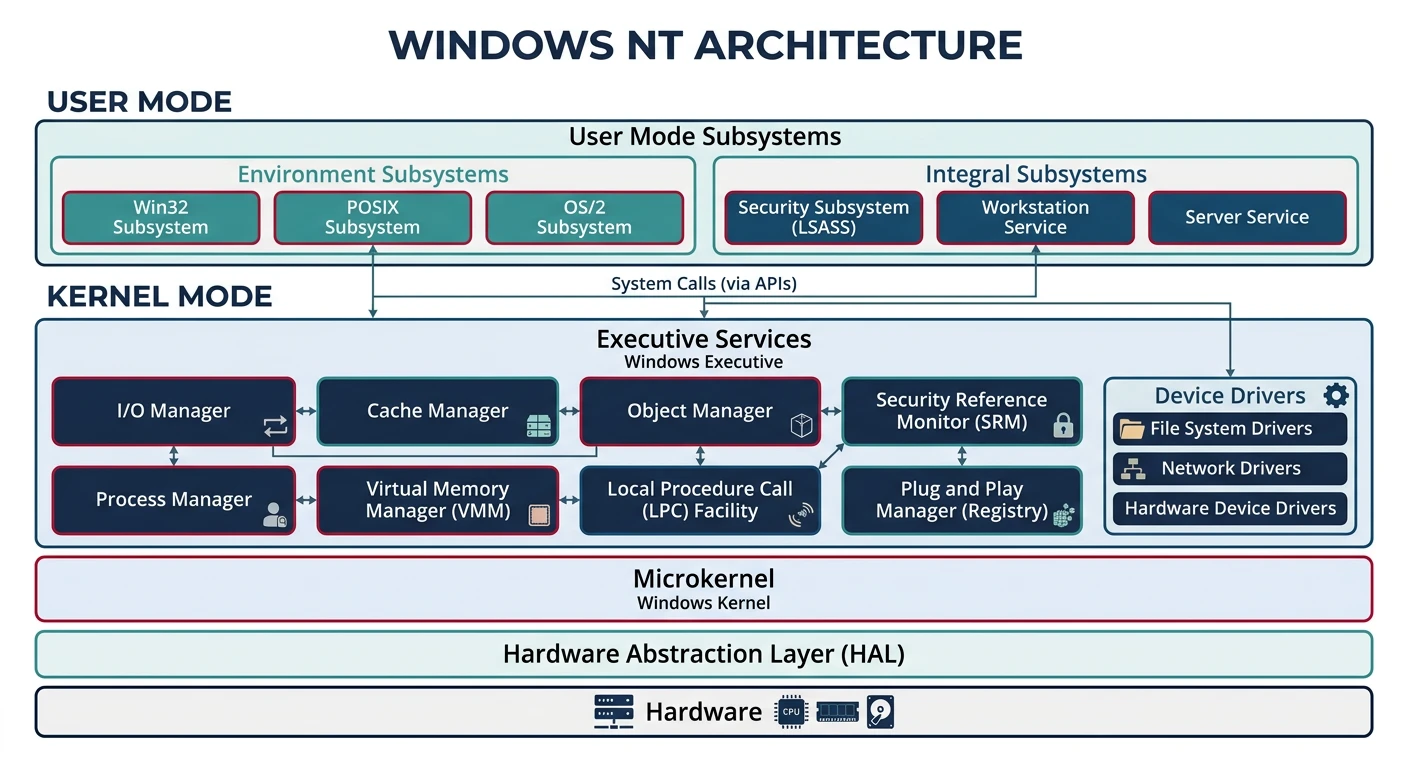
Windows NT is Microsoft's kernel since Windows NT 3.1 (1993), designed for compatibility and enterprise features.
Windows NT hybrid kernel architecture: executive services bridge user-mode subsystems and the hardware abstraction layer
Windows NT Architecture:
══════════════════════════════════════════════════════════════

 User Mode
 ┌───────────────────────────────────────┐
 │  Win32 Apps | UWP Apps | Subsystems  │
 ├───────────────────────────────────────┤
 │        NTDLL.DLL (NT API)             │
 └───────────────────────────────────────┘
                    │
 Kernel Mode        ▼
 ┌───────────────────────────────────────┐
 │    Executive (NT Kernel Services)     │
 │  • Process Mgr   • Memory Mgr         │
 │  • I/O Mgr       • Object Mgr         │
 ├───────────────────────────────────────┤
 │    HAL (Hardware Abstraction Layer)   │
 └───────────────────────────────────────┘

Key Features:
• Object-based design (everything is an object)
• Strong backward compatibility
• Registry for configuration
• Hybrid kernel (microkernel-like structure, monolithic performance)
macOS Overview
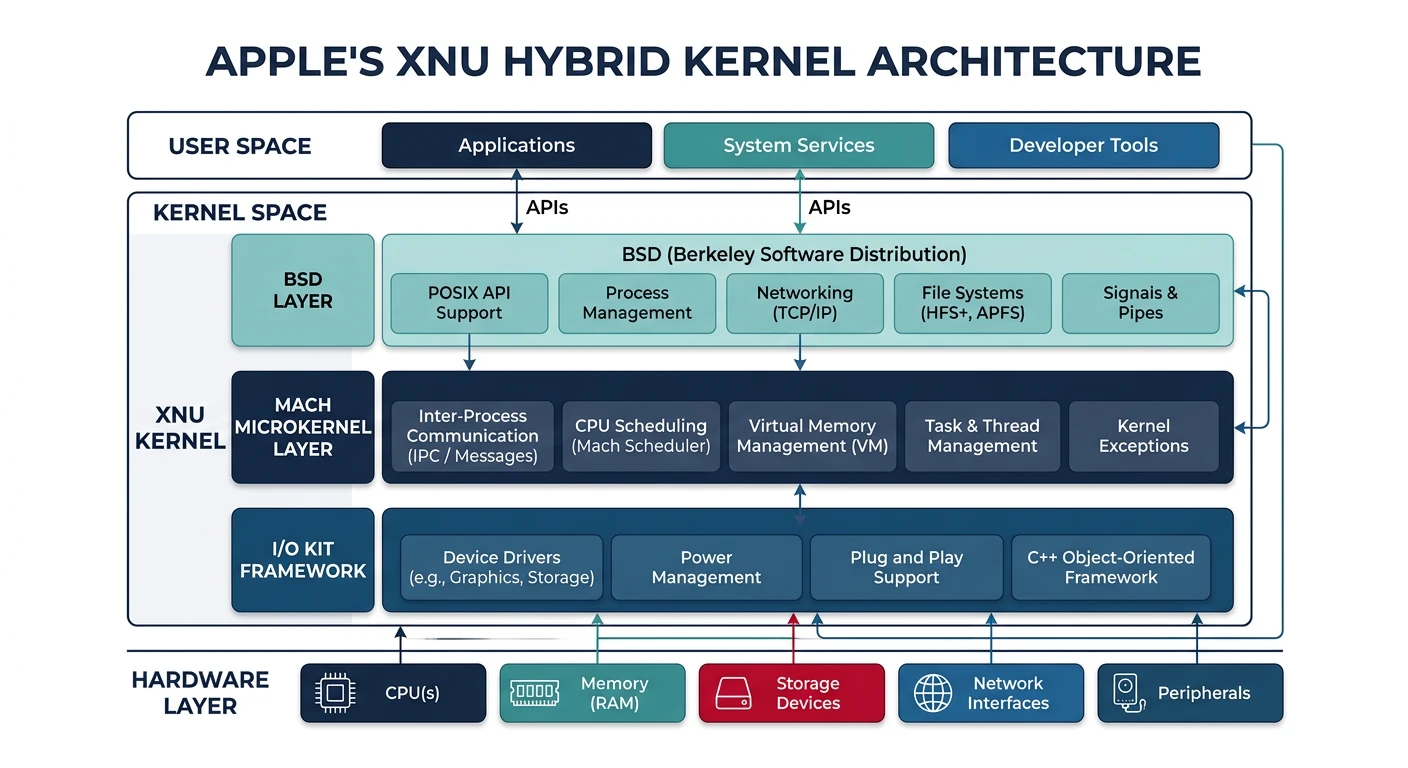
XNU ("X is Not Unix") is Apple's hybrid kernel combining Mach microkernel with BSD Unix.
Apple's XNU hybrid kernel: Mach microkernel provides IPC and memory management while the BSD layer handles POSIX APIs and networking
Kernel Architecture Comparison:
══════════════════════════════════════════════════════════════

Aspect          Linux           Windows NT      macOS (XNU)
━━━━━━━━━━━━━━━━━━━━━━━━━━━━━━━━━━━━━━━━━━━━━━━━━━━━━━━━━━━━
Type            Monolithic      Hybrid          Hybrid
Source          Open (GPL)      Closed          Partial open
LOC             ~30M            ~50M (est.)     ~8M

Syscall         syscall inst    sysenter/int2e  mach_msg/BSD
IPC             Pipes, sockets  Named pipes,    Mach ports
                signals, SysV   LPC/ALPC        BSD sockets
Scheduling Comparison
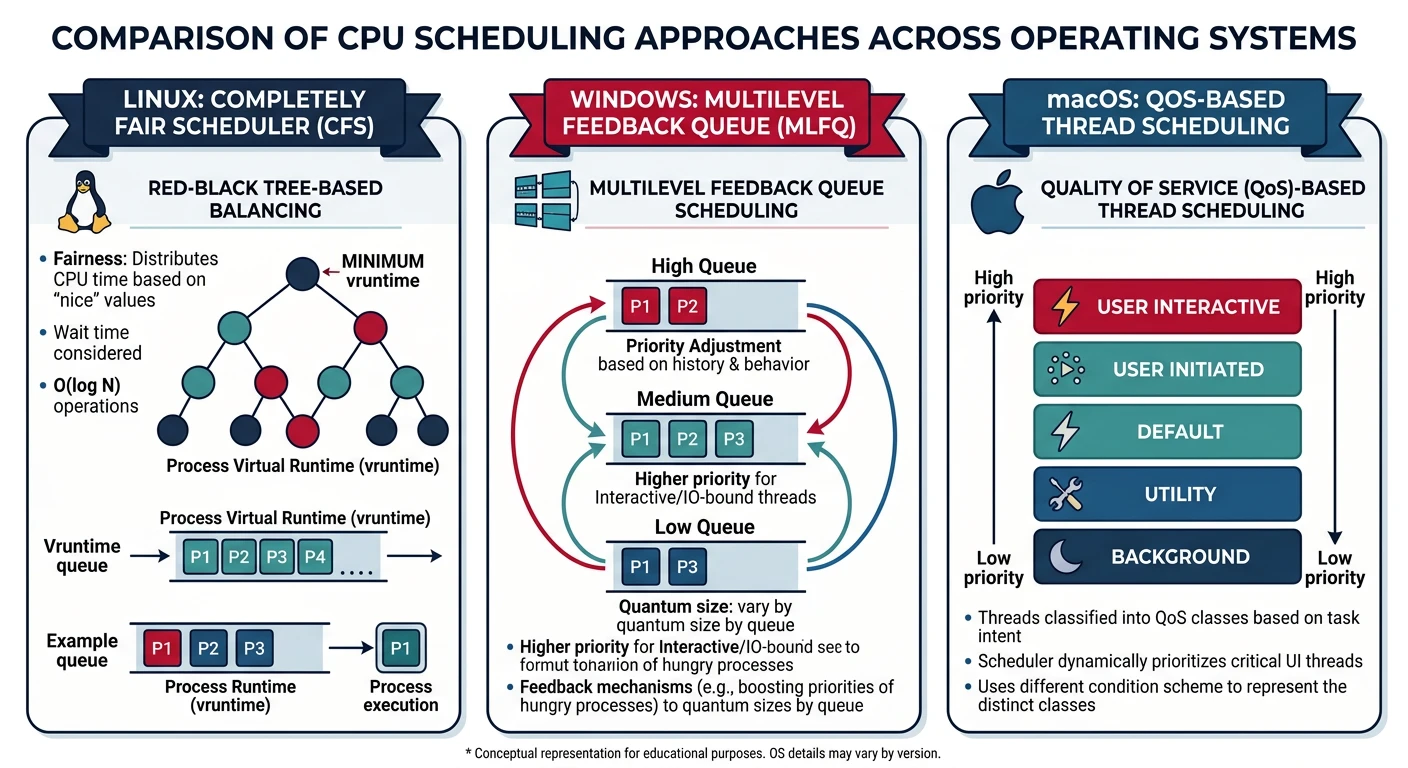
CPU scheduling compared: Linux uses CFS with virtual runtime fairness, Windows uses priority-based multilevel feedback, and macOS uses QoS-driven thread scheduling
CPU Scheduling Approaches:
══════════════════════════════════════════════════════════════

LINUX (CFS - Completely Fair Scheduler):
• Red-black tree of tasks, sorted by virtual runtime
• Tasks that run less get scheduled more
• Per-CPU runqueues, periodic load balancing
• Priority: nice values (-20 to +19)

WINDOWS (Multilevel Feedback Queue):
• 32 priority levels (0-31)
• Higher priority always preempts lower
• Priority boost for I/O-bound tasks
• Foreground window priority boost

macOS (Mach-based):
• Thread-centric scheduling (not process)
• Quality of Service (QoS) classes
• Grand Central Dispatch integrates with scheduler
• Priority: kernel manages based on QoS
Memory Management
Virtual Memory Implementation:
══════════════════════════════════════════════════════════════

LINUX:
• 4-level page tables (x86-64)
• Demand paging with copy-on-write
• Slab allocator for kernel objects
• OOM killer when memory exhausted

WINDOWS:
• Paged and non-paged pools
• Working Set management (per-process)
• Standby list for quick reclaim
• SuperFetch (predictive loading)

macOS:
• Compressed memory (in-RAM compression)
• Memory pressure notifications to apps
• Unified memory on Apple Silicon (CPU+GPU share)
macOS: Integration, user experience, creative workflows
Key Insight: There's no "best" OS—only the right tool for the job. Understanding how each works helps you leverage their strengths and work around limitations.