File systems provide the abstraction for persistent storage. They organize data on disk, manage metadata, and ensure data integrity through mechanisms like journaling.
Series Context: This is Part 17 of 24 in the Computer Architecture & Operating Systems Mastery series. We transition from memory management to persistent storage.
The Persistent Challenge: How does the OS turn a spinning magnetic platter or flash chips into a reliable hierarchical file system? And how does it survive sudden power loss?
File Concepts
A file is an abstraction for persistent storage—a named collection of related data with associated metadata.
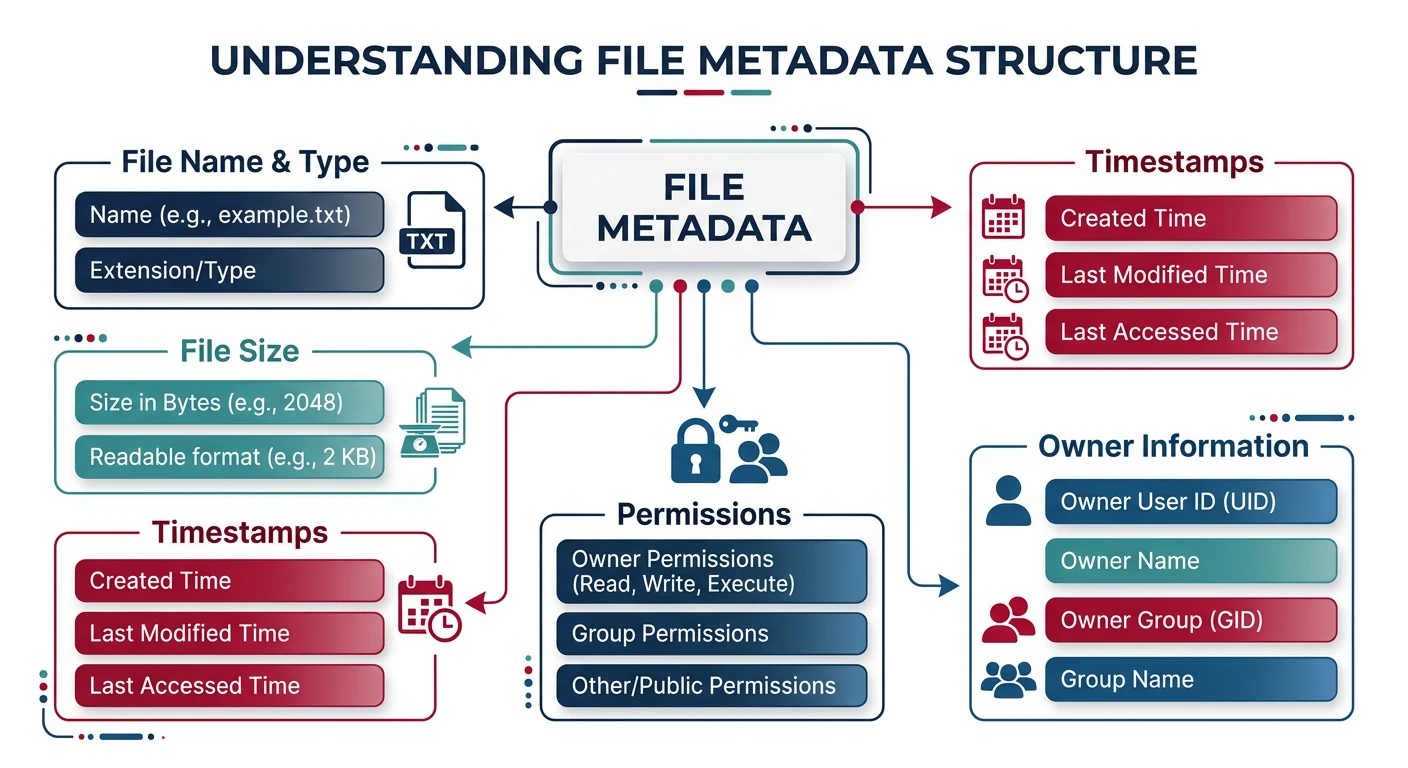
File attributes: every file carries metadata including name, size, timestamps (ctime/mtime/atime), ownership, and permission bits
File Attributes
File Metadata:
══════════════════════════════════════════════════════════════

Core Attributes:
• Name: Human-readable identifier (e.g., "report.pdf")
• Type: File extension or magic number
• Location: Pointer to data blocks on disk
• Size: Current file size in bytes


Timestamps:
• Created (ctime): When file was created
• Modified (mtime): Last data modification
• Accessed (atime): Last read/access


Permissions:
• Owner (user ID)
• Group (group ID)
• Mode (read/write/execute bits)


$ ls -la report.pdf
-rw-r--r-- 1 wasil users 24576 Jan 15 10:30 report.pdf
 ││││││││││ │ │     │     │     │     │
 ││││││││││ │ │     │     │     │     └─ Name
 ││││││││││ │ │     │     │     └───── mtime
 ││││││││││ │ │     │     └─────────── Size
 ││││││││││ │ │     └───────────────── Group
 ││││││││││ │ └─────────────────────── Owner
 ││││││││││ └───────────────────────── Links
 └─────────┘─────────────────────────── Permissions
Directory Structure
Directories are special files that map names to file metadata. They create the hierarchical namespace.
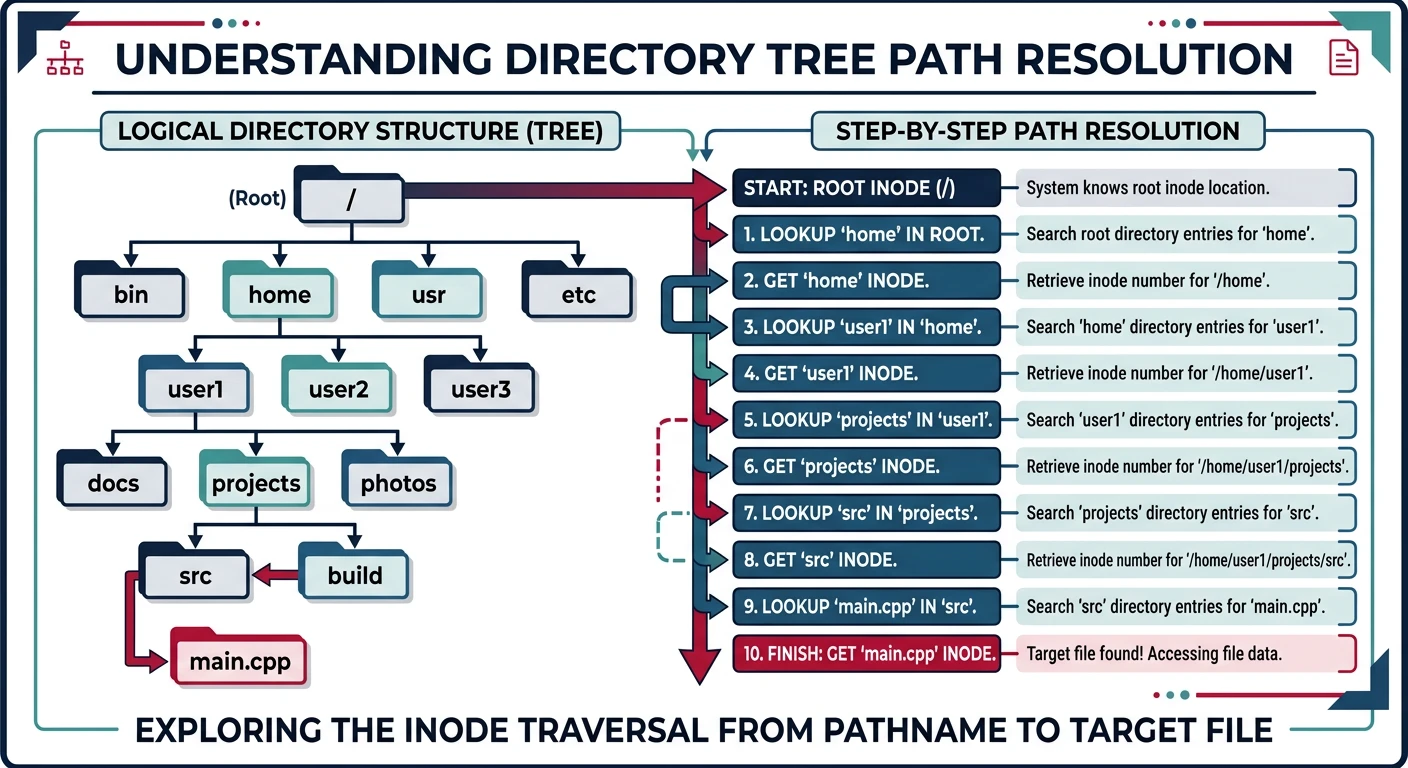
Directory path resolution: each directory maps names to inode numbers, requiring multiple disk reads to traverse from root to target file
Directory as a File:
══════════════════════════════════════════════════════════════

A directory contains entries mapping names → inodes:

/home/wasil/documents/
┌────────────────────────────────────────┐
│   Name          │    Inode Number   │
├──────────────────┼────────────────────┤
│   .             │        12345      │  ← This directory
│   ..            │        12300      │  ← Parent directory
│   report.pdf    │        12350      │
│   notes.txt     │        12351      │
│   project/      │        12400      │  ← Subdirectory
└──────────────────┴────────────────────┘


Path Resolution: /home/wasil/report.pdf
━━━━━━━━━━━━━━━━━━━━━━━━━━━━━━━━━━━━━━━━━━━━━━━━━━━━━━━━━━━━
1. Start at root inode (inode 2 on most systems)
2. Read root directory, find "home" → inode 100
3. Read inode 100, get data blocks, find "wasil" → inode 12300
4. Read inode 12300, find "report.pdf" → inode 12350
5. Read inode 12350 to get file metadata and data block pointers

Each step requires disk I/O! Caching is crucial.
Hard Links vs Symbolic Links: Hard links are additional directory entries pointing to the same inode. Symbolic (soft) links are files containing a path string. Hard links can't cross file systems; symlinks can.
File Allocation Methods
How does the file system map file data to disk blocks? Three classic approaches.
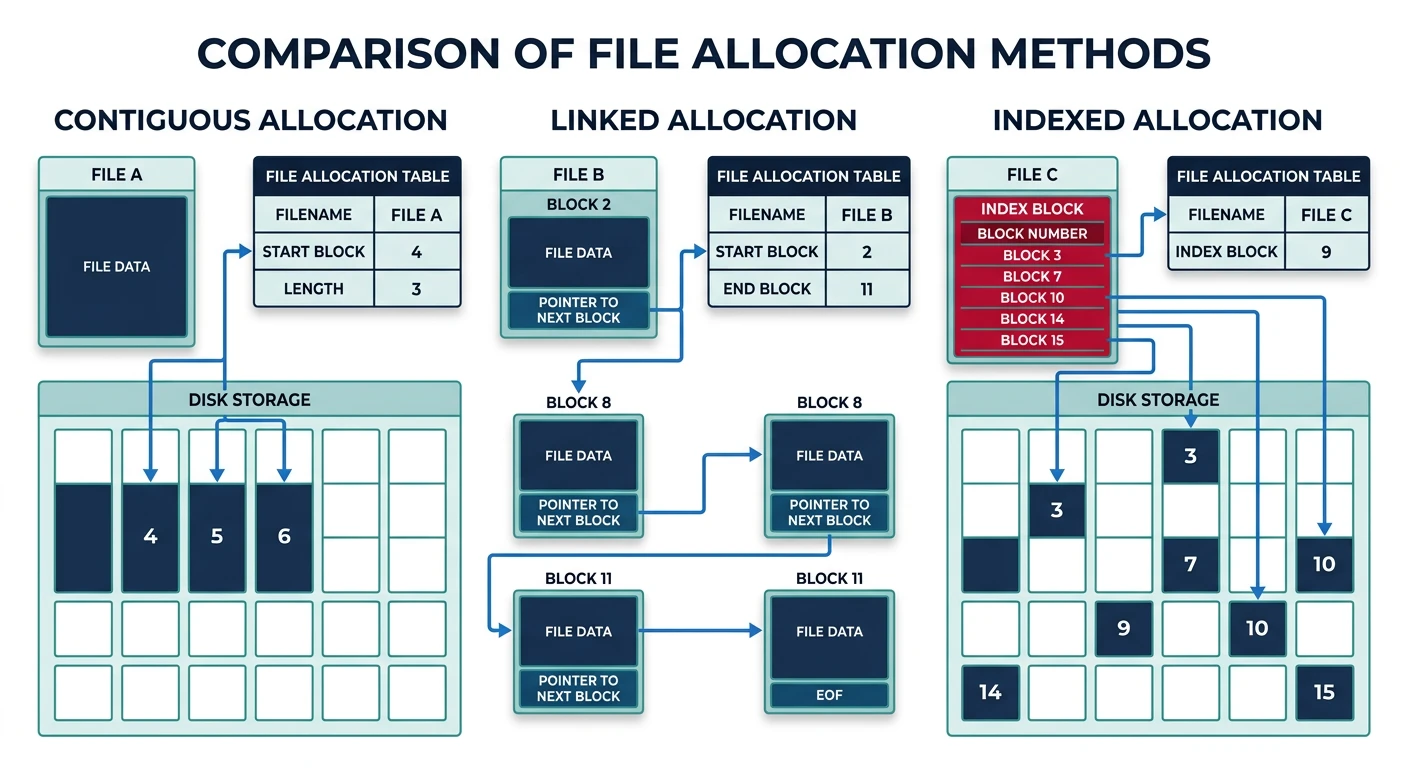
File allocation methods: contiguous stores blocks sequentially, linked chains blocks via pointers, and indexed uses an index block for direct access
1. CONTIGUOUS ALLOCATION:
══════════════════════════════════════════════════════════════

File A: Start=10, Length=4
[  ] [  ] [  ] ... [A0][A1][A2][A3] [  ] [  ] ...
                    10  11  12  13

✓ Simple - just store start + length
✓ Fast sequential and random access
✗ External fragmentation (like memory)
✗ File can't grow easily

Used by: CD-ROMs, DVDs (files don't change)


2. LINKED ALLOCATION:
══════════════════════════════════════════════════════════════

Each block contains pointer to next block:

[A0|25] ──→ [A1|42] ──→ [A2|18] ──→ [A3|nil]
block 10    block 25    block 42    block 18

✓ No external fragmentation
✓ Files can grow easily
✗ Random access is slow (must traverse list)
✗ Pointer space overhead
✗ One bad block breaks the chain

Variation: FAT (File Allocation Table) keeps all pointers
in a table in memory for faster access.


3. INDEXED ALLOCATION:
══════════════════════════════════════════════════════════════

Index block contains pointers to all data blocks:

Index Block (block 50):
┌─────────────┐
│  [0] → 10   │
│  [1] → 25   │ ──────→ Data blocks scattered anywhere
│  [2] → 42   │
│  [3] → 18   │
└─────────────┘

✓ Fast random access (direct to any block)
✓ No external fragmentation
✗ Index block overhead for small files
✗ Limited file size by index block size

Solution: Multi-level index (used by Unix/ext4)
Inodes & Metadata
The inode (index node) is Unix's solution for storing file metadata and block pointers.
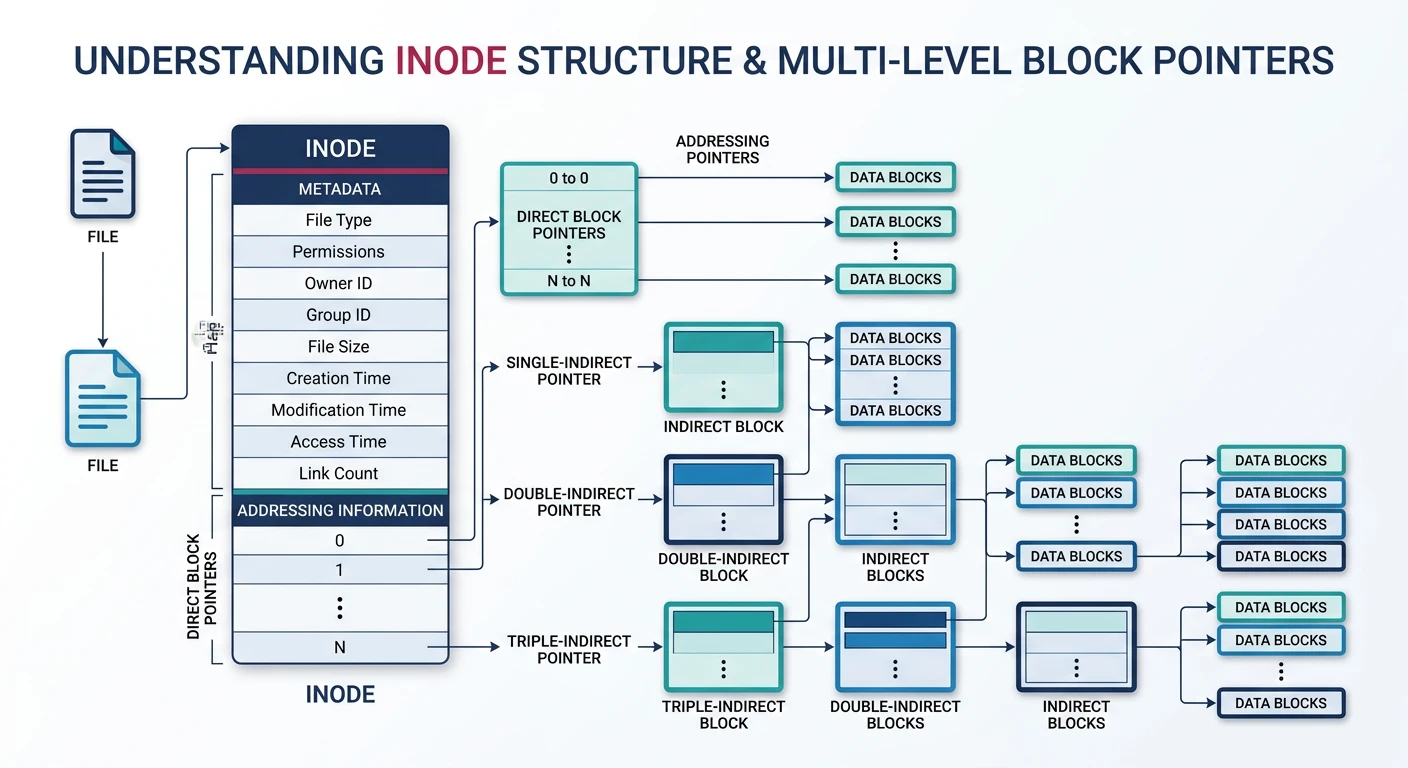
Unix inode: 12 direct block pointers for small files, plus single/double/triple indirect pointers enabling files up to 4 TB
Inode Structure
Unix Inode (typical 256 bytes):
══════════════════════════════════════════════════════════════

┌─────────────────────────────────────────────────────┐
│  File type and permissions (mode)           │
│  Owner UID, Group GID                       │
│  File size in bytes                         │
│  Timestamps: atime, mtime, ctime            │
│  Link count (number of hard links)          │
├─────────────────────────────────────────────────────┤
│  Direct block pointers [0-11]               │ ─→ 12 blocks
├─────────────────────────────────────────────────────┤
│  Single indirect pointer                    │ ─→ +1024 blocks
├─────────────────────────────────────────────────────┤
│  Double indirect pointer                    │ ─→ +1M blocks
├─────────────────────────────────────────────────────┤
│  Triple indirect pointer                    │ ─→ +1G blocks
└─────────────────────────────────────────────────────┘

Multi-level Indexing (4KB blocks, 4-byte pointers):
━━━━━━━━━━━━━━━━━━━━━━━━━━━━━━━━━━━━━━━━━━━━━━━━━━━━━━━━━━━━

Direct:     12 × 4KB = 48 KB
Single:     1024 × 4KB = 4 MB
Double:     1024² × 4KB = 4 GB
Triple:     1024³ × 4KB = 4 TB

Small files (most files!) use only direct blocks → fast!
The VFS is an abstraction layer allowing the kernel to support multiple file system types with a uniform interface.
VFS Architecture:
══════════════════════════════════════════════════════════════

              User Space
───────────────────────────────────────────────────
    open()  read()  write()  close()  stat()
───────────────────────────────────────────────────
              Kernel Space
                  │
         ┌────────┴────────┐
         │      VFS       │  ← Common interface
         └────────┬────────┘
                 │
    ┌───────────┼───────────┐
    │           │           │
┌───┴───┐ ┌────┴───┐ ┌───┴────┐
│  ext4  │ │  NTFS   │ │  NFS    │  ← Filesystem drivers
└────────┘ └─────────┘ └─────────┘
    │           │           │
    ▼           ▼           ▼
  Local       Local       Network
  Disk        Disk        Server


VFS Objects:
━━━━━━━━━━━━━━━━━━━━━━━━━━━━━━━━━━━━━━━━━━━━━━━━━━━━━━━━━━━━
• superblock:  Represents mounted filesystem
• inode:       File metadata (in-memory)
• dentry:      Directory entry (cached paths)
• file:        Open file (per-process)
ext4 File System
ext4 (fourth extended filesystem) is the default Linux filesystem, evolved from ext2/ext3.
ext4 Features:
══════════════════════════════════════════════════════════════

1. EXTENTS (instead of indirect blocks):
   Contiguous block ranges in single descriptor
   [start_block, length] vs thousands of pointers

2. BLOCK GROUPS:
   Disk divided into groups for locality
   Each group has own inode table, bitmap, data blocks

3. DELAYED ALLOCATION:
   Don't allocate blocks until flush time
   Better placement decisions, reduced fragmentation

4. JOURNALING (see below)

5. Limits:
   • Max file size: 16 TB
   • Max volume size: 1 EB (exabyte)
   • Max filename: 255 bytes
NTFS (New Technology File System) is Windows' primary filesystem since Windows NT.
NTFS Key Concepts:
══════════════════════════════════════════════════════════════

1. MASTER FILE TABLE (MFT):
   • Every file/directory is an MFT record
   • Record 0 = $MFT itself
   • Each record typically 1KB
   • Contains attributes (name, data, timestamps)

2. EVERYTHING IS AN ATTRIBUTE:
   • $STANDARD_INFORMATION - timestamps, permissions
   • $FILE_NAME - name(s) and parent reference
   • $DATA - actual file content
   • $INDEX_ROOT - B-tree for directories

3. RESIDENT vs NON-RESIDENT:
   • Small files (<700 bytes) stored IN the MFT record
   • Larger files have data runs pointing to clusters

4. FEATURES:
   • Journaling (transaction log)
   • ACLs (Access Control Lists)
   • Compression and encryption (EFS)
   • Alternate Data Streams (multiple $DATA attributes)
   • Hard links and symbolic links
Journaling
Journaling protects filesystem consistency during crashes. Changes are logged before applied.
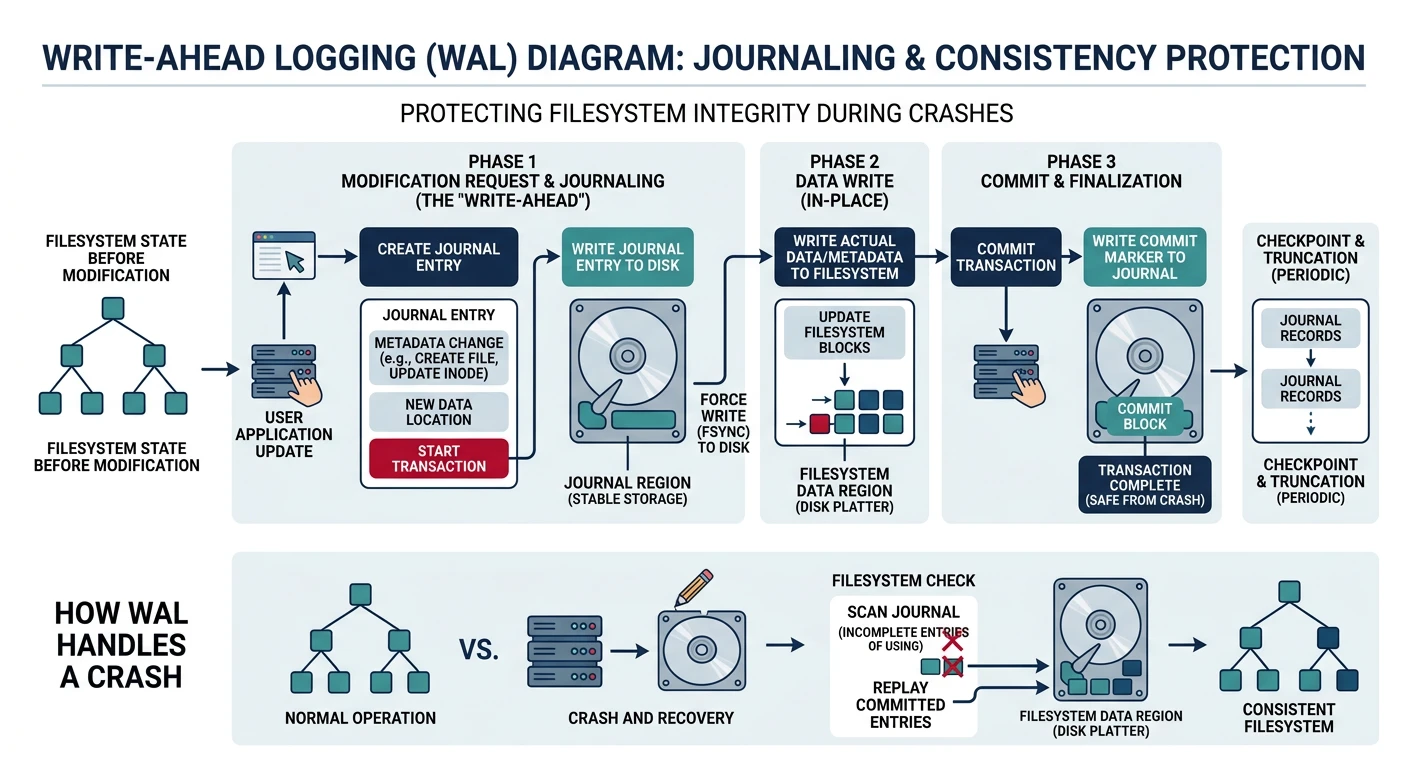
Write-ahead logging: changes are recorded in the journal before being applied to disk, allowing recovery to a consistent state after a crash
Write-Ahead Logging
The Problem Without Journaling:
══════════════════════════════════════════════════════════════

Creating a file requires multiple disk writes:
1. Allocate inode
2. Initialize inode
3. Add directory entry
4. Update directory inode
5. Update free block/inode bitmaps

Crash between steps → INCONSISTENT state!
• Orphan inodes (allocated but not in any directory)
• Directory points to unallocated inode
• Blocks marked used but unreferenced

Without journaling: Run fsck for hours to repair!


Journaling Solution:
━━━━━━━━━━━━━━━━━━━━━━━━━━━━━━━━━━━━━━━━━━━━━━━━━━━━━━━━━━━━

1. Write intent to JOURNAL
2. Apply changes to actual locations
3. Mark journal entry complete

┌───────────┐    ┌───────────┐    ┌───────────┐
│   Write   │ → │   Apply   │ → │  Commit   │
│  Journal  │    │  Changes  │    │  (delete) │
└───────────┘    └───────────┘    └───────────┘

Crash recovery:
• Incomplete journal entry → discard (undo)
• Complete entry, changes not applied → replay (redo)

Recovery in seconds, not hours!
Journal Modes: ext4 supports: journal (safest, slowest—logs data+metadata), ordered (default—data written before metadata logged), writeback (fastest—metadata only, data may be stale).
Conclusion & Next Steps
File systems are fundamental to how computers organize persistent data. We've covered:
File Concepts: Attributes, metadata, and permissions
Directory Structure: Hierarchical namespace via directory entries
Allocation Methods: Contiguous, linked, and indexed approaches
Inodes: Unix's metadata and block pointer structure
VFS: Kernel abstraction for multiple filesystem types
Journaling: Crash consistency through write-ahead logging
Key Insight: File systems are all about managing two things: metadata (inodes, directory entries) and data blocks. Journaling ensures these stay consistent even through crashes.