Back to Technology

Part 22: Advanced Kernel Internals

January 31, 2026 Wasil Zafar 40 min read

Deep dive into Linux kernel internals—subsystems, modules, debugging techniques, and kernel development practices.

Table of Contents

  1. Introduction
  2. Linux Kernel Architecture
  3. Major Subsystems
  4. Kernel Modules
  5. proc & sysfs
  6. Kernel Debugging
  7. Tracing & Profiling
  8. eBPF
  9. Conclusion & Next Steps

Introduction

The Linux kernel is a complex piece of software managing hardware resources, processes, memory, and I/O. Understanding its internals is essential for system programmers and performance engineers.

Series Context: This is Part 22 of 24 in the Computer Architecture & Operating Systems Mastery series. We explore the Linux kernel's internal structure and debugging tools.

Computer Architecture & OS Mastery

Your 24-step learning path • Currently on Step 22
1
Part 1: Foundations of Computer Systems
System overview, architectures, OS role
2
Digital Logic & CPU Building Blocks
Gates, registers, datapath, microarchitecture
3
Instruction Set Architecture (ISA)
RISC vs CISC, instruction formats, addressing
4
Assembly Language & Machine Code
Registers, stack, calling conventions
5
Assemblers, Linkers & Loaders
Object files, ELF, dynamic linking
6
Compilers & Program Translation
Lexing, parsing, code generation
7
CPU Execution & Pipelining
Fetch-decode-execute, hazards, prediction
8
OS Architecture & Kernel Design
Monolithic, microkernel, system calls
9
Processes & Program Execution
Process lifecycle, PCB, fork/exec
10
Threads & Concurrency
Threading models, pthreads, race conditions
11
CPU Scheduling Algorithms
FCFS, RR, CFS, real-time scheduling
12
Synchronization & Coordination
Locks, semaphores, classic problems
13
Deadlocks & Prevention
Coffman conditions, Banker's algorithm
14
Memory Hierarchy & Cache
L1/L2/L3, cache coherence, NUMA
15
Memory Management Fundamentals
Address spaces, fragmentation, allocation
16
Virtual Memory & Paging
Page tables, TLB, demand paging
17
File Systems & Storage
Inodes, journaling, ext4, NTFS
18
I/O Systems & Device Drivers
Interrupts, DMA, disk scheduling
19
Multiprocessor Systems
SMP, NUMA, cache coherence
20
OS Security & Protection
Privilege levels, ASLR, sandboxing
21
Virtualization & Containers
Hypervisors, namespaces, cgroups
22
Advanced Kernel Internals
Linux subsystems, kernel debugging
You Are Here
23
Case Studies
Linux vs Windows vs macOS
24
Capstone Projects
Shell, thread pool, paging simulator
Under the Hood: The Linux kernel is ~30 million lines of code managing hardware from embedded devices to supercomputers. How is it organized, and how do we debug it when things go wrong?

Linux Kernel Architecture

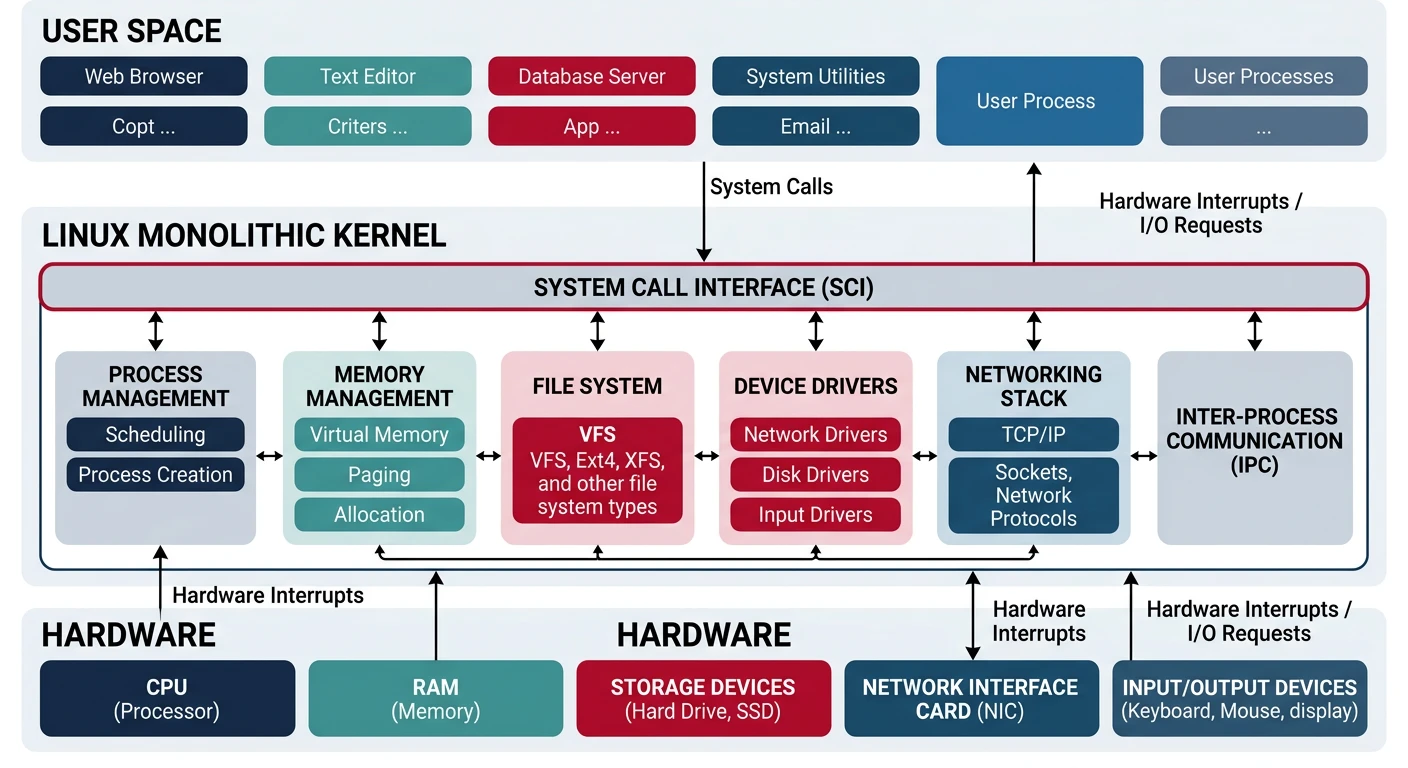
Linux is a monolithic kernel—all core services run in kernel space. But it's modular, with loadable kernel modules.

Source Tree Structure

Linux Kernel Source (~30M lines):
══════════════════════════════════════════════════════════════

linux/
├── arch/           # Architecture-specific (x86, arm, riscv)
├── block/          # Block I/O layer
├── drivers/        # Device drivers (~60% of code!)
├── fs/             # File systems (ext4, btrfs, nfs)
├── include/        # Header files
├── init/           # Kernel initialization
├── ipc/            # Inter-process communication
├── kernel/         # Core (scheduler, signals, time)
├── lib/            # Kernel library routines
├── mm/             # Memory management
├── net/            # Networking stack
├── scripts/        # Build scripts
├── security/       # SELinux, AppArmor
├── sound/          # Audio subsystem (ALSA)
└── tools/          # Userspace tools (perf, bpf)

Major Subsystems

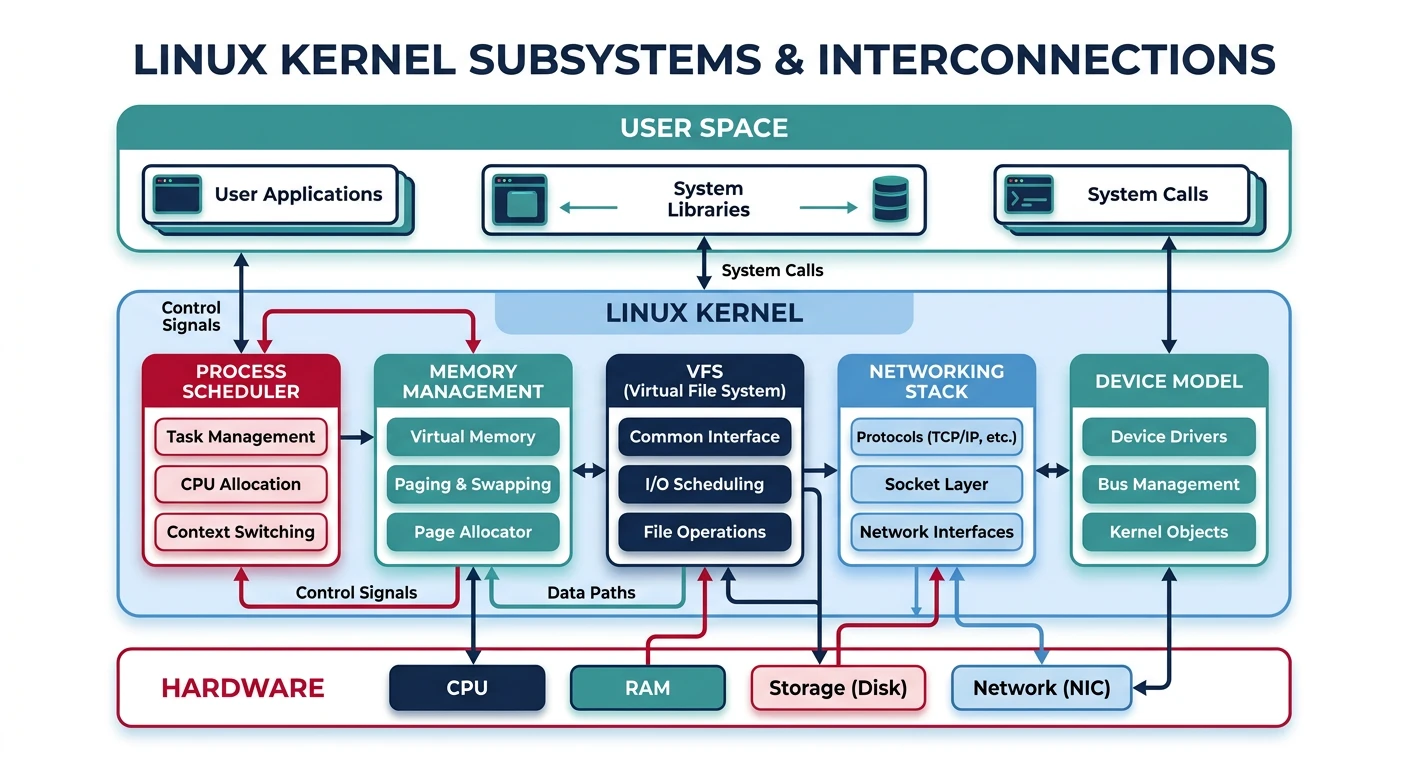
The kernel is organized into interconnected subsystems.

Core Subsystems:
══════════════════════════════════════════════════════════════

1. PROCESS SCHEDULER (kernel/sched/)
   • CFS (Completely Fair Scheduler) - default
   • Real-time schedulers (FIFO, RR)
   • Per-CPU runqueues, load balancing

2. MEMORY MANAGEMENT (mm/)
   • Page allocator (buddy system)
   • Slab allocator (small objects)
   • Virtual memory (page tables, TLB)
   • OOM killer

3. VIRTUAL FILE SYSTEM (fs/)
   • VFS abstraction layer
   • Inode cache, dentry cache
   • Page cache for I/O

4. NETWORKING (net/)
   • Socket layer
   • Protocol stacks (TCP/IP, UDP)
   • Netfilter (iptables/nftables)

5. DEVICE MODEL (drivers/)
   • Unified driver framework
   • sysfs representation
   • Power management

Kernel Modules

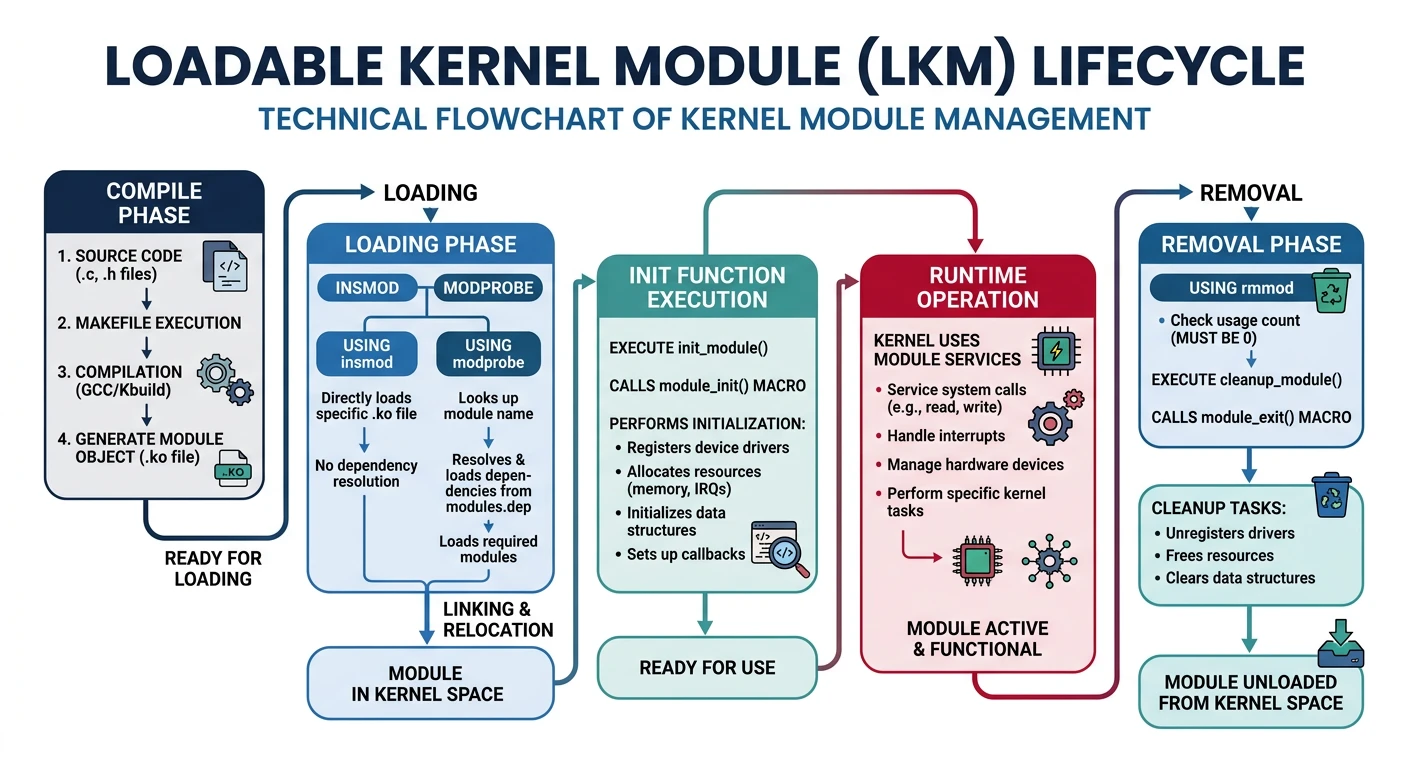
Loadable Kernel Modules (LKMs) extend the kernel at runtime without reboot.

# List loaded modules
$ lsmod
Module                  Size  Used by
ext4                  811008  1
mbcache                16384  1 ext4
jbd2                  131072  1 ext4
nvme                   45056  3

# Load/unload module
$ sudo modprobe nvme      # Load with dependencies
$ sudo rmmod nvme         # Unload

# Module info
$ modinfo ext4
filename:       /lib/modules/6.1.0/kernel/fs/ext4/ext4.ko
license:        GPL
description:    Fourth Extended Filesystem
author:         Theodore Ts'o

# View kernel ring buffer for module messages
$ dmesg | tail -20
Module Entry Points: Every module has module_init() (called on load) and module_exit() (called on unload). Modules export symbols that other modules can use.

proc & sysfs

/proc and /sys are virtual filesystems exposing kernel data structures.

# /proc - Process and kernel information
$ cat /proc/cpuinfo        # CPU details
$ cat /proc/meminfo        # Memory statistics
$ cat /proc/interrupts     # Interrupt counts
$ cat /proc/1234/maps      # Memory map of PID 1234
$ cat /proc/1234/fd/       # Open file descriptors

# /sys - Kernel object hierarchy
$ ls /sys/class/net/       # Network interfaces
$ cat /sys/block/sda/queue/scheduler  # I/O scheduler
$ echo 1 > /sys/class/leds/input0::capslock/brightness

# Tunable parameters via /proc/sys
$ cat /proc/sys/vm/swappiness
60
$ echo 10 | sudo tee /proc/sys/vm/swappiness  # Less swappy

Kernel Debugging

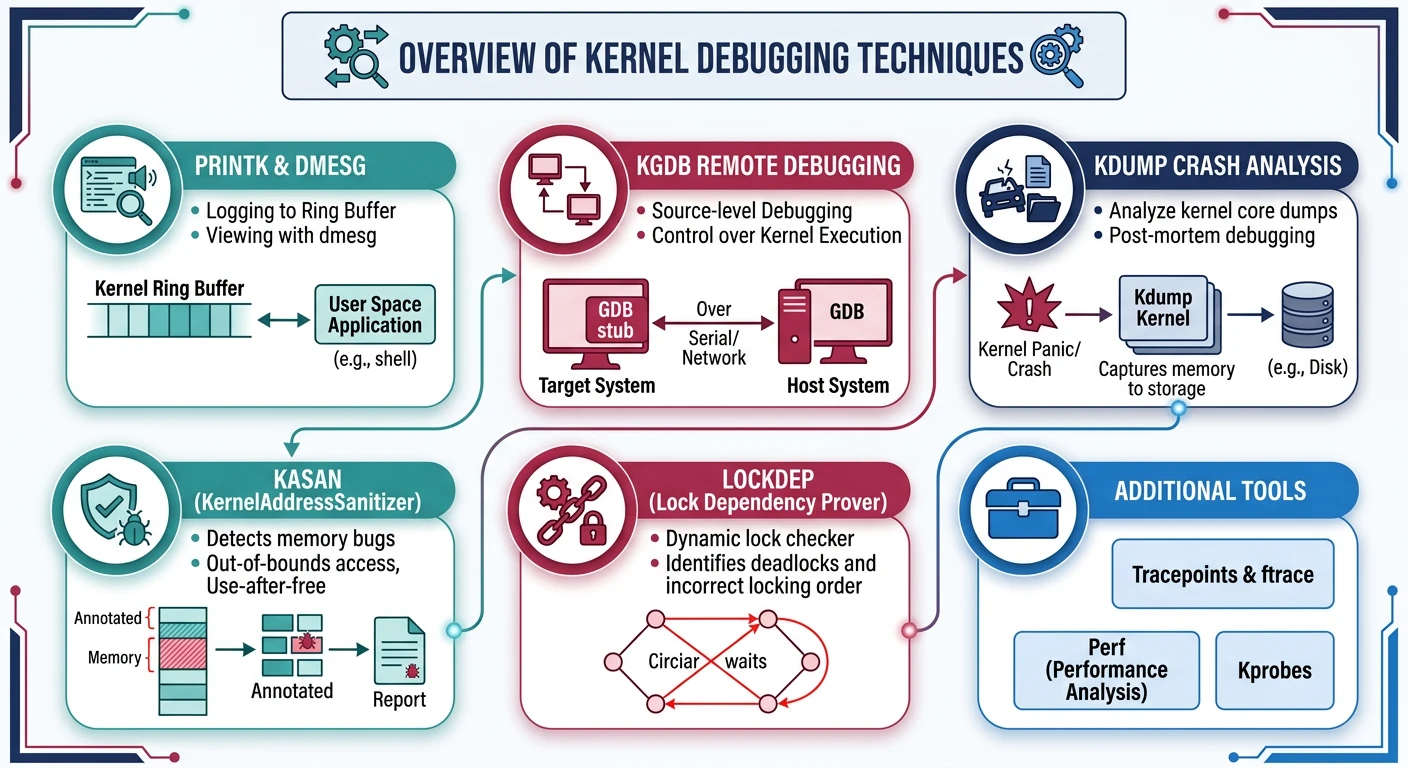
Debugging kernel code is challenging—there's no debugger running underneath!

Debugging Techniques:
══════════════════════════════════════════════════════════════

1. printk() - Kernel's printf
   pr_info("Value: %d\n", x);
   pr_err("Error: %s\n", msg);
   
2. dmesg - Kernel ring buffer
   $ dmesg -w  # Follow new messages

3. KGDB - Kernel debugger
   Connect GDB to kernel via serial/network
   
4. Crash dumps (kdump)
   Capture memory on panic for post-mortem

5. KASAN - Kernel Address Sanitizer
   Detects use-after-free, buffer overflow
   
6. lockdep - Lock dependency checker
   Detects potential deadlocks
# Analyze kernel panic
$ dmesg | grep -i panic
[  123.456] Kernel panic - not syncing: Fatal exception

# Check for kernel warnings/bugs
$ dmesg | grep -E 'BUG|WARNING|Oops'

# Magic SysRq key (emergency commands)
$ echo b > /proc/sysrq-trigger  # Reboot immediately
$ echo c > /proc/sysrq-trigger  # Crash (for testing)

Tracing & Profiling

Tracing observes kernel behavior without modifying it.

# perf - Performance profiling
$ perf top                    # Real-time CPU profiling
$ perf record ./program       # Record profile
$ perf report                 # Analyze profile

# ftrace - Function tracer
$ cd /sys/kernel/debug/tracing
$ echo function > current_tracer
$ echo 1 > tracing_on
$ cat trace                   # See function calls

# trace-cmd (friendlier ftrace interface)
$ trace-cmd record -p function_graph -F ./program
$ trace-cmd report

eBPF

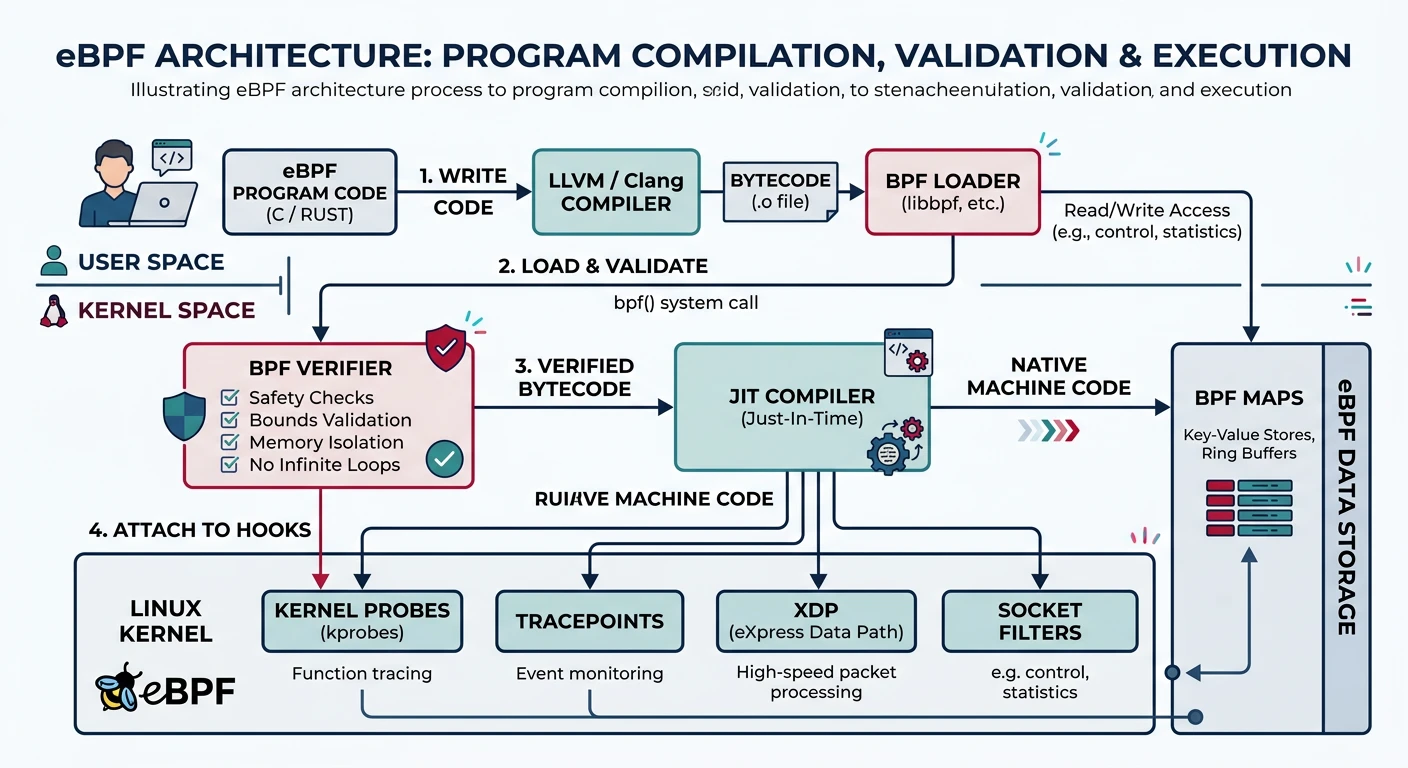
eBPF (extended Berkeley Packet Filter) runs sandboxed programs in the kernel—revolutionizing observability and networking.

eBPF Architecture:
══════════════════════════════════════════════════════════════

 User Space                      Kernel Space
┌─────────────┐              ┌───────────────────┐
│ BPF Program │  ──────────→ │ BPF Verifier    │
│ (C / bpftrace)            ├───────────────────┤
└─────────────┘              │ JIT Compiler    │
                             ├───────────────────┤
                             │ BPF VM (runs    │
                             │ at attach point)│
                             └───────────────────┘

Attach Points:
• kprobes - Any kernel function
• tracepoints - Stable trace points
• XDP - Network packet processing
• tc - Traffic control
• cgroup - Resource control
# bpftrace - High-level eBPF scripting
$ sudo bpftrace -e 'kprobe:sys_read { @[comm] = count(); }'
# Count read() calls by process name

# Trace syscall latency
$ sudo bpftrace -e '
    tracepoint:syscalls:sys_enter_read { @start[tid] = nsecs; }
    tracepoint:syscalls:sys_exit_read /@start[tid]/ {
        @latency = hist(nsecs - @start[tid]);
        delete(@start[tid]);
    }'

# BCC tools (pre-built eBPF tools)
$ sudo execsnoop           # Trace new processes
$ sudo opensnoop          # Trace file opens
$ sudo tcpconnect         # Trace TCP connections
eBPF Safety: The verifier ensures BPF programs terminate (bounded loops), don't access invalid memory, and don't crash the kernel. But they run with kernel privileges—loading requires CAP_BPF.

Conclusion & Next Steps

The Linux kernel is a masterpiece of systems engineering. We've covered:

  • Architecture: Source tree organization and subsystems
  • Subsystems: Scheduler, memory, VFS, networking
  • Modules: Loadable kernel modules (LKMs)
  • proc & sysfs: Virtual filesystems for introspection
  • Debugging: printk, dmesg, KGDB, sanitizers
  • Tracing: perf, ftrace, trace-cmd
  • eBPF: Safe kernel programmability
Key Insight: eBPF is transforming Linux—enabling safe, dynamic extension of the kernel for networking, security, and observability without modifying kernel source or loading traditional modules.
Next in the Series

In Part 23: Case Studies, we'll compare how Linux, Windows, and macOS solve common OS challenges differently.