We use cookies to enhance your browsing experience, serve personalized content, and analyze our traffic.
By clicking "Accept All", you consent to our use of cookies. See our
Privacy Policy
for more information.
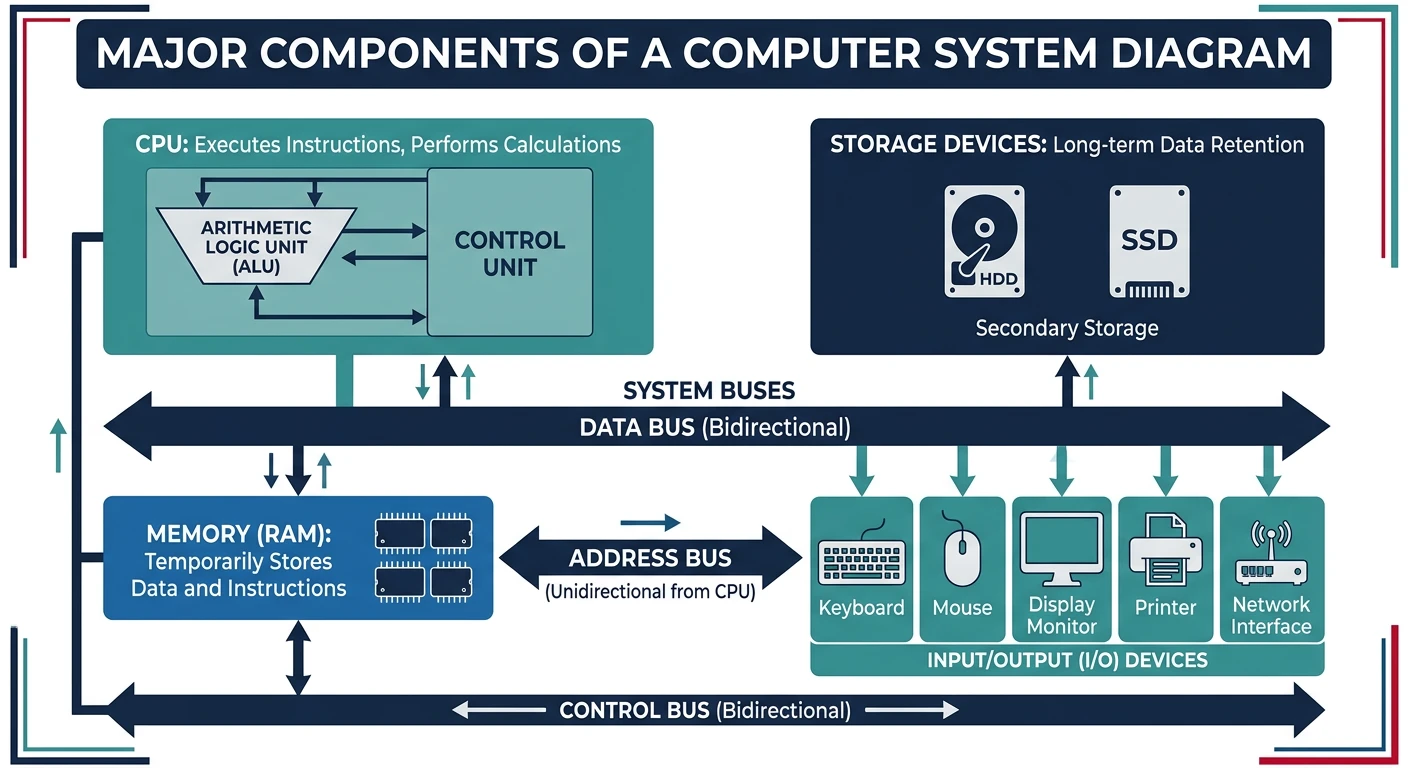
A computer system is an integrated collection of hardware and software components that work together to process data, execute instructions, and provide useful computation. Understanding how these components interact is fundamental to mastering both computer architecture and operating systems.
Overview of a computer system's major components and their interconnections
Series Context: This is Part 1 of 24 in the Computer Architecture & Operating Systems Mastery series. We begin with foundational concepts that underpin everything from CPU design to kernel development.
At its most fundamental level, a computer is a general-purpose machine that manipulates data according to a set of instructions called a program. Unlike calculators or single-purpose devices, computers can be reprogrammed to perform virtually any computational task.
The Coffee Shop Analogy
Real-World Analogy
Think of a computer like a well-organized coffee shop:
CPU (Barista) — The worker who follows recipes and makes drinks
Memory (Counter Space) — Where ingredients are laid out for quick access
Storage (Pantry) — Long-term storage for all ingredients
I/O Devices (Windows & Doors) — How orders come in and drinks go out
Operating System (Manager) — Coordinates everything, handles scheduling
Just as a coffee shop needs all these elements working together to serve customers efficiently, a computer needs its components coordinated to execute programs.
What You'll Learn in This Series
This 24-part series takes you from transistors to operating systems, building a complete mental model of how modern computers work:
Learning Path Overview:
Parts 1-7: Computer Architecture — Hardware foundations, ISA, assembly, compilation
Parts 8-13: Process Management — Kernels, processes, threads, scheduling, synchronization
Parts 19-24: Advanced Topics — Multiprocessing, security, virtualization, case studies
The Hardware-Software Boundary
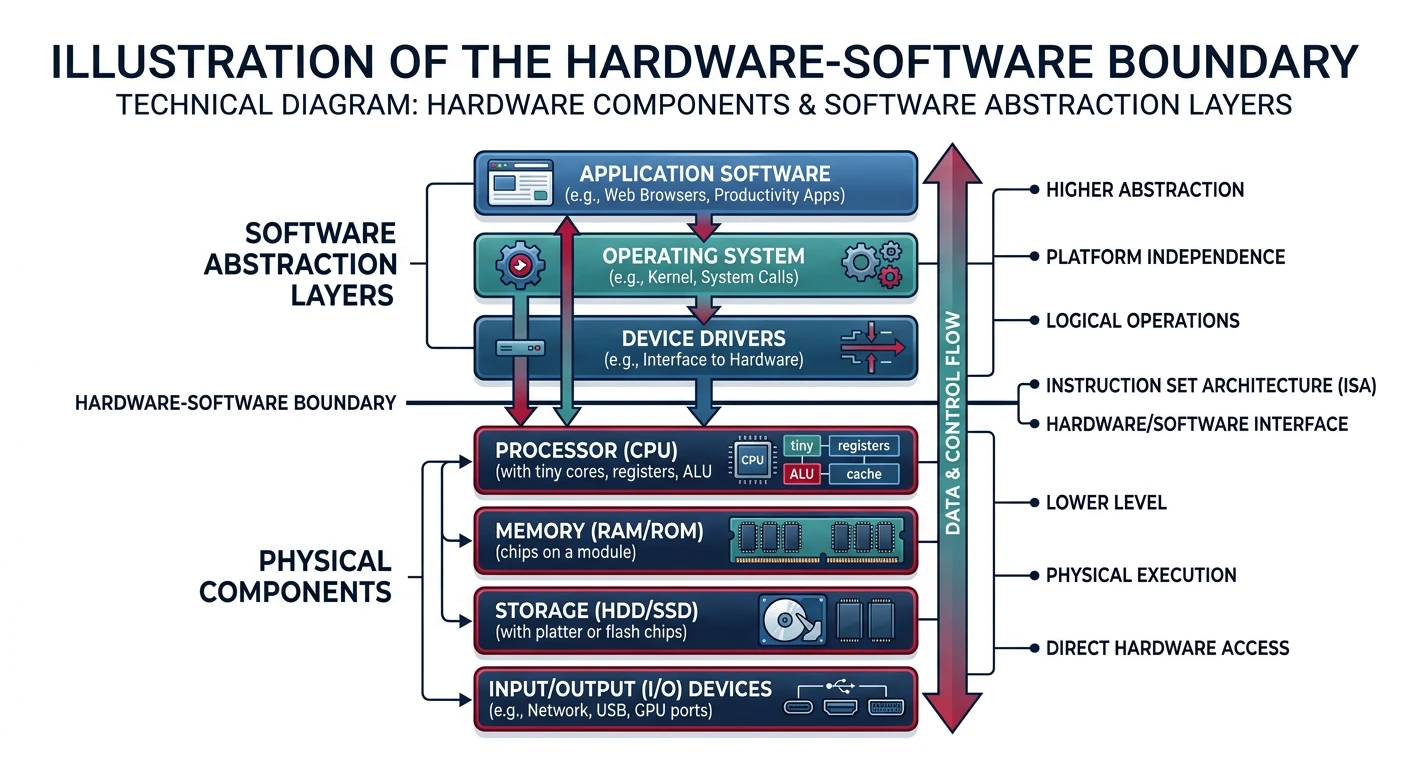
The relationship between hardware and software is often described as a boundary or interface. Understanding where hardware ends and software begins is crucial for systems programming and debugging.
The hardware-software boundary separating physical components from software abstractions
Hardware: The Physical Foundation
Hardware consists of the tangible, physical components that you can touch. Here are the essential hardware components:
Component
Function
Speed
Example
CPU
Executes instructions
~3-5 GHz
Intel Core i9, AMD Ryzen 9
RAM
Temporary working memory
~100 ns access
DDR5-6000 (48GB/s)
Storage
Persistent data storage
~10 μs (SSD)
NVMe SSD (7GB/s)
GPU
Parallel computation
~2 GHz
NVIDIA RTX 4090
Motherboard
Connects all components
N/A
PCIe 5.0, DDR5
Speed Matters: The Memory Hierarchy
Performance
Different components operate at vastly different speeds. Here's a perspective using human-scale time:
This dramatic speed difference is why caching and memory management are so critical to system performance!
Software: The Logical Layers
Software is the set of instructions that tell hardware what to do. Software exists in several layers, each building on the one below:
┌─────────────────────────────────────────────────┐
│           User Applications                      │  ← Chrome, VS Code, Games
├─────────────────────────────────────────────────┤
│           System Libraries                       │  ← libc, Win32 API
├─────────────────────────────────────────────────┤
│           System Services/Daemons               │  ← Networking, Printing
├─────────────────────────────────────────────────┤
│           Operating System Kernel               │  ← Linux, Windows NT
├─────────────────────────────────────────────────┤
│           Firmware / BIOS / UEFI                │  ← Boot code, drivers
├─────────────────────────────────────────────────┤
│           Hardware                               │  ← CPU, RAM, Storage
└─────────────────────────────────────────────────┘
Key Insight: Each layer only needs to understand the interface of the layer immediately below it. A web browser doesn't need to know about transistors—it just calls OS functions. This abstraction is what makes modern computing possible.
The Interface Between Layers
Communication between layers happens through well-defined interfaces:
ISA (Instruction Set Architecture) — The interface between software and CPU hardware
System Calls — The interface between user programs and the kernel
APIs — The interface between applications and libraries
ABIs (Application Binary Interface) — How compiled code interacts with the system
// Example: Reading a file involves multiple layers

// Layer 1: Application code (C)
FILE *fp = fopen("data.txt", "r");  // High-level API

// Layer 2: Library function (libc)
// fopen() internally calls the system call

// Layer 3: System call to kernel
int fd = syscall(SYS_open, "data.txt", O_RDONLY);

// Layer 4: Kernel handles the request
// - Validates permissions
// - Looks up file in filesystem
// - Allocates file descriptor
// - Returns to userspace
Computer Architectures
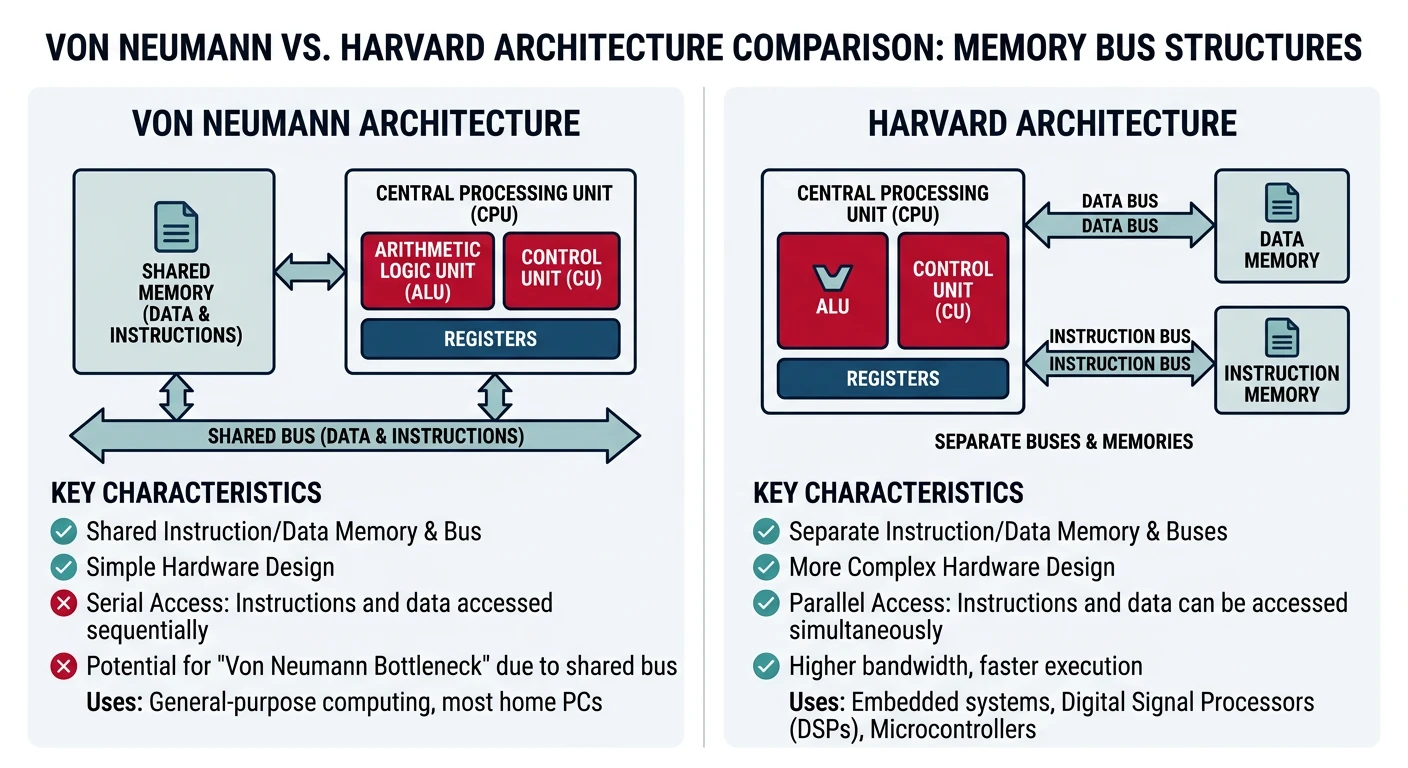
The computer architecture defines how a computer's components are organized and how they communicate. The two most influential architectures are Von Neumann and Harvard.
Von Neumann (shared bus) vs Harvard (separate buses) architecture comparison
Von Neumann Architecture (1945)
Proposed by mathematician John von Neumann, this architecture revolutionized computing by introducing the concept of a stored program—where instructions and data reside in the same memory.
Because instructions and data share the same memory bus, they cannot be fetched simultaneously. This creates a bandwidth limitation known as the Von Neumann bottleneck.
Time →  ─────────────────────────────────────►
        │ Fetch    │ Decode │ Fetch  │ Execute │
        │ Instr 1  │        │ Data   │         │
        └──────────┴────────┴────────┴─────────┘
        ↑                   ↑
        └───────────────────┘
          CPU must wait for bus
Modern solutions: Caching, pipelining, out-of-order execution, and separate instruction/data paths internally.
Key Characteristics:
✅ Single memory for code and data — Simpler and cheaper
✅ Self-modifying code possible — Programs can modify themselves
❌ Memory bus contention — Instructions and data compete for access
✅ Flexible — Memory allocation between code and data is dynamic
Harvard Architecture
Originally developed for the Harvard Mark I computer (1944), this architecture uses separate memory spaces and buses for instructions and data.
✅ Parallel access — Fetch instruction AND data simultaneously
✅ Higher throughput — No bus contention
✅ Security — Code and data separation prevents certain attacks
❌ Fixed memory allocation — Can't easily reallocate between code and data
❌ More complex/expensive — Requires two memory systems
Where Harvard Architecture is Used: Digital Signal Processors (DSPs), many microcontrollers (Arduino's ATmega, PIC), and internally within modern CPUs (separate L1 instruction and data caches).
Architecture Comparison
Feature
Von Neumann
Harvard
Memory Structure
Single unified memory
Separate instruction & data memory
Bus Architecture
Single bus for both
Separate buses
Performance
Limited by bus bandwidth
Higher throughput
Complexity
Simpler, cheaper
More complex, expensive
Self-Modifying Code
Yes
Difficult/Impossible
Use Cases
General-purpose computers
Embedded systems, DSPs
Modified Harvard Architecture
Modern CPUs
Most modern processors use a Modified Harvard Architecture that combines the best of both worlds:
Externally: Von Neumann (unified main memory)
Internally: Harvard (separate L1 instruction and data caches)
This hybrid approach gives programs a unified memory view while providing the performance benefits of separate caches.
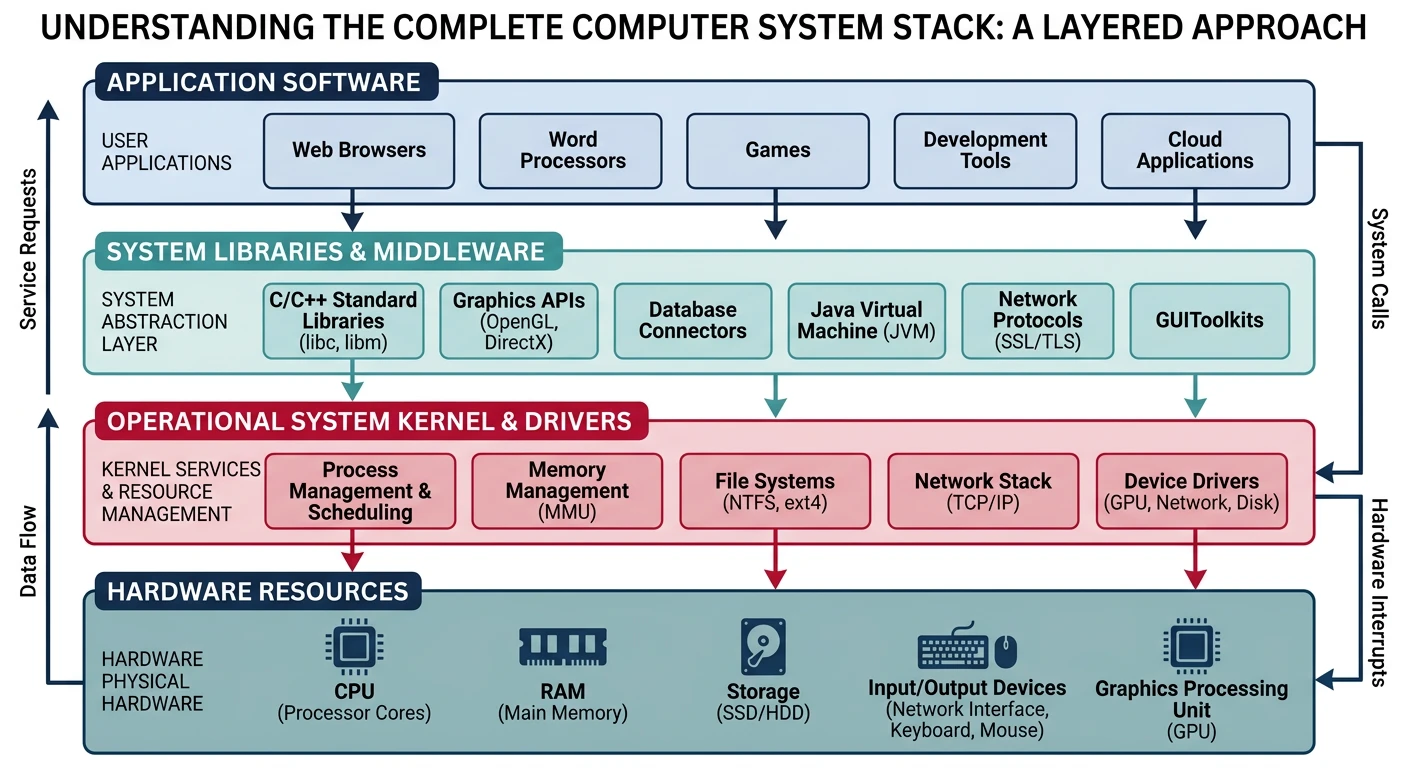
The Complete System Stack
A computer system consists of multiple layers, each abstracting the complexity below. Let's examine each layer from the bottom up:
The complete system stack from hardware to application software
Layer 1: Hardware
The foundation of every computer system is the physical hardware:
Processing Components
CPU — Central Processing Unit, executes instructions
GPU — Graphics Processing Unit, parallel computation
NPU — Neural Processing Unit, AI acceleration
Memory & Storage
Registers — Fastest, inside CPU (bytes)
Cache — L1/L2/L3, on-chip (KB-MB)
RAM — Main memory (GB)
SSD/HDD — Persistent storage (TB)
# View your CPU information (Linux)
cat /proc/cpuinfo | grep "model name" | head -1
cat /proc/cpuinfo | grep "cpu cores" | head -1
cat /proc/cpuinfo | grep "cache size" | head -1

# View memory hierarchy
lscpu | grep -i cache

# Example output:
# L1d cache:           32K      (data cache)
# L1i cache:           32K      (instruction cache)
# L2 cache:            256K
# L3 cache:            8192K
Layer 2: Firmware (BIOS/UEFI)
Firmware is software stored in non-volatile memory that initializes hardware before the operating system loads.
The Boot Process
System Startup
Power On
    │
    ▼
┌─────────────────────────────────────┐
│  1. UEFI/BIOS Firmware Starts      │
│     - POST (Power-On Self-Test)     │
│     - Initialize hardware           │
│     - Detect CPU, RAM, storage      │
└─────────────────┬───────────────────┘
                  │
                  ▼
┌─────────────────────────────────────┐
│  2. Bootloader Loads               │
│     - GRUB, Windows Boot Manager    │
│     - Loads kernel into memory      │
│     - Passes control to kernel      │
└─────────────────┬───────────────────┘
                  │
                  ▼
┌─────────────────────────────────────┐
│  3. Kernel Initializes             │
│     - Sets up memory management     │
│     - Loads device drivers          │
│     - Starts init/systemd           │
└─────────────────┬───────────────────┘
                  │
                  ▼
┌─────────────────────────────────────┐
│  4. User Space Starts              │
│     - System services start         │
│     - Login manager loads           │
│     - User session begins           │
└─────────────────────────────────────┘
BIOS vs UEFI
Feature
BIOS (Legacy)
UEFI (Modern)
Year Introduced
1981
2007
Boot Mode
16-bit real mode
32/64-bit protected mode
Max Disk Size
2 TB (MBR)
9.4 ZB (GPT)
Secure Boot
No
Yes
GUI Interface
Text only
Graphical possible
Layer 3: Operating System Kernel
The kernel is the core of the operating system—it's the first software loaded after the bootloader and remains in memory throughout operation.
Kernel vs User Space: The kernel runs in privileged mode (Ring 0) with full hardware access. User programs run in unprivileged mode (Ring 3) and must request services from the kernel via system calls.
What the Kernel Does:
Process Management — Creating, scheduling, terminating processes
// Example: System call to create a new process (fork)
#include <unistd.h>
#include <stdio.h>

int main() {
    pid_t pid = fork();  // System call - enters kernel

    if (pid == 0) {
        // Child process
        printf("I am the child! PID: %d\n", getpid());
    } else if (pid > 0) {
        // Parent process
        printf("I am the parent! Child PID: %d\n", pid);
    } else {
        // fork() failed
        perror("fork failed");
        return 1;
    }

    return 0;
}
Layer 4: User Space
Everything that runs outside the kernel operates in user space. This includes:
System Programs
Shell (bash, zsh, PowerShell)
File managers
System utilities (ls, cp, grep)
Network daemons
User Applications
Web browsers
Text editors / IDEs
Games
Custom programs
# Trace system calls made by a program (Linux)
strace ls -la

# Example output shows the program calling the kernel:
# execve("/bin/ls", ["ls", "-la"], ...) = 0
# openat(AT_FDCWD, ".", O_RDONLY|O_NONBLOCK|O_DIRECTORY) = 3
# getdents64(3, ...) = 1024
# write(1, "total 128\n", 10) = 10
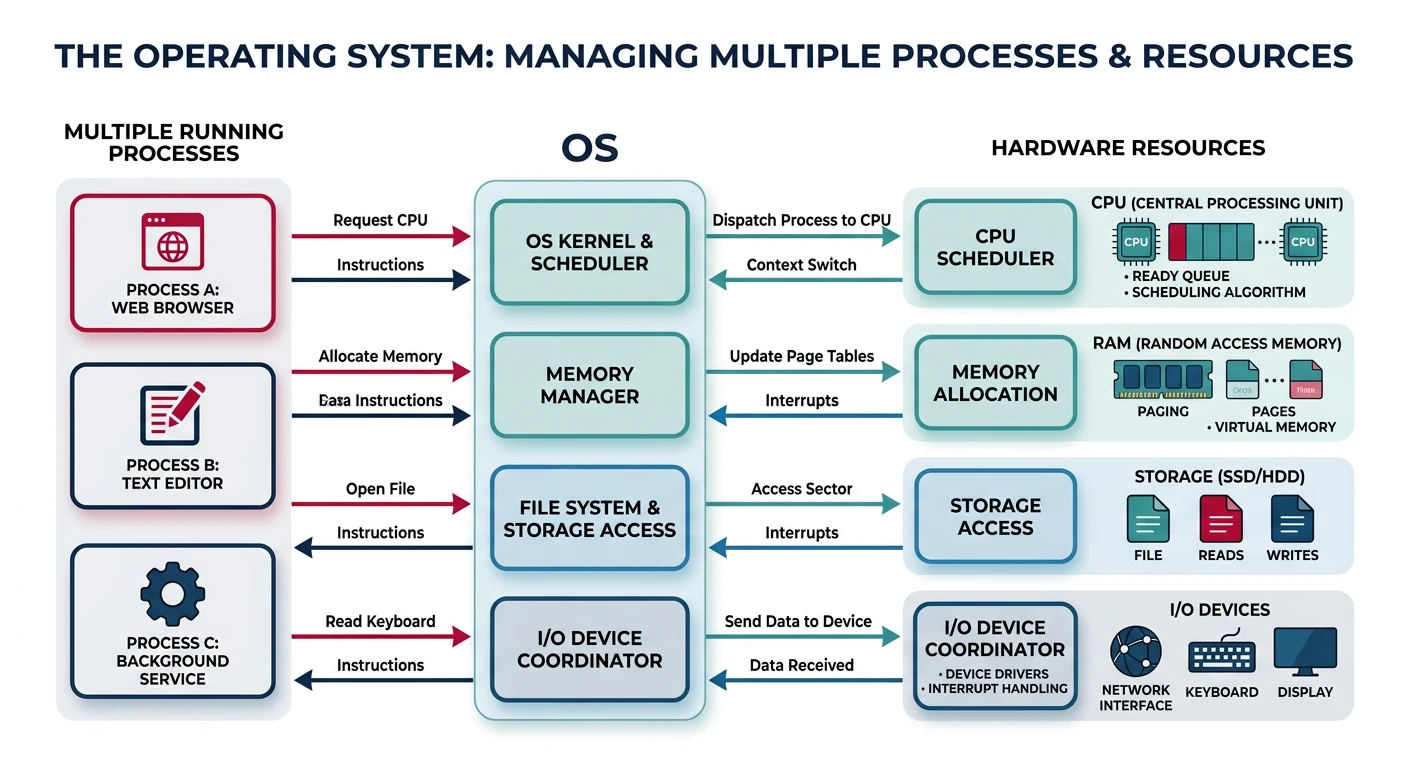
The OS as Resource Manager
The operating system's primary role is to manage resources—CPU time, memory, storage, and I/O devices—efficiently and fairly among competing processes.
The OS as resource manager: coordinating CPU, memory, storage, and I/O across processes
The Traffic Cop Analogy
Real-World Analogy
Think of the OS as a traffic cop at a busy intersection (the CPU):
Cars = Processes wanting CPU time
Traffic signals = Scheduling algorithms
Lanes = Memory partitions
Road rules = Security policies
The cop (OS) ensures no single car (process) hogs the intersection (CPU), handles accidents (crashes), and keeps traffic flowing smoothly.
CPU Management
The CPU is the most valuable shared resource. The OS must decide which process runs when, for how long, and on which core.
Key Concepts:
Multiprogramming — Keep CPU busy by running another process when one is waiting for I/O
Time-sharing — Give each process a small time slice, switching rapidly
Scheduling — Algorithms to decide which process runs next
# View running processes and CPU usage (Linux)
top -b -n 1 | head -20

# Output shows:
# PID USER      PR  NI    VIRT    RES    SHR S  %CPU %MEM     TIME+ COMMAND
#   1 root      20   0  225552   9472   6612 S   0.0  0.2   0:01.82 systemd
# 534 root      20   0       0      0      0 I   0.0  0.0   0:00.15 kworker

# Check how many CPUs/cores
nproc
# Output: 8

# See CPU scheduling information for a process
cat /proc/1/sched | head -10
Scheduling Goals (often conflicting):
Maximize CPU utilization — Keep the CPU busy
Maximize throughput — Complete more processes per unit time
Minimize latency — Quick response for interactive programs
Ensure fairness — Every process gets its share
Meet deadlines — Critical for real-time systems
Memory Management
Memory is finite, but processes want unlimited space. The OS must:
Allocate memory to processes as they need it
Protect memory — Prevent processes from accessing others' memory
Virtual memory — Give processes the illusion of more memory than physically exists
The OS presents all devices through a unified file interface:
# Everything is a file in Unix/Linux!
ls -la /dev | head -15

# Character devices (one byte at a time)
crw-rw-rw- 1 root root 1, 3 Jan 31 /dev/null
crw-rw-rw- 1 root root 1, 5 Jan 31 /dev/zero

# Block devices (blocks of data)
brw-rw---- 1 root disk 8, 0 Jan 31 /dev/sda
brw-rw---- 1 root disk 8, 1 Jan 31 /dev/sda1

# Pseudo-devices
crw-rw-rw- 1 root root 1, 8 Jan 31 /dev/random
// Reading from different "files" uses the same API
int fd1 = open("/dev/random", O_RDONLY);  // Random number generator
int fd2 = open("/home/user/data.txt", O_RDONLY);  // Regular file
int fd3 = open("/dev/sda", O_RDONLY);  // Entire disk!

// All use the same read() system call
char buffer[100];
read(fd1, buffer, 100);  // Get random bytes
read(fd2, buffer, 100);  // Get file contents
read(fd3, buffer, 100);  // Get raw disk sectors
Key I/O Concepts:
Interrupts
Devices signal the CPU when they need attention, rather than the CPU constantly checking (polling).
DMA
Direct Memory Access lets devices transfer data directly to RAM without involving the CPU.
Buffering
Data is accumulated in memory before being written, smoothing out speed differences.
Caching
Frequently accessed data is kept in faster storage for quick retrieval.
Exercises
Practice Exercises
Hands-On
System Exploration: Run the following commands and document what you learn about your system:
# CPU information
lscpu | grep -E "Model name|CPU\(s\)|Thread|Cache"

# Memory information
free -h

# Storage devices
lsblk

# Running processes
ps aux | wc -l
Architecture Quiz: Your smartphone likely uses which architecture internally? Why?
Boot Sequence: Research your computer's boot time. What happens during those seconds?
Memory Challenge: Write a C program that allocates 1GB of memory. Does it succeed? Why or why not?
System Calls: Use strace to trace a simple command like echo "hello". How many system calls does it make?
Conclusion & Key Takeaways
In this foundational guide, we've established the core concepts that underpin all of computer science and systems engineering.
Key Concepts to Remember:
Computers are layered systems — From transistors to applications, each layer abstracts the one below
Von Neumann architecture dominates general computing — unified memory, simpler design
Harvard architecture offers performance — separate instruction/data paths, used in DSPs and caches
Modern CPUs are hybrid — Modified Harvard internally (separate L1 caches), Von Neumann externally
The OS is a resource manager — CPU scheduling, memory management, and I/O coordination
Everything runs through the kernel — System calls are the gateway between user programs and hardware
What's Next?
With these foundations in place, we're ready to dive deeper. The next several parts will explore:
Part 2: How digital logic gates become CPU components
Part 3: How instructions are encoded and executed
Part 4: How assembly language bridges software and hardware
Further Reading
Books: "Computer Organization and Design" by Patterson & Hennessy
Books: "Operating System Concepts" by Silberschatz, Galvin, Gagne
Online: MIT OpenCourseWare 6.004 (Computation Structures)