A process is a program in execution—it's the fundamental unit of work in an operating system. Understanding processes is essential for systems programming, performance tuning, and debugging complex applications.
A process is a running instance of a program with its own memory space, execution context, and system resources.
Series Context: This is Part 9 of 24 in the Computer Architecture & Operating Systems Mastery series. Building on kernel architecture, we now explore how the OS manages running programs.
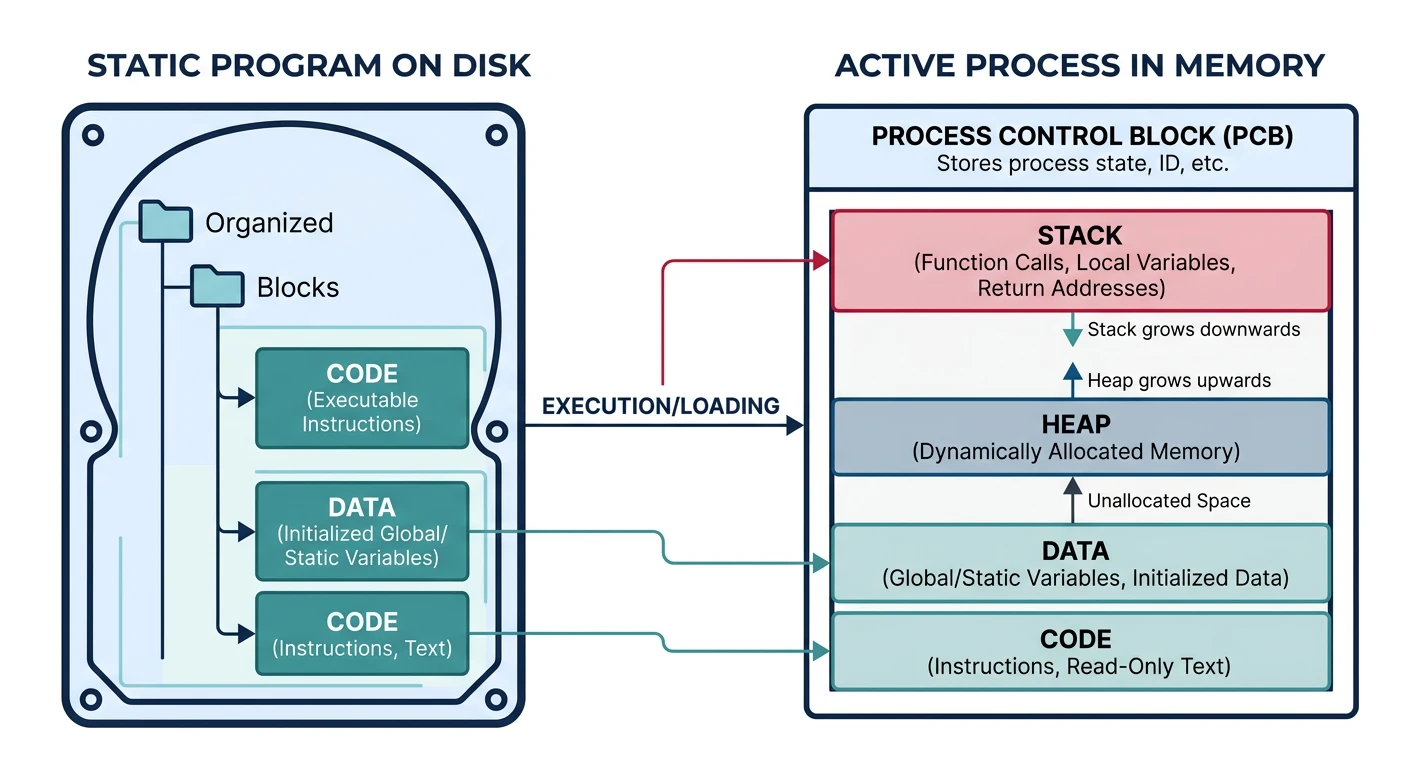
A process is a program in execution—a running instance of a program with its own resources, memory space, and execution context. While a program is static code on disk, a process is dynamic and active.
Analogy: A program is like a recipe (instructions written down). A process is like actually cooking that recipe—with ingredients (data), a chef (CPU), pots and pans (resources), and the current step you're on (program counter).
Process Concept
Process vs Program
Program vs Process
Program vs Process:
══════════════════════════════════════════════════════════════

PROGRAM (Static)                    PROCESS (Dynamic)
────────────────────────────────    ────────────────────────────────
• Code stored on disk              • Program loaded in memory
• Passive entity                   • Active entity
• No state                         • Has execution state
• Can exist without executing      • Exists only while running
• One program file                 • Multiple processes possible

Example:
┌─────────────────┐                ┌─────────────────┐
│   /bin/bash     │                │  Process 1234   │
│   (executable)  │  ───────────→  │  bash (user A)  │
│                 │  fork + exec   │                 │
└─────────────────┘                └─────────────────┘
        │
        │                          ┌─────────────────┐
        └───────────────────────→  │  Process 5678   │
                      fork + exec  │  bash (user B)  │
                                   └─────────────────┘

Same program, multiple processes, each with own:
• Memory space (isolated)
• File descriptors
• Environment variables
• Current working directory
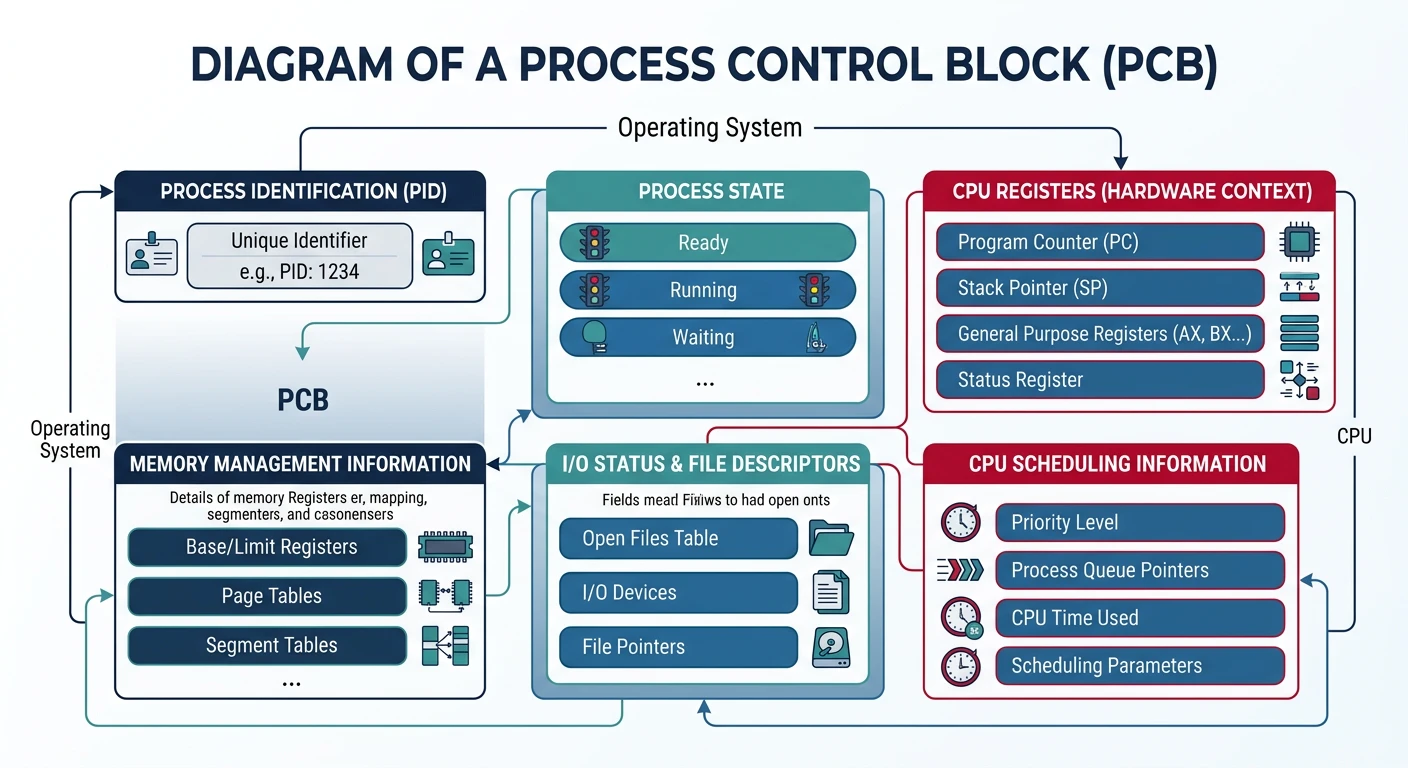
The Process Control Block (PCB) is a data structure the kernel maintains for each process. It contains all information needed to manage and schedule the process.
The Process Control Block (PCB) stores all essential process metadata that the kernel uses for management and scheduling.
PCB Contents
PCB Structure
Process Control Block (task_struct in Linux):
══════════════════════════════════════════════════════════════

┌─────────────────────────────────────────────────────────────┐
│                    Process Control Block                     │
├─────────────────────────────────────────────────────────────┤
│ IDENTIFICATION                                              │
│   • PID (Process ID): 1234                                 │
│   • PPID (Parent PID): 1                                   │
│   • UID/GID (User/Group): 1000/1000                        │
│   • Process name: "firefox"                                │
├─────────────────────────────────────────────────────────────┤
│ STATE INFORMATION                                           │
│   • Current state: Running / Ready / Blocked               │
│   • Priority: 20 (nice value)                              │
│   • CPU time used: 45.23 seconds                           │
│   • Scheduling class: SCHED_NORMAL                         │
├─────────────────────────────────────────────────────────────┤
│ CPU CONTEXT (saved on context switch)                       │
│   • Program Counter (RIP): 0x401234                        │
│   • Stack Pointer (RSP): 0x7ffc12345678                    │
│   • General registers: RAX, RBX, RCX, ...                  │
│   • Flags register (RFLAGS)                                │
│   • Floating-point state (FPU/SSE/AVX)                     │
├─────────────────────────────────────────────────────────────┤
│ MEMORY MANAGEMENT                                           │
│   • Page table pointer (CR3): 0x12345000                   │
│   • Memory limits: stack, heap boundaries                  │
│   • Memory map (VMAs): code, data, stack, mmap            │
├─────────────────────────────────────────────────────────────┤
│ FILE DESCRIPTORS                                            │
│   • Open file table pointer                                │
│   • stdin (0), stdout (1), stderr (2)                      │
│   • Network sockets, pipes, etc.                           │
├─────────────────────────────────────────────────────────────┤
│ SIGNAL HANDLING                                             │
│   • Pending signals bitmap                                 │
│   • Signal handlers: signal → handler function             │
│   • Blocked signals mask                                   │
├─────────────────────────────────────────────────────────────┤
│ ACCOUNTING                                                  │
│   • Start time: 2024-01-15 10:30:45                        │
│   • CPU time (user/system): 12.5s / 3.2s                   │
│   • I/O statistics: bytes read/written                     │
└─────────────────────────────────────────────────────────────┘
Context Switching
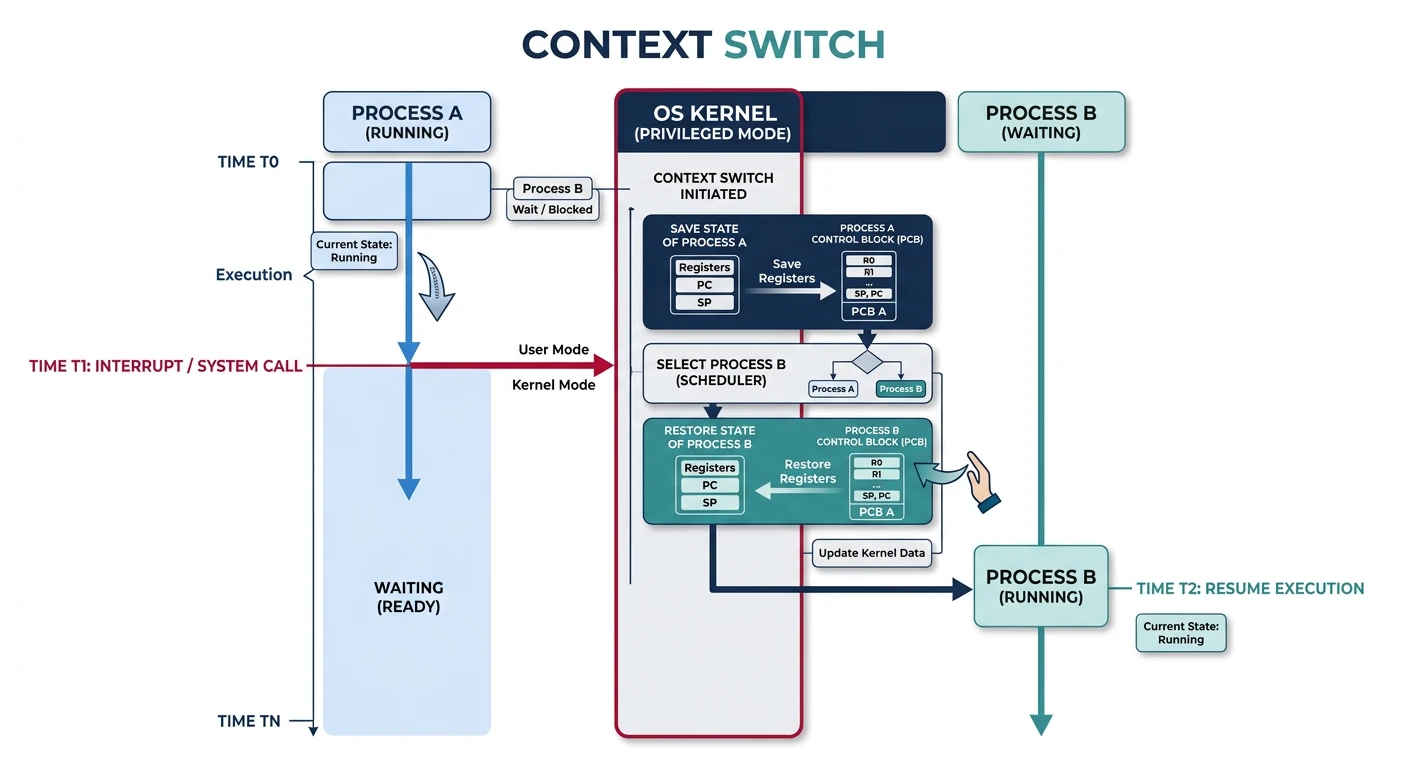
A context switch saves one process's state and restores another's, allowing the CPU to run multiple processes "simultaneously."
During a context switch, the kernel saves Process A's state to its PCB and restores Process B's state, enabling multitasking.
Context Switch Sequence:
══════════════════════════════════════════════════════════════

Process A running                   Process B waiting
     │                                    │
     ▼                                    │
┌─────────────────┐                       │
│ Timer interrupt │                       │
│ or syscall      │                       │
└────────┬────────┘                       │
         │                                │
         ▼                                │
┌─────────────────────────────────────────┼─────────────────┐
│                    KERNEL                │                 │
│                                          │                 │
│  1. Save Process A's context:           │                 │
│     • Push registers to A's kernel stack│                 │
│     • Save stack pointer in A's PCB     │                 │
│                                          │                 │
│  2. Scheduler selects Process B         │                 │
│                                          │                 │
│  3. Restore Process B's context:        │                 │
│     • Load B's page table (CR3)         │                 │
│     • Load B's stack pointer            │                 │
│     • Pop registers from B's kernel stack                 │
│                                          │                 │
└──────────────────────────────────────────┴─────────────────┘
                                                    │
                                                    ▼
                              ┌─────────────────────────────┐
                              │     Process B now running   │
                              │     (A is now "Ready")      │
                              └─────────────────────────────┘

Context Switch Cost:
━━━━━━━━━━━━━━━━━━━━━━━━━━━━━━━━━━━━━━━━━━━━━━━━━━━━━━━━━━━━
Operation                              Time
━━━━━━━━━━━━━━━━━━━━━━━━━━━━━━━━━━━━━━━━━━━━━━━━━━━━━━━━━━━━
Save/restore registers                 ~1-2 μs
TLB flush (address space switch)       ~0-10 μs (ASID helps)
Cache pollution                        10-1000+ μs (indirect)
━━━━━━━━━━━━━━━━━━━━━━━━━━━━━━━━━━━━━━━━━━━━━━━━━━━━━━━━━━━━
Direct cost: ~2-5 μs
Indirect cost (cache misses): Much higher!
Process Creation
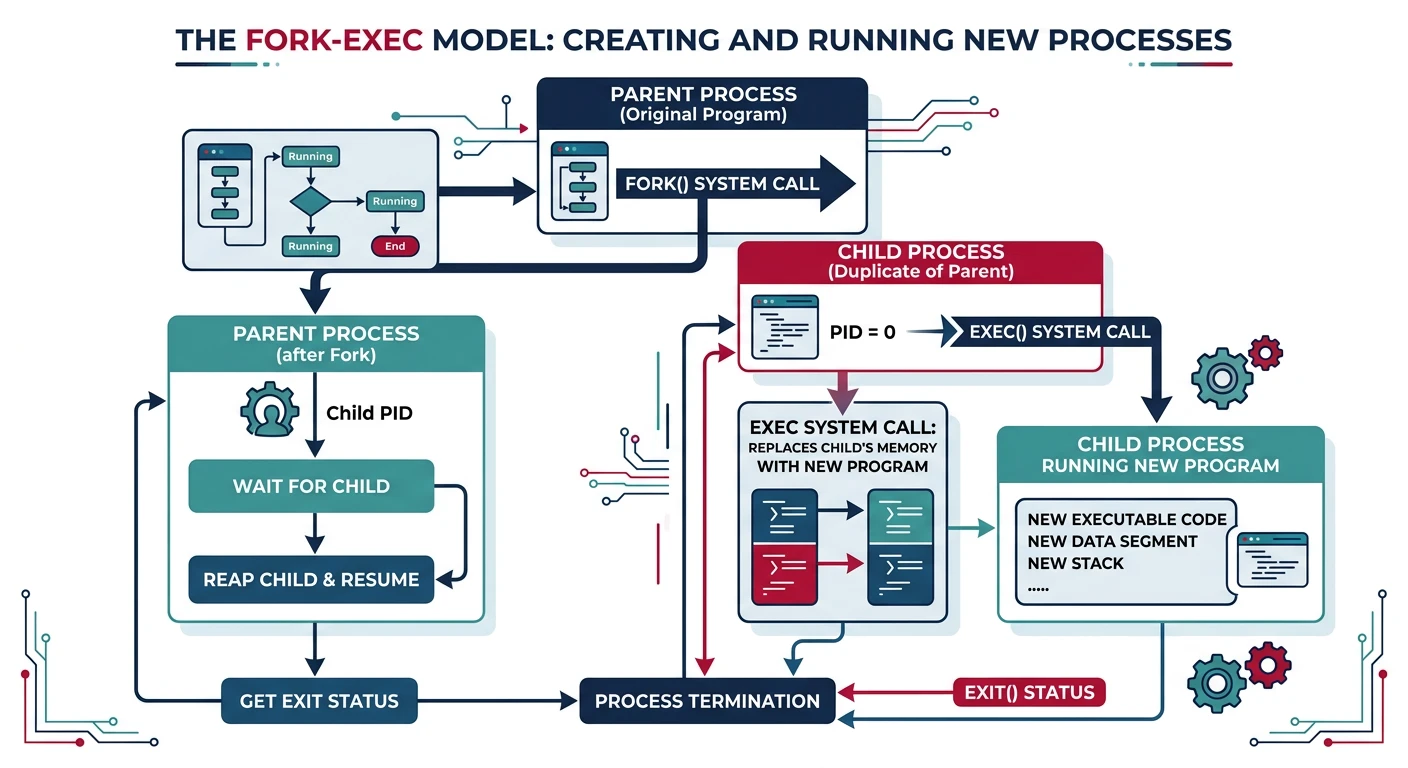
On Unix/Linux, processes are created using the fork-exec model: fork() creates a copy of the parent, then exec() replaces it with a new program.
The Unix fork-exec model creates processes in two steps: fork() clones the parent, then exec() loads a new program image.
fork() System Call
fork() Creates a Clone
// fork() example - creates child process
#include <stdio.h>
#include <unistd.h>
#include <sys/wait.h>

int main() {
    printf("Before fork: PID = %d\n", getpid());

    pid_t pid = fork();  // Creates child process

    if (pid < 0) {
        // fork() failed
        perror("fork failed");
        return 1;
    }
    else if (pid == 0) {
        // CHILD process (fork returns 0 to child)
        printf("Child: PID = %d, Parent PID = %d\n",
               getpid(), getppid());
        // Child does its work...
    }
    else {
        // PARENT process (fork returns child's PID)
        printf("Parent: PID = %d, Child PID = %d\n",
               getpid(), pid);
        wait(NULL);  // Wait for child to exit
        printf("Parent: Child finished\n");
    }

    return 0;
}
Copy-on-Write (COW): Modern systems don't actually copy all memory on fork(). Instead, parent and child share memory pages marked read-only. Only when either writes does the kernel copy that specific page. This makes fork() very fast!
exec() System Call
// exec() replaces process image with new program
#include <stdio.h>
#include <unistd.h>

int main() {
    printf("About to exec ls...\n");

    // Replace this process with /bin/ls
    // execl(path, arg0, arg1, ..., NULL)
    execl("/bin/ls", "ls", "-la", "/tmp", NULL);

    // If exec succeeds, this line NEVER executes!
    // The process is now running /bin/ls
    printf("This won't print unless exec failed\n");
    perror("exec failed");
    return 1;
}

// exec family variants:
// execl  - list of args  : execl("/bin/ls", "ls", "-l", NULL)
// execv  - array of args : execv("/bin/ls", argv)
// execlp - search PATH   : execlp("ls", "ls", "-l", NULL)
// execvp - search PATH   : execvp("ls", argv)
// execle - with env      : execle("/bin/ls", "ls", NULL, envp)
// execve - array + env   : execve("/bin/ls", argv, envp)
Fork-Exec Pattern
How Shells Launch Programs
// Shell-like process creation
#include <stdio.h>
#include <unistd.h>
#include <sys/wait.h>

int main() {
    char *command = "/bin/ls";
    char *args[] = {"ls", "-la", "/tmp", NULL};

    pid_t pid = fork();

    if (pid == 0) {
        // CHILD: Replace with new program
        execv(command, args);
        perror("exec failed");  // Only reached if exec fails
        _exit(127);
    }
    else if (pid > 0) {
        // PARENT: Wait for child
        int status;
        waitpid(pid, &status, 0);

        if (WIFEXITED(status)) {
            printf("Child exited with code %d\n",
                   WEXITSTATUS(status));
        }
    }

    return 0;
}
Process Termination:
══════════════════════════════════════════════════════════════

Normal Termination:
• exit(status)   - Terminate with exit code
• return from main() - Same as exit(return_value)
• _exit(status)  - Immediate termination (no cleanup)

Abnormal Termination:
• Killed by signal (SIGKILL, SIGTERM, SIGSEGV, etc.)
• Uncaught exception
• abort() - Sends SIGABRT to self

Exit Code Conventions:
━━━━━━━━━━━━━━━━━━━━━━━━━━━━━━━━━━━━━━━━━━━━━━━━━━━━━━━━━━━━
Code    Meaning
━━━━━━━━━━━━━━━━━━━━━━━━━━━━━━━━━━━━━━━━━━━━━━━━━━━━━━━━━━━━
0       Success
1       General error
2       Misuse of shell command
126     Command found but not executable
127     Command not found
128+N   Killed by signal N (e.g., 137 = 128 + 9 = SIGKILL)

$ ls /nonexistent
ls: cannot access '/nonexistent': No such file or directory
$ echo $?
2

$ sleep 100 &
$ kill -9 $!
$ wait $!
$ echo $?
137   # 128 + 9 (SIGKILL)
Zombies & Orphans
Zombie and Orphan Processes
Zombie Process:
══════════════════════════════════════════════════════════════
A process that has terminated but whose parent hasn't called
wait() yet. The PCB remains so the parent can retrieve the
exit status.

Parent                          Child
   │                              │
   │                              │ exit(0)
   │                              ▼
   │                    ┌─────────────────┐
   │  (doesn't wait)    │ ZOMBIE (Z state)│
   │                    │ PID exists      │
   │                    │ Takes no resources│
   │                    │ Waiting for     │
   │                    │ parent's wait() │
   │                    └─────────────────┘

$ ps aux | grep Z
user   12345  0.0  0.0   0   0 ?  Z  10:30  0:00 [defunct]

Problem: Too many zombies can exhaust PID space.
Solution: Parent should always wait() for children.


Orphan Process:
══════════════════════════════════════════════════════════════
A process whose parent has terminated. The orphan is "adopted"
by init (PID 1) or a subreaper process, which will wait() for it.

Parent (PID 1000)              Child (PID 1001)
   │                              │
   │ exit(0)                      │
   ▼                              │
(Parent terminates)               │
                                  │
init (PID 1)                      │
   │                              │
   │◄───── reparented ────────────┤
   │                              │
   │                              │ exit(0)
   │                              ▼
   │◄─── wait() ────── (Orphan terminates cleanly)

Orphans are NOT zombies - they continue running normally,
just with a new parent (usually init).
Inter-Process Communication
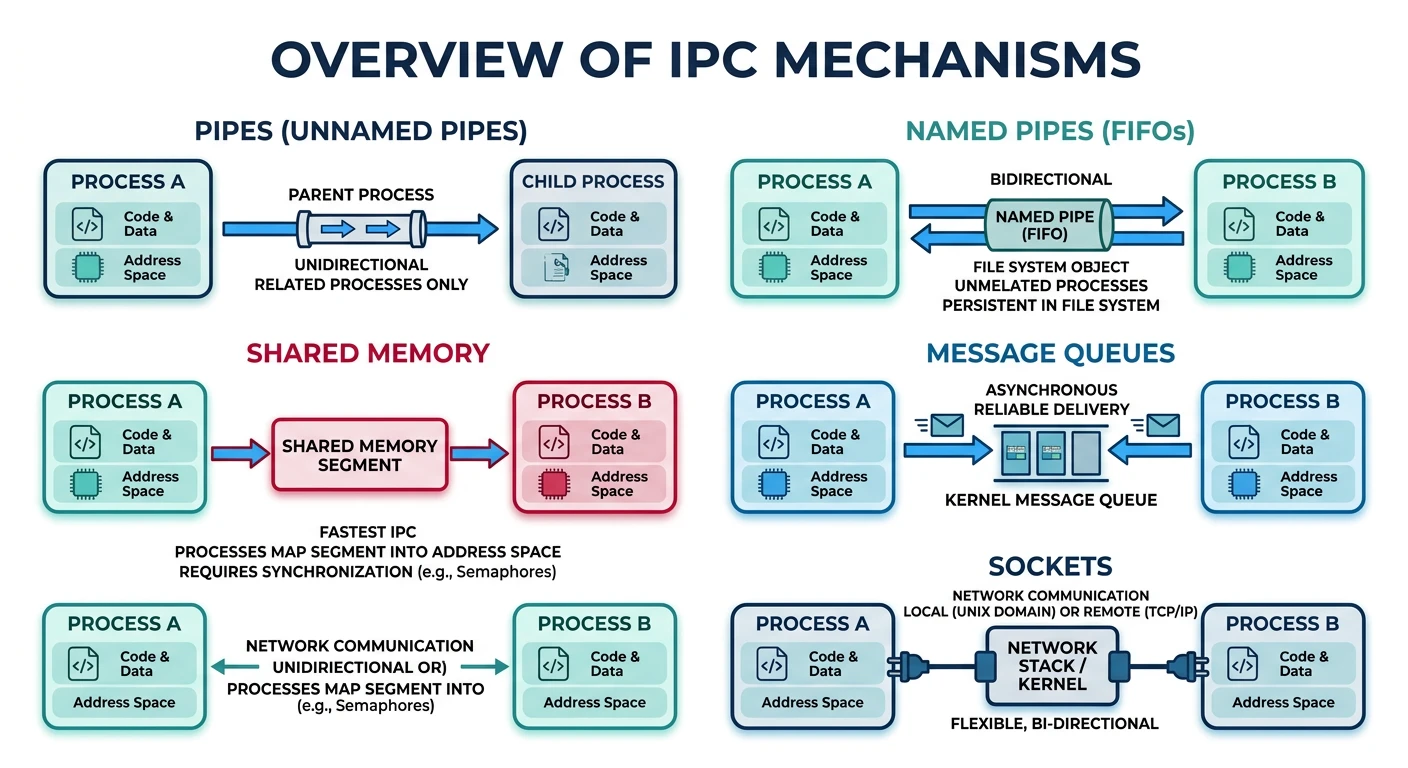
Processes are isolated by design, but sometimes they need to communicate. The OS provides several IPC (Inter-Process Communication) mechanisms:
Inter-Process Communication (IPC) mechanisms enable isolated processes to exchange data through pipes, shared memory, sockets, and message queues.
IPC Mechanisms
Mechanism
Description
Use Case
Pipes
Unidirectional byte stream between related processes
ls | grep foo
Named Pipes (FIFOs)
Pipes with filesystem name, any process can connect
Simple client-server
Shared Memory
Memory region mapped into multiple processes
High-speed data sharing
Message Queues
Kernel-managed message passing
Structured communication
Semaphores
Synchronization primitive (not data transfer)
Coordinate access
Sockets
Network-style communication (local or remote)
Client-server apps
Signals
Asynchronous notifications
SIGTERM, SIGINT, etc.
// Pipe example - parent writes, child reads
#include <stdio.h>
#include <unistd.h>
#include <string.h>

int main() {
    int pipefd[2];  // pipefd[0] = read end, pipefd[1] = write end
    char buf[100];

    pipe(pipefd);   // Create pipe before fork!

    if (fork() == 0) {
        // CHILD: Read from pipe
        close(pipefd[1]);  // Close unused write end
        read(pipefd[0], buf, sizeof(buf));
        printf("Child received: %s\n", buf);
        close(pipefd[0]);
    } else {
        // PARENT: Write to pipe
        close(pipefd[0]);  // Close unused read end
        char *msg = "Hello from parent!";
        write(pipefd[1], msg, strlen(msg) + 1);
        close(pipefd[1]);
        wait(NULL);
    }
    return 0;
}
// Output: Child received: Hello from parent!
IPC Choice Matters: Shared memory is fastest (no kernel involvement for data transfer) but requires manual synchronization. Pipes/sockets are simpler but involve kernel copies. Choose based on your needs!
Conclusion & Next Steps
Processes are the fundamental abstraction for running programs. We've covered:
Process Concept: Programs in execution with their own memory space and resources
Memory Layout: Text, data, BSS, heap, and stack segments
Process States: Running, ready, blocked, zombie, and the transitions between them
PCB: The kernel's data structure containing all process information
Fork-Exec: Unix model for process creation via clone + replace
Termination: Exit codes, zombies, and orphan handling
IPC: Pipes, shared memory, sockets for inter-process communication
Key Insight: Processes provide isolation—one process crashing doesn't affect others. This isolation comes at a cost (context switch overhead, IPC complexity), which is why threads (next topic) share an address space for faster communication.
Continue the Computer Architecture & OS Series
Part 8: OS Architecture & Kernel Design
Monolithic vs microkernel, system calls, and interrupt handling.