We use cookies to enhance your browsing experience, serve personalized content, and analyze our traffic.
By clicking "Accept All", you consent to our use of cookies. See our
Privacy Policy
for more information.
The journey from source code to running program involves several critical stages: assembly, linking, and loading. Understanding this toolchain is essential for debugging, optimization, and systems programming.
Series Context: This is Part 5 of 24 in the Computer Architecture & Operating Systems Mastery series. Building on assembly language knowledge, we now explore how programs are built and loaded.
Think of the compilation process like a factory assembly line:
The Software Factory
Source Code (.c, .cpp)     →  Raw Materials (blueprints)
         ↓
    Preprocessor            →  Expand macros, includes
         ↓
    Compiler                →  Translate to assembly
         ↓
    Assembler               →  Convert to machine code (object files)
         ↓
    Linker                  →  Combine parts, resolve references
         ↓
    Loader                  →  Place in memory, start execution
         ↓
Running Program            →  Finished Product
Each stage transforms the code into a form closer to what the CPU can actually execute. Understanding this pipeline helps you debug mysterious linker errors, optimize build times, and create efficient programs.
Why This Matters: When you see cryptic errors like "undefined reference to 'main'" or "relocation truncated to fit," understanding the toolchain reveals exactly what went wrong and how to fix it.
Seeing the Pipeline in Action
Let's trace a simple program through the entire build process:
// hello.c - Our example program
#include <stdio.h>

int global_var = 42;        // Initialized data
int uninitialized_var;      // BSS (zero-initialized)

int main(void) {
    printf("Hello, World! Value: %d\n", global_var);
    return 0;
}
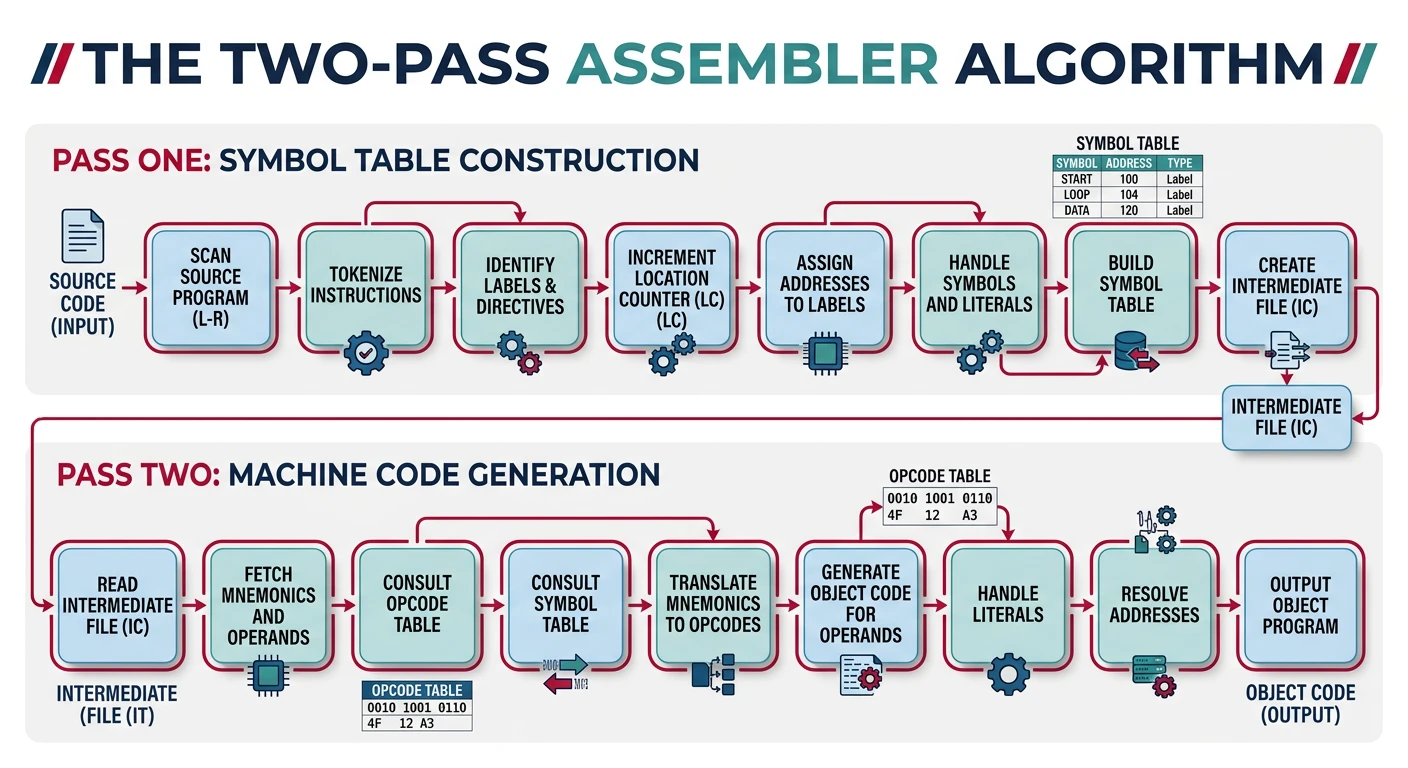
The assembler is the tool that translates assembly language (human-readable mnemonics) into machine code (binary instructions the CPU understands). It's not just a simple one-to-one translation—assemblers handle symbols, calculate addresses, and manage memory layout.
The two-pass assembler: first pass builds the symbol table, second pass generates machine code with resolved addresses
Two-Pass Assembly
Most assemblers use a two-pass algorithm because they can't know all addresses on the first read. Consider this problem:
; What address is 'end_label' during first scan?
        JMP     end_label       ; Address unknown yet!
        ADD     R1, R2, R3
        SUB     R4, R5, R6
end_label:
        RET
When the assembler first sees JMP end_label, it doesn't know where end_label will be—the label is defined later (forward reference).
Two-Pass Algorithm
PASS 1: Build Symbol Table
--------------------------
Read through entire file
For each label found:
    Record its location counter value
    Store in symbol table
Track location counter (address of next instruction)

                 Location    Symbol Table
Line             Counter     After Pass 1
-----------------------------------------
start:           0x0000      start → 0x0000
  JMP end_label  0x0000
  ADD R1,R2,R3   0x0004
  SUB R4,R5,R6   0x0008
end_label:       0x000C      end_label → 0x000C
  RET            0x000C


PASS 2: Generate Code
---------------------
Read through file again
For each instruction:
    Look up symbols in symbol table
    Generate machine code with resolved addresses
    Output to object file

Output Machine Code:
0x0000: JMP 0x000C    ← Now we know end_label = 0x000C
0x0004: ADD R1,R2,R3
0x0008: SUB R4,R5,R6
0x000C: RET
Two-Pass Assembly Pipeline
flowchart LR
    A["Source File
.asm"] --> B["Pass 1
Build Symbol Table"]
    B --> C["Symbol Table
Labels to Addresses"]
    A --> D["Pass 2
Generate Machine Code"]
    C --> D
    D --> E["Object File
.o / .obj"]

    style A fill:#e8f4f4,stroke:#3B9797
    style C fill:#f0f4f8,stroke:#16476A
    style E fill:#e8f4f4,stroke:#3B9797
Location Counter: The assembler maintains a location counter (sometimes called the program counter during assembly) that tracks the address where the next byte will be placed. This starts at 0 (or an origin address) and increments with each instruction/data byte.
Symbol Tables
The symbol table is the assembler's database of all defined names (labels, variables, constants). It maps symbolic names to their numeric values or addresses.
// Conceptual symbol table structure
struct symbol_entry {
    char *name;           // "end_label", "global_var", etc.
    uint64_t value;       // Address or constant value
    int section;          // .text, .data, .bss section index
    int binding;          // LOCAL or GLOBAL visibility
    int type;             // FUNC, OBJECT, SECTION, etc.
};

// Example symbol table after assembly:
// Name           Value    Section  Binding   Type
// -----------------------------------------------
// main           0x0000   .text    GLOBAL    FUNC
// helper         0x0040   .text    LOCAL     FUNC
// global_var     0x0000   .data    GLOBAL    OBJECT
// printf         0x0000   UNDEF    GLOBAL    FUNC  ← External!
External Symbols: When the assembler encounters a symbol that's used but not defined (like printf), it marks it as UNDEFINED. The linker will resolve these references later by finding the definition in another object file or library.
Viewing Symbol Tables
# Compile to object file
gcc -c hello.c -o hello.o

# View symbol table with nm
nm hello.o
# Output:
# 0000000000000000 T main           # T = Text section (code)
# 0000000000000000 D global_var     # D = Initialized data
# 0000000000000004 C uninitialized  # C = Common (BSS)
#                  U printf         # U = Undefined (external)

# More detailed with readelf
readelf -s hello.o
# Shows: Value, Size, Type, Bind, Vis, Ndx, Name
Assembler Directives
Assembler directives (also called pseudo-ops) are instructions to the assembler itself—they don't generate machine code directly but control how the assembler works.
Common Assembler Directives
GAS Syntax (GNU Assembler)
Directive
Purpose
Example
.section
Switch to named section
.section .data
.text
Code section (executable)
.text
.data
Initialized data section
.data
.bss
Uninitialized data (zeroed)
.bss
.global
Export symbol for linker
.global main
.byte
1-byte data
.byte 0x41, 0x42
.word
2-byte data
.word 0x1234
.long/.int
4-byte data
.long 42
.quad
8-byte data
.quad 0x123456789ABCDEF0
.ascii
ASCII string (no null)
.ascii "Hi"
.asciz
Null-terminated string
.asciz "Hello"
.align
Pad to boundary
.align 16
.space
Reserve bytes
.space 100
.equ
Define constant
.equ BUFSIZE, 1024
Complete Assembly Example
# example.s - Complete assembly program (x86-64 Linux)
        .section .data
msg:    .asciz "Result: %d\n"    # Null-terminated format string
value:  .long 42                 # 4-byte integer

        .section .bss
buffer: .space 256               # 256 uninitialized bytes

        .section .text
        .global main             # Export main for linker

main:
        pushq   %rbp             # Save frame pointer
        movq    %rsp, %rbp       # Set up stack frame

        # Call printf(msg, value)
        movl    value(%rip), %esi    # Second arg: value
        leaq    msg(%rip), %rdi      # First arg: format string
        xorl    %eax, %eax           # Zero for no vector args
        call    printf@PLT           # Call via PLT (dynamic)

        xorl    %eax, %eax       # Return 0
        popq    %rbp             # Restore frame pointer
        ret
# Assemble and link
gcc -c example.s -o example.o   # Assemble
gcc example.o -o example        # Link with C library
./example
# Output: Result: 42
Object Files
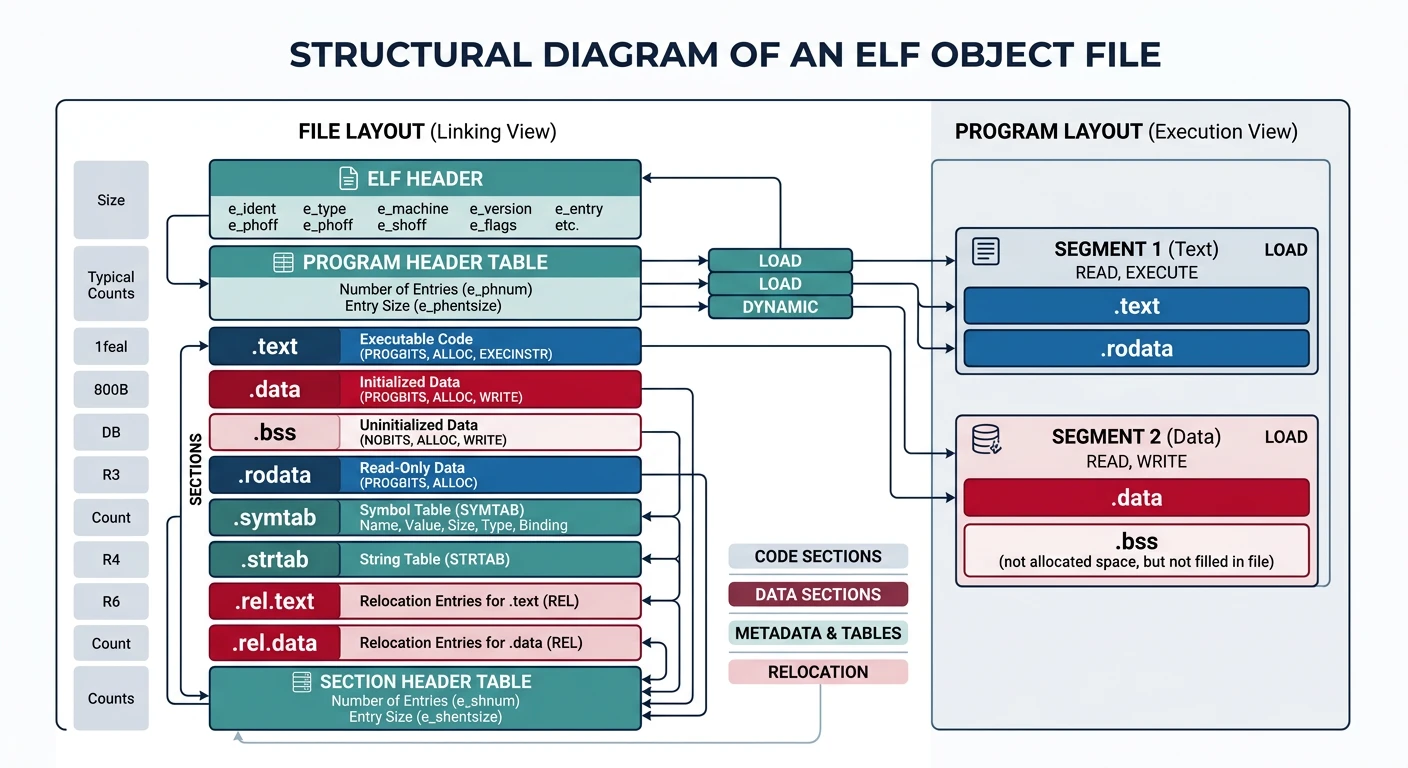
The assembler produces object files—containers holding machine code, data, and metadata in a structured format. Object files are not yet executable; they're intermediate files ready to be combined by the linker.
ELF object file structure: headers, code and data sections, symbol table, and relocation information organized in a standardized format
ELF Format
The Executable and Linkable Format (ELF) is the standard object file format on Linux, BSD, and most Unix-like systems. It's elegantly designed to serve multiple purposes:
ELF File Types
Type
Purpose
Extension
Relocatable
Object files for linking (addresses not final)
.o
Executable
Ready-to-run programs (addresses fixed)
no extension (usually)
Shared Object
Dynamic libraries
.so
Core Dump
Process memory snapshot for debugging
core
ELF Structure Overview
ELF File Layout
═══════════════════════════════════════════════
│              ELF Header                      │  ← File identification & metadata
│  (Magic: 0x7F 'E' 'L' 'F')                  │
├──────────────────────────────────────────────┤
│         Program Header Table                 │  ← How to create process image
│  (Used by loader for executables)            │     (segments for memory mapping)
├──────────────────────────────────────────────┤
│                                              │
│              .text section                   │  ← Executable code
│                                              │
├──────────────────────────────────────────────┤
│              .rodata section                 │  ← Read-only data (strings, constants)
├──────────────────────────────────────────────┤
│              .data section                   │  ← Initialized global/static variables
├──────────────────────────────────────────────┤
│              .bss section                    │  ← Uninitialized data (zeroed at runtime)
│              (not stored in file!)           │
├──────────────────────────────────────────────┤
│              .symtab section                 │  ← Symbol table (names → addresses)
├──────────────────────────────────────────────┤
│              .strtab section                 │  ← String table (symbol names)
├──────────────────────────────────────────────┤
│              .rela.text section              │  ← Relocation entries for .text
├──────────────────────────────────────────────┤
│              Other sections...               │
├──────────────────────────────────────────────┤
│         Section Header Table                 │  ← Describes all sections
│  (Used by linker for relocatables)           │     (offset, size, type, flags)
═══════════════════════════════════════════════
ELF distinguishes between sections (logical divisions for linking) and segments (physical divisions for loading). This dual view is one of ELF's most powerful features.
Linking View vs Execution View:
Sections: Used by the linker—fine-grained, named divisions (.text, .data, .rodata)
Segments: Used by the loader—grouped by permissions (read-only, read-write, executable)
Common ELF Sections
Section
Contents
Permissions
.text
Machine code instructions
Read + Execute
.rodata
String literals, const data
Read only
.data
Initialized global/static vars
Read + Write
.bss
Uninitialized globals (zero-init)
Read + Write
.symtab
Symbol table (linking info)
Not loaded
.strtab
Symbol name strings
Not loaded
.rel.text / .rela.text
Relocation entries for code
Not loaded
.plt
Procedure Linkage Table (dynamic)
Read + Execute
.got
Global Offset Table (dynamic)
Read + Write
.init / .fini
Initialization/termination code
Read + Execute
# List all sections
readelf -S hello.o

# Output shows: Name, Type, Address, Offset, Size, Flags
# [Nr] Name              Type             Address           Offset
#      Size              EntSize          Flags  Link  Info  Align
# [ 1] .text             PROGBITS         0000000000000000  00000040
#      0000000000000023  0000000000000000  AX       0     0     1
# [ 2] .rela.text        RELA             0000000000000000  00000198
#      0000000000000048  0000000000000018   I       9     1     8
# [ 3] .data             PROGBITS         0000000000000000  00000063
#      0000000000000004  0000000000000000  WA       0     0     4
#
# Flags: A=Alloc, W=Write, X=Execute, I=Info link
Sections to Segments Mapping
When creating an executable, the linker groups sections into segments (also called program headers) based on their memory permissions:
# View program headers (segments) in executable
readelf -l hello

# Output:
# Program Headers:
#   Type           Offset   VirtAddr           PhysAddr           FileSiz  MemSiz   Flg Align
#   LOAD           0x000000 0x0000000000400000 0x0000000000400000 0x000478 0x000478 R   0x1000
#   LOAD           0x001000 0x0000000000401000 0x0000000000401000 0x000185 0x000185 R E 0x1000
#   LOAD           0x002000 0x0000000000402000 0x0000000000402000 0x000108 0x000108 R   0x1000
#   LOAD           0x002e10 0x0000000000403e10 0x0000000000403e10 0x000220 0x000228 RW  0x1000
#
# Section to Segment mapping:
#   Segment Sections...
#    00
#    01     .text .init .fini               ← Executable code
#    02     .rodata                          ← Read-only data
#    03     .data .bss                       ← Read-write data
Relocation Entries
Relocation is how object files handle addresses that aren't known until link time. When the assembler can't resolve an address (external symbol or absolute address), it creates a relocation entry—a note to the linker saying "fix this address later."
// ELF relocation entry (with addend)
typedef struct {
    Elf64_Addr  r_offset;   // Location to patch (offset in section)
    Elf64_Xword r_info;     // Symbol index + relocation type
    Elf64_Sxword r_addend;  // Constant to add to symbol value
} Elf64_Rela;

// r_info encodes:
//   - Symbol table index (which symbol to look up)
//   - Relocation type (how to calculate the final value)
Common x86-64 Relocation Types
Relocation Types Explained
Type
Calculation
Use Case
R_X86_64_PC32
S + A - P
PC-relative 32-bit (calls, branches)
R_X86_64_PLT32
L + A - P
PLT entry for dynamic function call
R_X86_64_32
S + A
Absolute 32-bit address
R_X86_64_64
S + A
Absolute 64-bit address
R_X86_64_GOTPCREL
G + GOT + A - P
GOT entry for global data
Legend: S = Symbol value, A = Addend, P = Place (relocation address), L = PLT entry, G = GOT entry offset
# View relocation entries
readelf -r hello.o

# Output:
# Relocation section '.rela.text' at offset 0x198 contains 2 entries:
#   Offset          Info           Type           Sym. Value    Sym. Name + Addend
# 000000000007  000500000002 R_X86_64_PC32     0000000000000000 .rodata - 4
# 000000000014  000a00000004 R_X86_64_PLT32    0000000000000000 printf - 4
#
# Interpretation:
# - At offset 0x07 in .text: insert address of .rodata (string "Hello")
# - At offset 0x14 in .text: insert PLT call to printf

# See the unresolved bytes in object file
objdump -d hello.o
# 0000000000000000 <main>:
#    0:   48 83 ec 08             sub    $0x8,%rsp
#    4:   48 8d 3d 00 00 00 00    lea    0x0(%rip),%rdi  ← Zeros to be patched!
#                         7: R_X86_64_PC32    .rodata-0x4
#    b:   31 c0                   xor    %eax,%eax
#    d:   e8 00 00 00 00          call   12 <main+0x12>  ← Zeros to be patched!
#                         e: R_X86_64_PLT32   printf-0x4
Position-Independent Code (PIC): Modern shared libraries use relocation types that support loading at any address. Instead of absolute addresses, they use PC-relative addressing and the GOT/PLT mechanism for external references.
Linkers
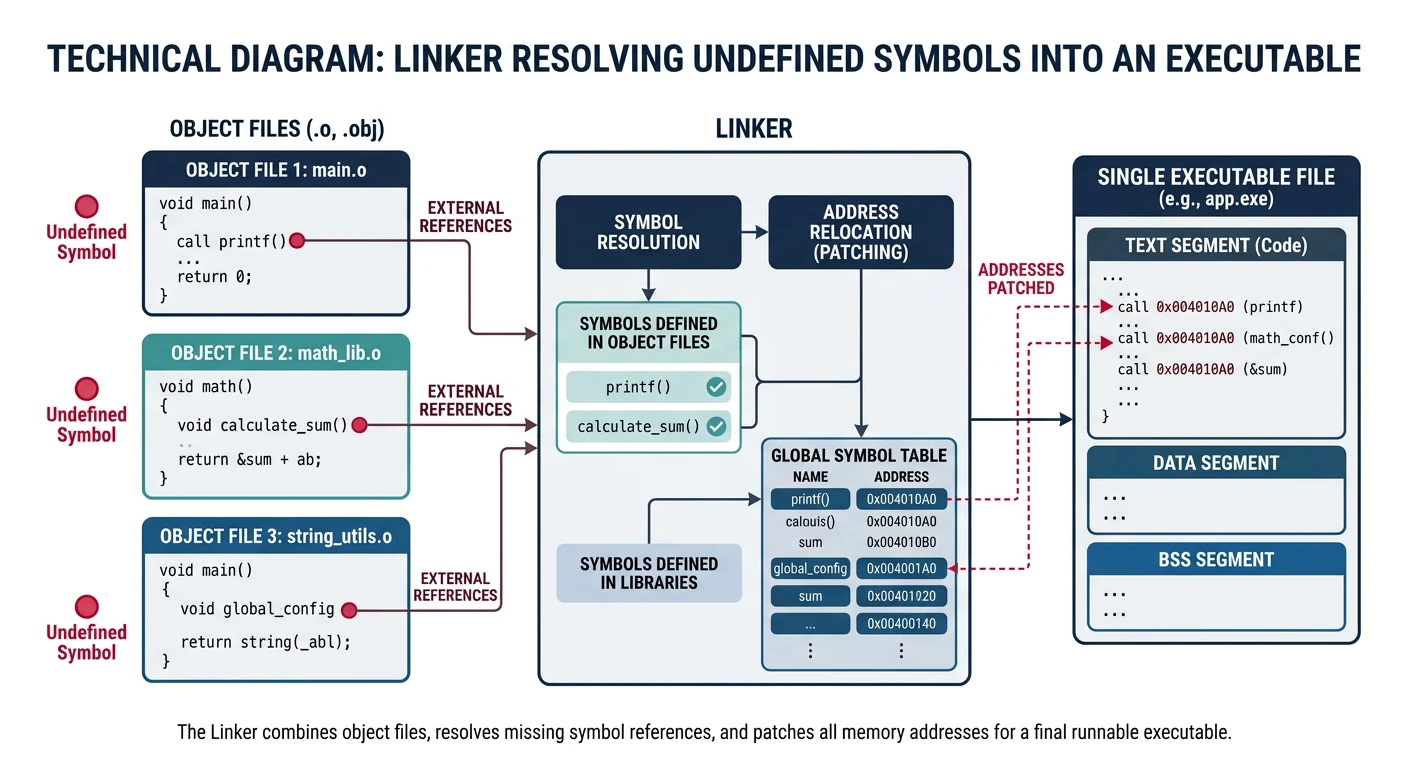
The linker (or link editor) combines multiple object files and libraries into a single executable. It performs two critical tasks: symbol resolution (finding where symbols are defined) and relocation (patching addresses).
The linker resolves symbol references across multiple object files and relocates addresses to produce a unified executable
The Linker's Job: Take many puzzle pieces (object files), figure out how they connect (symbol resolution), arrange them into a complete picture (address assignment), and glue everything together (relocation).
Symbol Resolution
Symbol resolution answers the question: "For every symbol reference, where is it defined?" The linker builds a global symbol table by scanning all input files.
When the linker encounters symbols, it follows specific rules:
Symbol Types & Resolution
Symbol Type
Binding
Linker Behavior
Strong Global
Functions, initialized globals
Must be unique; duplicates cause error
Weak Global
Uninitialized globals
Can have duplicates; linker picks one
Local
Static variables/functions
Not visible outside file; no conflicts
Undefined
External references
Must find definition or error
// file1.c
int x = 100;          // Strong symbol (initialized)
int y;                // Weak symbol (uninitialized → common)
static int z = 50;    // Local symbol (not exported)

void foo() { }        // Strong symbol

// file2.c
int x = 200;          // ERROR! Multiple strong definitions of 'x'
int y;                // OK: weak symbol, linker picks one definition
static int z = 99;    // OK: different local symbol in different file
Common Linker Error: "multiple definition of 'symbol_name'" means two files both define the same strong symbol. Fix: make one declaration extern, or use static for internal linkage.
Static Linking
Static linking produces a self-contained executable by copying all needed code directly into the final binary. No external dependencies at runtime.
A static library (archive) is a collection of object files bundled together. The linker extracts only the needed object files—it doesn't include the entire library.
# Create object files
gcc -c helper.c -o helper.o
gcc -c math_funcs.c -o math_funcs.o
gcc -c string_utils.c -o string_utils.o

# Create static library (archive)
ar rcs libmyutils.a helper.o math_funcs.o string_utils.o
#  r = insert/replace files
#  c = create archive if needed
#  s = create index (for fast lookup)

# View archive contents
ar -t libmyutils.a
# helper.o
# math_funcs.o
# string_utils.o

# Link against static library
gcc main.c -L. -lmyutils -o program
# -L.      → search current directory for libraries
# -lmyutils → link against libmyutils.a (or .so)
Library Search Order: The linker searches for libraries in this order:
Directories specified by -L
LIBRARY_PATH environment variable
System directories (/usr/lib, /lib)
For each -l flag, it prefers .so (dynamic) over .a (static) unless -static is used.
Library Order Matters! The linker processes files left-to-right. Put libraries AFTER the files that use them:
gcc main.c -lutils ✓ (main.c needs symbols from libutils)
gcc -lutils main.c ✗ (library scanned before main.c, no undefined refs yet)
Loaders
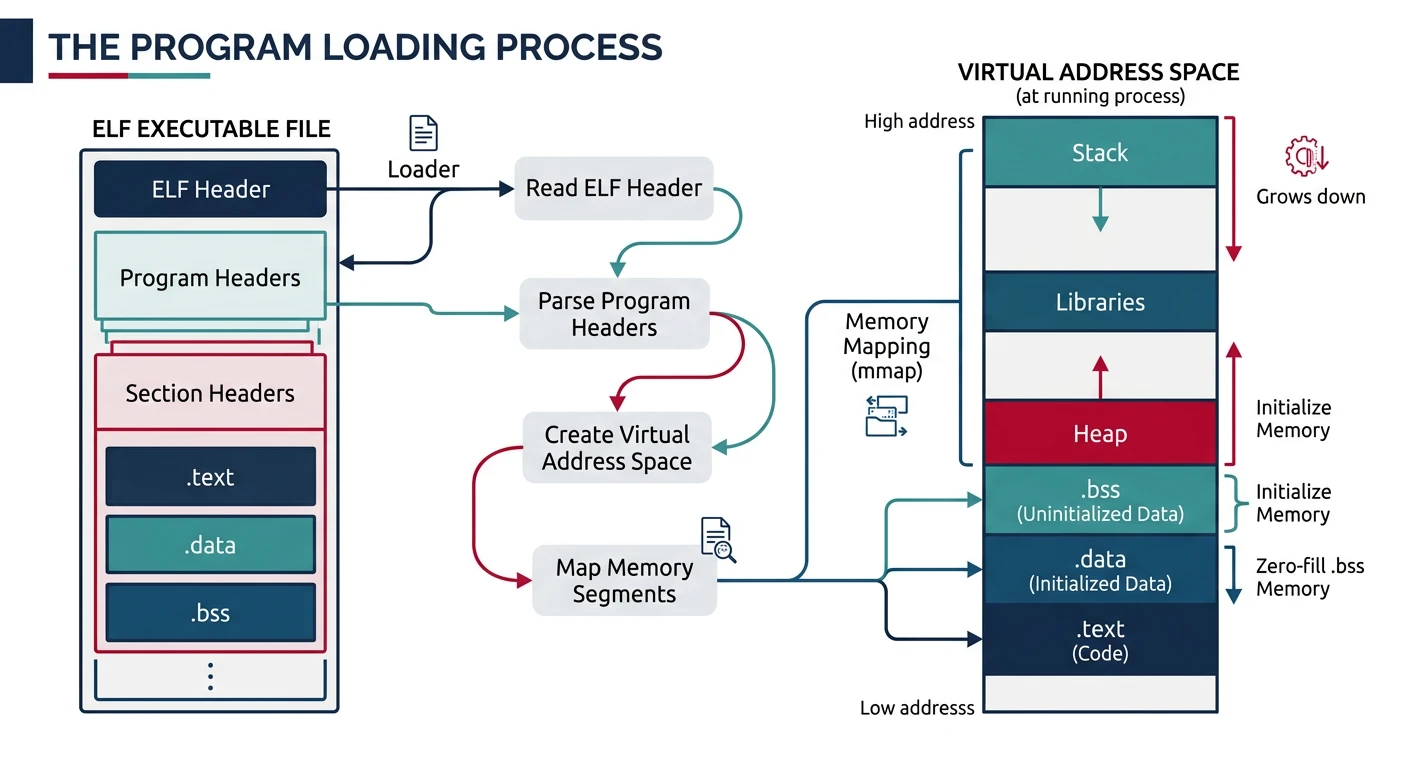
The loader is the OS component that reads an executable file into memory and prepares it for execution. On Linux, this is handled by the kernel (for ELF executables) and the dynamic linker (for dynamic dependencies).
Program loading: the OS reads the executable, creates a virtual address space, and maps code and data segments into memory
Program Loading
Program Loading Steps
When you run: ./hello
═══════════════════════════════════════════════════════════════

1. Shell calls execve("./hello", argv, envp)
   └─→ Control transfers to kernel

2. Kernel examines file header
   └─→ Reads ELF magic number (0x7F E L F)
   └─→ Determines file type (executable, needs interpreter?)

3. Kernel creates new address space
   ┌─────────────────────────────────────────────────────────┐
   │                      Stack                              │ ← grows down
   │  (argv, envp, stack frames)                             │
   ├─────────────────────────────────────────────────────────┤
   │                                                         │
   │                  (unmapped region)                      │
   │                                                         │
   ├─────────────────────────────────────────────────────────┤
   │                      Heap                               │ ← grows up
   │  (malloc allocations)                                   │
   ├─────────────────────────────────────────────────────────┤
   │               .bss (uninitialized data)                 │ RW-
   ├─────────────────────────────────────────────────────────┤
   │               .data (initialized data)                  │ RW-
   ├─────────────────────────────────────────────────────────┤
   │               .rodata (read-only data)                  │ R--
   ├─────────────────────────────────────────────────────────┤
   │               .text (code)                              │ R-X
   └─────────────────────────────────────────────────────────┘
                              0x400000 (typical start)

4. Kernel maps segments from ELF file
   └─→ mmap() each LOAD segment with correct permissions
   └─→ .text: PROT_READ | PROT_EXEC
   └─→ .data: PROT_READ | PROT_WRITE
   └─→ .bss:  Allocated and zeroed

5. Set up stack with arguments
   └─→ Push environment variables
   └─→ Push argv strings
   └─→ Push argc
   └─→ Set up auxiliary vector (AT_ENTRY, AT_PHDR, etc.)

6. Transfer control
   └─→ If statically linked: jump to entry point (main)
   └─→ If dynamically linked: jump to interpreter (ld.so)
Address binding is the process of assigning actual memory addresses to symbolic addresses in a program. This can happen at different stages:
When Addresses Get Bound
Binding Time
Who Does It
Pros/Cons
Compile Time
Compiler/Assembler
Fast; but program must load at fixed address (rare today)
Link Time
Linker
Addresses assigned at link; relocatable within image
Load Time
Loader
Flexible; can load at any address (requires relocation)
Run Time
Dynamic Linker / MMU
Most flexible; enables ASLR, shared libraries
Position-Independent Executables (PIE)
Modern executables are compiled as PIE (Position-Independent Executable), allowing ASLR (Address Space Layout Randomization) to load them at random addresses for security.
# Check if executable is PIE
file /bin/ls
# /bin/ls: ELF 64-bit LSB pie executable, x86-64, dynamically linked

readelf -h /bin/ls | grep Type
# Type: DYN (Position-Independent Executable file)

# Non-PIE would show:
# Type: EXEC (Executable file)

# Compile as PIE (default on most modern systems)
gcc -pie -fPIE hello.c -o hello_pie

# Compile without PIE (fixed addresses)
gcc -no-pie hello.c -o hello_nopie

# ASLR in action: address changes each run
./hello_pie &; cat /proc/$!/maps | grep hello_pie
./hello_pie &; cat /proc/$!/maps | grep hello_pie
# Different base addresses each time!
Security Benefit: ASLR + PIE makes exploits harder because attackers can't predict where code/data will be in memory. Without PIE, the executable loads at a fixed address, making buffer overflow attacks easier.
The execve() System Call
// How programs are loaded (simplified kernel perspective)
// execve("./hello", argv, envp) does:

int do_execve(const char *filename, char **argv, char **envp) {
    // 1. Open the executable file
    struct file *file = open_exec(filename);

    // 2. Read and validate ELF header
    struct elf_header *ehdr = read_elf_header(file);
    if (ehdr->magic != ELF_MAGIC) return -ENOEXEC;

    // 3. Flush old address space
    flush_old_exec();

    // 4. Set up new address space
    setup_new_exec();

    // 5. Map each LOAD segment
    for (each program_header in ehdr->phdrs) {
        if (phdr->type == PT_LOAD) {
            // Map file contents into memory with correct permissions
            vm_mmap(phdr->vaddr, phdr->memsz, phdr->flags,
                    file, phdr->offset);
        }
    }

    // 6. Set up stack with args/env
    create_elf_tables(argv, envp);

    // 7. If dynamically linked, invoke interpreter (ld.so)
    if (has_interpreter) {
        // Map ld.so, set entry point to ld.so's entry
        load_interpreter();
    }

    // 8. Start execution at entry point
    start_thread(ehdr->entry_point);
}
Dynamic Linking
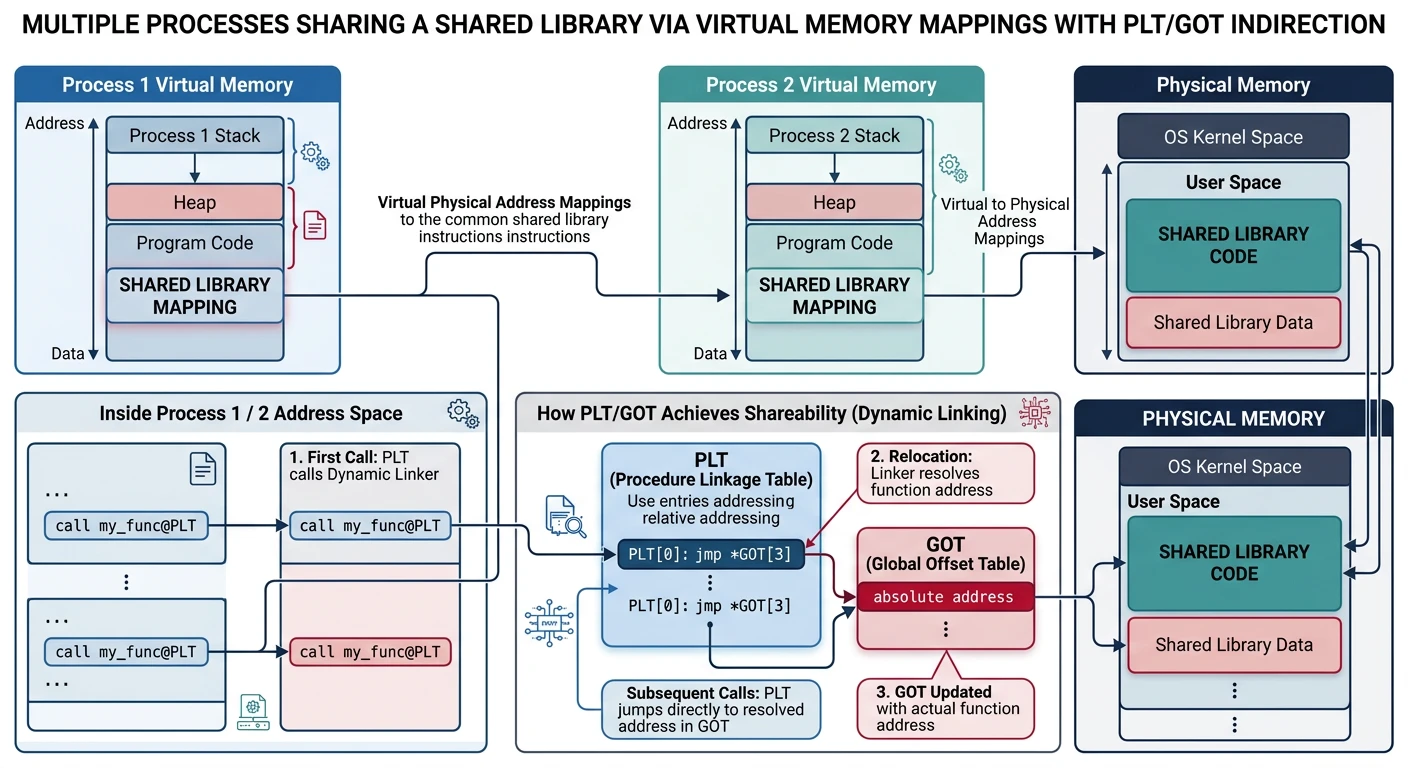
Dynamic linking defers some linking to load time or run time. Instead of copying library code into executables, programs reference shared libraries (`.so` on Linux, `.dll` on Windows, `.dylib` on macOS) that are loaded into memory once and shared between all processes that use them.
Dynamic linking: multiple processes share a single physical copy of library code through virtual memory mappings
Shared Libraries
Shared Libraries in Memory
Multiple Processes Sharing libc.so
════════════════════════════════════════════════════════════════

Physical Memory:                    Process A's Virtual Memory:
┌─────────────────────┐            ┌─────────────────────────┐
│                     │            │ [stack]                 │
│   libc.so code      │←───┬──────│                         │
│   (read-only)       │    │      │ [heap]                  │
│                     │    │      │                         │
├─────────────────────┤    │      │ libc.so ────────────────┤
│                     │    │      │ program code            │
│   libc.so data      │    │      └─────────────────────────┘
│   template          │    │
└─────────────────────┘    │      Process B's Virtual Memory:
                           │      ┌─────────────────────────┐
                           │      │ [stack]                 │
                           └──────│                         │
                                  │ [heap]                  │
                                  │                         │
                                  │ libc.so ────────────────┤
                                  │ program code            │
                                  └─────────────────────────┘

Benefits:
• Code pages are shared (read-only) - saves memory
• Data pages are copy-on-write - each process gets own copy when modified
• Library updates benefit all programs without recompilation
# Create a shared library
gcc -fPIC -shared -o libmymath.so mymath.c
#  -fPIC:    Position-Independent Code (required for shared libs)
#  -shared:  Create shared library, not executable

# View shared library dependencies
ldd /bin/ls
# linux-vdso.so.1 (0x00007ffcc7dfe000)
# libselinux.so.1 => /lib64/libselinux.so.1 (0x00007f...)
# libc.so.6 => /lib64/libc.so.6 (0x00007f...)
# /lib64/ld-linux-x86-64.so.2 (0x00007f...)

# Link against shared library
gcc main.c -L. -lmymath -o program
# At runtime, need: export LD_LIBRARY_PATH=.:$LD_LIBRARY_PATH

# Or install to system path
sudo cp libmymath.so /usr/local/lib
sudo ldconfig  # Update library cache
The Dynamic Linker (ld.so)
When you run a dynamically-linked executable, the kernel doesn't execute your code directly. It first loads the dynamic linker (ld-linux.so or ld.so), which then:
Dynamic Linker Responsibilities:
═══════════════════════════════════════════════════════════

1. Load shared libraries
   └─→ Read DT_NEEDED entries from executable's .dynamic section
   └─→ Find each library (using rpath, LD_LIBRARY_PATH, /etc/ld.so.cache)
   └─→ mmap() each library into process address space

2. Resolve symbols
   └─→ Build global symbol table from all loaded objects
   └─→ Resolve undefined symbols in executable
   └─→ Handle symbol versioning (GLIBC_2.17, etc.)

3. Perform relocations
   └─→ Patch GOT entries for global variables
   └─→ Set up PLT for function calls (lazy binding)

4. Run initialization functions
   └─→ Execute .init and .init_array functions in each library
   └─→ Execute __attribute__((constructor)) functions

5. Transfer control to program
   └─→ Jump to executable's entry point (usually _start → main)
# View dynamic section
readelf -d /bin/ls | head -20
# Dynamic section at offset 0x1f3f0 contains 27 entries:
#   Tag        Type                         Name/Value
#  0x0000000000000001 (NEEDED)             Shared library: [libselinux.so.1]
#  0x0000000000000001 (NEEDED)             Shared library: [libc.so.6]
#  0x000000000000000c (INIT)               0x4000
#  0x000000000000000d (FINI)               0x15b74
#  ...

# Trace dynamic linker activity
LD_DEBUG=libs ./hello
# Shows: searching, loading, initialization order

LD_DEBUG=symbols ./hello
# Shows: symbol resolution process
PLT & GOT
The PLT (Procedure Linkage Table) and GOT (Global Offset Table) are the key data structures enabling dynamic linking. They allow calls to external functions without knowing their addresses at link time.
# View PLT entries
objdump -d -j .plt /bin/ls | head -30

# View GOT entries
readelf -r /bin/ls | grep GLOB_DAT  # Global data relocations
readelf -r /bin/ls | grep JUMP_SLOT # Function call relocations

# Example output:
# Relocation section '.rela.plt':
#   Offset          Info           Type           Sym. Value    Sym. Name
# 000000403018  000200000007 R_X86_64_JUMP_SLOT    0000000000000000 free@GLIBC_2.2.5
# 000000403020  000300000007 R_X86_64_JUMP_SLOT    0000000000000000 __ctype_toupper@GLIBC
Lazy Binding
Lazy binding (the default) defers symbol resolution until first use. This speeds up program startup because not all library functions are needed immediately.
Binding Strategies
Strategy
When Resolved
Use Case
Lazy (default)
First function call
Faster startup; most programs
Now
At load time
Security (RELRO); detect errors early
# Force immediate binding (no lazy)
LD_BIND_NOW=1 ./program

# Or compile with -z now
gcc -Wl,-z,now hello.c -o hello_now

# Also enable Full RELRO (GOT becomes read-only after relocation)
gcc -Wl,-z,relro,-z,now hello.c -o hello_secure

# Check RELRO status
readelf -l hello_secure | grep GNU_RELRO
#   GNU_RELRO      0x002df0 0x0000000000403df0 ... 0x000210 RW  0x10

# Full RELRO makes GOT read-only after initialization
# Partial RELRO (default): GOT writable (vulnerable to GOT overwrite attacks)
# Full RELRO: GOT read-only (more secure, slower startup)
Loading Libraries at Runtime
Programs can load shared libraries dynamically at runtime using the dlopen() API, useful for plugins and optional features:
#include <dlfcn.h>
#include <stdio.h>

int main() {
    // Load shared library at runtime
    void *handle = dlopen("./libplugin.so", RTLD_LAZY);
    if (!handle) {
        fprintf(stderr, "dlopen: %s\n", dlerror());
        return 1;
    }

    // Get pointer to function in library
    void (*plugin_init)(void) = dlsym(handle, "plugin_init");
    if (!plugin_init) {
        fprintf(stderr, "dlsym: %s\n", dlerror());
        dlclose(handle);
        return 1;
    }

    // Call the function
    plugin_init();

    // Unload when done
    dlclose(handle);
    return 0;
}
# Compile with -ldl
gcc -rdynamic main.c -ldl -o loader
#  -rdynamic: export symbols from executable (for plugin callbacks)
Security Consideration: Dynamic loading is powerful but risky. Always validate library paths and use RTLD_NOW in security-sensitive code to catch missing symbols early. Never load untrusted libraries.
Exercises
Hands-On Exercises
Symbol Table Exploration: Compile a multi-file C program and use nm, readelf -s, and objdump -t to examine symbol tables. Identify local vs global symbols.
Static vs Dynamic Size: Compile the same program with and without -static. Compare file sizes with ls -lh and strip symbols with strip.
Create a Shared Library: Write a simple math library with add() and multiply(). Create both static (.a) and shared (.so) versions. Link a test program against each.
PLT/GOT Investigation: Use objdump -d to disassemble a dynamically linked program. Find the PLT stubs and trace how they reference the GOT.
Lazy Binding Demo: Write a program that calls printf and malloc. Run with LD_DEBUG=bindings to watch symbols resolve on first call.
Plugin System: Create a simple plugin system using dlopen()/dlsym(). Load different plugins at runtime based on user input.
Conclusion & Next Steps
You've now journeyed through the complete toolchain that transforms source code into running programs. From assemblers that translate mnemonics to machine code, through linkers that combine object files and resolve symbols, to loaders that place programs in memory—each component plays a crucial role.
Key Takeaways:
Assemblers use two passes to build symbol tables and generate relocatable object code
ELF is the standard format for object files, executables, and shared libraries on Linux
Linkers resolve symbols, perform relocations, and produce final executables