Memory management is a core OS responsibility. The operating system must efficiently allocate memory to processes while minimizing waste and ensuring isolation.
Series Context: This is Part 15 of 24 in the Computer Architecture & Operating Systems Mastery series. Building on cache and memory hierarchy, we explore OS-level memory management.
The Core Challenge: Every process needs memory, but physical RAM is limited. How does the OS allocate memory efficiently, prevent processes from interfering with each other, and handle memory that runs out?
Address Spaces
An address space is the range of addresses a program can use. Modern systems use separate address spaces for each process.
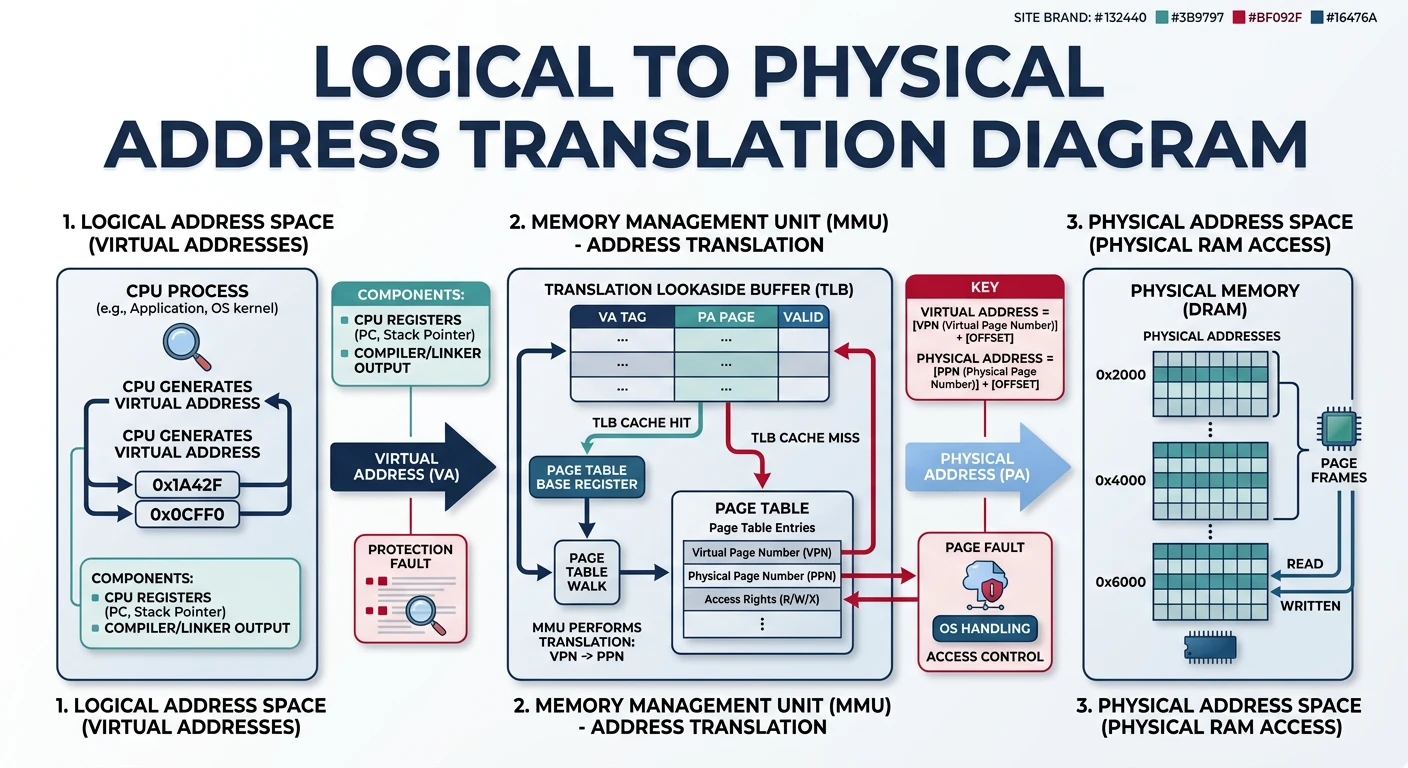
Address translation: CPU generates logical addresses, MMU maps them to physical memory
Physical vs Logical Addresses
Address Types:
══════════════════════════════════════════════════════════════

PHYSICAL ADDRESS:
• Actual location in hardware RAM chips
• What memory controller sees on the bus
• Range: 0 to (RAM size - 1)
• Example: 0x0000_7FFF_ABCD_1234 (physical location)

LOGICAL (VIRTUAL) ADDRESS:
• Address used by program/process
• What CPU generates during execution
• Each process has its own address space
• Example: 0x0040_0000 (process's view)


Address Translation:
━━━━━━━━━━━━━━━━━━━━━━━━━━━━━━━━━━━━━━━━━━━━━━━━━━━━━━━━━━━━

┌─────────┐   Logical    ┌─────────────┐  Physical   ┌────────┐
│   CPU   │ ───────────→ │     MMU     │ ──────────→ │  RAM   │
│         │   Address    │ (Memory     │   Address   │        │
└─────────┘              │  Mgmt Unit) │             └────────┘
                         └─────────────┘

Process A: 0x1000 → MMU → Physical 0x50000
Process B: 0x1000 → MMU → Physical 0x80000

Same virtual address → Different physical locations!
This enables ISOLATION between processes.
Early systems allocated each process a single contiguous block of memory. Simple but problematic.
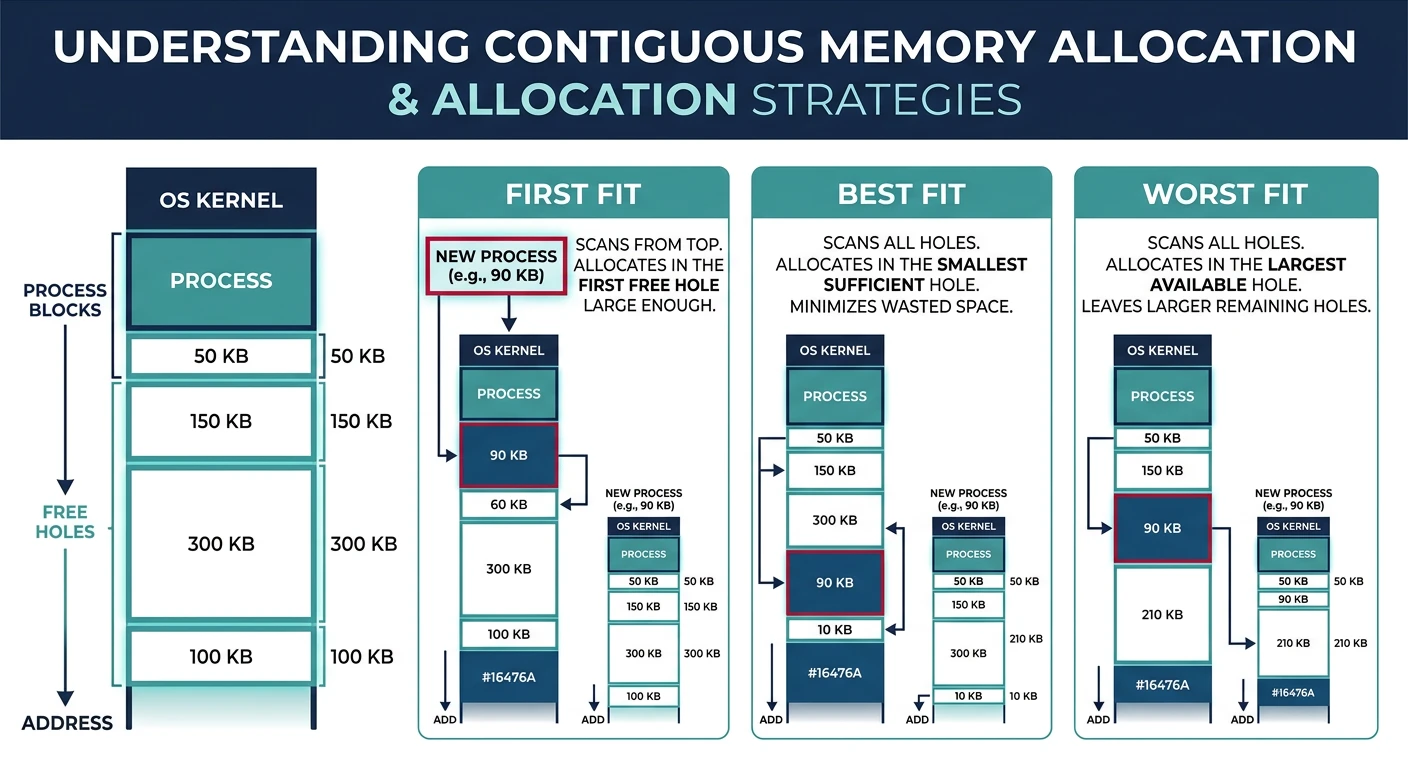
Contiguous memory allocation with first fit, best fit, and worst fit placement strategies
Contiguous Memory Allocation:
══════════════════════════════════════════════════════════════

Memory State After Loading Processes:
┌─────────────────────────────────────┐ 0x00000000
│           OS Kernel                 │
├─────────────────────────────────────┤ 0x00100000
│         Process A (2 MB)            │
├─────────────────────────────────────┤ 0x00300000
│         Process B (4 MB)            │
├─────────────────────────────────────┤ 0x00700000
│         Process C (1 MB)            │
├─────────────────────────────────────┤ 0x00800000
│              FREE                   │
│           (8 MB hole)               │
└─────────────────────────────────────┘ 0x01000000


Allocation Strategies (for choosing which hole):
━━━━━━━━━━━━━━━━━━━━━━━━━━━━━━━━━━━━━━━━━━━━━━━━━━━━━━━━━━━━

1. FIRST FIT
   • Allocate first hole big enough
   • Fast - stop searching once found
   • Tends to leave small holes at start

2. BEST FIT
   • Allocate smallest hole that fits
   • Leaves smallest leftover fragments
   • Must search entire list (slow)
   • Creates many tiny unusable holes

3. WORST FIT
   • Allocate largest hole
   • Leaves largest leftover (may be useful)
   • Must search entire list (slow)
   • Poor in practice

Empirical results: First Fit ≈ Best Fit > Worst Fit
Hardware Support: Contiguous allocation uses base and limit registers. Base = start address, Limit = size. CPU checks: base ≤ address < base + limit. Violation = segmentation fault!
Fragmentation
Fragmentation is wasted memory that can't be used. Two types plague memory managers.
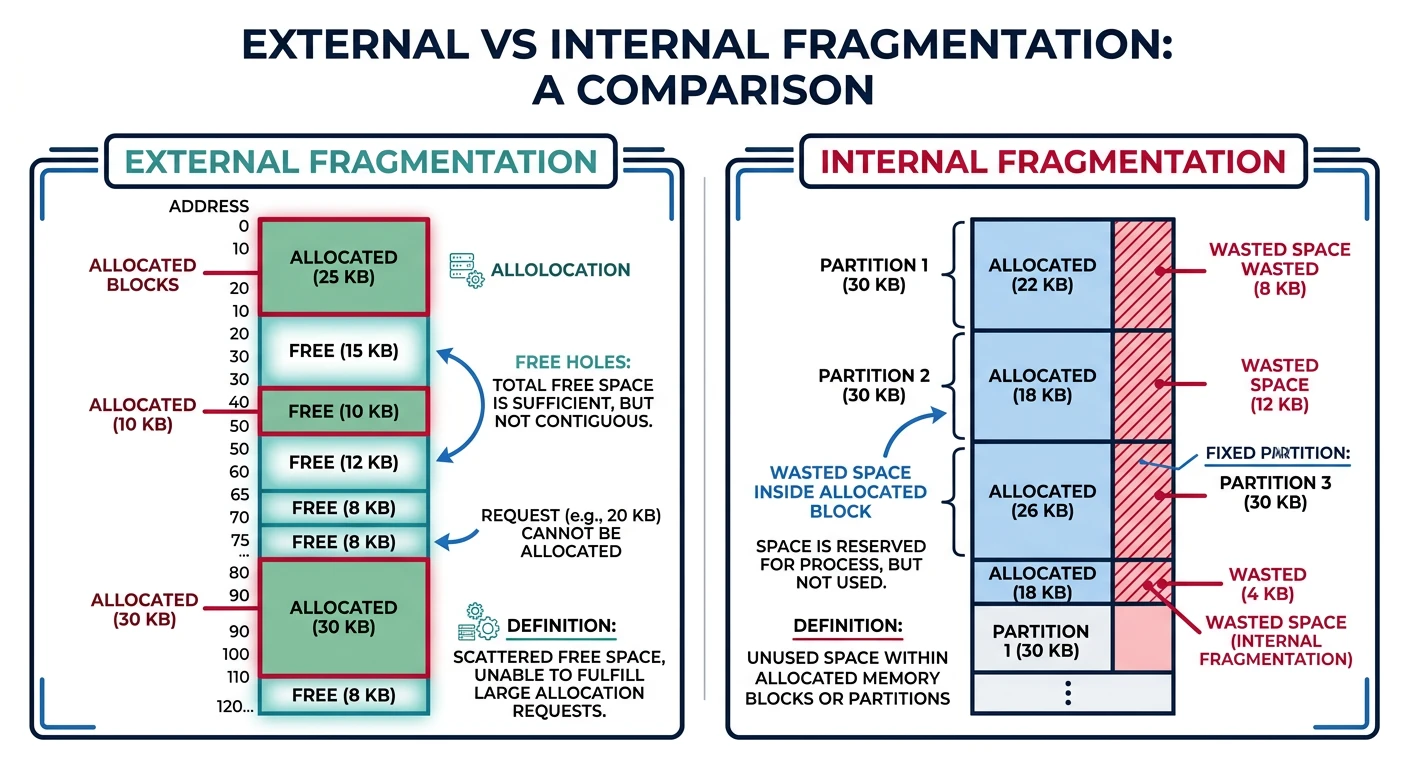
External fragmentation (scattered free holes) vs internal fragmentation (wasted space within blocks)
External vs Internal Fragmentation
EXTERNAL FRAGMENTATION:
══════════════════════════════════════════════════════════════
Free memory exists but is scattered in small non-contiguous holes.

After Process B exits:
┌─────────────────┐
│    OS Kernel    │
├─────────────────┤
│   Process A     │ 2 MB
├─────────────────┤
│    FREE HOLE    │ 4 MB  ←─┐
├─────────────────┤         │ Total free: 12 MB
│   Process C     │ 1 MB    │ But can't fit 8 MB process!
├─────────────────┤         │
│    FREE HOLE    │ 8 MB ←──┘
└─────────────────┘

Solution: COMPACTION
• Move processes to create one large free block
• Expensive - must copy all process memory
• Only possible if relocation is dynamic


INTERNAL FRAGMENTATION:
══════════════════════════════════════════════════════════════
Allocated memory is larger than requested (wasted inside block).

Process requests 1000 bytes, system allocates 4096 (one page):
┌─────────────────────────────────────┐
│ Used: 1000 bytes │ Wasted: 3096    │
│ ████████████████ │                 │
└─────────────────────────────────────┘
                     ↑
           Internal fragmentation

Causes:
• Fixed-size allocation units (pages, blocks)
• Alignment requirements (8-byte, cache-line)
• Power-of-2 allocators
Segmentation
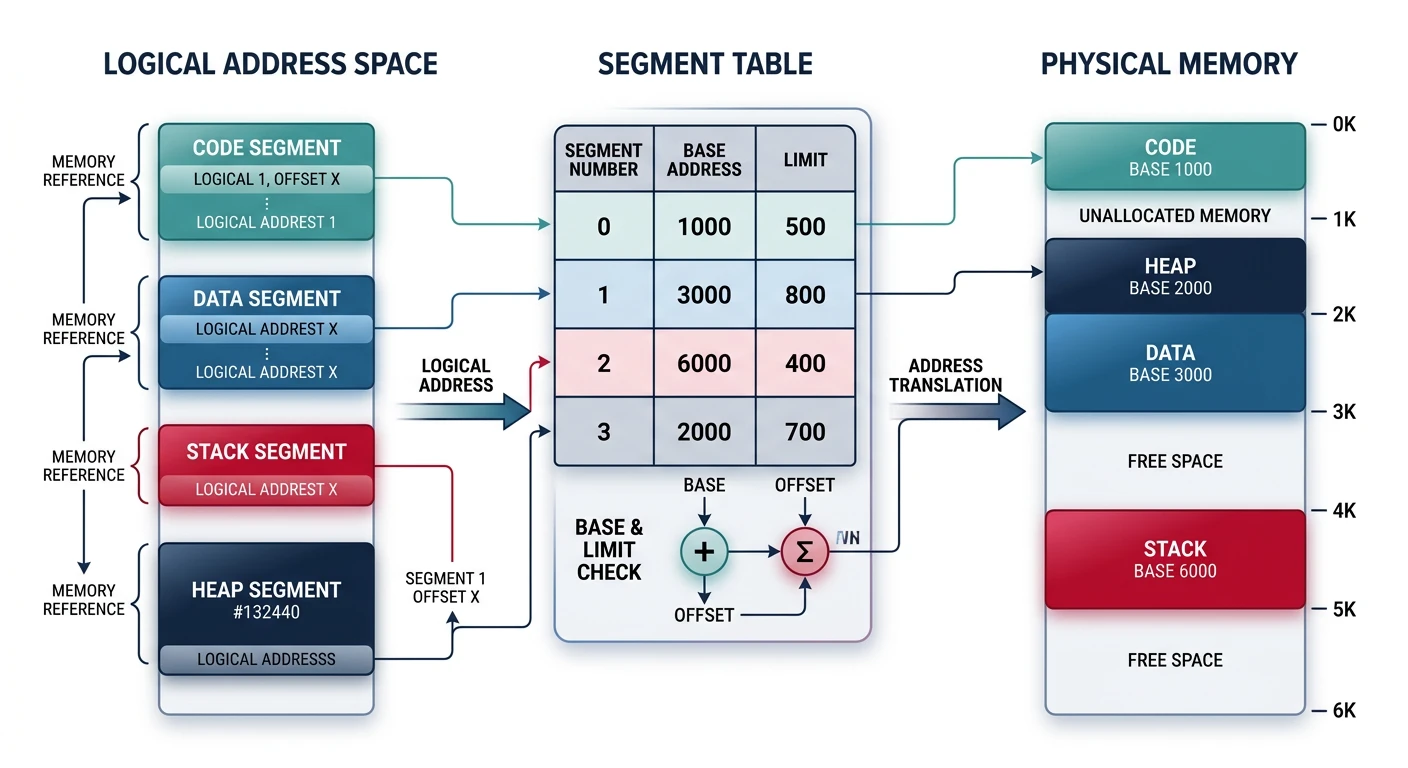
Segmentation divides a process into logical segments (code, data, stack, heap). Each segment can be placed anywhere in memory.
Segmentation: logical segments mapped to physical memory via the segment table
Segmentation Problems: Still suffers from external fragmentation (segments vary in size). Modern systems use paging instead, though x86 supports both (segmentation mostly disabled in 64-bit mode).
Introduction to Paging
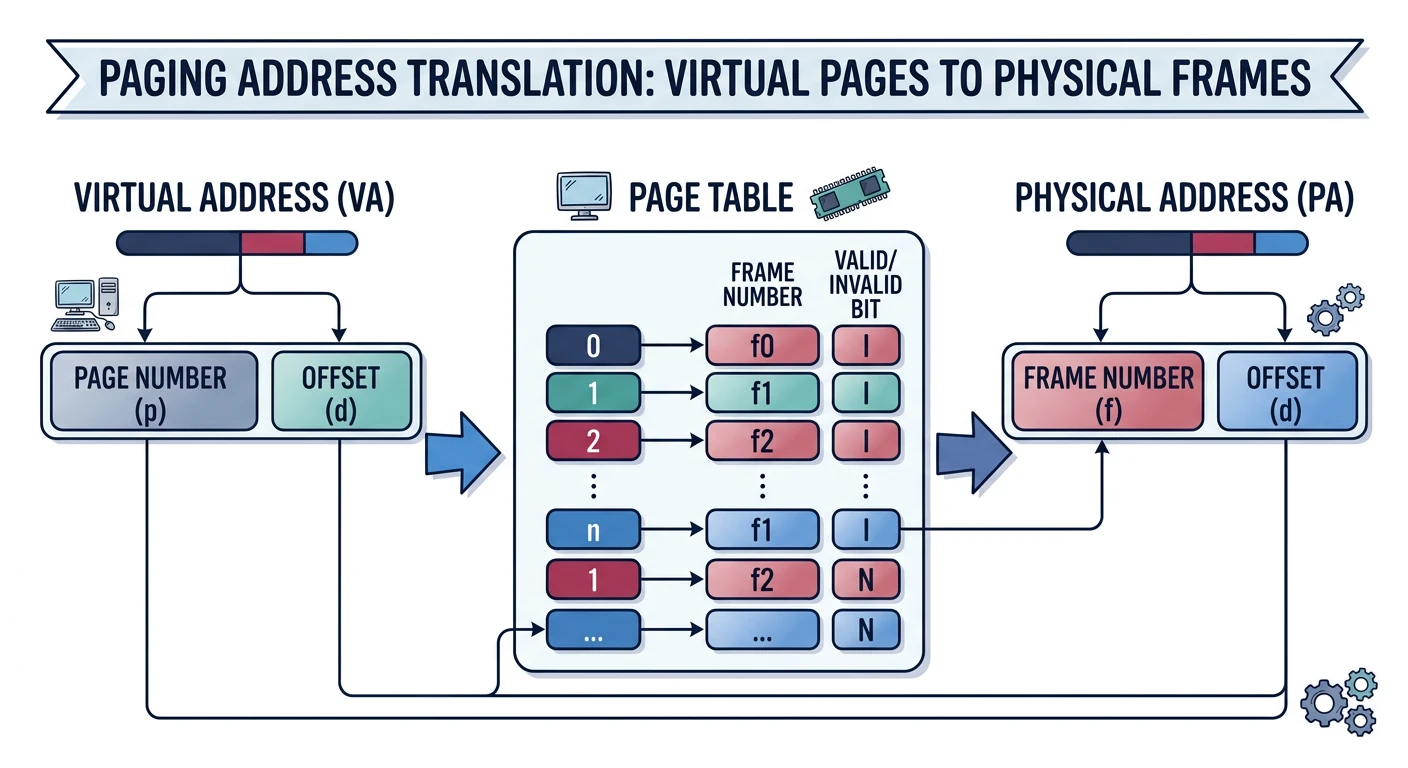
Paging divides memory into fixed-size blocks. Virtual memory uses pages; physical memory uses frames. No external fragmentation!
Paging: virtual pages mapped to physical frames via the page table
Key Insight: Paging is the foundation of modern virtual memory. By using fixed-size pages, we eliminate external fragmentation and enable powerful features like demand paging and copy-on-write.